
Outsource management system for repair shops: send a job out, keep the record
Outsource management software is a system for sending repair jobs to external vendors without losing track of them — vendor, price, delivery challan, pickup and status stay on the job. What software manages outside repair vendors? In BytePhase, outsource management starts from the repair ticket: when a board-level repair, a screen refurb or a data recovery goes to a specialist, the job stays with you, carrying the vendor, the price and the status.
- Send a job out from the repair ticket
- Delivery challan for the vendor
- Drop and pickup booked to the vendor
- Every outsourced job listed by vendor
15-day free trial · 30-day money-back guarantee
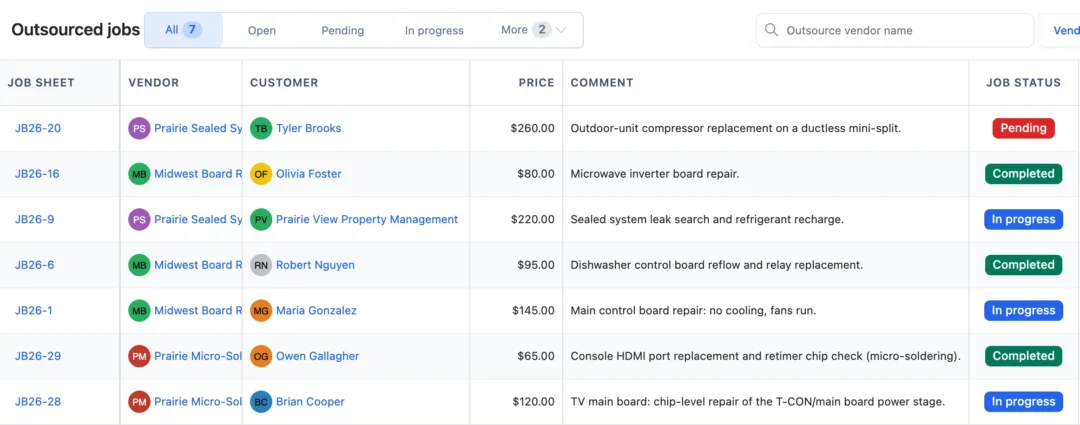
What software manages outside repair vendors?
Outsource management software keeps track of who has the device, what the vendor charges, how far the work has got and when it comes back. In BytePhase you send the job from the ticket to a saved vendor, record their price, print a delivery challan, book the drop and update the status until the device returns. The job keeps its number and its business the whole time.
How a job goes out and comes back
- 1
Outsource from the ticket
Job actions › Outsource to: pick or add the vendor, the price they charge and the work to do.
- 2
Print the challan
An outsource delivery challan for the vendor, to print, share or send on WhatsApp.
- 3
Book the drop
Save & schedule drop books the device to the vendor; book the pickup when it is ready.
- 4
Update until it returns
Move it through Open, Pending, In Progress and Completed, then hand the device back to the customer.
Outsourced repairs, vendors and what you paid
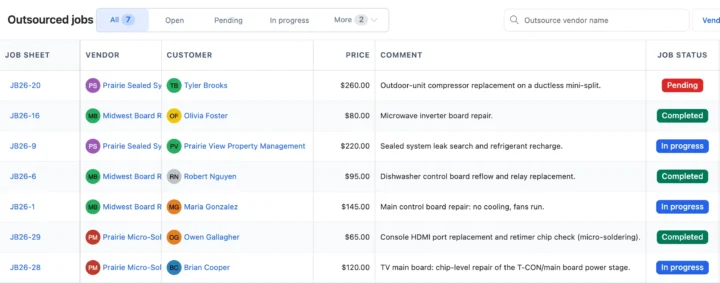
Every outsourced job on one list
Filter by Open, Pending, In Progress, Completed or Cancelled, search by vendor and open the job sheet in one click. The repair itself stays in your repair ticket software.
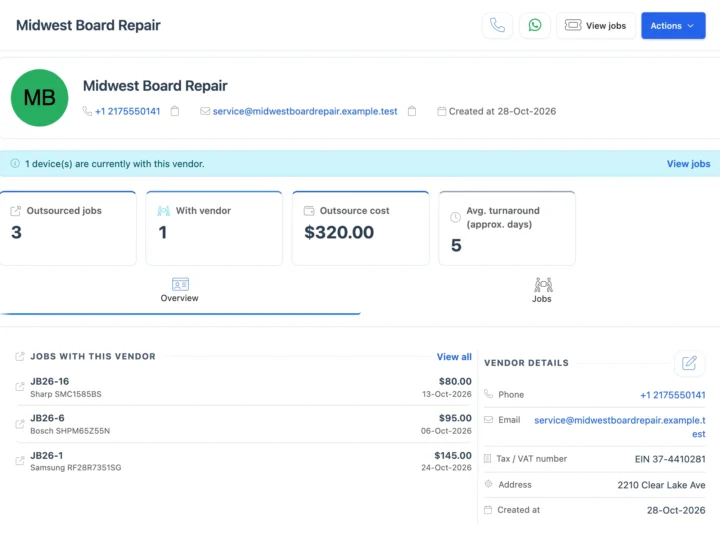
Vendor records and their jobs
Each vendor keeps a name, mobile, phone, email, address and tax number, with a Jobs tab of everything sent to them. Vendors are shared by every business in your account. Plan follow-ups with task management.
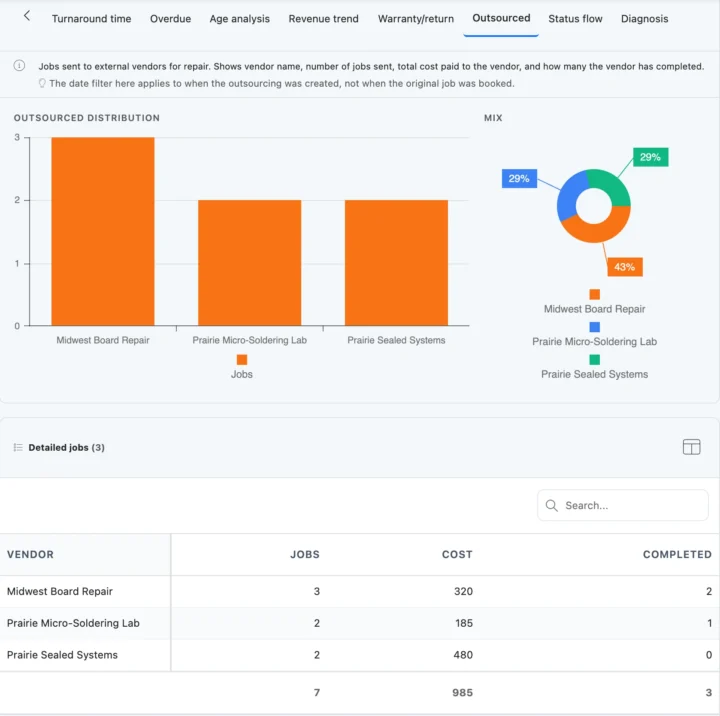
Outsourced report by vendor
The Jobs report has an Outsourced view: each vendor, the number of jobs, what you paid and how many they finished, with an Excel export. Record courier and vendor bills in shop expenses.
Also in outsource management
Vendor tax numbers and challans in your currency
Save each vendor’s tax number, record their price in your operating currency and print or share the outsource challan.
How outsource management connects to the rest of BytePhase
Each card opens the feature it shares data with, so nothing is typed twice.
When to outsource a repair and how to price it
Outsourcing is normal. Customers rarely mind as long as they get one price, an honest date and a working device. It makes sense when the fault needs tools you do not own (micro-soldering, chip-level work, a sealed refrigeration system, clean-room recovery), when a partner stocks a part you cannot get, when the brand's warranty needs an authorized center, or when your bench is full and the partner is quicker. If the same repair goes out every week, price up bringing it in-house.
Choosing a partner shop
Their work carries your name, so ask what they repair every day, not what they can attempt. Agree a typical turnaround per job type, get their warranty on the work in writing, insist on a fixed price or a diagnosis fee plus quote before work starts, and ask how they handle personal data on phones and laptops. Start with one or two low-risk jobs, and keep two partners per specialism so one busy week does not stall your customers.
Pricing an outsourced job
You are still responsible to the customer, so the price covers more than the vendor's bill: the vendor's price plus any diagnosis or return fee, your handling time (intake, packing, paperwork, follow-ups, testing on return), transport both ways, and the risk of the warranty you give. Most shops add a fixed handling charge or a percentage. Quote the customer one price and one date, and record the vendor's price on the job so you can see the real margin later.
Mistakes that cost twice
- No price agreed before the device leaves.
- No condition photos, so a scratch cannot be dated.
- Chargers and cases sent along and lost between shops.
- Status kept in one person's head.
- No test on return, so the customer finds the fault still there.
Tell the customer at intake that a specialist will do the work, give one realistic date, and message them if the vendor reports a delay or a higher quote.
Set up outsourced repair management step by step
Short guides with screenshots in the BytePhase Help Center, checked against the app.

Outsource management FAQs
Outsource management software inside your repair shop system. In BytePhase you send a job to an outside repair vendor from the ticket, record their price, print a delivery challan, book the drop and follow the status until the device comes back, with every job listed by vendor.
Outsource Management is for work that another shop or specialist does for you, such as a board repair expert. You send the job to a vendor from the ticket and record their price, and BytePhase keeps the vendor, status and delivery challan with the job, so you always know who has the device and how far the work has got.
Right away. Your account comes ready to use and there is no vendor list to build first: the first time you outsource a job, add the vendor in the outsource window, then pick them from the list after that. Basic setup takes about 10 minutes, and you can outsource a job from the Android and iOS apps as well as the web.
Yes. Click Save & schedule drop when you outsource the job, or choose Schedule pickup/drop from the outsourced job’s menu, to book the device to or from the vendor. The booking follows the same steps as any pickup and drop and is shown on the Outsourced jobs list.
Yes. When you outsource a job its status changes to Outsourced, and when you set the outsourced job’s status to Completed, the job itself becomes Completed. Editing the price or description does not change the job’s status.
Yes. Open the vendor and its Jobs tab lists every job you have sent them. The Outsourced jobs list shows the job, vendor, customer, price, status and whether a pickup or drop is booked, and the Jobs report’s Outsourced view counts the jobs, what you paid and how many each vendor finished.
Every outsourced job is listed under Jobs › Outsourced jobs with its vendor, customer, price and status (Open, Pending, In Progress, Completed or Cancelled), and whether a pickup or drop is booked. From each row you can reopen the delivery challan, edit the job or book a pickup or drop. The dashboard also counts jobs still with an outside repairer.
Yes. Edit the outsourced job and set its status to Open, Pending, In Progress, Completed or Cancelled as the work moves on. You and your team keep it up to date from the list or the job. Setting it to Completed also moves the job itself to Completed.
Yes. Save each vendor once with name, mobile, phone, email, address and tax number, then pick them from the list whenever you outsource a job; you can also add a new vendor right from the outsource window. Vendors are shared by all your businesses, and each vendor’s Jobs tab shows the work you have sent them.
Yes. Type the price the vendor charges you in the Price box when you outsource the job, and edit it later if the quote changes. The price shows in the Outsourced jobs list, and the Jobs report’s Outsourced view shows what you paid across your vendors.
Yes. Vendors are shared by all the businesses in your BytePhase account, so you save each vendor once and any business can send jobs to them. The outsourced job keeps its own job number and stays with the business it belongs to. A vendor’s Jobs tab lists the jobs sent to them.
Send your next specialist repair out and keep track of it
Add a vendor and outsource your first job from the ticket with BytePhase outsource management.
15-day free trial · 30-day money-back guarantee
2000+ Professional Repair & Data Recovery Businesses Trust BytePhase
We help you stay focused and organized by keeping detailed records
Best-in-class support
No matter what you need help with, our team is here to assist you. The goal of our business is to build long-lasting relationships with our customers.
Free Updates, Always Included
We will provide you with free and regular updates and welcome your feedback, which we will consider for implementation in your subscription.
Data Security & Encryption
We use the highest industry standard (AES-256) to encrypt your data on a secure RDS server for maximum protection.
Automatic Backups
We perform automatic backups daily on our dedicated database server to keep your data safe.
Last updated: 30 October 2026