
Expense management for the running costs of a repair shop
Record rent, salaries, courier charges and tea money as they happen, with the bill attached, and see them beside what the shop earns. BytePhase expense management software sits in the same login as your repair jobs, so costs never live in a separate notebook.
- A category on every expense
- The bill photo attached to the expense
- Add an expense from the phone app
- Expenses and net profit on the dashboard
15-day free trial · 30-day money-back guarantee
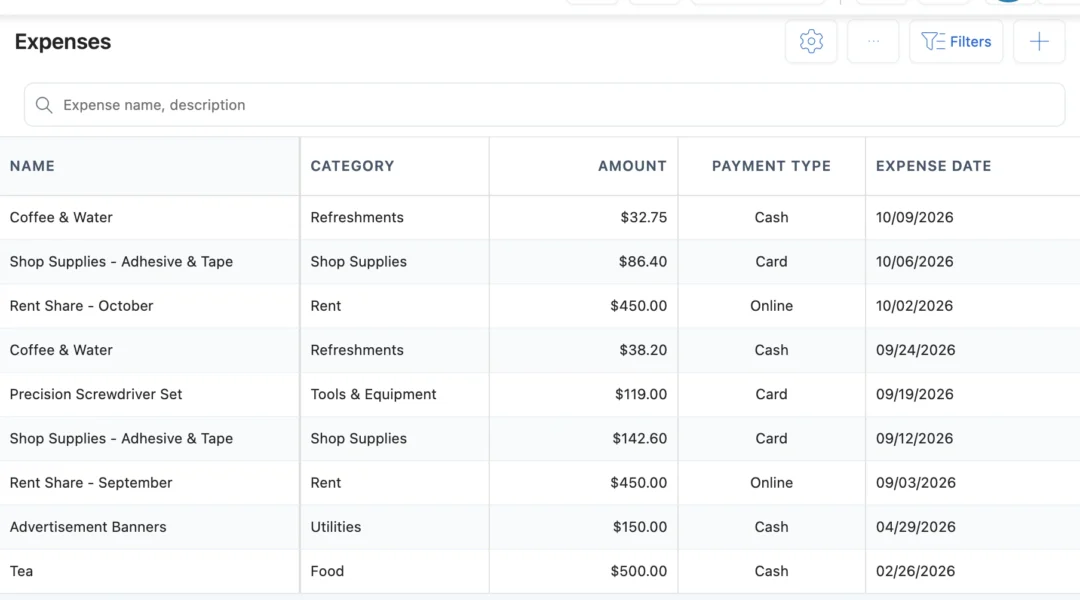
What is expense management for a repair shop?
Expense management is keeping a record of the money that goes out of the shop that is not stock: rent, electricity, salaries, courier charges, tools for the bench, staff tea. In BytePhase each expense has a name, date, category, payment mode and amount, with the bill attached, and it counts in the same dashboard as your repair revenue. Parts you buy for stock are recorded as purchases instead.
Recording a shop expense
- 1
Name and date
Type what it was, for example “Electricity bill”, and the date you paid it.
- 2
Pick a category
Rent, Utilities, Courier or your own. Add a new category from the same box.
- 3
Payment mode and amount
Cash, card, online or cheque, or a payment type you add, with a transaction ID or cheque number if you have one.
- 4
Attach the bill
Add a photo, scan or document of the bill. The expense now counts in your reports for this business.
Every shop cost in one expense list
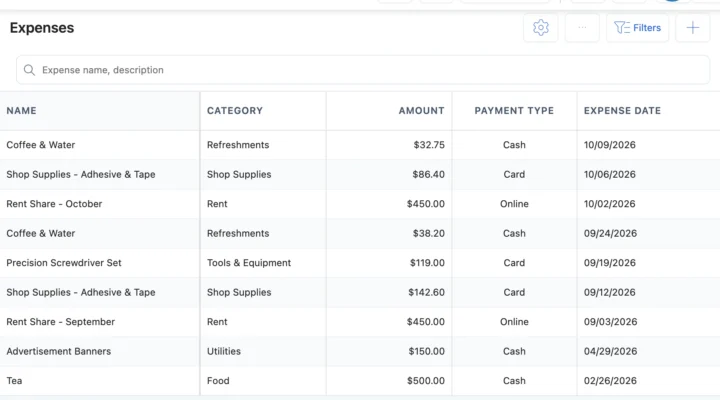
Expense categories and bills
Each expense has a name, date, category, description, payment mode and amount, plus a transaction ID or cheque number and the bill attached. Categories are set once and shared by all your businesses, while each business keeps its own expenses. Work handed to a specialist is tracked in outsource management.
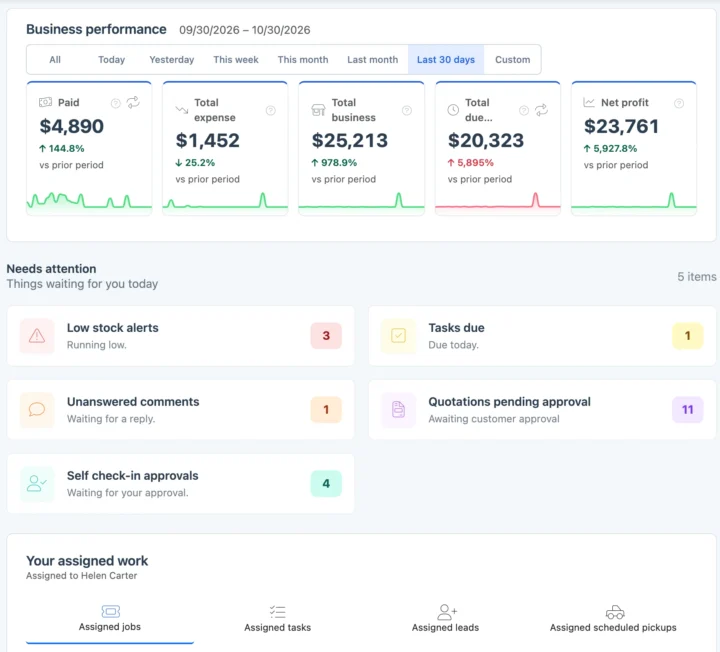
Expenses beside revenue and profit
The dashboard puts Total expense, which adds your expenses and supplier purchases, next to what was paid, your total business and net profit for any period. The older reports add total expense, an expense chart and expenses by category, and the list exports to Excel for your accountant. Parts for stock go in supplier purchases.
Also in expenses
Expenses in your currency
Record expenses in your operating currency, paid by cash, card, cheque or online. Switch Expenses on in your settings and it is ready to use.
How expenses connect to the rest of BytePhase
Each card opens the feature it shares data with, so nothing is typed twice.

Expense management FAQs
Record each cash payment as an expense with payment mode Cash and a category, from the web or the phone app, with the bill attached. You then see those costs by category in your reports and in Total expense on the dashboard.
The Expense Management feature in BytePhase helps you track, categorize, and manage all your business expenses from a central dashboard. It ensures accurate tax calculations and integrates seamlessly with accounting systems.
Yes, BytePhase allows you to categorize expenses for accurate tax compliance and financial reporting.
Your account comes ready to use and basic setup takes about 10 minutes. Add an expense with its name, category, date, payment mode and amount on the web or in the BytePhase Android and iOS apps, and attach the bill. Need a new category? Add it from the same screen. There is nothing to import: start with today’s bills, and the dashboard and expense report build up as you record.
It puts your costs next to your earnings. The dashboard shows Total expense (your expenses plus your purchases) and Net profit, and the expense report shows the total amount, the number of expenses and a split by category. The figures follow what your team has recorded, so they are only as current as the entries.
By automating expense tracking and reporting, BytePhase reduces manual entry errors, speeding up financial processes.
Yes. Attach the bill, receipt or a scan to the expense, and more than one file is fine. Images, PDFs and Word files are accepted. Add them while you create the expense or later by opening it and choosing Edit, from the web or the phone app.
No. Parts you buy for stock are recorded as a purchase, not an expense, so stock and supplier payments stay in one place. Expenses are for other money going out, such as rent, electricity or courier charges. The dashboard’s Total expense adds both together. See purchase management.
Yes. Use the Export button on the Expenses list: BytePhase builds an Excel file and emails it to you, ready to forward. The file holds what you are allowed to see. The expense report charts themselves cannot be exported, so send the Excel list. BytePhase does not calculate tax on expenses.
Yes. Each business keeps its own expenses: you see and add the expenses of the business chosen in the business switcher, and the expense reports follow it. Expense categories are shared by all your businesses, so you set them up once.
Count the running costs before you count the profit
Add your expense categories once and record the next bill in BytePhase expense management, from the counter or the phone.
15-day free trial · 30-day money-back guarantee
2000+ Professional Repair & Data Recovery Businesses Trust BytePhase
We help you stay focused and organized by keeping detailed records
Best-in-class support
No matter what you need help with, our team is here to assist you. The goal of our business is to build long-lasting relationships with our customers.
Free Updates, Always Included
We will provide you with free and regular updates and welcome your feedback, which we will consider for implementation in your subscription.
Data Security & Encryption
We use the highest industry standard (AES-256) to encrypt your data on a secure RDS server for maximum protection.
Automatic Backups
We perform automatic backups daily on our dedicated database server to keep your data safe.
Last updated: 30 October 2026