
Task Management for Repair Shop Teams
Task management for the work that isn’t a repair job: call a customer back about a part, order screen protectors, chase a supplier. Each task gets an owner, a due date and a priority, and the assignee is alerted the way you choose when you save it.
- Assign with a due date and priority
- Alert by email, SMS or app notification
- Link a task to a customer
- See what’s due on the dashboard
15-day free trial · 30-day money-back guarantee
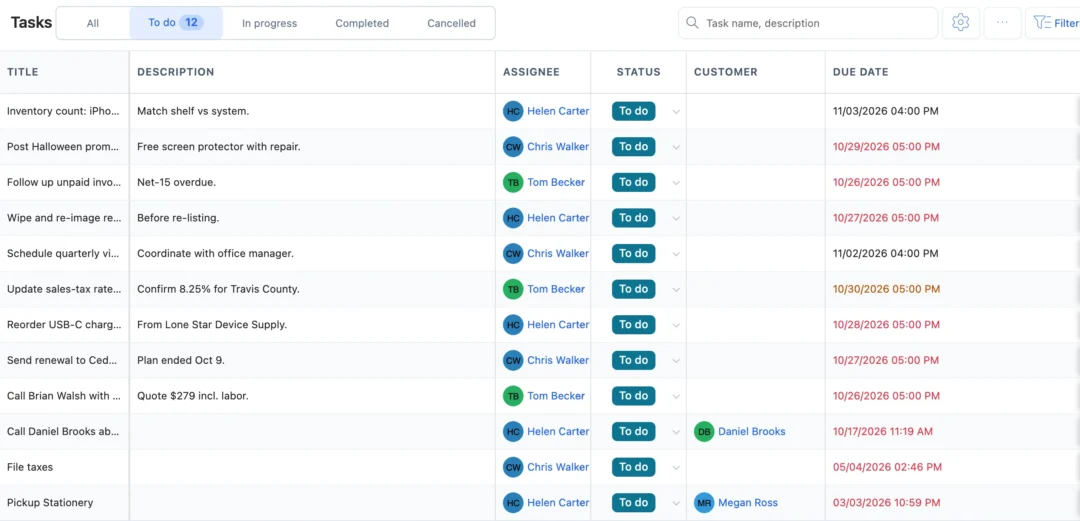
What is task management in a repair shop?
Task management is how a shop keeps track of the small jobs around the repairs: call-backs, reorders, payment chasers, visit preparation. In BytePhase a task has a title, a description, one assignee, a due date, a priority and, if it’s about a customer, that customer. It moves from To do to In progress to Completed or Cancelled, and it sits on the same calendar as your repair jobs and pickups.
How a task moves from assigned to done
- 1
Create the task
Title, description, assignee, due date and priority; pick a customer if it’s about one.
- 2
Alert the assignee
Tick email, SMS or app notification before you save, so the task is seen.
- 3
Work it from To do
The assignee moves it to In progress from the web or the phone app.
- 4
Close it
Completed or Cancelled. A reassigned task alerts its new owner the same way.
Task management your technicians actually use
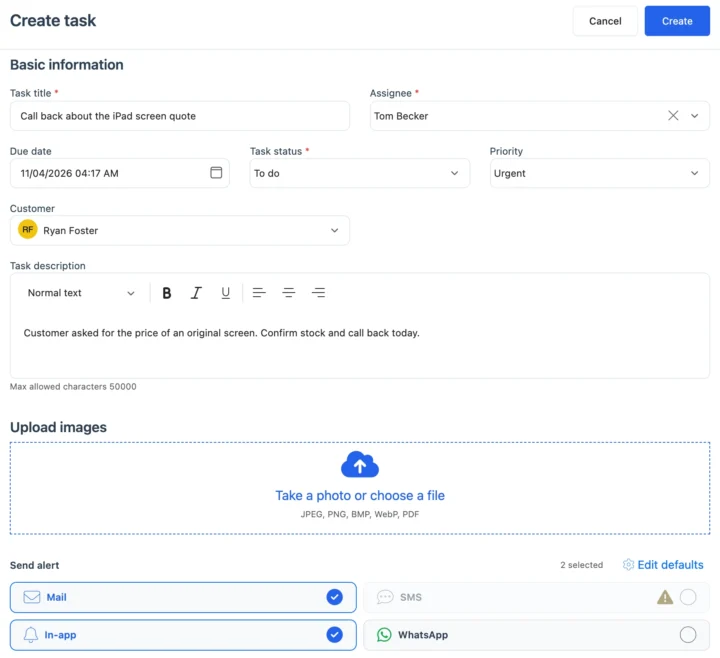
Assign, prioritise and alert
Give the task one owner, a due date and a priority, link the customer, and tick how the assignee hears about it: email, SMS on your own provider or an app notification. Follow-ups with new enquiries live in lead management.
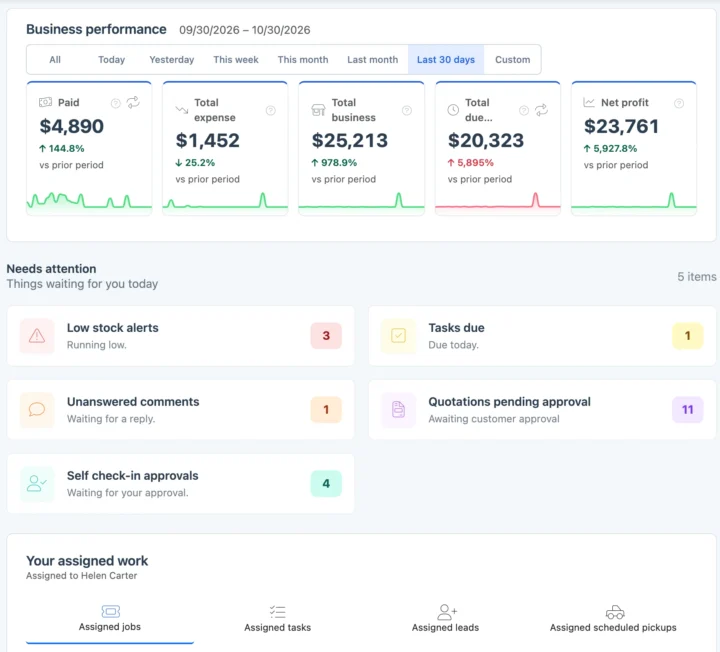
Due dates and reminders
Tasks due today show on the dashboard, and each person finds the tasks assigned to them next to their jobs and leads. Your shop can email reminders before tasks are due, set once under due dates for jobs, tasks and purchases. Plan visits that belong to a contract in AMC management.
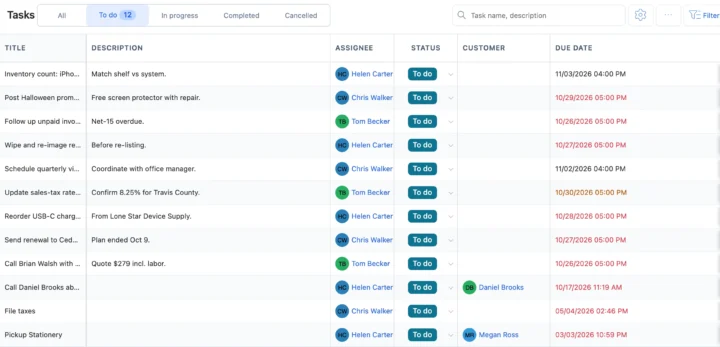
Statuses, filters and who sees what
Filter the list by status, priority or due date. You can limit someone to the tasks assigned to them, and choose who may view or create tasks. Set those rights in configurable permissions.
Also in tasks
Task alerts by email, SMS and the app
Alert staff by email, by SMS on your own provider, or with an app notification on their phone.
How tasks connect to the rest of BytePhase
Each card opens the feature it shares data with, so nothing is typed twice.

Task management questions
When you create or reassign a task, tick how the assignee should hear about it: email, SMS on your own provider or an app notification. You get an app alert when the status changes, tasks due today show on the dashboard, and your shop can email reminders before tasks are due.
Yes. When you add or edit a task, choose the customer under Customer. It is optional, so tasks like ordering stock can have no customer. The task list shows a Customer column, and tasks are shared across all your businesses, just like your customers.
Yes. Tasks are in the Android and iOS apps under More › Daily work › Tasks. Staff see the tasks assigned to them, and anyone your owner allows to edit tasks can move the status from To do to In progress to Completed. The alerts you tick when assigning reach them as app notifications.
No. Tasks show on the BytePhase Calendar next to jobs, pickups and AMC visits, but they are not copied into Google or Microsoft calendars. If a staff member connects their own Google or Microsoft calendar, their personal events show beside their BytePhase work.
In a group chat a request scrolls away and nobody owns it. In BytePhase each task has one assignee, a due date and a priority, the assignee is told by email, SMS on your own provider or an app notification, and you get an app alert when the status changes. Unlike a separate to-do app, a task can be linked to the customer and sits on the same calendar as your repair jobs, pickups and AMC visits, in the Android and iOS task management app as well as on the web.
Straight away. Your account comes ready to use and basic setup takes about 10 minutes. Tasks are not imported from a file: add the to-dos you have open today and assign them. If your staff list is long, import your employees from an Excel or CSV file, and each person then signs in with their own login on the web or the Android and iOS apps.
BytePhase Task Management is a feature that helps repair shops organize, assign, and track tasks efficiently, ensuring better productivity and collaboration among team members.
Yes. Permissions decide who can view tasks and who can create and edit them, and your shop owner can limit someone to only the tasks assigned to them. In the task list you can filter and sort by status, priority and due date.
No, BytePhase Task Management offers unlimited tasks and checklists, allowing you to scale your operations without any limitations.
By organizing tasks, setting priorities, and tracking progress, BytePhase Task Management helps teams work more efficiently, reducing the chances of missed deadlines and improving overall output.
Give every shop to-do an owner and a due date
Create your first task and see how task management keeps call-backs and reorders from slipping.
15-day free trial · 30-day money-back guarantee
2000+ Professional Repair & Data Recovery Businesses Trust BytePhase
We help you stay focused and organized by keeping detailed records
Best-in-class support
No matter what you need help with, our team is here to assist you. The goal of our business is to build long-lasting relationships with our customers.
Free Updates, Always Included
We will provide you with free and regular updates and welcome your feedback, which we will consider for implementation in your subscription.
Data Security & Encryption
We use the highest industry standard (AES-256) to encrypt your data on a secure RDS server for maximum protection.
Automatic Backups
We perform automatic backups daily on our dedicated database server to keep your data safe.
Last updated: 30 October 2026