
OTP for delivery: verify every device handover at your repair shop
OTP for delivery is a verification step that sends your customer a one-time password which must be confirmed before their device leaves the counter. BytePhase asks for the delivery OTP at the shop counter — no code, no handover. It is OTP-based delivery verification built in as an OTP delivery step for repair shops, not a courier service: the 6-digit code goes by SMS and email.
- 6-digit code by SMS and email
- Save stays locked until the code matches
- “Verified” on the delivery challan
- Works in the Android and iOS apps
15-day free trial · 30-day money-back guarantee
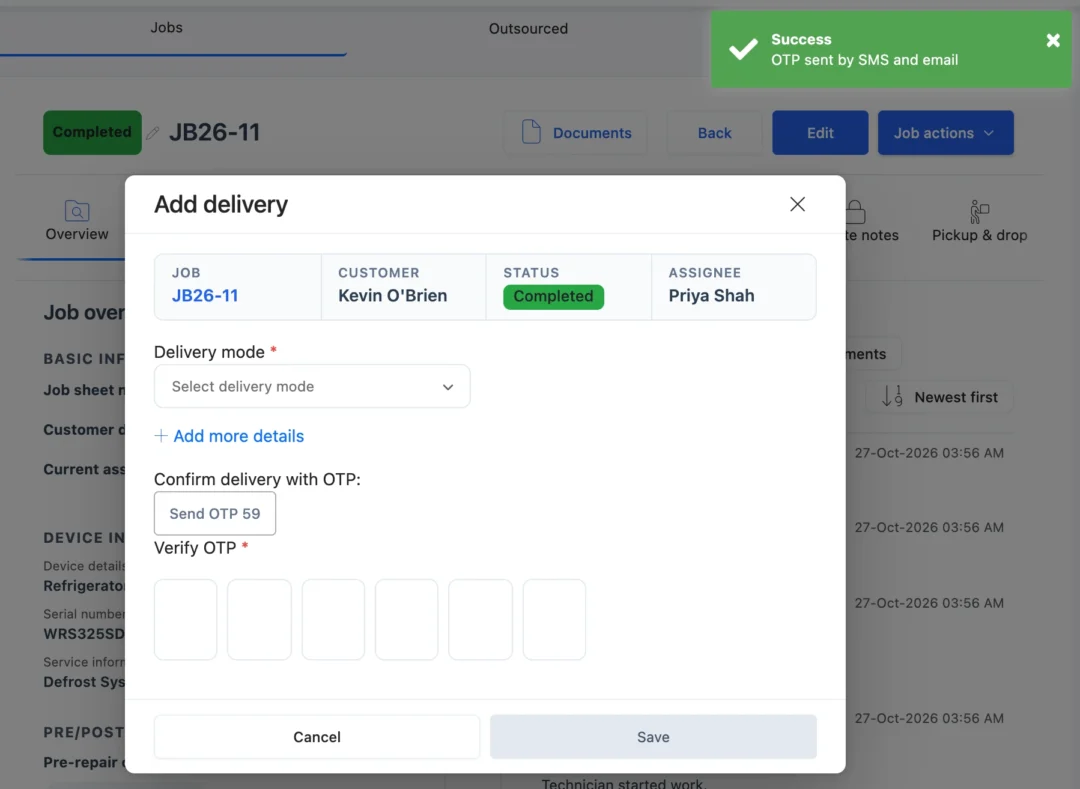
What is OTP for delivery in a repair shop?
OTP for delivery is a check at handover. BytePhase sends a one-time code to the customer’s mobile by SMS and to their email, and the device is saved as delivered only when the person collecting it reads the code out. It turns delivery verification into one step of closing the job, and leaves a record of who collected each device.
How the delivery OTP works
- 1
Finish the repair
Open Job actions › Add delivery and choose customer pickup or courier.
- 2
Send the OTP
A 6-digit code goes by SMS to the customer’s mobile and by email if they have one. Resend is ready after 30 seconds.
- 3
Type the code they read out
Save stays greyed until the code matches. Each code works for 30 minutes; a new one cancels the old.
- 4
Save and print the challan
Set the status, who delivered it and any photos, then print or share the delivery challan marked Verified.
Secure OTP delivery for every handover
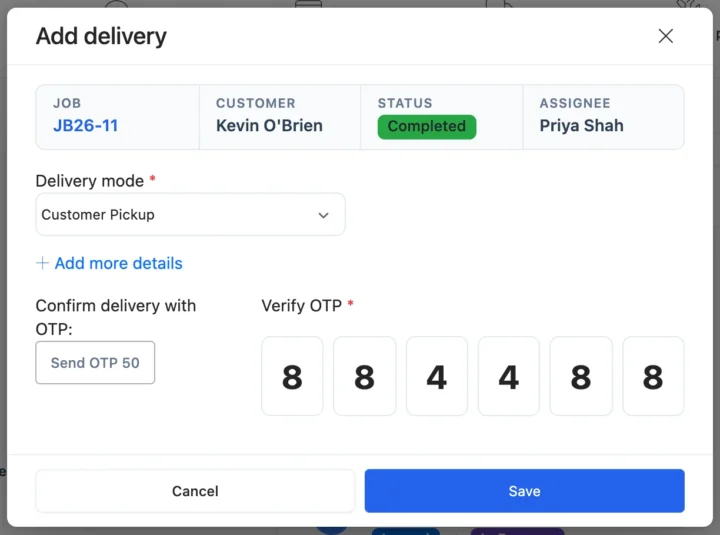
OTP at the repair shop counter
Staff type the code the customer reads from their phone, and Save stays greyed until it matches, so nobody skips the step on a busy day. Technicians do the same from Jobs › job › Delivery in the BytePhase mobile app.
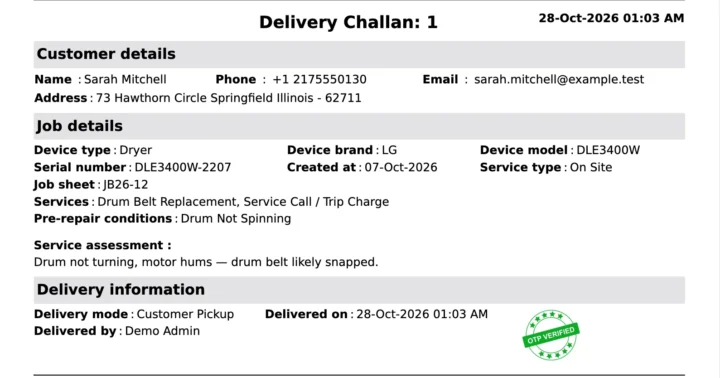
Proof of delivery on the challan
When the OTP was used, the delivery challan prints a Verified badge, and the delivery record keeps who delivered it, a comment and photos. The customer can also sign the challan with signature capture.
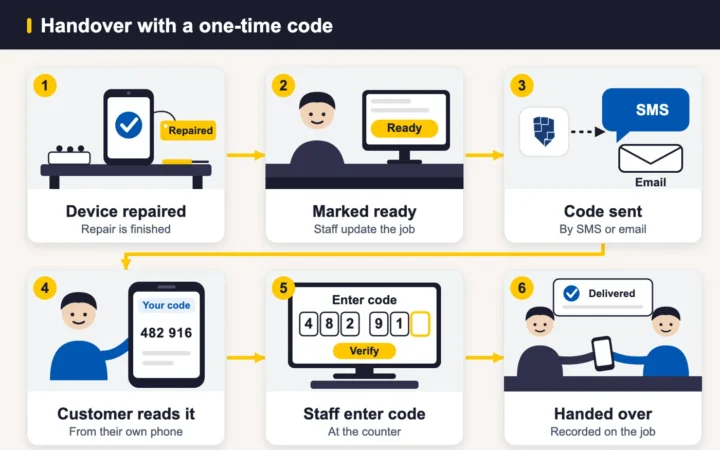
When the code does not arrive
Resend OTP sends a fresh code and cancels the old one, and the message log shows whether each SMS and email was Sent, Failed or Skipped. The fixes are in the OTP troubleshooting guide.
Also at handover
Delivery codes by SMS and email worldwide
At handover, staff tap Send OTP and the customer gets a 6-digit code by SMS and email. The device is saved as delivered only when that code is typed in.
How the handover connects to the rest of BytePhase
Each card opens the feature it shares data with, so nothing is typed twice.
Code-checked handovers in phone, laptop and data recovery shops

OTP for delivery questions
It is a verification step at handover. BytePhase sends the customer a 6-digit one-time password by SMS and email, and the device is saved as delivered only when that code is typed in. It is an OTP delivery step for repair shops, not a courier service.
When the customer comes to collect, open the job, choose Job actions › Add delivery and tap Send OTP. BytePhase sends a 6-digit code to the customer by SMS and email. They read it out, you type it into Verify OTP, and only then can you save the delivery. Each code works for 30 minutes, and Resend OTP sends a new one.
At handover, open the job, choose Job actions › Add delivery and tap Send OTP. The customer gets a 6-digit code by SMS and email; type in the code they read out, then save the delivery.
No. The delivery OTP goes by SMS and email only. At handover, staff tap Send OTP and the customer gets the 6-digit code by SMS and email.
First check the customer’s mobile number and email, then tap Resend OTP once the 30-second countdown ends; the newest code replaces the old one. The message log shows whether each SMS and email was Sent, Failed or Skipped.
The code goes to the customer’s own mobile and email, so the delivery is saved only when the person collecting reads out the right one. Compared with a paper token, a handover register or a signature alone, that gives you a record of who took the device, and the delivery challan prints a Verified badge when an OTP was used. The handover stays on the repair ticket with its photos and comments. It is a handover check for your shop, not a guarantee against every dispute.
Yes, customers will receive their OTP via SMS or email, and they can track the status of their delivery and OTP code through the BytePhase customer portal or app, ensuring they are informed throughout the delivery process.
Yes. When a delivery was confirmed with an OTP, the printed delivery challan (the delivery receipt) carries a Verified badge. A delivery saved without a code has no badge. In the same window you can also record who delivered it and add a comment or photos.
Yes. The Android and iOS apps follow the same steps: open the job, tap ⋮ (Job actions), choose Delivery, pick the delivery mode, tap Send OTP and type the code the customer reads out. The person doing it needs permission to create and edit jobs.
Yes. You can have the customer sign the delivery challan on your screen, tablet or phone, and a staff signature can be added too. The two work side by side: the OTP confirms who is collecting, and the signature is saved on the delivery document.
Hand every repaired device to the right person
Send your first delivery OTP from BytePhase and keep a record of who collected each device.
15-day free trial · 30-day money-back guarantee
2000+ Professional Repair & Data Recovery Businesses Trust BytePhase
We help you stay focused and organized by keeping detailed records
Best-in-class support
No matter what you need help with, our team is here to assist you. The goal of our business is to build long-lasting relationships with our customers.
Free Updates, Always Included
We will provide you with free and regular updates and welcome your feedback, which we will consider for implementation in your subscription.
Data Security & Encryption
We use the highest industry standard (AES-256) to encrypt your data on a secure RDS server for maximum protection.
Automatic Backups
We perform automatic backups daily on our dedicated database server to keep your data safe.
Last updated: 30 October 2026