Repair POS System
A repair POS system that bills the counter sale and the repair from the same parts list and customer record. Scan or search a part, take a full or part payment, and the stock, dues and sales reports update as you sell. In short: built for repair shops that also sell parts and accessories.
- Scan a barcode or search to add parts
- Walk-in or saved customers, one ledger
- Part payments with the balance due tracked
- Stock comes off as you sell
15-day free trial · 30-day money-back guarantee
What is a repair POS system?
A repair POS system is the billing counter of a repair shop: it sells accessories and parts, takes payments and keeps the customer’s balance, using the same parts list and customer record as the repair jobs. A retail billing app sees only the sale; BytePhase sees the repair too.
How a sale moves through the counter
- 1
Pick the customer
Search by name, mobile or email, add a new customer, or sell to a walk-in.
- 2
Scan or search the parts
Scan the barcode with a USB scanner or the phone camera, or search by name or SKU.
- 3
Discount and round off
Add a bill discount and round the total; tax is worked out per part.
- 4
Take the payment
Full or part payment by the customer’s chosen mode; print or share the receipt, and the stock goes down.
One counter for repairs and accessory sales
A sale in a few keystrokes
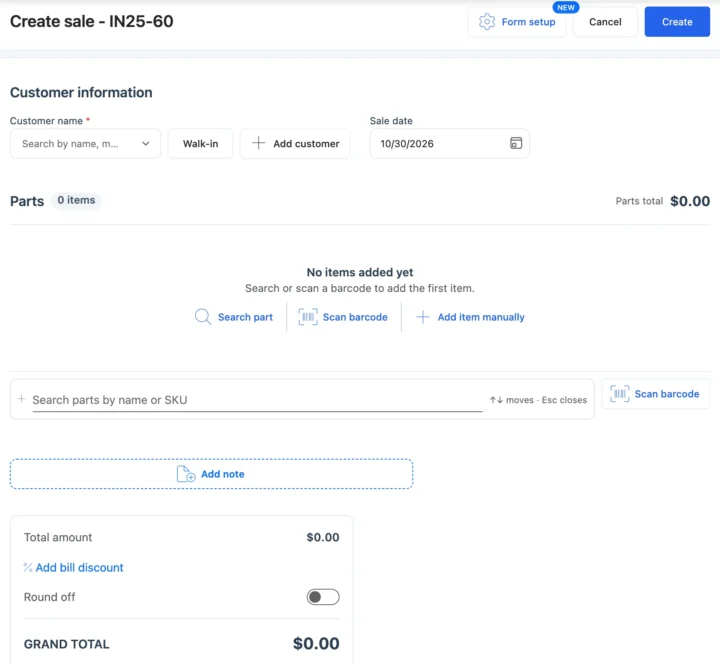
Pick the customer or Walk-in, scan the barcode or search by name or SKU, add a bill discount and round the total. The parts come from the same list your technicians use, so read more on repair shop inventory.
Payments and dues
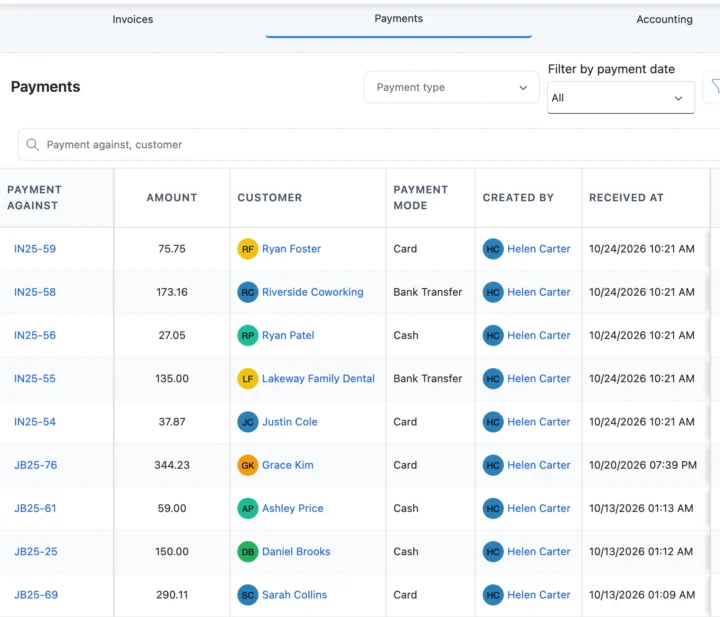
Record each payment with its mode — cash, card or bank transfer — against a sale or a repair job. Part payments keep the balance on the customer. Settle several bills at once with bulk payments.
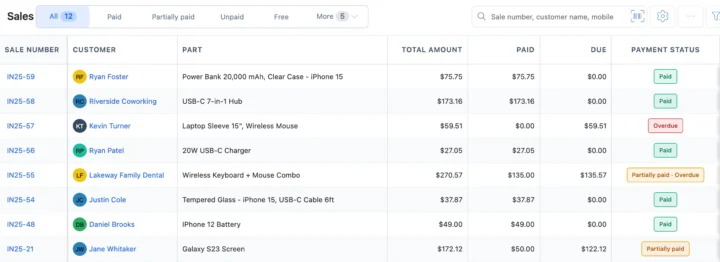
Sales status and reports
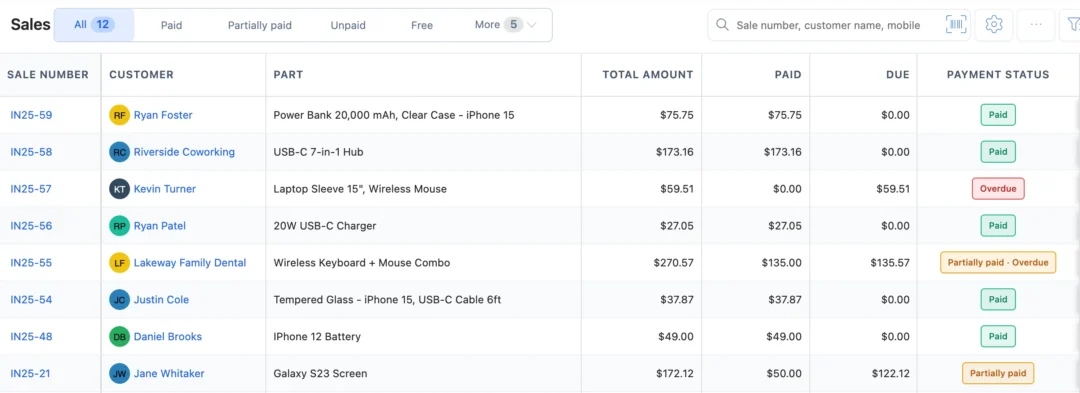
Every sale shows Paid, Partially paid, Unpaid or Overdue, and the list filters by status in one tap. Sales roll into your reports alongside repair jobs, and the invoice for a repair sits with your billing as in repair ticket software. Garages bill parts and labour from the same counter with auto repair invoice software.
Also at the counter
Your currency, your tax, your payment types
Sell in your operating currency with your tax name and rate, record card, cash or bank transfer, and send invoices by email or WhatsApp in one tap.
How the POS connects to the rest of BytePhase
Each card opens the feature it shares data with, so nothing is typed twice.
POS for phone, laptop and camera counters
Choosing a repair shop POS: what to check before you switch
Counter stress is rarely about the volume of sales. It comes from uncertainty: not knowing what is in stock, chasing a half-paid bill, or typing the same customer details three times. A POS earns its place by removing those small frictions, so judge it against your actual day rather than a feature list.
Four checks before you commit
- Can staff learn it in an afternoon? A system the Saturday part-timer cannot use is a system that gets bypassed with a notebook.
- Does it work with the hardware you already own? Your USB barcode scanner, thermal receipt printer and the phone or tablet at the counter should all work without buying new kit.
- Does it cover what you actually sell? Accessories and parts, but also part payments, balances due on a customer, and the repair invoice from the same counter. A retail billing app does the first and none of the rest.
- Try several on a real week. Run the same five sales, one part payment and one end-of-day cash count through each candidate before deciding.
Use the reports, not your memory
Once sales run through one system, the reports answer questions you used to guess at: which accessories sell most, which hours and days are busiest, which customers buy repeatedly, and which bills are overdue. Check them weekly. Reorder the fast movers before they run out, staff the counter for the busy hours, and chase overdue balances from the list rather than from a stack of receipts. Done consistently, that is where the time saving shows up, and it is why a POS built around repairs reduces stress in a way a generic till cannot.
Set up repair POS system step by step
Short guides with screenshots in the BytePhase Help Center, checked against the app.

Repair POS questions
Yes. Record what the customer pays now; the sale shows Partially paid and the balance stays on the customer until they pay the rest, by any payment mode you use.
Yes. BytePhase is a repair shop POS system built for phone, computer, electronics and auto repair businesses. It rings up sales and repair invoices, scans parts by barcode, records card, cash and online payments, applies discounts, and syncs every sale to live reports, all linked to the repair ticket.
A good repair shop POS system should handle barcode billing, partial payments, inline discounts, several payment types (cash, card and online), thermal or A4 receipts and sales reports, all connected to the repair job. BytePhase covers each of these from one screen.
Yes. BytePhase works in any web browser and ships native Android and iOS apps, so you can ring up sales, scan parts with your phone camera and collect payments at the counter or on the go, with no per-device limit.
Yes. Download the sample file and upload your Excel or CSV file of customers or parts. You match your columns to BytePhase fields, check a preview, and download an error report for any rows that fail. Parts go into the business you have selected.
About 10 minutes for the basics. Your account comes ready to use, with ready-made print themes that put your logo, tax number and terms on every bill. Import your parts and customers from Excel or CSV if you have them, and you can make your first sale the same day. 24/7 live chatbot support, free training and a live demo on request help your counter staff get going.
Yes, BytePhase allows you to customize and manage in-line discounts directly at checkout.
Yes. Bills and repair updates can go to customers by email, SMS and WhatsApp. WhatsApp goes out automatically once it is connected and your message wording is approved; otherwise one tap opens it ready to send. In India, PhonePe can also send a payment request to the customer’s phone.
Yes. Set your own tax name and rate, such as VAT, sales tax or GST, and pick it on each bill line. Record payments as cash, card, online or cheque, or add your own payment type. Bills use your shop’s currency, and sales can sync to QuickBooks or Xero for your accountant.
Yes, if your computer or phone can already print to it. BytePhase prints sales as 58 mm or 80 mm thermal receipts, or on A4, A5 and Letter paper, through your device’s normal print option. It does not connect to printers directly. See the supported hardware guide for sizes.
Absolutely, BytePhase uses AES-256 encryption and automatic backups to secure your data.
The POS feature in BytePhase enables repair shops to manage sales efficiently by processing payments, generating invoices, and offering customer discounts.
Affordable repair POS software should bill the repair and the counter sale from one parts list, take full or part payments and update stock as you sell, without a per-device fee. Check how many staff logins the plan includes and whether the trial covers the POS. BytePhase's 15-day free trial gives full access, POS included.
Look for one system where the repair ticket and the counter sale share the same parts list and customer record: a screen replacement and the case sold with it should land on one invoice, with full or part payment and the stock updated. Check for a barcode scanner, receipt printing on thermal or A4, and technician apps. BytePhase's repair POS system does this on the web and in native Android and iOS apps; compare it with RepairDesk and RepairShopr on a test sale.
Yes. The same repair POS system bills RAM, SSDs, chargers and accessories at a computer repair counter and the repair itself from one parts list, so stock stays right and the customer's balance is on one record. Barcode labels, thermal or A4 receipts and walk-in sales work the same way; see computer repair shop software for the full repair workflow.
Yes. A phone service centre bills repairs and accessory sales from the same counter in your currency, with your tax name and rate on the invoice, card, cash or bank-transfer payments recorded against the sale, and the receipt printed or sent by email or WhatsApp.
Bill the repair and the counter sale from one place
Add your parts list and ring up your next sale on the BytePhase repair POS system.
15-day free trial · 30-day money-back guarantee
2000+ Professional Repair & Data Recovery Businesses Trust BytePhase
We help you stay focused and organized by keeping detailed records
Best-in-class support
No matter what you need help with, our team is here to assist you. The goal of our business is to build long-lasting relationships with our customers.
Free Updates, Always Included
We will provide you with free and regular updates and welcome your feedback, which we will consider for implementation in your subscription.
Data Security & Encryption
We use the highest industry standard (AES-256) to encrypt your data on a secure RDS server for maximum protection.
Automatic Backups
We perform automatic backups daily on our dedicated database server to keep your data safe.
Last updated: 14 November 2026