
WhatsApp integration for repair shops
In short: the BytePhase WhatsApp integration sends job updates, quotations, invoices and payment receipts to your customers on WhatsApp, automatically through the official WhatsApp Business API or with one tap from your own WhatsApp. Customers approve quotations with a button, reply in a shared inbox your whole team can see, and you can run WhatsApp campaigns to repeat customers.
Repair updates reach every customer without anyone messaging them one by one: tick WhatsApp when you save the job, and the update, PDF and buttons go out on their own.
Setup: Open in WhatsApp needs nothing. Automatic sending is one click on BytePhase’s number, or about 10 minutes to connect your own WhatsApp Business number.
The difference
The old way vs BytePhase
Flip the switch to compare
Pick how you send
Three ways to send WhatsApp messages from BytePhase
Start with one and switch whenever you like. Your WhatsApp balance and saved messages stay when you change. Tap a card to see how each one works.
Open in WhatsApp
The simplest way to start. Save a job, invoice or quotation, tick WhatsApp, and BytePhase opens WhatsApp on your phone or computer with the customer's number and the message already typed. You check it and press send.
- Free, with nothing to set up
- Goes from your shop's own WhatsApp, on the web or the mobile app
- Green WhatsApp buttons on jobs, invoices, sales, quotations, payment receipts, AMC and rental contracts
- Your WhatsApp signature is added to the end of every message
Send from BytePhase's number
The quickest way to have messages go out on their own. Choose BytePhase's number once, and every job and invoice message your staff tick is sent through the official WhatsApp Business API with no WhatsApp window and no setup at Meta.
- Ready in one click, nothing to set up at Meta or Facebook
- Messages go out automatically with the PDF and buttons you turned on
- A small per-message fee and WhatsApp's own charge both come from your prepaid WhatsApp balance
- Switch to your own number later; your balance and saved messages stay
Send from your own WhatsApp number
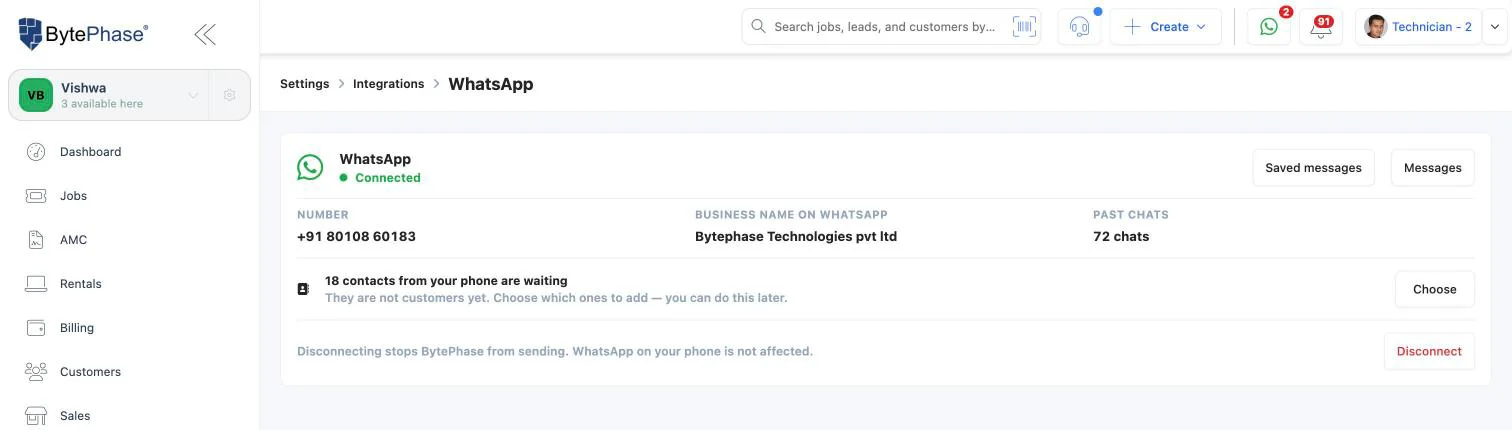
Connect the number your shop already uses on the WhatsApp Business app. BytePhase sends job and invoice messages from it automatically, customer replies arrive in a shared inbox in BytePhase, and you can run WhatsApp campaigns. WhatsApp keeps working on your shop phone.
- Customers see your shop name and number
- Your contacts and the last 6 months of chats come across when you connect
- Two-way WhatsApp inbox for your team, plus campaigns on Standard and Enterprise
- About 10 minutes on a computer, or we set it up with you on a call
Sending on its own (BytePhase’s number or your own) is available to shops in India today. Shops in other countries can use Open in WhatsApp on every plan and can ask our support team about the others. Compare the three ways in the help center →
What goes out
Every repair message, delivered on WhatsApp
Each one has its own wording, with the PDF and buttons if you want them.
New job and job sheet
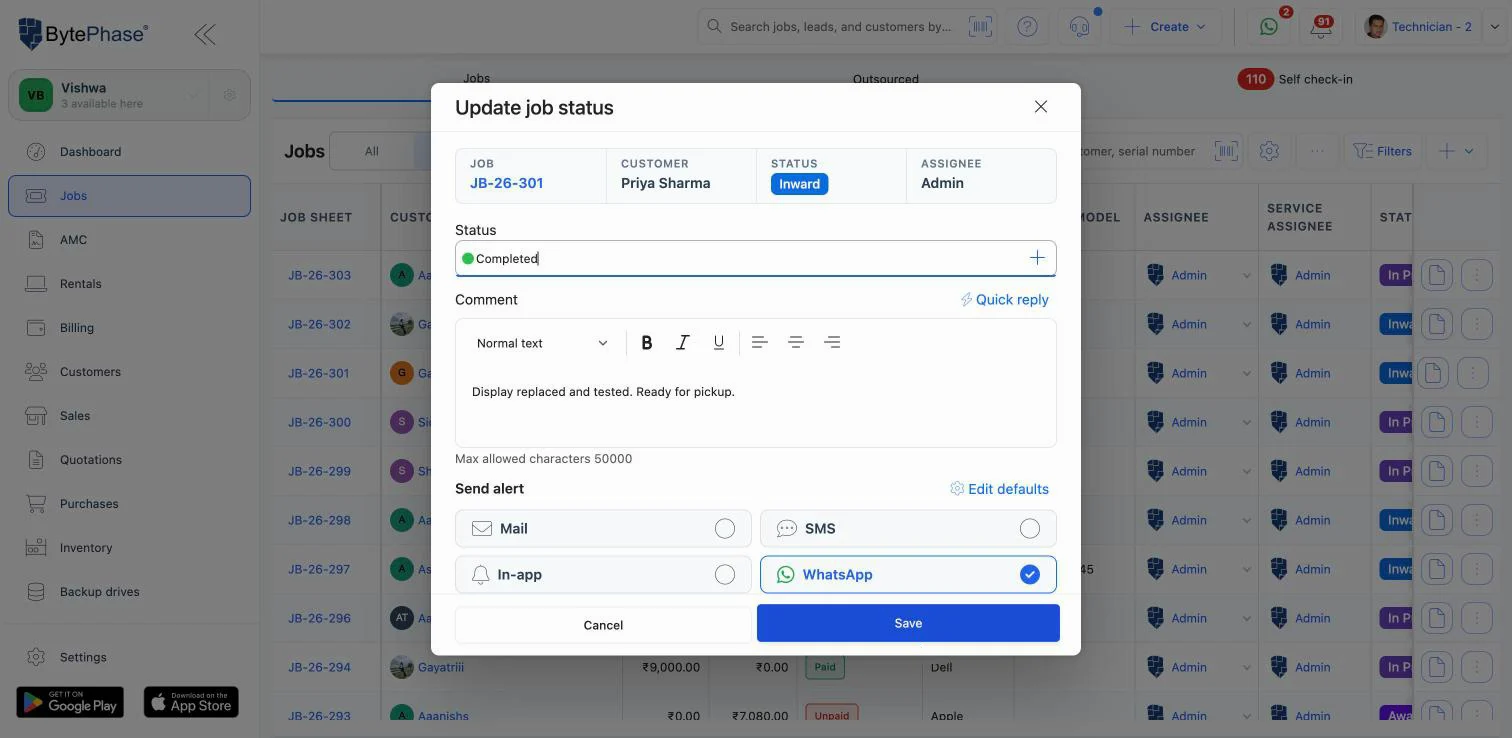
The job sheet PDF and a tracking link the moment a device is checked in.
Repair status updates
In progress, waiting for parts, ready for pickup: sent as the job moves.
Quotations with Approve / Reject
The quotation PDF with fixed Approve and Reject buttons the customer taps.
Invoices and payment receipts
The invoice or receipt PDF, so the paperwork is in the chat, not lost in email.
AMC and rental contracts
Maintenance and rental contract messages with their document attached.
Pickups and drops
Pickup and delivery messages for doorstep and collection jobs.
Diagnosis reports
Data-recovery and diagnosis reports shared on the customer’s phone.
Up to 3 buttons
Add Reply, Open a link or Call buttons under a message.
Why nothing gets stuck
How WhatsApp message approval works
WhatsApp checks a business’s wording before it can start a chat. BytePhase handles that for you.
You keep or edit the words
Your shop starts with wording that is already approved, so you can send the day you connect.
Send for approval
Changed a message? One click sends it to WhatsApp to check.
In review
Usually a few minutes. Meanwhile that message opens in WhatsApp for staff to send by hand.
Approved, sends on its own
From then on it goes out automatically, with the PDF and buttons you turned on.
If a message isn’t ready to send on its own (wording still in review, balance empty, or WhatsApp has paused your number), nothing is lost: it falls back to Open in WhatsApp so your staff can still send it. Keep job and invoice messages plain; WhatsApp charges offer-style wording at its higher Marketing rate. Message approval statuses →
One tap, everywhere
One tap on Approve updates the whole job
The customer approves the quotation from the WhatsApp message itself. No call, no note on a slip of paper.
Two-way chat
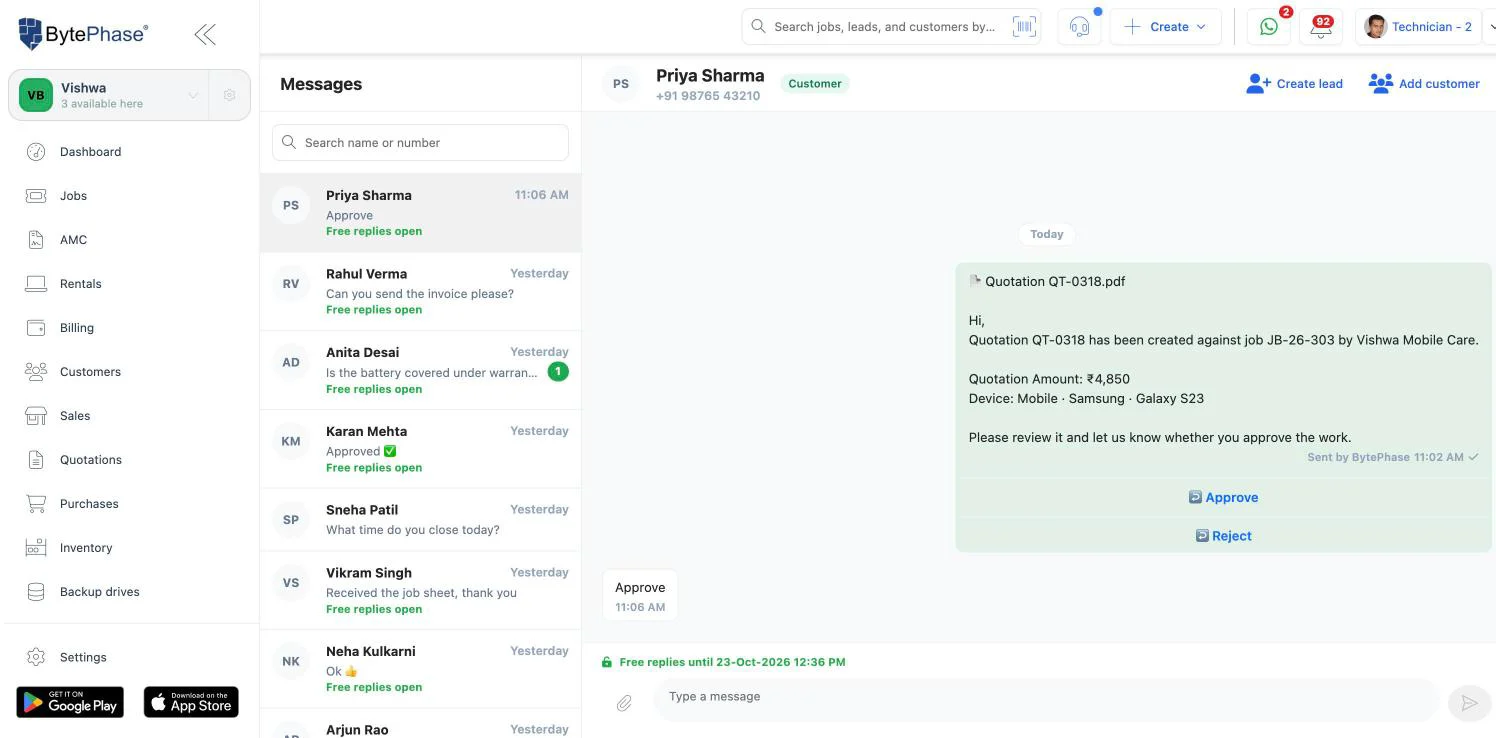
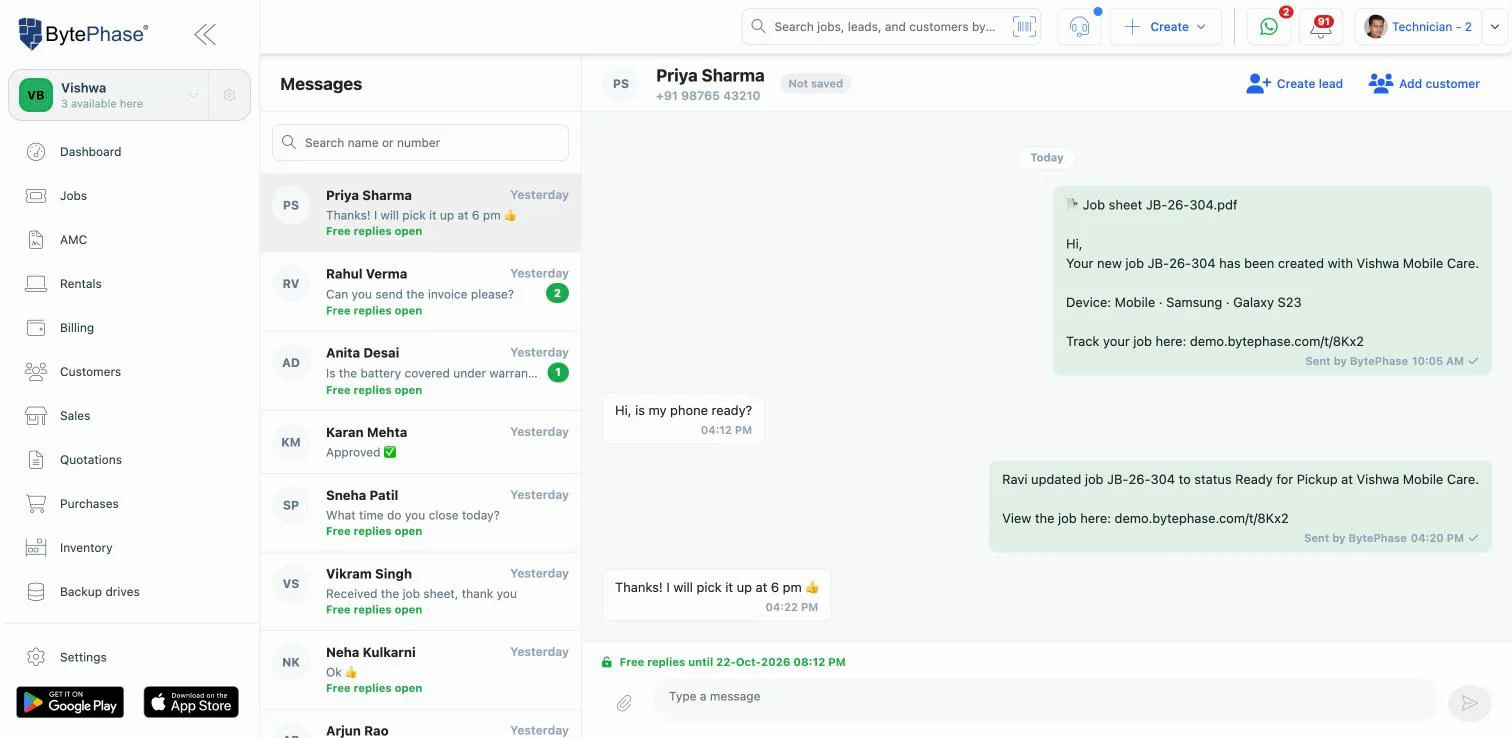
A shared WhatsApp inbox for your front desk
With your own number connected, customer messages arrive in BytePhase as well as on your shop phone. Anyone you allow can read and answer them, so a reply never depends on one person’s phone.
- The green WhatsApp messages button shows how many customers are waiting
- Type freely for 24 hours after a customer writes; those replies are free
- Send photos and files: JPG or PNG up to 5 MB, PDF, Word, Excel and more up to 25 MB
- See whether the person is a customer or a lead, and add them in one click
- Bring your phone contacts in as customers, choosing who to add
- Messages you send from the WhatsApp app on your phone show in the same chat
Marketing, done properly
WhatsApp marketing campaigns for repeat customers
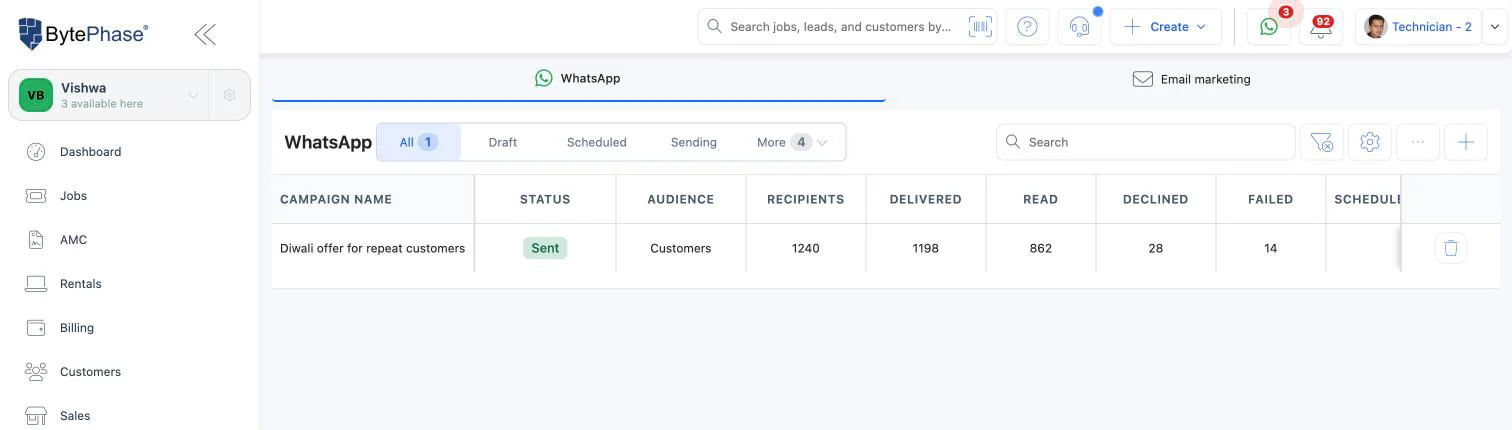
Send one approved WhatsApp message to many people at once, for example a festival offer to your repeat customers. You see exactly who gets it and what it costs before anything goes out. Campaigns are on the Standard and Enterprise plans, from your own connected number.
Message
Pick an approved marketing message made in Meta’s WhatsApp Manager.
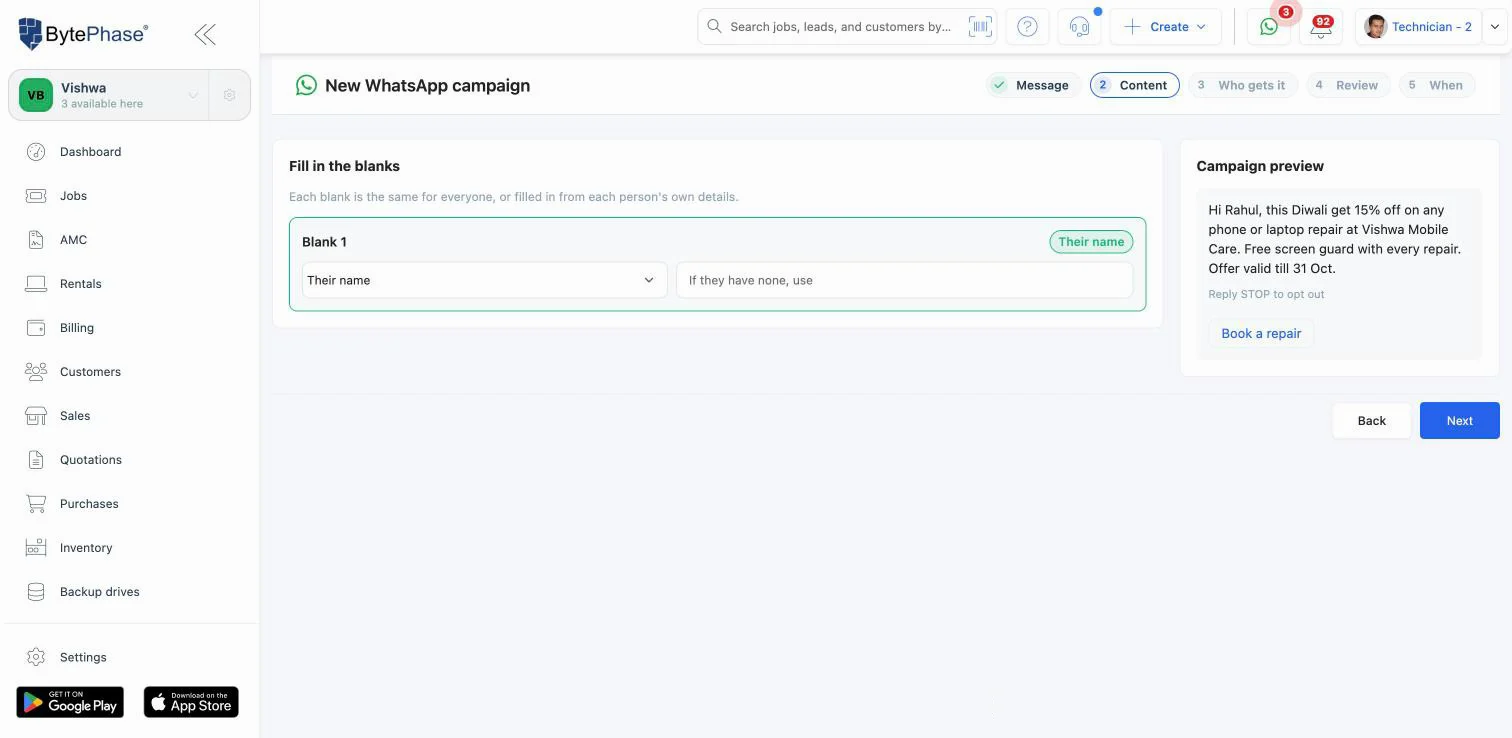
Content
Add the picture and fill the blanks with each person’s name or city.
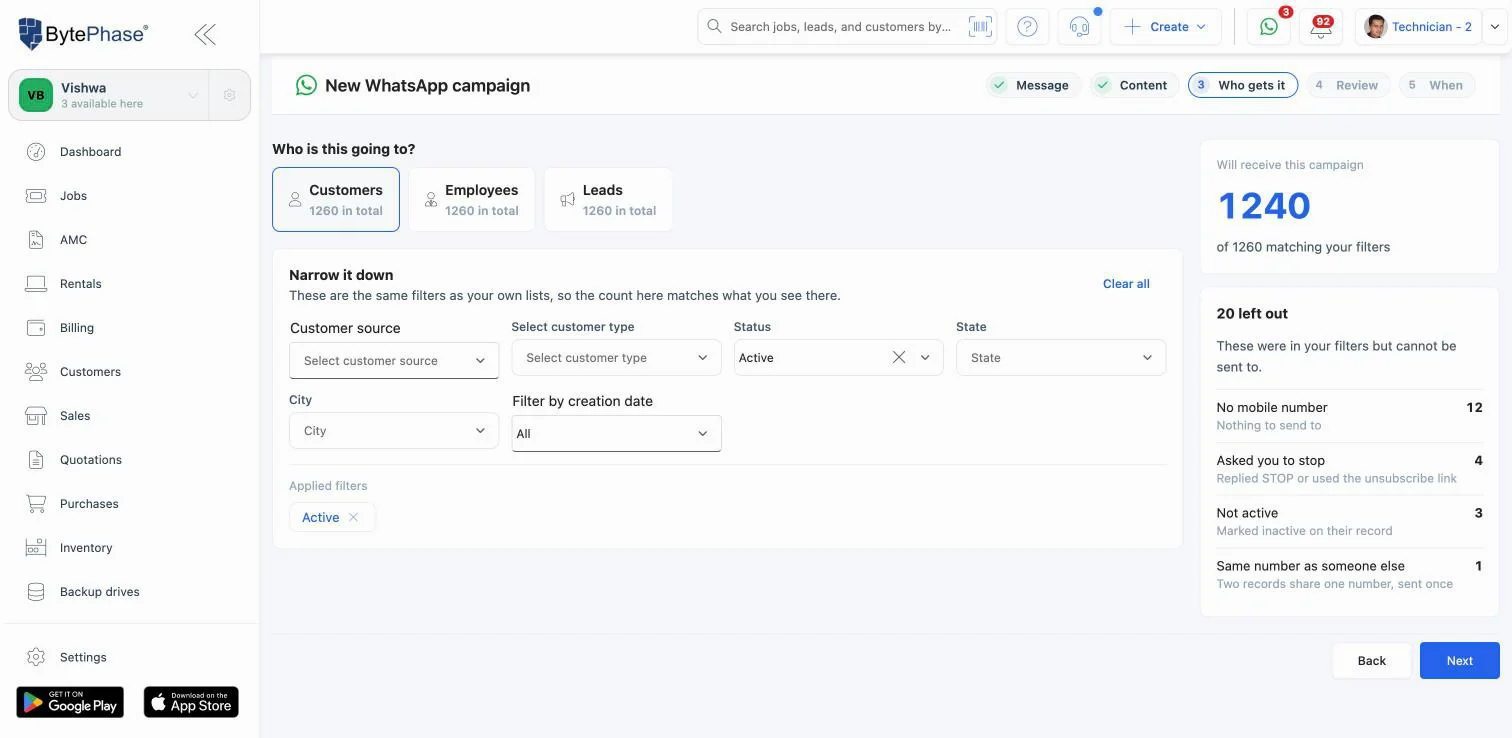
Who gets it
Customers, leads or staff, narrowed with the same filters as your lists.
Review
Recipients, cost and a test send to your own phone.
When
Send now or schedule it in your time zone.
A report for every campaign
Sent, delivered, read, declined and failed, with the reason for each one that didn’t go.
Opt-outs handled for you
Anyone who replies STOP, UNSUBSCRIBE or similar gets no more WhatsApp messages from you.
Never overspend
If the balance runs out the campaign pauses; add balance and resume the rest.
Up to 5,000 people per campaign and 10,000 messages a day. WhatsApp decides how many marketing messages a person receives a day and does not deliver marketing to US (+1) numbers; declined messages are not charged. Run your first campaign →
Inside the product
See the WhatsApp integration inside BytePhase
Real screens from a BytePhase account.
Send your first WhatsApp repair update today
15-day free trial with every feature, or a demo where we connect WhatsApp with you.
In practice
Four everyday repair-shop scenarios
WhatsApp works inside the rest of BytePhase repair shop management software: the same job, quotation and invoice your team already uses.
“Is my phone ready?” stops
The technician marks the job ready and the customer gets the pickup message with the shop’s details. The front desk phone stays quiet.
Approved from the bus
A customer gets the quotation PDF on WhatsApp and taps Approve on the way to work. The repair starts before lunch.
A festival offer that lands
A Standard-plan shop sends a Diwali offer to active repeat customers, with a picture and each person’s name, and sees who read it.
One chat, the whole team
A customer asks about warranty late in the day. Whoever is at the counter answers from BytePhase, with the job on screen.
Good to know
Charges, limits and WhatsApp’s rules
Straight answers, so there are no surprises on your first day.
What is free
Open in WhatsApp, your replies within 24 hours of a customer’s message, messages you send from your phone, and messages WhatsApp refuses to deliver.
Prepaid WhatsApp balance
Messages BytePhase sends take a small fee from a prepaid balance you top up in BytePhase. It never expires, even when your plan renews, and a statement shows every charge.
WhatsApp’s own charge
WhatsApp (Meta) sets a charge for each message. On BytePhase’s number it comes from your balance; on your own number Meta bills the card or UPI you add.
Where it works
Automatic sending is for shops in India today. Open in WhatsApp works on every plan in every country.
Stay on WhatsApp’s good side
Message people who agreed to hear from you and keep updates plain. WhatsApp can limit numbers that customers block or report.
You stay in control
Only people you allow can connect WhatsApp, add balance, read chats or run campaigns. Disconnect any time; WhatsApp on your phone is not affected.
Read WhatsApp’s Business Messaging Policy. Current fees are shown inside BytePhase before you add balance, and on the WhatsApp balance help page.
Questions about the WhatsApp integration
Three. Open in WhatsApp: BytePhase writes the message and opens WhatsApp with the customer’s number, and you press send. It is free and works on every plan in every country. BytePhase’s number: messages go out on their own through the official WhatsApp Business API, with nothing to set up. Your own number: messages go out on their own from the WhatsApp Business number your shop already uses, replies come into BytePhase, and you can run campaigns. You can switch whenever you like.
Yes. Automatic sending, from BytePhase’s number or your own, uses the official WhatsApp Business API from Meta with message wording WhatsApp has approved. Open in WhatsApp simply opens your own WhatsApp with the message ready to send.
Sending job, quotation, invoice and receipt messages on WhatsApp works on every plan. WhatsApp marketing campaigns need the Standard or Enterprise plan. Messages that BytePhase sends for you use a prepaid WhatsApp balance.
Open in WhatsApp works in every country. Sending on its own, from BytePhase’s number or your own, is available to shops in India today; shops in other countries can ask our support team about access.
Open in WhatsApp is free. Each message BytePhase sends for you takes a small fee from your prepaid WhatsApp balance, plus WhatsApp’s own charge for that message: on BytePhase’s number both come from your balance, and on your own number Meta bills its charge to the card or UPI you add in Meta. Your replies within 24 hours of a customer’s message and messages WhatsApp refuses to deliver are free. The balance never expires, and current fees are shown inside BytePhase before you add balance.
Yes. When you connect your own number, the WhatsApp Business app keeps working on your phone. Chats show on the phone and in BytePhase, and your contacts and the last 6 months of chats come across when you connect.
Yes. Quotations go out with fixed Approve and Reject buttons. When the customer taps one, the quotation is approved or rejected in BytePhase and your team is notified.
Yes. Turn on Attach the PDF for a message and the printed document goes with it: invoices, job sheets, quotations, payment receipts, sales, purchases, diagnosis reports, maintenance contracts and pickups. You can also add up to 3 buttons to reply, open a link or call.
Pick an approved marketing message, fill its blanks with each person’s name or city, choose customers, leads or staff with filters, review the recipients and cost, send yourself a test, then send now or schedule it. BytePhase leaves out people who asked you to stop, and each campaign has a report of sent, delivered, read and declined messages. Campaigns need your own number connected and the Standard or Enterprise plan.
Either you haven’t chosen BytePhase’s number or connected your own yet, that message’s wording is still waiting for WhatsApp’s approval, your WhatsApp balance is empty, or WhatsApp has paused your number until something is fixed in your Meta account. In every case the message opens in WhatsApp so your staff can still send it by hand.
More answers in the WhatsApp questions and answers help page. Related: Repair shop software · Gupshup SMS · Twilio · PhonePe · All integrations

Last updated: 23 October 2026