Lead Management CRM for Repair Shop Enquiries
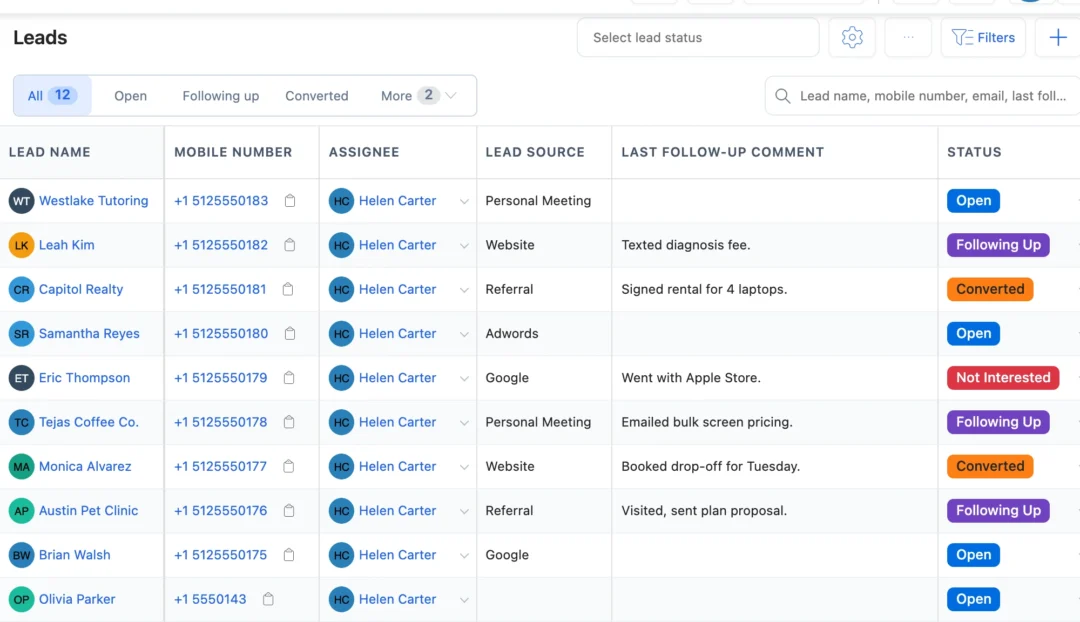
Lead management for repair shops: every enquiry from the counter, the phone, your website and Facebook or Instagram lead ads lands in one list with its source, an owner and a follow-up date, until it becomes a quotation or a repair job.
- Enquiries from your website and ad forms arrive on their own
- Follow-ups due today on the dashboard
- Each lead assigned to one person
- Turn a lead into a job or quotation without retyping
15-day free trial · 30-day money-back guarantee
What is lead management for a repair shop?
Lead management keeps track of everyone who asked about a repair, a rental or a maintenance contract but hasn’t said yes yet: who they are, where they came from, who is calling them back and when. A general sales CRM stops at the deal. BytePhase turns the lead into a customer, a quotation or a repair job in the same system that runs your bench.
How a repair enquiry becomes a booked job
- 1
The enquiry arrives
A walk-in, a call, your website form or a Facebook or Instagram lead ad, saved with its source.
- 2
Assign it and set a follow-up
Give the lead to one person with a follow-up date, its lead type and what the customer is interested in.
- 3
Log each follow-up
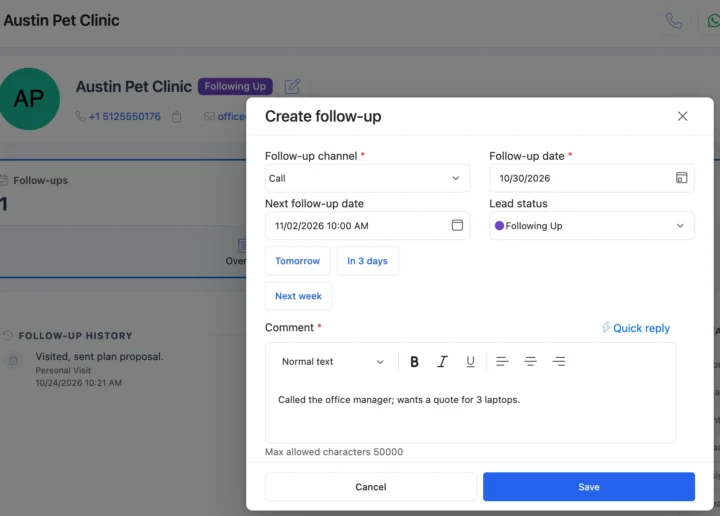
Call, WhatsApp, SMS, email or a visit: each follow-up saves the comment, the new status and the next date.
- 4
Convert when they say yes
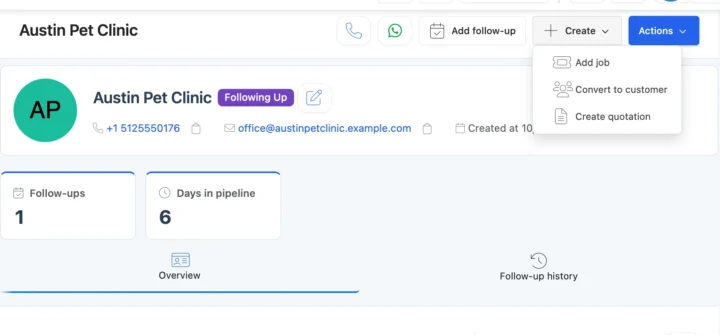
Create a quotation or a repair job from the lead, and its status turns Converted.
Lead management from first enquiry to converted
Leads that arrive on their own
Connect a source once and new enquiries land in the lead list with their source, ready to assign. You can also import existing leads from a spreadsheet. See every source in BytePhase integrations.
Follow-ups that happen on time
Each follow-up records the channel — call, WhatsApp, SMS, email or a visit — what was said, the new status and the next date. Leads to call today show on the dashboard, and marketing and sales staff have Leads in the phone app’s bottom bar. Plan other to-dos in task management.
From lead to quotation or repair job
When the customer says yes, open the lead and choose Convert to customer, Add job or Create quotation. BytePhase checks whether they are already a customer, and the lead turns Converted. The job then runs like any other in repair ticket software.
Also in lead management
Facebook lead ads, website forms and email follow-ups
Leads from your Facebook or Instagram ad forms and your website arrive on their own; connect other apps through Zapier or n8n, and follow up by call, email or WhatsApp in one tap.
How leads connect to the rest of BytePhase
Each card opens the feature it shares data with, so nothing is typed twice.
Set up lead management for repair shops step by step
Short guides with screenshots in the BytePhase Help Center, checked against the app.

Lead management questions
Facebook and Instagram lead ads, your WordPress or own website form, Typeform, JotForm and Tally.so, and other apps through Zapier or n8n. You can also add leads by hand or import them from a spreadsheet.
Your account comes ready to use and basic setup takes about 10 minutes. Import your existing enquiry list from an Excel or CSV file using the sample file, add new leads by hand, and connect the sources you already use, such as Facebook and Instagram lead ads or your website form. Once connected, new enquiries arrive in Leads on their own, tagged with their source.
BytePhase allows you to schedule follow-ups directly within the platform, log each follow-up by call, SMS, WhatsApp, email or visit, set the next follow-up date, and see the follow-ups due today on your dashboard so no lead is forgotten, thereby improving customer engagement and conversion rates.
Yes. The native BytePhase Android and iOS apps let you add leads, log follow-ups and convert leads from your phone (marketing and sales staff have Leads in the bottom bar), ensuring you stay connected and productive wherever you are.
BytePhase employs AES-256 encryption, the industry standard for data security, ensuring that all lead and customer information is securely stored and protected against unauthorized access.
The BytePhase Lead Management System is a comprehensive tool designed to streamline the process of capturing, tracking, and converting leads. It records each lead’s source, type and follow-ups, and converts a lead into a customer, a repair job or a quotation when they say yes.
BytePhase helps by making sure no enquiry is forgotten. Each lead shows its status and follow-up history, follow-ups due today appear on the dashboard and in each person’s assigned leads, and Reports show new-lead trends and follow-up counts per employee. It does not promise a conversion rate, but your team always knows who to call next.
The IndiaMART connection is for shops in India; it does not appear for shops elsewhere. Outside India, leads arrive from Facebook and Instagram lead ads, your website forms (WordPress, Typeform, Jotform, Tally.so or your own site), and other apps through Zapier or n8n, each tagged with its source.
The Justdial connection is for shops in India; it does not appear for shops elsewhere. Outside India, leads arrive from Facebook and Instagram lead ads, your website forms (WordPress, Typeform, Jotform, Tally.so or your own site), and other apps through Zapier or n8n, each tagged with its source.
IndiaMART connections exist only for shops in India. For the sources you can use elsewhere, send a test: Meta’s Lead Ads Testing Tool sends a test lead from Facebook, and for a website form you submit it once and click Check now to see Test submission captured. Whatever arrives appears in Leads, tagged with its source.
IndiaMART and Justdial connections are for shops in India. Your website-form connections offer a similar choice: BytePhase matches by mobile number or email, and for a customer who already exists you pick Create a new record or Skip the submission. A Meta lead ad from someone who is already a lead is skipped.
Stop losing enquiries between the first call and the job
Connect a form or add your first leads, and run lead management in the same place as your repairs.
15-day free trial · 30-day money-back guarantee
2000+ Professional Repair & Data Recovery Businesses Trust BytePhase
We help you stay focused and organized by keeping detailed records
Best-in-class support
No matter what you need help with, our team is here to assist you. The goal of our business is to build long-lasting relationships with our customers.
Free Updates, Always Included
We will provide you with free and regular updates and welcome your feedback, which we will consider for implementation in your subscription.
Data Security & Encryption
We use the highest industry standard (AES-256) to encrypt your data on a secure RDS server for maximum protection.
Automatic Backups
We perform automatic backups daily on our dedicated database server to keep your data safe.
Last updated: 30 October 2026