
Inventory management for repair shops that ties every part to a job
Know which parts you have before you promise a repair, and bill every part you fit. With BytePhase inventory management for repair shops, stock, purchases, repair tickets and billing all work from one parts list. In short: built for repair shops that stock parts.
- Check a part is in stock before you quote
- See which parts each repair job used
- Spot low-stock parts before a repair has to wait
- Purchases, tickets and bills move the same count
15-day free trial · 30-day money-back guarantee
What is inventory management for repair shops?
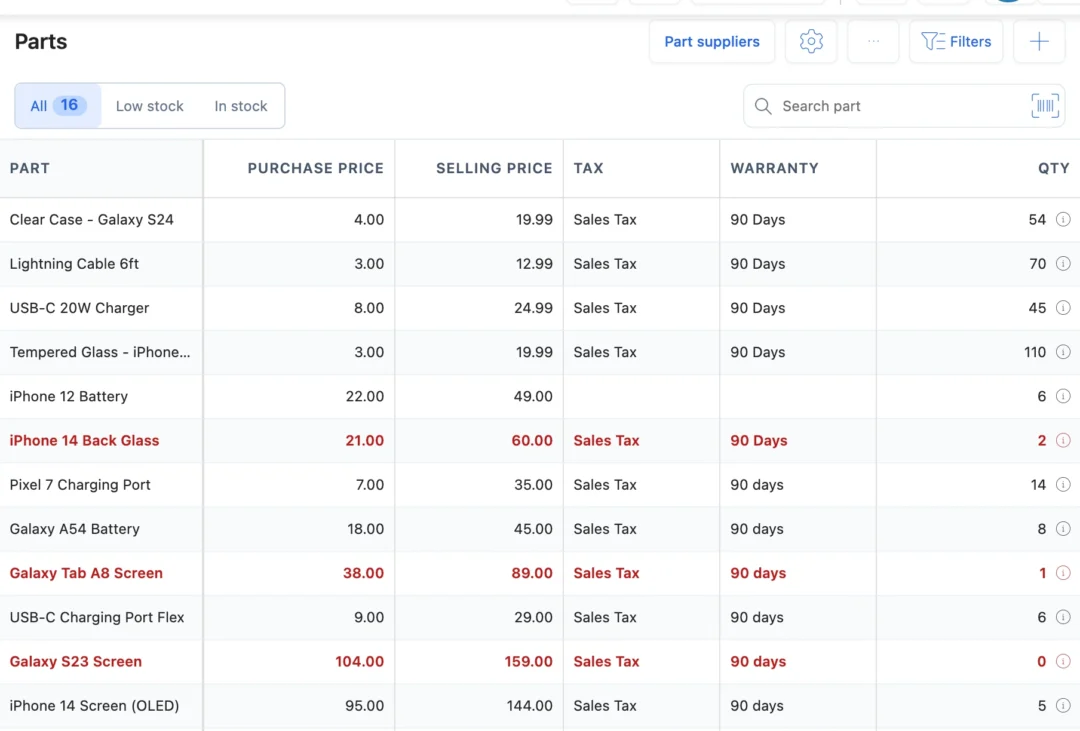
Inventory management for repair shops is how a business tracks the parts it buys, fits on repairs and sells at the counter. In BytePhase every part has a purchase price, a selling price, its tax and a warranty, and every purchase, repair and sale moves its count.
From the supplier’s box to the customer’s bill
- 1
Receive stock from a supplier
Record the purchase and the quantity is added to stock, with what you paid.
- 2
Fit parts on a repair job
Add the part to the repair ticket. Stock goes down and the part is on the job sheet.
- 3
Sell parts at the counter
Scan the barcode at the point of sale to sell cases, chargers and accessories.
- 4
Reorder before stock runs out
Parts at or below their low stock level are flagged, so you reorder in time.
Do you also lend or hire out devices? Rental stock and loaner devices are tracked in device rental management.
Spare parts management software that follows the repair
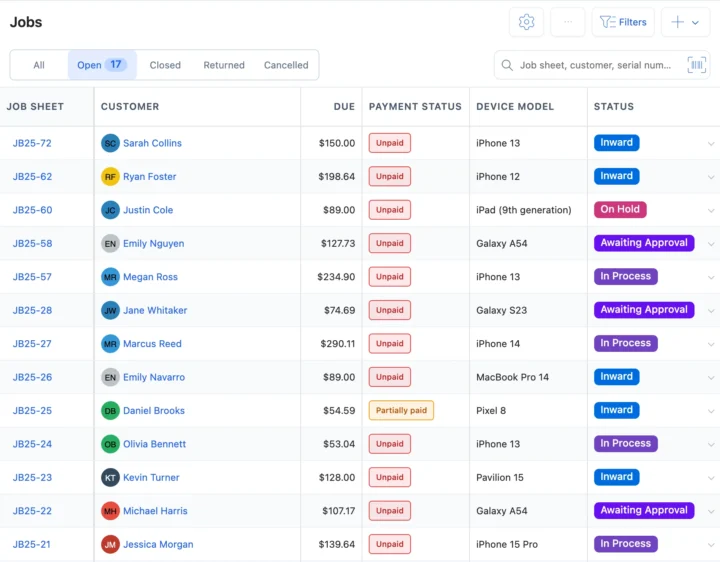
Parts connected to repair tickets
Pick parts from stock while you work on a ticket. The job’s activity log records which part went on which repair, and it prints on the job sheet and the invoice. See repair ticket management.
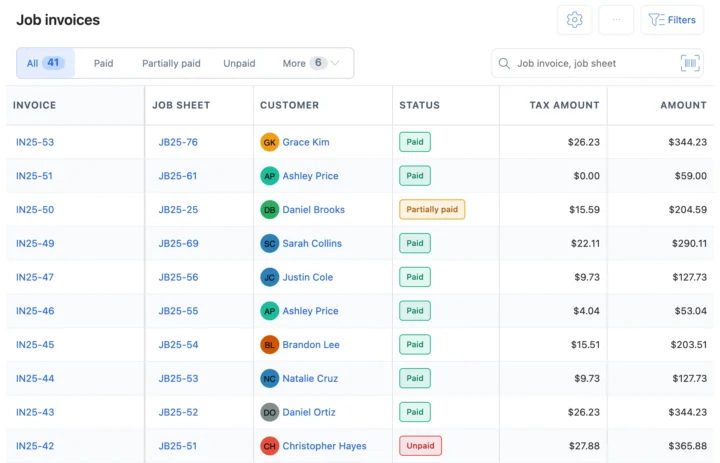
Parts on invoices, sales and stock
Parts on a repair print on its invoice with their tax. At the counter, scan a part’s barcode with a USB scanner, a webcam or the phone camera to add it to a sale; either way the stock goes down. Sell from point of sale.
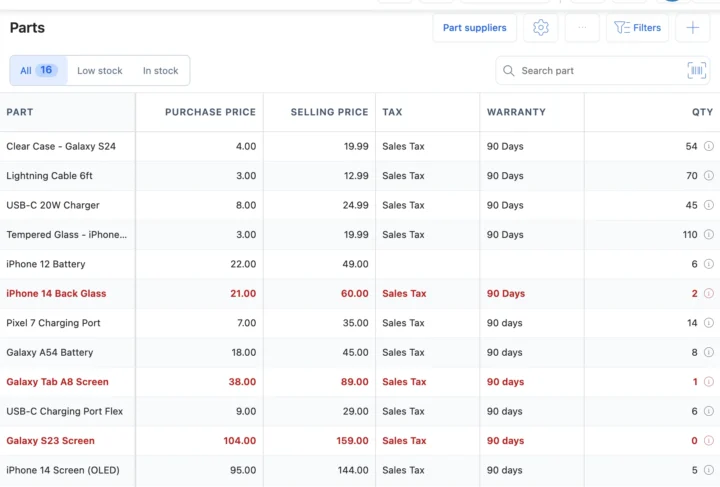
Low stock and part suppliers
Give a part its low stock level. When it falls to that level it turns red and shows on your dashboard. Keep each supplier next to the parts you buy from them and record purchases in one place. See purchase management.
Also in inventory
Your currency and your tax on every part
Outside India, inventory management for repair shops works in your operating currency: price parts in it and set your tax name and rate, whether sales tax, VAT or GST. Invoices with their parts and tax can go to QuickBooks or Xero.
How inventory connects to the rest of BytePhase
Each card opens the feature it shares data with, so nothing is typed twice.
Inventory management for repair shops: what each trade stocks
Set up inventory management for repair shops step by step
Short guides with screenshots in the BytePhase Help Center, checked against the app.

Inventory questions repair shops need answered
Yes. Download the sample file, fill it in or match the columns of your own Excel or CSV file, and import your parts in one go with their quantity, SKU, barcode, purchase and selling price, tax, category and storage location. Rows that fail come back in an error report to fix and upload again. Your account comes ready to use and basic setup takes about 10 minutes; check the quantities once before you start billing from the list.
A spreadsheet is only right when someone remembers to update it. In BytePhase a part comes off stock the moment it is added to a job or a sale, a recorded purchase adds it back, and every change is saved in the part’s stock history with who made it and when. Low-stock parts show a badge and are counted on the dashboard, and technicians check stock in the Android and iOS apps. You can import your current Excel sheet to start.
Yes, for separate businesses in one account. Each business keeps its own parts and stock count, and a job or sale can only use parts from its own business. There is no stock transfer: to move parts, reduce the stock in one business and add it in the other with Adjust stock, adding a remark in both. Categories and suppliers are shared.
The moment you add a part to a job, it comes off your stock. Remove the part and the stock goes back; change the quantity and the stock follows. If you do not have enough, BytePhase stops you unless the owner allows parts beyond available stock. Every change is recorded in that part’s stock history.
Yes. Every part has its own purchase price and selling price, and you can pick a tax on it if your business is tax registered. Amounts show in your local currency, and the part appears on the job sheet and the invoice when you use it on a repair.
Set a low stock level on each part. A part at or below it shows a Low stock badge in Inventory and is counted on the dashboard’s Low stock alerts card, and clicking the card opens the list. To reorder, buy from your supplier and record the delivery as a purchase, which adds the stock and keeps the supplier’s bill. BytePhase does not send low-stock messages.
Yes. Inventory management for repair shops works on the phone too: the native Android and iOS apps have Inventory, so a technician can look up a part and its stock. On a job they can search a part by name or SKU or tap Scan barcode and point the phone camera at the label. What each person can view or edit follows the permissions you give them.
Yes. As part of its inventory management for repair shops, BytePhase gives every part a barcode and prints labels in five sizes, from 38×25 mm to 100×75 mm, or an A4 sheet of 40. You can then scan a label with your camera to add the part to a job, a sale or a purchase, which saves typing and avoids picking the wrong part.
This is how inventory management for repair shops works in BytePhase: stock goes down when a part is added to a job or a sale and goes up when a purchase is recorded. Every change is saved in the part’s stock history, with who made it and when.
In BytePhase’s inventory management for repair shops, a low stock alert is a badge on screen, not a message. Set a low stock level on each part. When its stock falls to that level, the part shows a Low stock badge in Inventory and is counted on the dashboard’s Low stock alerts card, so you can reorder before a shortage.
Updates are free and always included, so your software always has the latest features.
BytePhase Inventory Management is inventory management for repair shops: it links spare parts to repair jobs, sales and purchases, keeps a stock history for every part and flags low-stock parts on the dashboard.
Know what’s on your shelf before the next repair
Start inventory management for repair shops like yours with your own parts list and your next repair job.
15-day free trial · 30-day money-back guarantee
2000+ Professional Repair & Data Recovery Businesses Trust BytePhase
We help you stay focused and organized by keeping detailed records
Best-in-class support
No matter what you need help with, our team is here to assist you. The goal of our business is to build long-lasting relationships with our customers.
Free Updates, Always Included
We will provide you with free and regular updates and welcome your feedback, which we will consider for implementation in your subscription.
Data Security & Encryption
We use the highest industry standard (AES-256) to encrypt your data on a secure RDS server for maximum protection.
Automatic Backups
We perform automatic backups daily on our dedicated database server to keep your data safe.
Last updated: 14 November 2026