
Technician Scheduling Software for Repair Shops
The BytePhase work scheduler puts today’s repairs, tasks, pickups and drops and AMC visits on one repair shop calendar, for each technician, before the phone starts ringing. As technician scheduling software, it needs nothing typed in twice: work appears on its date as soon as you save it.
- One calendar for jobs, tasks, pickups and AMC
- Each technician sees their own day
- Owners check anyone’s schedule
- Google or Microsoft events side by side
15-day free trial · 30-day money-back guarantee
What is a work scheduler for a repair shop?
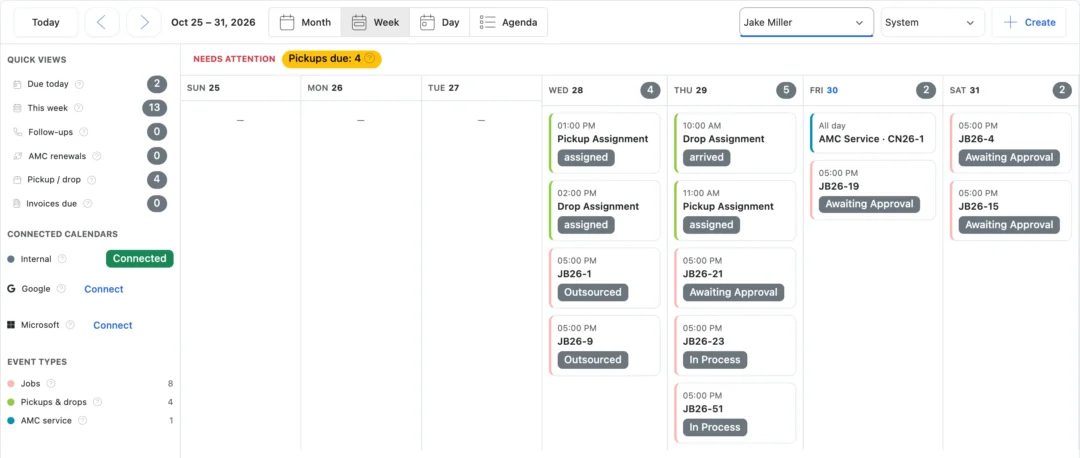
A work scheduler, or technician scheduling software, shows who is doing what, and when. In BytePhase it is a calendar built from the work itself: jobs on their due date, tasks, pickups and drops, and AMC visits and renewals. Each person sees their own work; owners and admins can open any employee’s calendar. Click an entry and it opens the job, pickup, task list or contract behind it. For garages and workshops, see how the calendar supports garage and workshop scheduling.
What lands on the repair shop calendar
- 1
Repair jobs
Each job on its due date, with its status; change the due date on the job and the calendar follows.
- 2
Tasks
Call-backs, reorders and other to-dos on their due date, for the person assigned.
- 3
Pickups and drops
Every scheduled collection and return on its day.
- 4
AMC visits and renewals
Contract service visits and renewal dates next to your repairs.
Technician scheduling software at a glance
Each technician’s day, and yours
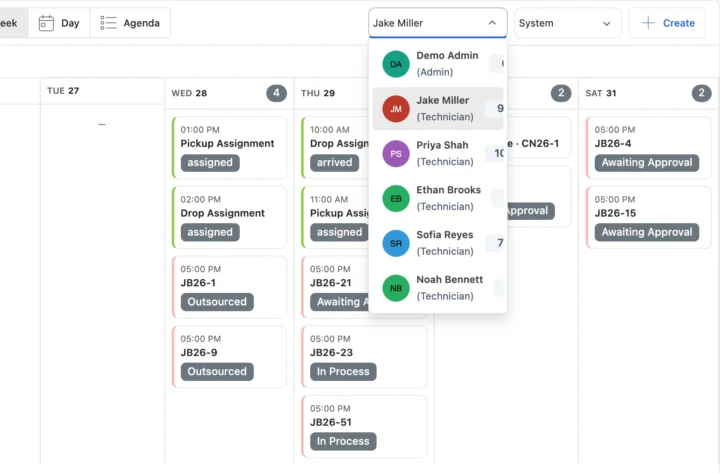
Everyone opens the calendar on their own work. Owners and admins pick any employee at the top to see that person’s day, week or month, then switch between Month, Week, Day and Agenda. Technician scheduling software starts with who does the job: hand out repairs with job assignment.
Quick views that count what needs you
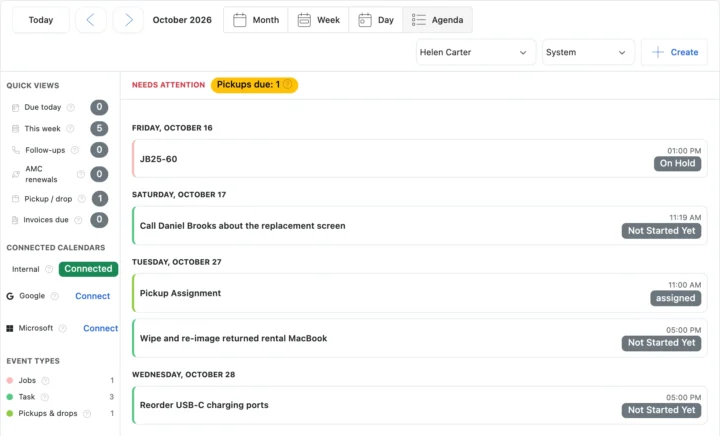
Down the side of the calendar, quick views count what is due today, this week, follow-ups, AMC renewals, pickups and drops and invoices due. On a phone, the agenda lists the same work under Daily work › Calendar in the Android and iOS app.
Google Calendar and Microsoft 365 alongside your repairs
Each person connects their own Google or Microsoft calendar, and their events show beside their BytePhase work. Events you create in BytePhase go to the calendar you pick. Jobs, tasks, pickups and AMC dates stay in BytePhase and are not copied out. Set it up in Google Calendar integration.
Also on the calendar
How the calendar connects to the rest of BytePhase
Each card opens the feature it shares data with, so nothing is typed twice.
Set up work scheduler step by step
Short guides with screenshots in the BytePhase Help Center, checked against the app.

Work scheduler questions
Yes. Change the due date on the job or the task, or the schedule on the pickup, and the calendar follows. Entries are not dragged around on the calendar itself; the record stays the one source of the date.
Partly. Each person can connect their own Google or Microsoft (Outlook) calendar. Their personal events then show beside their BytePhase work, and events they create in BytePhase go to the calendar they pick. Jobs, tasks, pickups and AMC dates are not copied into Google or Microsoft; open the BytePhase Calendar to see them. See the Google Calendar integration.
Yes. In the Android and iOS apps, open More › Daily work › Calendar and choose Agenda, Day, Week or Month. Each technician sees their own jobs, tasks, pickups and drops and AMC visits, and tapping an entry opens the job, task or pickup. Owners and admins can open any employee’s calendar.
No. The Work Scheduler is your team’s calendar, and customers cannot pick a time slot on it. They can send a repair request, with a preferred pickup time if you offer pickups, through your Self Check-In link. You approve it into a job or pickup, and it then appears on the calendar.
No. The repair shop calendar builds itself from work already in BytePhase: jobs with a due date, tasks, pickups and drops, and AMC visits and renewals appear on their dates as soon as you save them. There is no calendar to import. Each person can also connect their own Google or Microsoft calendar to see personal events beside their BytePhase work.
A whiteboard or a shared calendar is copied by hand and drifts from the real job. In BytePhase each calendar entry comes from its job, task, pickup or AMC contract, so changing the due date on the record moves it on the calendar, and clicking the entry opens it. Each technician sees their own day in the Android and iOS apps, owners can open anyone’s schedule, and AMC visits and renewals sit on the same calendar as repairs.
It is the BytePhase work scheduler: one calendar that shows each technician’s repair jobs on their due date, with their tasks, pickups and drops and AMC visits beside them. Assign a job to a technician on the job and it lands on that person’s calendar; owners and admins can open anyone’s schedule, on the web or in the Android and iOS apps. It plans work by person and date; it does not plan travel routes.
Yes, the Work Scheduler allows you to assign tasks to individual technicians or staff members. It ensures accountability by displaying assigned tasks on the scheduler, helping track progress seamlessly.
The calendar shows every scheduled pickup and drop next to your jobs and tasks, so you can see the day’s collections and deliveries at a glance. A Pickup / drop quick view counts them, and you can open an entry to reach the pickup.
Yes. Each repair job appears on the calendar on its due date with its current status beside it, alongside your tasks, so you can see what is pending, in progress or done. Click the entry to open the job. Jobs without a due date do not show on the calendar.
Plan the repair shop day from one calendar
Add your jobs, tasks and pickups and the technician scheduling software builds each person’s day for you.
15-day free trial · 30-day money-back guarantee
2000+ Professional Repair & Data Recovery Businesses Trust BytePhase
We help you stay focused and organized by keeping detailed records
Best-in-class support
No matter what you need help with, our team is here to assist you. The goal of our business is to build long-lasting relationships with our customers.
Free Updates, Always Included
We will provide you with free and regular updates and welcome your feedback, which we will consider for implementation in your subscription.
Data Security & Encryption
We use the highest industry standard (AES-256) to encrypt your data on a secure RDS server for maximum protection.
Automatic Backups
We perform automatic backups daily on our dedicated database server to keep your data safe.
Last updated: 30 October 2026