
Which Repair Ticket Software is easiest to use for beginners?

Introduction
For many repair shop owners, handling tickets manually quickly becomes chaotic. Paper logs get lost, spreadsheets get messy, and job tracking becomes frustrating. That’s exactly why beginners often search for the easiest repair ticket software—a tool that saves time, reduces errors, and keeps repair workflows smooth.
With beginner friendly repair ticket software like BytePhase, technicians can track repairs, update statuses, and communicate with customers without any learning curve. Therefore, this guide compares the most user-friendly repair ticket systems and explains why BytePhase stands out as one of the simplest and most beginner-friendly options.
🏆 BytePhase: The Easiest Repair Ticket Software for Beginners
BytePhase is designed specifically for mobile, computer, and electronics repair shops. Because of its clean interface and smart automation, beginners find it incredibly simple to start using—usually within minutes. If you’re opening a new repair shop, choosing beginner friendly repair ticket software can help you manage jobs effortlessly from day one.
Why BytePhase Is Beginner-Friendly
Here’s what makes BytePhase the ideal choice for new repair shop owners:
-
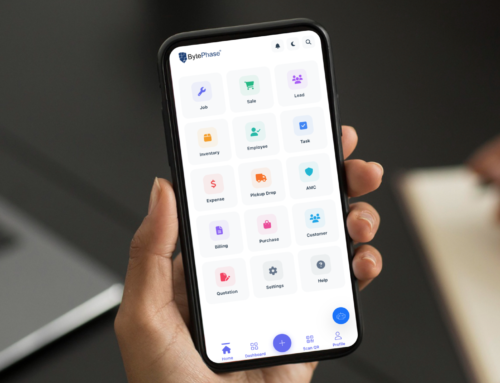
Clean, simple dashboard that shows tickets, tasks, and revenue at a glance
-
One-click ticket creation with customer details, device info, and issue reports
-
Custom repair statuses, allowing shops to personalize their workflow
-
Automated SMS, WhatsApp, email, and push notifications
-
Built-in OTP verification to ensure secure delivery
-
Barcode support for faster check-ins and item tracking
-
Customer portal + client login so customers can track their repairs
-
Image uploads for device condition reports
-
Inventory, employees, sales, and expenses in one place
-
UPI & PhonePe payment support
-
Printable invoices, labels, and templates with easy customization
-
Global search to find everything instantly
-
Cloud backup & recovery drive management for safety
Even better: BytePhase includes Android and iOS(Coming soon) apps, making it perfect for beginners who want to manage their shop on the go.
How BytePhase Compares to Competitors
Here’s a quick look at how BytePhase stacks up against other popular repair ticket tools.
RepairDesk
-
Good features but interface is heavier and requires more training
-
More expensive for small shops
-
Customizations require deeper setup
RepairShopr
-
Strong CRM features but not focused solely on repair shops
-
Complex for beginners due to many modules
-
Higher pricing for add-ons
Fixably
-
Enterprise-level features
-
Not ideal for small or new shops
-
Longer onboarding period
Why BytePhase Wins for Beginners
BytePhase beats competitors because it combines:
-
A clean, beginner-friendly interface
-
Super-simple ticket flows
-
Affordable pricing plans
-
All essential repair shop tools without unnecessary complexity
Additionally, while competitors often require 2–3 days of training, BytePhase users generally start creating tickets within minutes.
🚀 Final Thoughts: BytePhase Is the Best Beginner-Friendly Choice
When choosing the easiest repair ticket software for beginners, BytePhase stands out because it is simple, intuitive, and built specifically for repair shops. It eliminates the need for paperwork, centralizes all shop operations, and saves countless hours every week.
If you want to streamline workflow, track jobs easily, and offer professional service from day one, BytePhase is the perfect place to start.
👉 Ready to try an easy repair ticket system?
Start with BytePhase and experience stress-free repair shop management today. Book a demo now.