

How BytePhase Automates Employee Commission Calculation
- An end-to-end walkthrough for repair shops and field service businesses — from payment trigger to payroll-ready export.
- STEP 08 — Approval, audit, and compliance
- Audit tracking
- Why this matters
- STEP 09 — Commission periods and lock system
- End of period process
- Commission Lock Day
- Final step — mark as paid
- Why this structure works
- STEP 10 — Refunds, adjustments, and manual control
- Automatic refund handling
- Manual adjustments
- Why this matters
STEP 01 — The master switch
- Before any commission is calculated, the module must be enabled.
- Inside Setup Commission, the first toggle acts as the master switch.
- If OFF — No commission is calculated.
- If ON — The commission engine becomes active.

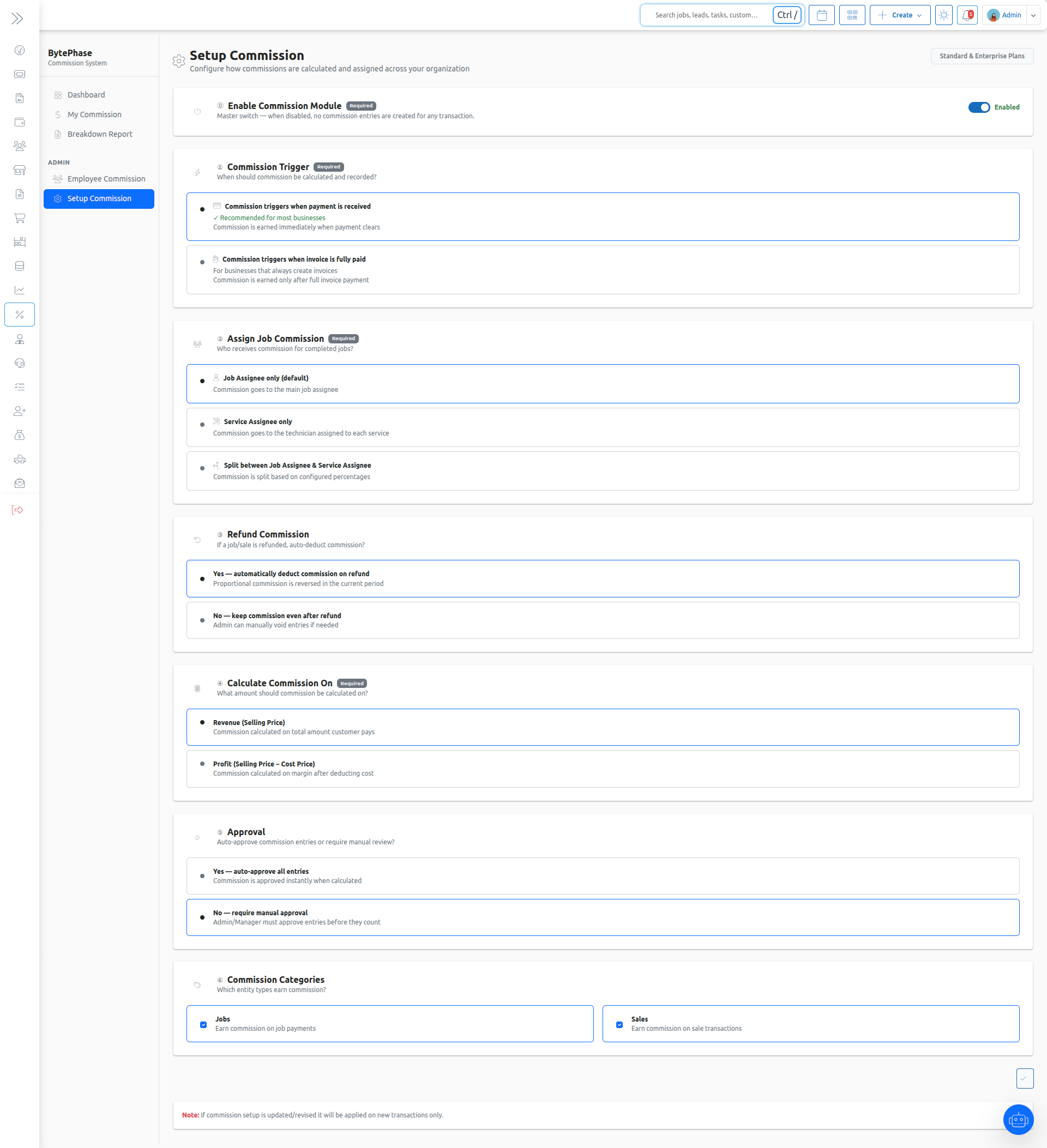
STEP 02 — Configure how commissions are earned
The Setup Commission page defines how commission will be calculated across your business.
In this configuration, commission is assigned only to the Job Assignee.
Service-level assignees and split modes are not considered.
This ensures a simple and clear payout structure where the responsibility and reward stay with the primary job owner.
- These are the key settings:
- Commission Trigger — Payment received / Invoice fully paid
Defines when commission is calculated - Job Assignment Mode — Job Assignee only
Commission is given only to the main assigned technician - Refund Behaviour — Auto-deduct / Manual review
Controls how commission is adjusted on refunds - Calculation Basis — Revenue / Profit
Defines whether commission is calculated on full amount or margin - Approval Flow — Auto / Manual
Controls whether approval is required before payout - Commission Categories — Jobs / Sales / Both
Defines where commission is applicable - Commission Lock Day — Day of month (1–28)
Defines when commission periods are locked - Any changes to these settings will apply to all future transactions, while past commission records remain unchanged.
- Commission Trigger — Payment received / Invoice fully paid
STEP 03 — Give each employee a commission profile
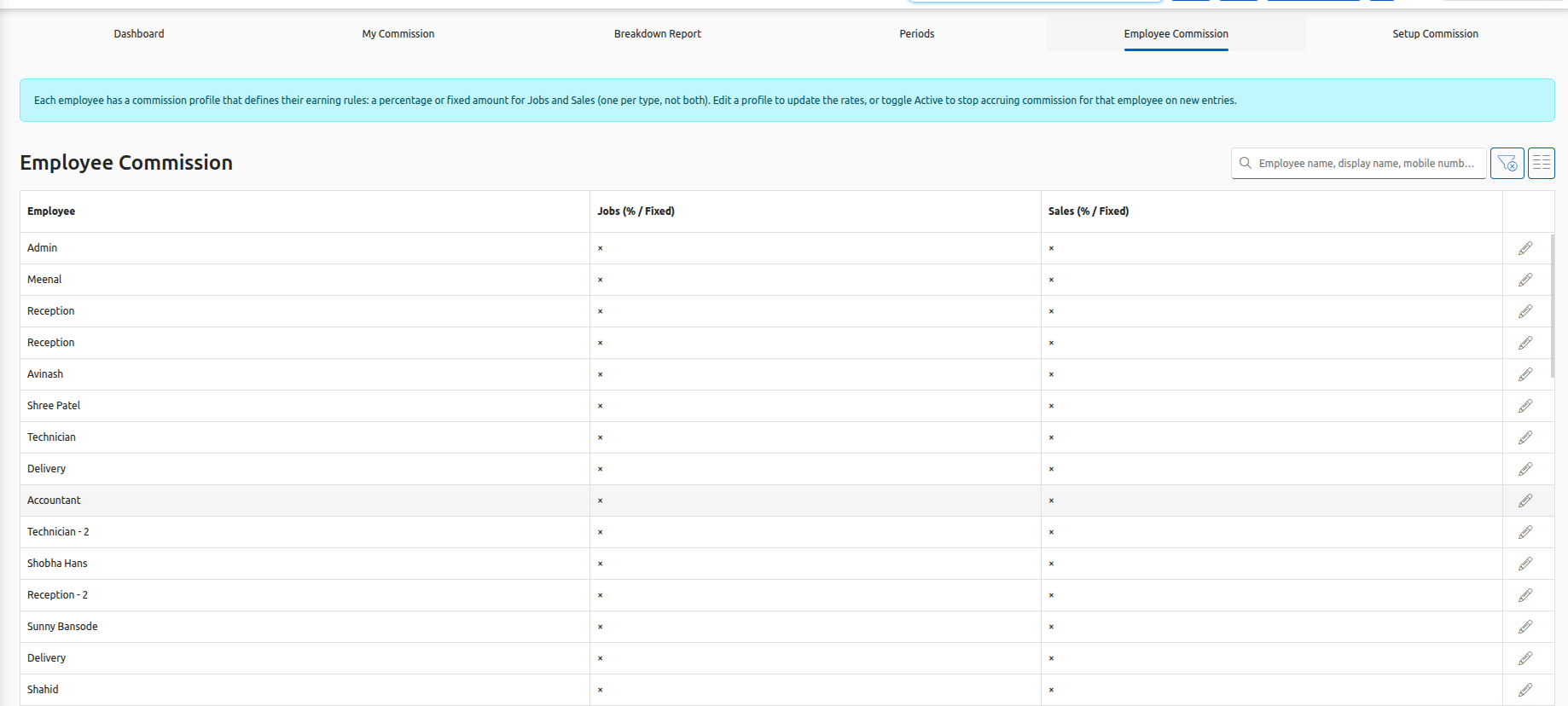
Global settings define how commission is calculated. The employee profile defines how much each person earns.
Every technician or salesperson has their own commission structure with the following values:
Job commission percentage — for example, 5% of every repair completed
Job commission fixed amount — a flat bonus per job, for example ₹50
Sale commission percentage — for example, 3% of every sale
Sale commission fixed amount — a flat bonus per sale
Active / Inactive status — allows you to pause commission without losing history
Percentage and fixed amount can be used together or separately.
You can configure:
STEP 04 — Payment received → commission is calculated instantly
This is where the system actually works in real time.
The moment a customer’s payment is recorded against a job or sale, BytePhase automatically checks a set of conditions before calculating commission.
- Safety checks before calculation
- Commission module is enabled
- Payment is linked to a valid job or sale
- Job is valid (not rejected, deleted, or free like warranty/rework)
- Commission is enabled for that category (job or sale)
- Payment is valid (not zero amount, deleted, or advance entry)
- Job or sale total is greater than zero
Only when all these checks pass does the system calculate commission.
What happens next
- Commission entry is created automatically
- No duplicate entries are generated
- Even if payment is recorded multiple times, commission is calculated only once
This ensures that commission calculation is always:
- Accurate
- Real-time
- Free from duplication errors
STEP 05 — Commission is assigned to Job Assignee only
In BytePhase, commission is calculated only for the Job Assignee.
This means the technician who is assigned as the primary owner of the job receives the full commission.
There is no split between multiple technicians or service-level assignments.
How it works
- Each job has one assigned technician
- Commission is calculated based on that assignment
- The full commission amount goes to that technician
This keeps the payout structure simple, transparent, and easy to manage.
Example
Job value: ₹3,000
Commission: 5%
Assigned technician: Amit
Amit earns ₹150
No other technician receives commission for this job.
Why this approach works
- Clear ownership of responsibility
- No confusion in commission distribution
- Easy to track and verify payouts
- Faster calculation and fewer disputes
This model is ideal for repair businesses where one technician handles the job end-to-end, since commission is calculated straight from your repair ticket management workflow rather than a separate spreadsheet.
STEP 06 — Revenue vs Profit: choosing the calculation basis
A commission percentage only makes sense when you define what it is calculated on.
BytePhase allows you to choose between two calculation bases:
Revenue basis
Commission is calculated on the full invoice amount.
This is simple, easy to understand, and commonly used in service-focused businesses.
Profit basis
Commission is calculated on profit.
Profit = selling price − cost of parts + service revenue
This helps protect your margins, especially when parts are discounted.
Example
Invoice value: ₹5,000
Parts: ₹3,000 (cost ₹2,000)
Service: ₹2,000
Commission rate: 5%
Revenue basis
5% of ₹5,000 = ₹250
Profit basis
5% of ₹3,000 (₹1,000 margin + ₹2,000 service) = ₹150
Key difference
Same job, same technician — but a ₹100 difference in payout.
- Revenue basis → higher payout, simpler logic
- Profit basis → controlled payout, better margin protection
When to use what
Use Revenue basis if:
- Your business is service-heavy
- Pricing is fixed
- You want simple calculations
Use Profit basis if:
- You sell parts with variable margins
- Discounts are common
- You want to protect profitability
This setting directly impacts how much commission is paid, so choose based on how your business operates.
STEP 07 — Partial payments and over-commission protection
Customers don’t always pay the full amount at once. Payments can come in parts — like a deposit first and the remaining balance later.
BytePhase handles this without creating duplicate or excess commission.
How it works
- Commission is calculated only once per job or sale
- It is based on the total invoice value
- After the first valid payment, the system locks further commission for that job
What this ensures
- No duplicate commission entries
- No overpayment to employees
- Commission is never calculated more than the job value
Example
Job value: ₹10,000
Technician commission: 5%
Day 1 — Customer pays ₹4,000
Commission is calculated on full ₹10,000 → ₹500
Day 10 — Customer pays remaining ₹6,000
No additional commission is created
Total commission paid: ₹500
Optional setting
If you prefer to calculate commission only after full payment:
- Switch Commission Trigger to Invoice fully paid
- Commission will be created only after 100% payment is received
Why this matters
This prevents one of the most common issues in manual systems — paying commission twice for the same job.
It keeps payouts accurate, controlled, and aligned with actual business revenue.
STEP 08 — Approval, audit, and compliance
Every commission entry is recorded with a clear status based on your settings.
There are two possible states:
Auto-approved — commission is immediately ready for payout
Pending — requires approval from admin or manager before payout
Audit tracking
Every action in the system is recorded, including:
- Commission creation
- Approval or rejection
- Adjustments or void actions
- Changes in commission settings
All of this is stored in a Commission Audit Log.
Why this matters
- Full transparency in commission tracking
- Easy handling of payroll disputes
- Clear history for internal reviews and compliance
Nothing is ever deleted silently — every change is traceable.
STEP 09 — Commission periods and lock system
All commission entries are automatically grouped into monthly periods.
Each entry is assigned to the current active period and aggregated employee-wise.
End of period process
At the end of the cycle:
- Admin can lock the period
- No further changes are allowed after locking
- Locked data remains fixed and secure
Commission Lock Day
You can define a lock date (for example, 5th of every month).
The system can automatically lock the previous period based on this setting.
Final step — mark as paid
After locking:
- The period can be marked as Paid
- Data becomes ready for payroll export or HR systems
Why this structure works
- Prevents accidental changes in past data
- Keeps payroll clean and accurate
- Follows standard accounting practices
STEP 10 — Refunds, adjustments, and manual control
In real business scenarios, not everything goes perfectly. Refunds and special cases need flexible handling.
BytePhase provides two controlled ways to manage this.
Automatic refund handling
When a customer refund is processed:
- The system automatically adjusts the commission
- A proportional deduction is created
- The adjustment is recorded in the current period
Important:
Past locked periods are never changed, ensuring data consistency.
Manual adjustments
Admins can manually adjust commission when needed.
This can be used for:
- Bonuses or incentives
- Penalties or corrections
- Special payouts
All manual changes require approval and are recorded in the audit log.
Why this matters
- Keeps commission accurate even in edge cases
- Maintains full transparency
- Ensures proper control over payouts
STEP 11 — Reports and dashboards
All commission calculations are organized into reports that help you track, verify, and use the data for decision-making and payroll.
There are four key reports in the system:
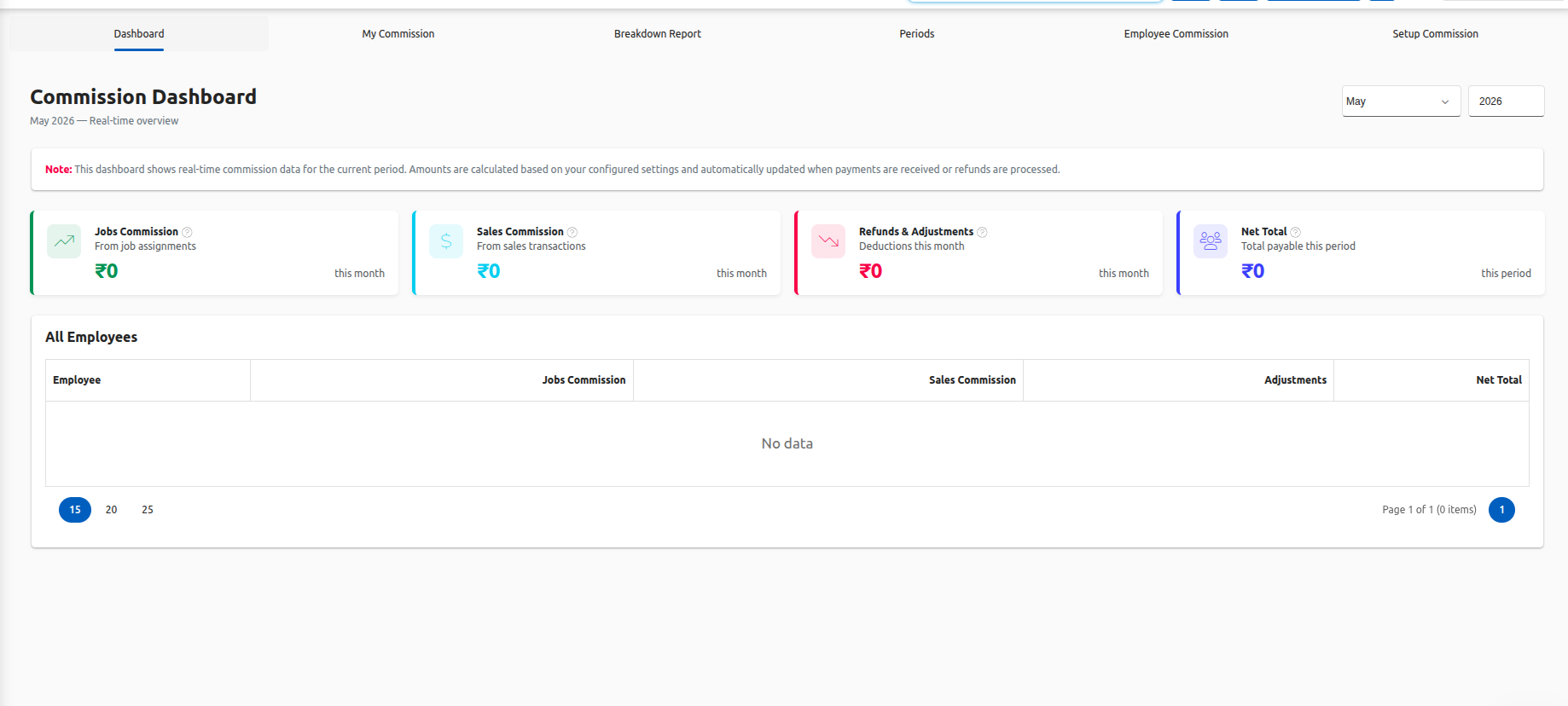
Commission Dashboard
Provides a real-time overview of current period earnings across all employees.
Accessible to: Owners and managers
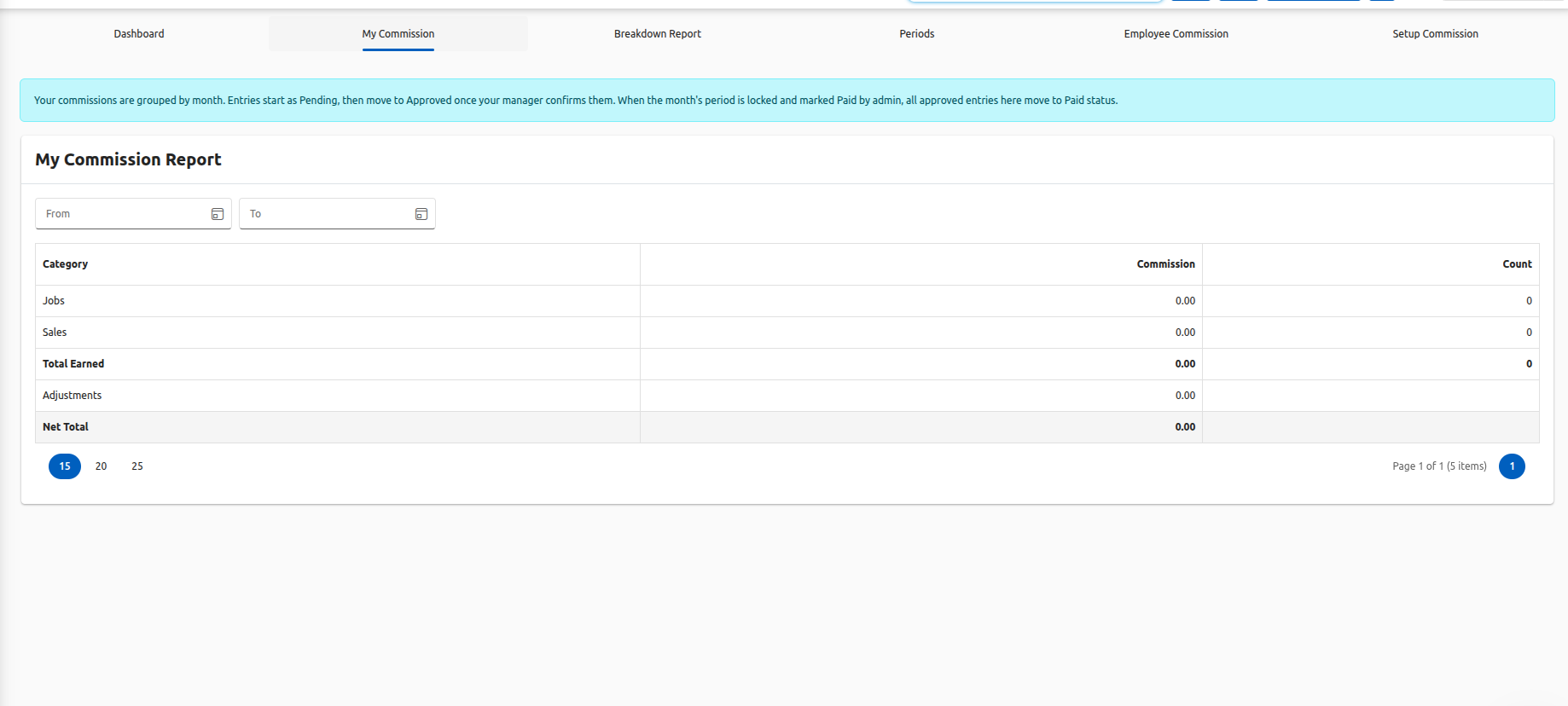
My Commission
Shows individual earnings for each employee.
Accessible to: All staff (only their own data)
Breakdown Report
Gives detailed insights at job, sale, and entry level.
Useful for audits and verification.
Accessible to: Owners and managers
Summary / Export Report
Provides payroll-ready data in export format (CSV/Excel).
Accessible to: Owners and payroll administrators
Access control
The system follows strict role-based access:
- Employees can see only their own commission
- They cannot view company-wide data or other employees’ earnings
- Owners and managers get complete visibility
Why this matters
- Ensures data privacy for employees
- Gives full control to management
- Makes payroll processing fast and accurate
End-to-end flow
Everything explained above works as a single connected process.
Every payment made by a customer follows this flow:
Customer makes a payment
The system validates the transaction
Commission rules are applied
Commission is calculated
Entry is created
Approval is applied (auto or manual)
Entry is added to the current period
Period is locked
Data is exported for payroll
This ensures that commission moves seamlessly from payment to payout without manual intervention.
Why BytePhase works differently
Most commission systems are built for simple sales workflows — one salesperson, one deal, one payout.
But real repair and field service businesses are more complex.
- Multiple technicians can be involved in one job
- Payments are often partial
- Refunds happen
- Parts have cost, services do not
- Employees need limited access to data
BytePhase is designed specifically to handle these real-world scenarios without complexity.
Final note
If you are still managing commissions in spreadsheets or calculating payouts manually, you are:
- Spending unnecessary time
- Increasing chances of errors
- Creating confusion and mistrust in your team
BytePhase automates the entire process — from payment to payroll — with accuracy, transparency, and control.
Try BytePhase commission module
Automatic commission calculation is available in BytePhase.
Setup takes just a few minutes:
Enable the module
Configure your rules
Assign employee profiles
The system handles everything else automatically.
Call to action
Book a demo and see how commission automation works in real time.
👉 Visit: https://bytephase.com