
What Is Repair Shop Management Software? Complete Guide (2026)

What Is Repair Shop Management Software — and Why Does Every Shop Need It in 2026?
Repair shop management software is a purpose-built, cloud-based system that manages the complete lifecycle of a repair job — from the moment a customer drops off a device to the moment they collect it, pay, and receive a digital receipt.
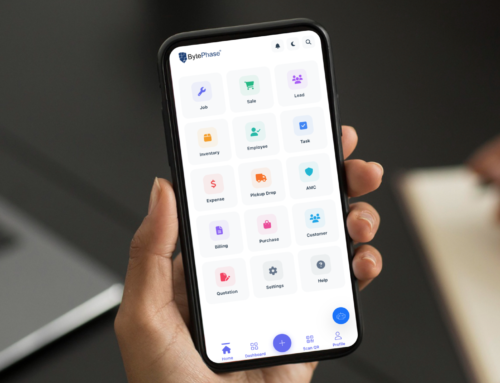
Unlike generic CRM tools designed for sales teams, repair shop management software is built around the repair workflow specifically. It handles:
- Device intake and job ticket creation
- Technician assignment and status tracking
- Spare parts deduction from inventory per repair
- Customer updates via WhatsApp, SMS, or email
- Tax-compliant invoicing (GST, VAT, US sales tax)
- Warranty tracking per completed repair
- Revenue and technician performance reporting
According to a Statista report on the global IT services market, the consumer electronics repair sector processes billions of device repairs annually — and the shops that adopt management software report 35–45% reduction in admin time per technician per day, freeing hours for billable repair work.
What Are the 7 Most Important Features of Repair Shop Management Software?
Not all repair shop software platforms are equal. These seven features separate a platform that genuinely transforms your business from one that just digitises your paper system.
Repair Shop Management Software vs Excel: Why Spreadsheets Fail After 20 Jobs Per Week
Most repair shops start on Excel or a notebook. It works at 10 jobs per week. At 30, 50, or 100 jobs per week, the same system becomes the biggest obstacle to growth.
| Capability | Repair Shop Software | Excel / Notebook |
|---|---|---|
| Real-time job status tracking | ✔ Live dashboard | ✘ Manual update only |
| WhatsApp / SMS customer updates | ✔ Fully automated | ✘ Impossible |
| Inventory low-stock alerts | ✔ Automatic | ✘ Manual counting |
| Tax-compliant invoicing (GST/VAT) | ✔ One-click generation | ✘ Manual, error-prone |
| Technician performance reports | ✔ Built-in analytics | ✘ Not possible |
| Warranty tracking per repair | ✔ Automatic with alerts | ✘ No tracking |
| Data security and backup | ✔ Cloud-synced daily | ✘ Single point of failure |
| Multi-location management | ✔ Centralised dashboard | ✘ Not feasible |
Which Types of Repair Shops Need Management Software?
Repair shop management software is not only for large chains. Any shop processing more than 15–20 repairs per week is leaving money on the table without it.
- Mobile phone repair shops — screen replacements, battery swaps, charging port repairs, water damage. High volume, fast turnaround, customer communication critical.
- Laptop and computer repair shops — multi-component diagnostics, data recovery, OS reinstalls. Detailed job notes and parts tracking are essential.
- Multi-device service centres — handling phones, tablets, laptops, and accessories simultaneously. Needs multi-category job ticket support.
- Data recovery specialists — complex case management, customer consent tracking, and secure file documentation.
- AC and appliance repair shops — home visit scheduling, AMC contract management, and recurring service reminders.
- Multi-branch repair chains — two or more locations needing centralised visibility without separate accounts.
BytePhase is currently used across all of these repair categories by 2,053+ businesses in 32 countries — from single-technician shops to 15-location chains.
How Does BytePhase Repair Shop Management Software Work — Step by Step?
BytePhase handles the complete repair workflow in five steps that replace every manual process in your current system:
- Device intake in 60 seconds: Log the customer’s details, device model, fault description, and device condition photos. A digital job ticket is created instantly and assigned to a technician.
- Automatic customer notification: BytePhase sends a WhatsApp or SMS message to the customer confirming their device has been received — with a unique job reference number. No manual message needed.
- Real-time repair tracking: The technician updates the job status as work progresses. Every status change triggers an automatic WhatsApp update to the customer — keeping them informed without interrupting the technician.
- Parts automatically deducted: When the technician logs parts used on the job ticket, BytePhase deducts them from inventory in real time — updating stock levels across every branch simultaneously.
- One-click invoice and OTP delivery: When the repair is complete, generate a fully tax-compliant invoice in one click. Send an OTP to the customer’s phone for secure device collection. Payment recorded. Job closed. Customer history updated.
For a deeper look at each step, see BytePhase’s full features list or read our guide to how repair ticket software reduces warranty returns.
How Much Does Repair Shop Management Software Cost — and Is It Worth It?
Repair shop management software pricing in 2026 ranges from free (limited-volume tiers) to $100+ per month for enterprise multi-location plans. The question is not whether you can afford it — it is whether you can afford not to have it.
Consider this calculation for a single shop processing 60 repairs per week:
- Time saved on manual invoicing: 10 minutes × 60 jobs = 10 hours/week
- Time saved on customer update calls: 5 minutes × 60 jobs = 5 hours/week
- Time saved on inventory counting: 3 hours/week
- Total time recovered: 18 hours/week — equivalent to more than 2 full working days returned to billable repair work every week
At a conservative repair labour rate of $20/hour, that is $360 of recovered technician time per week — or $18,720 per year — from a software subscription that costs a fraction of that monthly.
BytePhase offers a 14-day free trial with no credit card required. See BytePhase’s current pricing plans for details.
For an independent comparison of repair shop software options, see Capterra’s repair shop software reviews or G2’s repair shop category rankings.
Conclusion: Repair Shop Software Is Not a Cost — It Is a Revenue Decision
The question is no longer whether to use repair shop management software. At any meaningful repair volume, the real question is which platform fits your shop size, tax requirements, and customer communication needs.
BytePhase combines every tool a repair shop needs — tickets, inventory, invoicing, WhatsApp, multi-branch management, and analytics — in one cloud platform used by 2,053+ businesses across 32 countries. The 14-day free trial requires no credit card and takes under one hour to set up.