
Bag & Leather Repair Shop Software
BytePhase is bag repair shop software for handbags, luggage, wallets and leather goods: photograph every bag at drop-off, tie a job sticker to it, send the estimate for the customer to approve, collect suitcases with pickup and drop and hand back with a one-time code. This bag repair shop software runs on the web and in native Android and iOS apps.
- Photos and a checklist at drop-off
- Estimates the customer approves from a link
- Pickup and drop for luggage
- OTP handover with a signature
15-day free trial · 30-day money-back guarantee
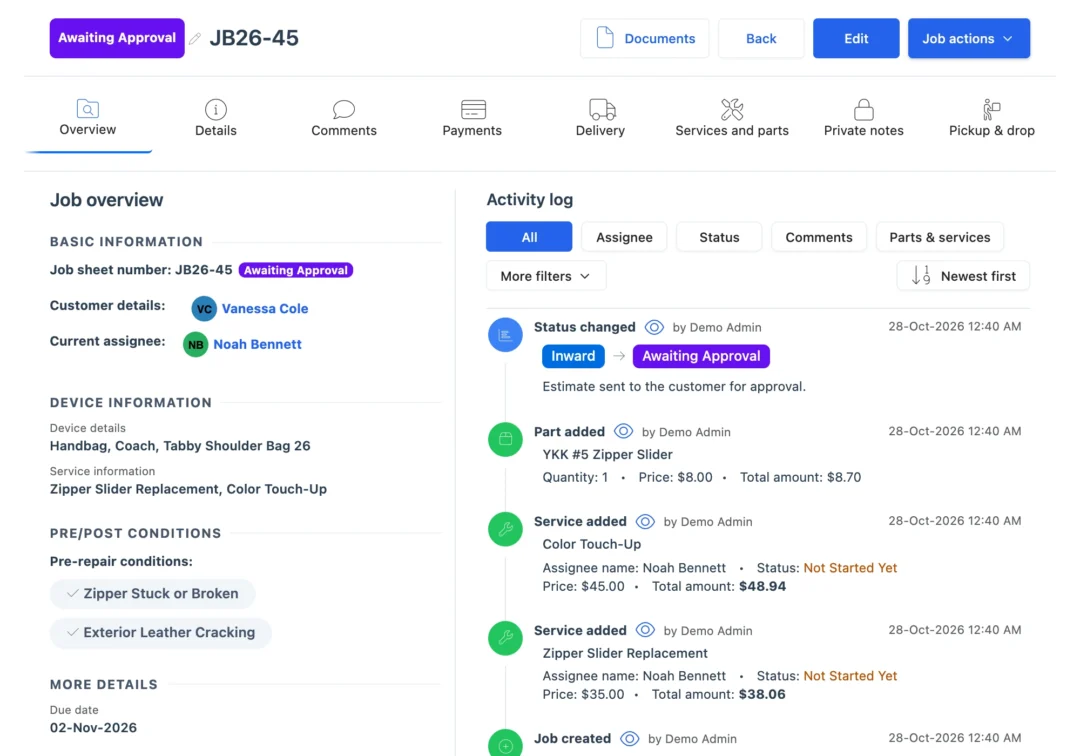
“BytePhase is a future for repair shop management or the repair industry. They have crafted the UI very beautifully.”
How a bag repair moves through BytePhase
Eight steps, one ticket. In BytePhase’s bag repair shop software the photos, the estimate, the outside work and the handover stay on the same job.
- 1
Take the bag in
Customer, item type such as handbag, backpack, luggage or wallet, brand, a description and where it is stored. - 2
Photograph and check it
Photos of every scuff and tear, a pre-repair checklist such as “Hardware corroded or broken”, and the customer’s signature. - 3
Tag it
Print a job sticker at drop-off and tie it to the bag, so it never loses its ticket. - 4
Estimate and approval
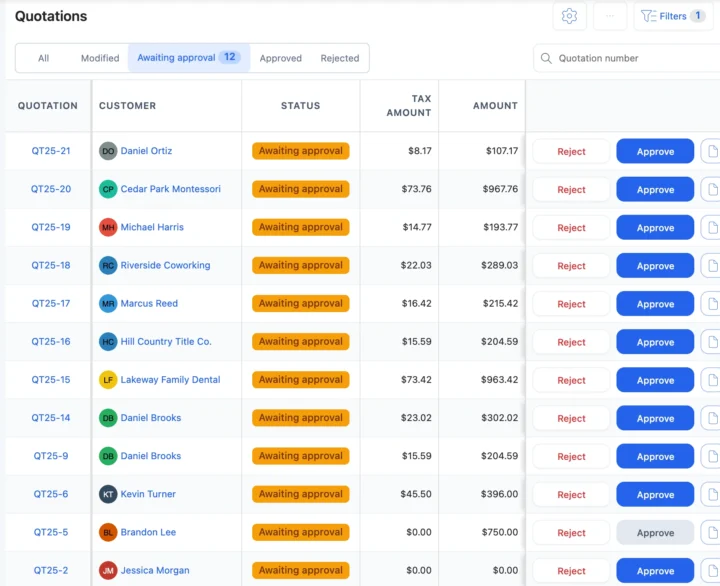
Send the quotation. The customer approves or rejects the estimate from the link before restoration starts. - 5
Bench or specialist
Assign the craftsperson, or outsource hard-shell or hardware work to a specialist with a delivery challan. - 6
Parts on the job
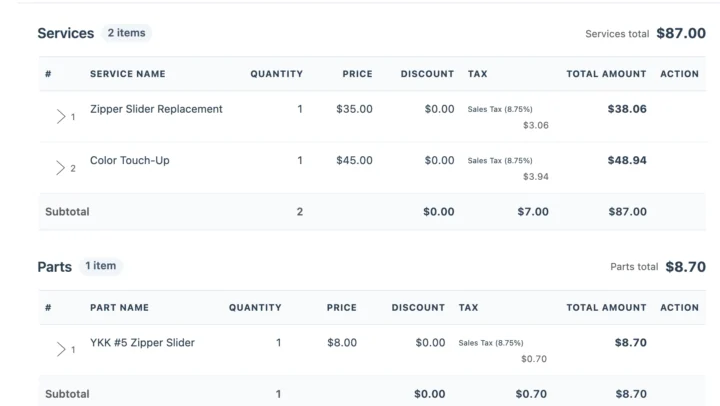
Zippers, sliders, buckles and handles come off stock and onto the bill. - 7
Tell the customer
Each status change can go by email or SMS, or on WhatsApp in one tap, with a link to the job. - 8
Hand over or drop off
Invoice from the job, record the payment, and release the bag with the 6-digit code, at the counter or on a scheduled drop.
Moments every leather workshop knows
Five moments where bag repair shop software settles a question before it becomes an argument at pickup.
“That scratch was already there”
Open the drop-off photos and the checklist the customer signed, recorded before anyone touched the leather. Condition photosA colour restoration needs a yes first
Send the estimate link with the colour-matching terms on the job sheet; work starts once the customer approves. QuotationsA hotel sends 12 suitcases
Add Bulk Repair Job creates one job per suitcase for one customer, and one bulk payment can settle the bills. Bulk paymentsA cracked hard shell goes out
Outsource it with a delivery challan and follow it until the case is back at your counter. OutsourcingA courier collects the bag
The 6-digit code goes to the customer by SMS and email, and the bag is released only when it is given. OTP for deliveryBag, wallet and leather restoration tickets
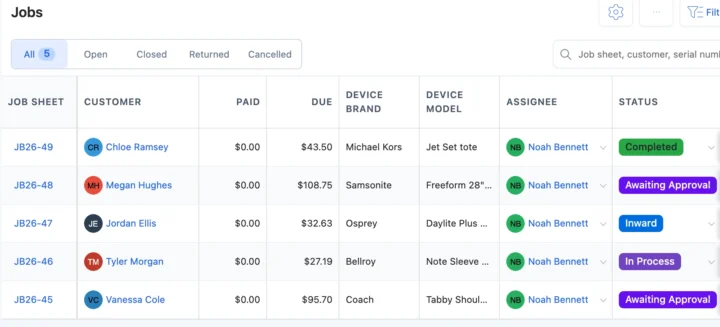
Every handbag, wallet and suitcase on one ticket
Pick Bag Repair at sign-up and handbags, backpacks, luggage, leather goods and sports bags arrive as item types, with about 40 services such as zipper replacement, handle repair, stitching, wallet stitch repair, card slot tightening, wheel replacement, colour touch-up and full colour restoration. Each ticket keeps condition photos, the checklist, the estimated delivery date and terms such as a colour matching disclaimer. See repair ticket management.
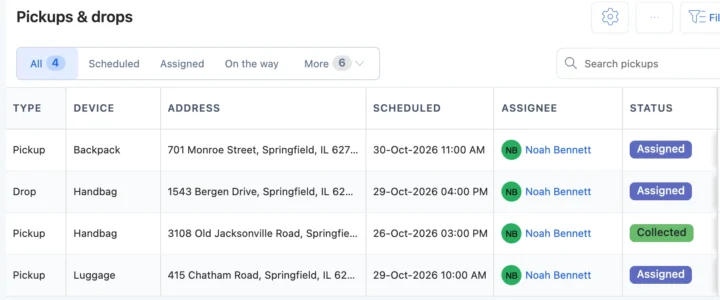
Luggage repair with pickup and drop
Schedule a collection or a return and assign the staff member who goes. Customers can also request a pickup from the portal. For hotels and offices, one bulk job covers the luggage and pickup and drop ends with a coded handover. Bill parts and services from the job or the point of sale.
A notebook, a shop POS or bag repair shop software?
| What you need to do | Notebook or spreadsheet | Shop POS | BytePhase |
|---|---|---|---|
| Find a bag by job number or customer | Page through the ticket book | Sales records only | Search every ticket by job number, customer or mobile number |
| Prove the scuff was there at drop-off | A carbon copy, if it was filled in | Not part of a sale | Photos, checklist and signature on the ticket |
| Agree the colour restoration price | A phone call | Not built for it | Estimate link; the answer is saved with the time |
| Collect luggage from a hotel | A note for the driver | Not built for it | Scheduled pickup with an assignee and a coded handover |
| Take in 12 suitcases at once | 12 slips by hand | One sale | Bulk repair job, one ticket per suitcase |
| Tell the customer it is ready | Call them | Marketing messages | Email, your own SMS or WhatsApp in one tap, with a tracking link |
Zippers, handles, colour and suitcase wheels
The jobs that fill a bag workshop’s week, and what BytePhase records for each.
Zipper replacement
The slider or the full zip off stock, the service from the template and the bill at pickup.Handle and strap repair
Photos of the worn handle at drop-off and the approved estimate on the ticket.Colour restoration on a designer handbag
Colour-matching terms on the job sheet and the customer’s approval before work starts.Suitcase wheel and handle
Wheel replacement or telescopic handle repair, with pickup and drop for heavy luggage.Your currency, your tax and the messages you already use
Price repairs and parts in your operating currency with your tax name and rate. Send updates by email, by SMS through your own provider, or on WhatsApp in one tap.
Setting up your bag repair shop
Moving to new bag repair shop software should not mean typing everything in again.
- 1
Pick Bag Repair
The setup wizard loads item types, about 40 services, checklists and terms such as a colour matching disclaimer and a storage policy. - 2
Bring your data across
Import customers, parts, staff and item types from a spreadsheet. Old tickets are not imported; open jobs are added as new jobs. - 3
Add your team
Add your staff and choose what each person can see and do. See permissions. - 4
Take in the first bag
Create the first ticket with photos, print its sticker and send the customer their first update. See the quick-start guide.

Bag and leather repair software questions
It runs a bag and leather repair business: it logs each handbag, wallet or suitcase with photos and a checklist, tracks the estimate, the work and the parts, keeps the customer updated and bills at the counter.
The price for your country is on the pricing page. You can start with a 15-day free trial, and you are covered by a 30-day money-back guarantee.
Each status change can go by email, by SMS through your own provider, or on WhatsApp in one tap. The message carries a link to the job.
With proof before the work: photos at drop-off, a signed pre-repair checklist, a colour matching disclaimer in the terms on the job sheet, and the customer’s approval of the estimate saved with the time.
Yes. Import customers, parts, staff and item types from Excel or CSV yourself; jobs still open in the logbook are added as new jobs. Free training sessions are available.
Yes. Wallet stitch repair, card slot tightening, colour touch-up and full colour restoration are in the Bag Repair template, and each wallet or bag gets its own ticket with photos, the estimate and the handover.
Yes. Send the quotation; the customer taps Approve or Reject from the link, and BytePhase saves the answer with the time.
Yes. Schedule a pickup, assign who goes and take in many suitcases as one bulk job, one ticket per suitcase.
Yes. Set your currency and your tax name and rate, sync invoices to QuickBooks or Xero, and use native Android and iPhone apps.
Your data, including drop-off photos and signatures, is encrypted (AES-256) at rest and backed up daily. Permissions decide what each person on your team can see and do, and the activity log records who changed what on every ticket.
Try the bag repair shop software on your next handbag
Run your bag and leather repair shop from one system: take in your next handbag with photos and send the customer their first update.
15-day free trial · 30-day money-back guarantee
Last updated: 30 October 2026