
AC & HVAC Service Management Software
BytePhase is AC service management software for split, window, cassette and VRF work: run AMC contracts with their visits and renewal reminders, assign each service call to a technician, get the quote approved before work starts, and keep customers updated from complaint to handover. AC types, gas refilling services and pre- and post-checks come ready in the setup wizard.
- AMC visits and renewal reminders
- A technician on every service call
- Quote approved before work starts
- AC types and gas services in the setup
15-day free trial · 30-day money-back guarantee
“BytePhase is a future for repair shop management or the repair industry. They have crafted the UI very beautifully.”
How an AC service call moves through BytePhase
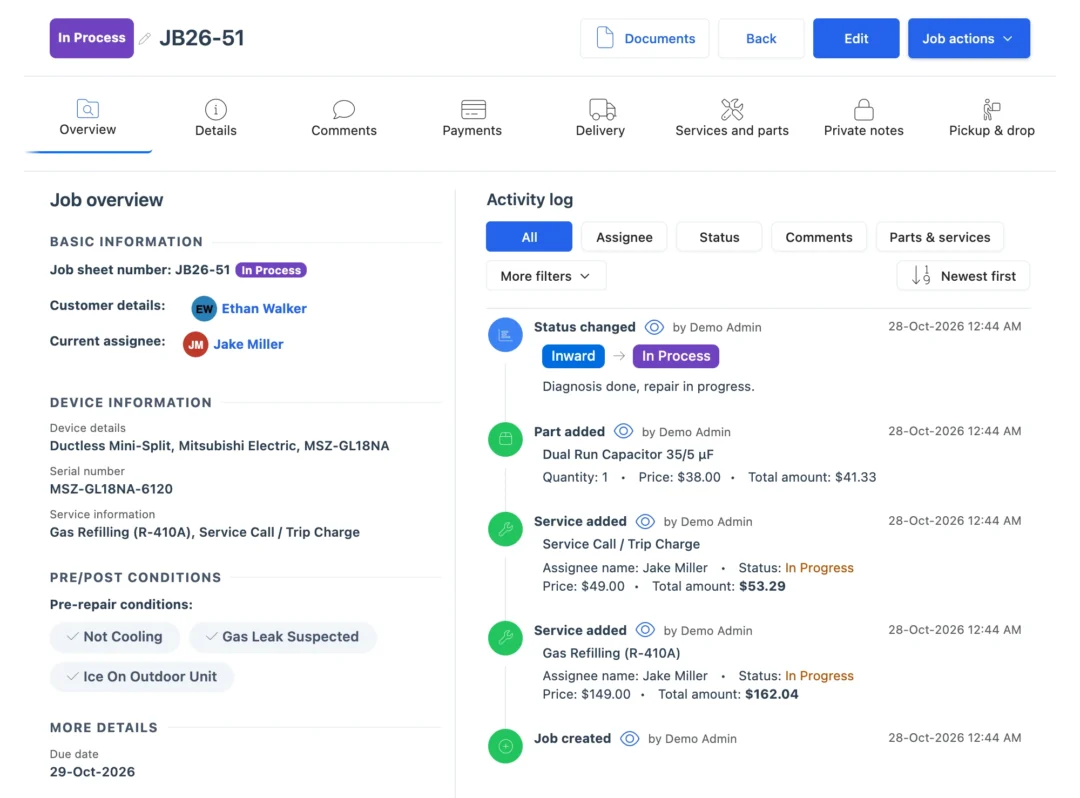
Air conditioning service work happens at the customer’s door as often as at your bench. In BytePhase’s AC service management software the complaint, the checks, the quote, the parts and the handover stay on one job.
- 1
Log the complaint
Customer, AC type such as split, window or cassette, brand and model, serial number, and how it is serviced: carried in, pickup, on site or courier. - 2
Run the pre-checks
Not cooling, gas leak, water leak, compressor not starting or noise: tick what the customer reports and add photos. - 3
Assign the technician
Assign or reassign the job; the technician is told by email, SMS, in-app alert or WhatsApp and opens it in the BytePhase app. - 4
Diagnose and quote
Add the diagnosis and send the quotation for a gas refill, a capacitor or a compressor. - 5
Get the customer’s approval
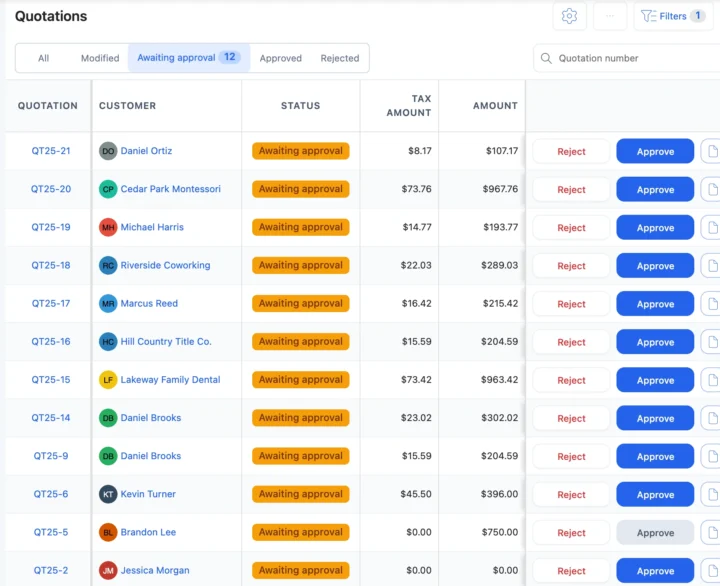
The customer approves or rejects the quote from the link, and the answer is saved with the time. - 6
Log parts and gas
Capacitors, PCBs and fan motors come off stock and onto the bill; the gas refill, R-22, R-410A or R-32, is a service on the job. - 7
Run the post-checks
Record cooling tested, gas pressure and drainage on the post-repair checklist. - 8
Bill and hand over
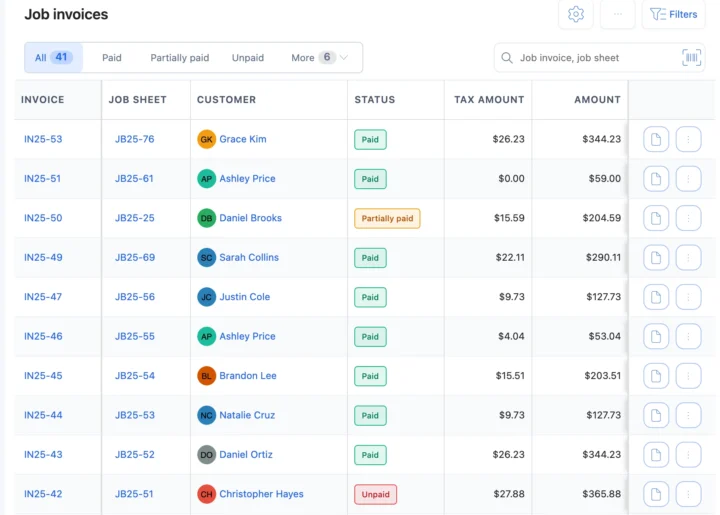
Invoice from the job, record the payment, and confirm the handover with a 6-digit code.
Situations every AC service business knows
Five moments where AC service management software saves a call, a visit or a customer.
The pre-summer AMC rush
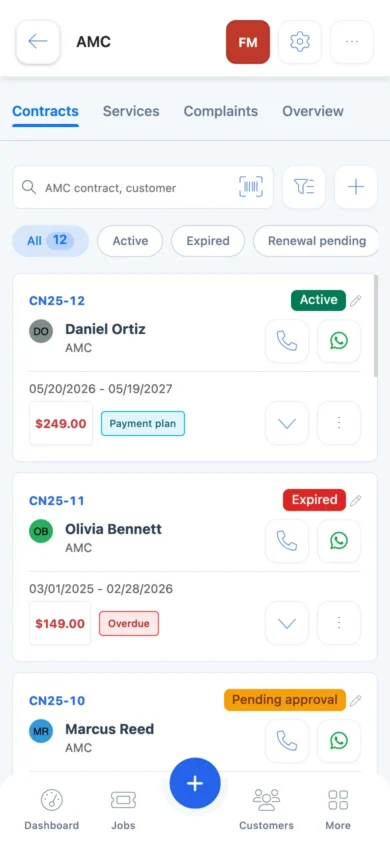
Every AMC visit is listed with its date, assignee and Paid or Free type, so the season’s visits are planned, not remembered. AMC contracts“When is the technician coming?”
Each status change can go by email or SMS, or on WhatsApp in one tap, with a link where the customer sees the job. Repair trackingA compressor quote waiting for approval
Send the quotation link; when the customer approves, the answer is saved and the technician can start. QuotationsA window AC that needs bench work
Schedule a pickup, record photos and the customer’s signature at the door, and schedule the drop when it is fixed. Pickup and dropThe technician needs a capacitor that is running low
Parts at their low stock level are flagged on the dashboard, so the purchase goes in before the next call. InventoryAC repair software for contracts, technicians and pickups
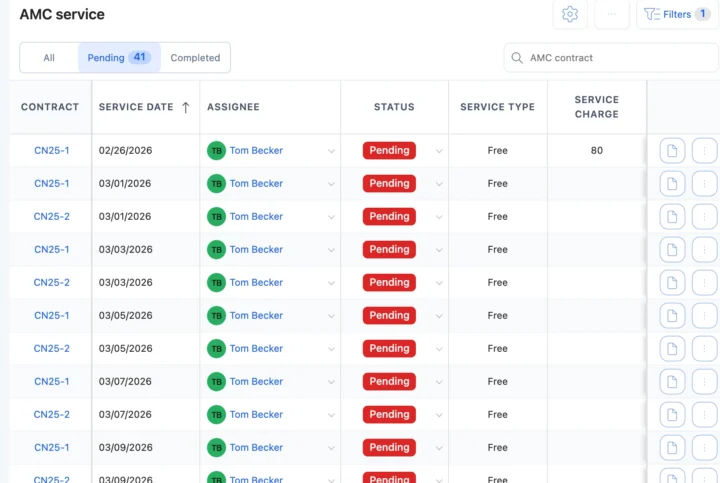
AMC contracts for split and VRF customers
Keep each customer’s units on an AMC contract with the units covered, the number of services, the response time and on-site or carry-in service, so HVAC maintenance visits are never missed. Each visit is logged as Paid or Free with its assignee, and BytePhase emails the customer and the assignee 15 days and 1 day before the contract ends and on the end date, so your staff renew it in time. Visits and renewals also show on the calendar.
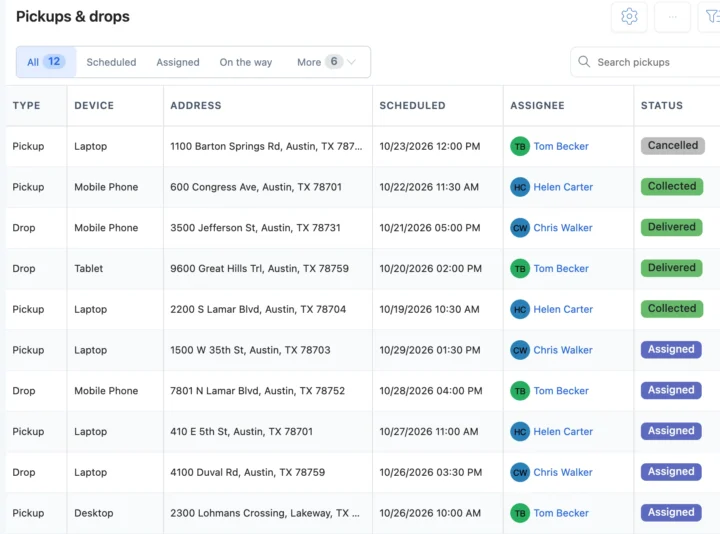
Technicians, pickups and drops
Assign each service call to a technician, who works it in the BytePhase app. When a window or portable unit needs the bench, schedule a pickup, record photos and the customer’s signature at the door, and schedule the drop when it is fixed. See pickup and drop.
Register, general CRM or AC service software?
| What you need to do | Notebook or spreadsheet | General CRM | BytePhase |
|---|---|---|---|
| Know which AMC visits are due this month | Flip through the register | Reminders you set by hand | Every AMC visit listed with its date, assignee and type |
| Remind customers before an AMC ends | Remember to call | A manual task | Emails to the customer and assignee 15 days, 1 day and on the end date |
| Record gas type and pre-checks | A line in the register | A free-text note | AC services and pre/post checklists ready in the setup |
| Get the customer’s OK on a compressor | A phone call | An email thread | Quotation link; the answer is saved with the time |
| Know which technician has which call | Ask on the phone | No service stages | Assignee, status and due date on every job; technician app |
| Tell the customer it is done | Call them | Marketing messages | Email, your own SMS or WhatsApp in one tap, with a tracking link |
Installations, gas refills and AMC visits
The AC jobs that fill a season, and what the AC service management software records for each.
Split AC installation
Log installation or uninstallation as a service on the job, with the unit’s serial and the post-checks.Gas refill
Pick R-22, R-410A or R-32 refilling as a service, with leak detection when the pre-check shows a leak.Compressor replacement
Diagnosis, an approved quote and the compressor from stock, with its own warranty on the bill.AMC visits, Free or Paid
Log a covered visit as Free, and a visit outside the contract as Paid with its service charge.Your currency, your tax and the messages you already use
Price service calls and parts in your operating currency with your tax name and rate. Send updates by email, by SMS through your own provider, or on WhatsApp in one tap, and sync invoices to QuickBooks or Xero.
Getting your AC business set up
Moving to new AC service management software should not mean typing everything in again.
- 1
Pick AC/HVAC repair
The setup wizard loads split, window, portable, cassette, VRF/VRV and ductless units, brands, gas and coil services, and pre- and post-checks. - 2
Bring your data across
Import customers, parts, staff and AC brands and models from a spreadsheet. Old jobs and contracts are not imported. - 3
Add your technicians
Add your team and choose what each person can see and do. See permissions. - 4
Create the first AMC
Add a customer’s units to a contract and log the first visit. See the quick-start guide.

AC service management software questions
Each contract lists the units covered, the number of services, the response time and on-site or carry-in service, with visits, complaints and payments. BytePhase emails the customer and the assignee 15 days and 1 day before it ends and on the end date; your staff renew it.
Yes. Assign or reassign a job and the technician is told by email, SMS, in-app alert or WhatsApp. They open it in the native Android or iOS app, which needs an internet connection.
Yes. Send the quotation; the customer opens the link and taps Approve or Reject, and BytePhase saves the answer with the time.
Import customers, parts, staff and AC brands and models from a spreadsheet into the AC service management software. Old jobs and AMC contracts are not imported; add open ones as new jobs and contracts.
Your data is encrypted (AES-256) in its own database, backed up daily and protected by two-factor login. Your logo and business details print on your documents, and white label runs BytePhase on your own domain.
Yes, in one tap: BytePhase writes the update and opens WhatsApp. Email and SMS through your own provider can go out at each status change too.
There is a 15-day free trial and a 30-day money-back guarantee. Prices for your country are on the pricing page.
BytePhase assigns each job and AMC visit to a technician and shows it on the calendar. For pickups and drops, the customer gets a tracking link with an ETA while the trip is under way. It is not a field-dispatch tool for planning routes across a fleet of vans.
Support comes by 24/7 AI chat, email, support tickets and callback requests, and your office staff and technicians can join free training sessions. You can also book a demo to see the AC service management software before you start.
It runs an AC service business: complaints and jobs for each unit, AMC contracts and visits, technicians, parts and gas services, quotes the customer approves, customer updates and billing, in one system.
Run your AC service business from one system
Try the AC service management software on your own calls: log your next complaint, assign a technician and set up your first AMC contract.
15-day free trial · 30-day money-back guarantee
Last updated: 30 October 2026