
Electronics Repair Shop Software
BytePhase is electronics repair shop management software for TVs, game consoles, audio and smart-home devices: check each unit in with its serial number and a checklist for its device type, get the quote approved before you open it, send board-level faults to a specialist and hand back with a one-time code. Offices, installers and event companies get AMC contracts and rentals from the same account.
- Checklists for each device type
- Diagnosis report, then quote approval
- Boards sent out with a delivery challan
- AMC contracts and rentals for business clients
15-day free trial · 30-day money-back guarantee
“It allows me to provide transparency to my customers by giving them the opportunity to review and approve quotes before any work begins.”
How a TV or console repair moves through BytePhase
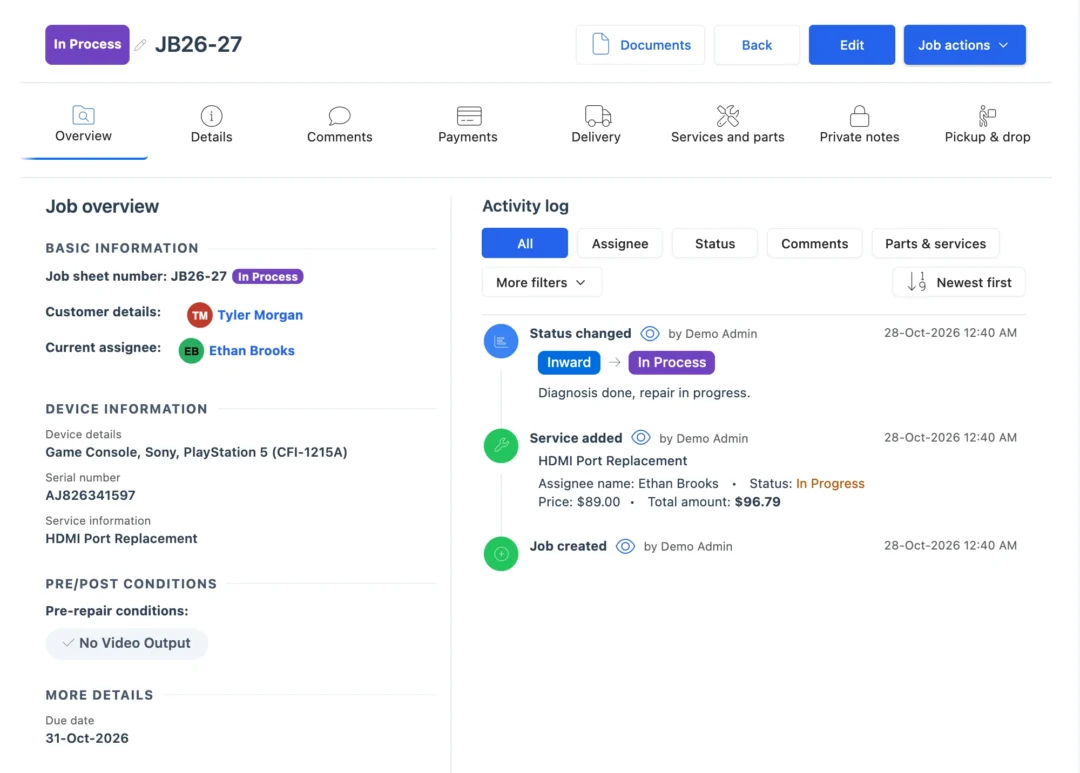
A TV, a console and a soundbar need different checks but the same discipline. As electronics service center software, BytePhase keeps the intake, the diagnosis, the customer’s approval, the parts and the handover on one job, and that is what electronics repair shop management software is for.
- 1
Check in the unit
Customer, device type, brand and model, serial number typed or scanned, accessories such as the remote, stand or controller, and the fault in the customer’s words. BytePhase warns you if another open job has the same serial. - 2
Run the checklist for its type
A pre-repair checklist set up for each device type, TV, console or speaker, with photos from the counter phone or a webcam and the customer’s signature. - 3
Write the diagnosis report
Record what you found and share the report with the customer before any work starts. - 4
Quote and get approval
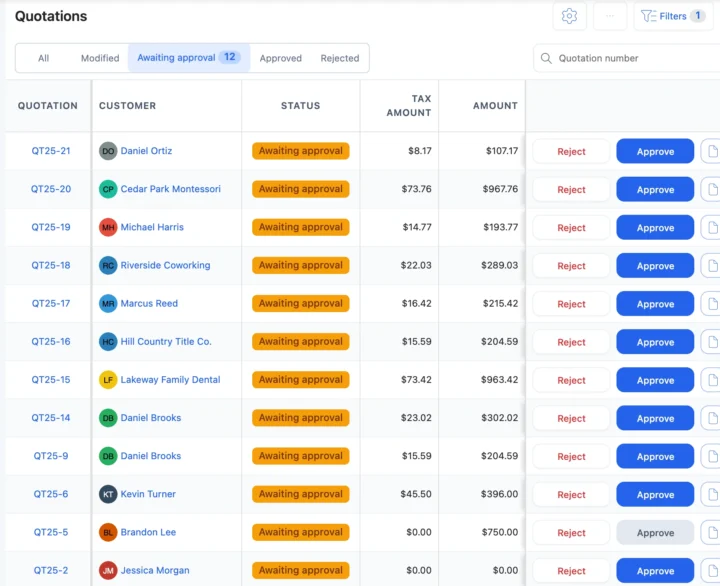
Send the quotation. The customer approves or rejects it from the link, or you record their answer at the counter. - 5
Assign the technician
Pick who works on it. They are alerted and open the job in the BytePhase app on Android or iOS. - 6
Fit parts or send the board out
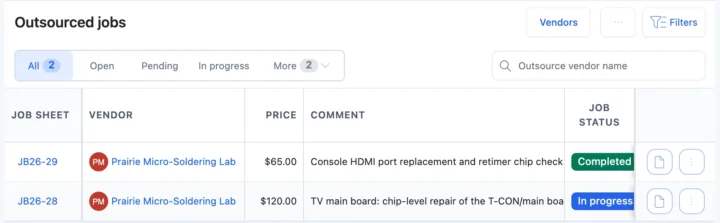
Power boards and HDMI ports come off stock and onto the bill. A main board that needs chip-level work goes to a specialist with a delivery challan. - 7
Keep the customer updated
Each status change can go by email or SMS, or on WhatsApp in one tap, with a link to the job. - 8
Bill, then hand over or deliver
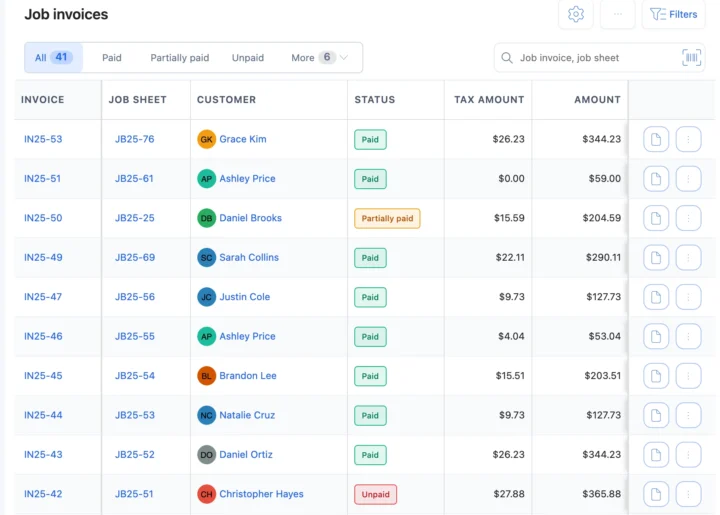
Invoice from the job, record the payment and confirm the handover with a 6-digit code, or schedule a drop to take a large TV back.
Situations an electronics repair shop knows
Five moments where electronics repair shop management software saves a trip, a lost board or an argument at pickup.
A 55-inch TV that cannot come to the counter
Schedule a pickup, collect it with photos and the customer’s signature at the door, and schedule the drop when it is fixed. Pickup and dropA main board that needs chip-level work
Outsource the job with a delivery challan and follow it until the board is back at your bench. OutsourcingThe customer wants a price before you open it
Write the diagnosis report, send the quotation and start only when they approve from the link. QuotationsAn office with 20 screens and projectors
Put them on one AMC contract with each device and its serial, visits on site or carry-in, and email reminders before it ends. AMC contractsAn event company needs projectors for a month
Rent them out with a monthly rent and a security deposit, and see which units are on rent, available or under repair. Device rentalsElectronics repair management software for every device type
Parts and billing on the same job
Power boards, backlight strips and HDMI ports carry a purchase price, a selling price, tax and a warranty. Add one to the job and it comes off stock and onto the invoice; parts at their low stock level are flagged on the dashboard. Sell remotes and cables from the point of sale, and buy from suppliers in inventory.
AMC contracts and rentals for business clients
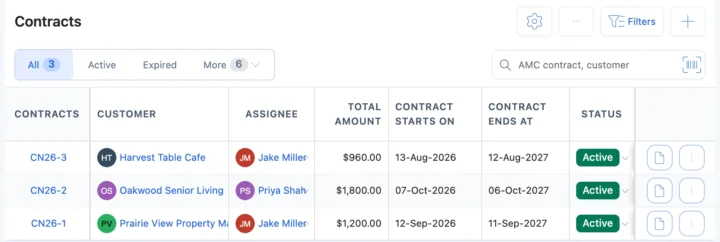
Offices, hotels and AV installers want one supplier for their screens and sound. Keep their devices on an AMC contract with visits and renewal emails to the customer and the assignee 15 days and 1 day before it ends and on the end date, and rent out projectors, TVs or speakers by the month with a security deposit. See device rental management.
Electronic repair software vs a notebook or a billing app
| What you need to do | Notebook or spreadsheet | Billing app or general POS | BytePhase |
|---|---|---|---|
| Find a unit by serial number, job number or customer | Page through by hand | Sales records only | Search every job; warning when a serial already has an open job |
| Record a TV’s condition before you open it | A note, if someone wrote one | Not part of a sale | Device-type checklist, photos and signature on the job |
| Agree the price before the work | A phone call | Not built for it | Diagnosis report and a quotation approved from a link |
| Send a board to a specialist | A note in the diary | Not part of a sale | Outsource with a delivery challan and track it back |
| Look after an office’s screens and AV kit | A spreadsheet of serials | No contracts | AMC contract with devices, visits, payments and renewal emails |
| Tell the customer it is ready | Call them | Marketing messages | Email, your own SMS or WhatsApp in one tap, with a tracking link |
TV, console and audio jobs, start to finish
The jobs that fill an electronics bench, and what the electronics repair shop management software records for each.
TV panel and backlight repairs
Collect the set with a pickup, take the backlight strips from stock and schedule the drop when it is done.Console HDMI and power faults
The diagnosis report, the approved quote and the part’s own warranty sit on one job.Speakers and home audio
A checklist for audio devices records what works at intake and after the repair.Projectors for offices and events
Service them under an AMC contract, or rent them out with a deposit and see which units are out.Your currency, your tax and the messages you already use
Price repairs and parts in your operating currency with your tax name and rate. Send updates by email, by SMS through your own provider, or on WhatsApp in one tap, and sync invoices to QuickBooks or Xero.
Setting up an electronics repair shop in BytePhase
Moving to new electronics repair shop management software should not mean typing everything in again.
- 1
Pick electronics repair
The setup wizard asks what you repair and loads electronics device types, brands and models, from TVs and consoles to audio and smart-home devices. - 2
Bring your data across
Import customers, parts, staff and device brands and models from a spreadsheet. Old tickets are not imported; open jobs are added as new jobs. - 3
Add your team
Add your technicians and choose what each person can see and do. See permissions. - 4
Check in the first unit
Create the first job with its serial number and send the customer their first update. See the quick-start guide.

Electronics repair shop software questions
It runs an electronics repair business: it logs each TV, console or speaker with its serial number, tracks the diagnosis, the customer’s approval, the parts and the technician, keeps the customer updated and bills at the counter. BytePhase is electronics repair shop management software that does this on the web and in native Android and iOS apps.
The electronics repair shop management software comes with a 15-day free trial and a 30-day money-back guarantee. Prices for your country are on the pricing page.
Each status change can go by email, by SMS through your own provider, or on WhatsApp in one tap. The message carries a link to the job.
Yes. One AMC contract lists every covered device with its serial and warranty dates, the visits on site or carry-in, complaints and payments. BytePhase emails the customer and the assignee 15 days and 1 day before the contract ends and on the end date; your staff renew it.
Yes. Your data is encrypted (AES-256) in its own database, backed up daily and protected by two-factor login. White label lets you run BytePhase on your own domain with your own brand.
Import customers, parts, staff and device brands and models from a spreadsheet into the electronics repair shop management software. Old tickets are not imported; jobs that are still open are added as new jobs.
There are self-hosted scripts and open-source projects, but you install, secure and update them yourself. BytePhase is hosted electronics repair shop management software, with native apps, daily backups and support included.
Yes. Outsource the job to a vendor with a delivery challan, note the price, follow its status and carry on with the job when the board comes back.
Yes. Schedule a pickup and a drop on the job and assign them to your team, who record photos and the customer’s signature at the door.
Run your electronics repair shop from one system
Try the electronics repair shop management software on your own repairs: check in your next TV or console with its serial number and send the customer their first update.
15-day free trial · 30-day money-back guarantee
Last updated: 30 October 2026