
Fridge repair management software for refrigerator service shops
BytePhase is fridge repair management software that takes every refrigerator job from a “not cooling” complaint to an OTP-confirmed handover: refrigerator checks ready on day one, the quote approved before the compressor is ordered, pickup for heavy units and AMC contracts for housing societies and offices. Technicians work the same jobs in native Android and iOS apps.
- Refrigerator checks ready on day one
- Quote approved before the compressor is ordered
- Pickup and drop for heavy units
- AMC for societies, hotels and offices
15-day free trial · 30-day money-back guarantee
“BytePhase is a future for repair shop management or the repair industry. They have crafted the UI very beautifully.”
How a fridge repair moves through BytePhase
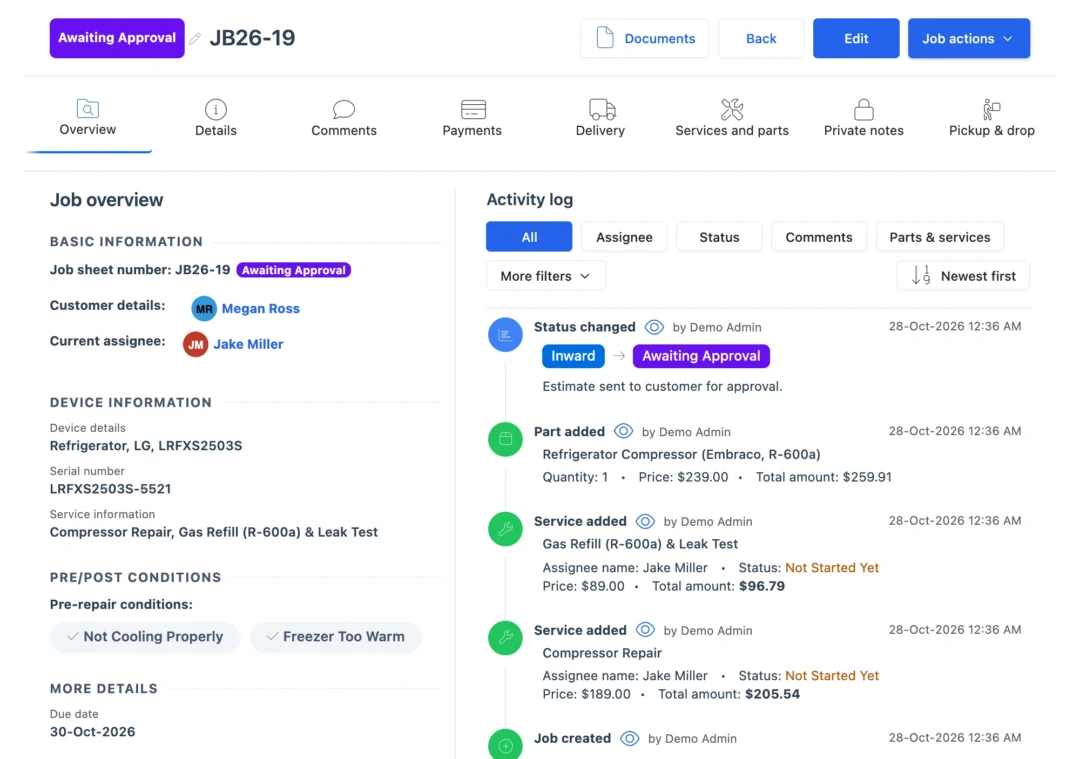
Eight steps, one ticket. In BytePhase’s fridge repair management software the complaint, the checks, the quote, the parts and the delivery stay on the same job.
- 1
Log the complaint
Customer, refrigerator brand and model, serial number and the fault, such as “Not cooling”. Walk-ins can fill the self check-in form. - 2
Pickup or on site
Choose the service type: the customer brings it in, you collect it, or the technician goes on site. - 3
Pre-checks and photos
Tick the checks that come with the Refrigerator type, such as water leaking, loud noise or freezer too warm, and add photos. - 4
Diagnose the fault
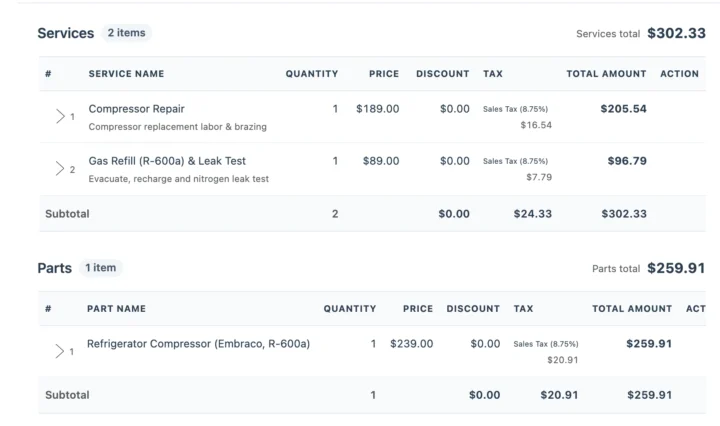
Add the diagnosis and services such as compressor, thermostat, ice maker, door seal or defrost repair. Gas work? Add your own gas refill service. - 5
Quote and approval
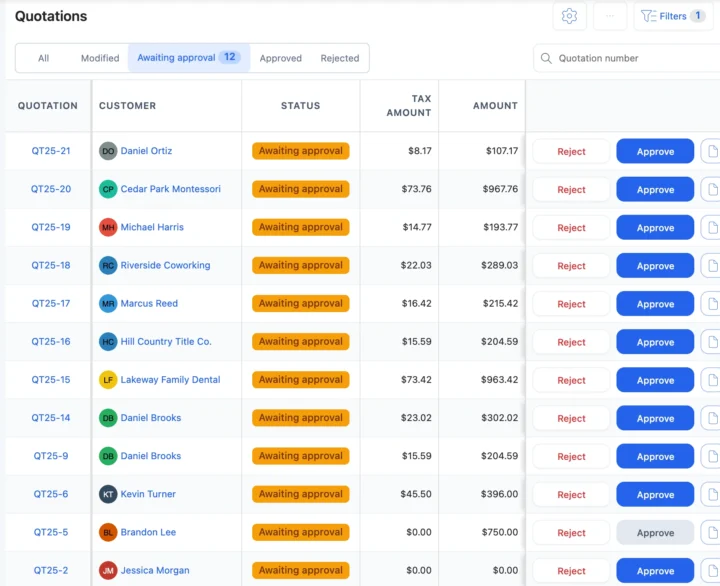
Send the quotation. The customer approves or rejects it from the link before the compressor is ordered. - 6
Parts and repair
Assign the technician, who is alerted and opens the job in the app. Spare parts come off stock and onto the bill. - 7
Keep the customer updated
Each status change can go by email or SMS, or on WhatsApp in one tap, with a link to the job. - 8
Post-checks and delivery
Tick “Temperature stable” and “No leaks”, invoice from the job, and confirm the delivery with a 6-digit code.
Problems fridge technicians see every day
Five moments where fridge repair management software saves a trip, a lost part or a phone call.
Not cooling, and it may be gas
Log the complaint, run the pre-checks and add your own gas refill service to the job, priced your way. Repair ticketsA compressor quote waits for a yes
Send the quotation link. When the customer approves, the answer is saved and the part can be ordered. QuotationsThe fridge is too heavy to carry in
Schedule a pickup, assign who goes, and confirm the drop with the 6-digit code. Pickup and drop“Is it fixed yet?” calls
The customer opens the tracking link from their last update and sees the status and the due date. Repair trackingA housing society wants yearly cover
One AMC contract lists every refrigerator, the visits and the payments, with reminder emails before it ends. AMC contractsRefrigeration spare parts and stock
Spare parts on every fridge job
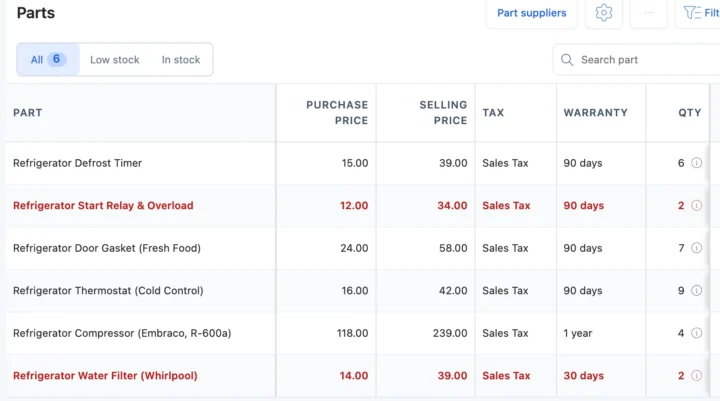
Compressors, thermostats, door gaskets and relays carry a purchase price, a selling price, tax and a warranty. Fitted on a job, they come off stock and onto the bill. Buy from your suppliers to add stock, print barcode labels, and see parts at their low stock level flagged in the list. See inventory and purchase management.
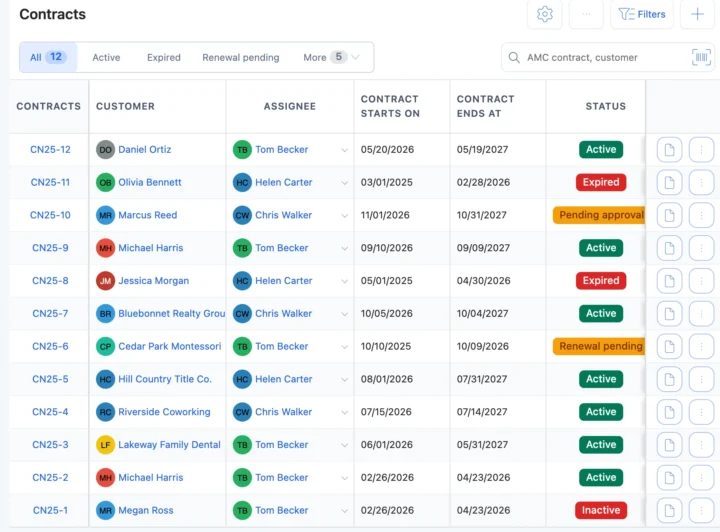
AMC contracts for refrigerators
Put housing societies, hotels and offices on an annual maintenance contract with each covered refrigerator, the visits, complaints and payments. Reminder emails go out 15 days and 1 day before the end date and on the day, and your team renews the contract by hand. Heavy units you collect go through pickup and drop with a coded handover.
Fridge repair software vs a job diary or WhatsApp chats
| What you need to do | Notebook or spreadsheet | WhatsApp chats | BytePhase |
|---|---|---|---|
| Find a unit by serial, job number or customer | Page through the diary | Scroll the chat | Search every job by serial, job number or mobile number |
| Agree the compressor price first | A phone call | A message, if it was read | Quotation link; the answer is saved with the time |
| Collect a heavy fridge | A note for the driver | An address in a chat | Scheduled pickup with an assignee and a coded handover |
| Know which parts went into which job | Remember them at the end | Not tracked | Parts on the job come off stock and onto the invoice |
| Cover a society’s refrigerators for a year | A list in the diary | Not tracked | AMC contract with units, visits, complaints and payments |
| Tell the customer it is ready | Call them | Type it each time | Email, your own SMS or WhatsApp in one tap, with a tracking link |
Compressor, gas, thermostat and door-seal jobs
The refrigerator jobs that fill a service shop’s week, and what BytePhase records for each.
Compressor replacement
Quote approved, the compressor off stock with its warranty, and the post-checks ticked before delivery.Gas refill
Your own gas refill service, priced your way, on the same job as the cooling fault.Thermostat fault
The diagnosis, the thermostat part and a “Temperature stable” post-check on one ticket.Door seal replacement
Door seal repair from the template, the gasket off stock and photos before and after.Your currency, your tax and the messages you already use
Price repairs and parts in your operating currency with your tax name and rate. Send updates by email, by SMS through your own provider, or on WhatsApp in one tap.
Getting your fridge service shop set up
Moving to new fridge repair management software should not mean typing everything in again.
- 1
Pick Home Appliance Repair
The setup wizard loads the Refrigerator type with its services and checks; add your own gas services next to them. - 2
Bring your data across
Import customers, parts, staff and appliance brands and models from a spreadsheet. Old tickets are not imported; open jobs are added as new jobs. - 3
Add your technicians
Add your team and choose what each person can see and do. See permissions. - 4
Log the first complaint
Create the first job and send the customer their first update. See the quick-start guide.

Fridge repair management software questions
Yes. Choose pickup or on-site as the service type, schedule the collection, and follow the job through checks, quote, parts and repair to a delivery confirmed with a 6-digit code.
Refrigeration spare parts such as compressors, thermostats and door gaskets carry a price, tax and a warranty. They come off stock when used on a job, purchases from suppliers add stock, and parts at their low stock level are flagged in the list.
Yes. An AMC contract lists each covered refrigerator, the number of visits, complaints and payments. Reminder emails go out before it ends, and your team renews it.
Yes. Each update carries a link to a tracking page with the status and the job sheet, sent by email, SMS or WhatsApp in one tap.
Yes. Send the quotation; the customer taps Approve or Reject from the link, and BytePhase saves the answer with the time.
Yes. Import customers, parts, staff and appliance brands and models from Excel or CSV. Jobs still open in your diary are added as new jobs, and free training sessions are available.
Yes. Set your operating currency and your tax name and rate, whether sales tax, VAT or GST, and sync invoices to QuickBooks or Xero.
Your data is encrypted (AES-256) at rest and backed up daily. Permissions decide what each office user and technician can see and do, and the activity log records who changed what on every job.
It runs a refrigerator repair business: it logs each unit and its fault, tracks pickup or on-site visits, the quote, the spare parts and the technician, keeps the customer updated and bills at the end. BytePhase adds AMC contracts and an OTP-confirmed handover.
Try the fridge repair management software on your next job
Log your next “not cooling” complaint and send the customer their first update.
15-day free trial · 30-day money-back guarantee
Last updated: 30 October 2026