Home appliance repair software for repair shops and service teams
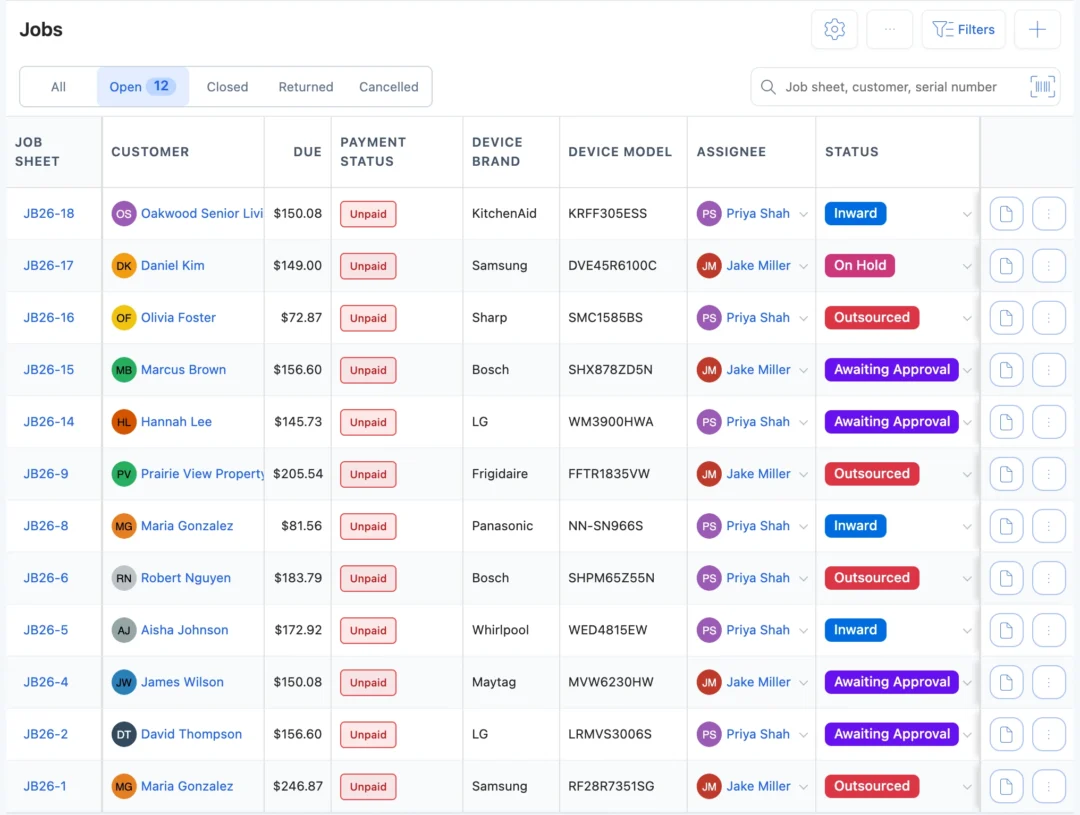
BytePhase is appliance repair shop software for fridge, washing machine, dishwasher, oven and microwave repair and installation work. Collect a heavy appliance from the customer’s home or repair it on site, get the quote approved before you order the part, and keep housing societies and property managers on AMC contracts. Technicians work the same jobs in native Android and iOS apps.
- Pickup and drop for bulky appliances
- Quote approved before you order the part
- AMC contracts for societies and property managers
- Technician app on Android and iOS
15-day free trial · 30-day money-back guarantee
“BytePhase is a future for repair shop management or the repair industry. They have crafted the UI very beautifully.”
How an appliance repair moves through BytePhase
Appliance jobs start at the customer’s door more often than at your counter. In BytePhase’s appliance repair software, the visit, the diagnosis, the quote, the part and the drop-off stay on one job.
- 1
Book the repair
Take the booking at the counter or on the phone, or let the customer fill the self check-in form. Pick the service type: carried in, pickup, on site or courier. - 2
Collect it or repair on site
Schedule a pickup and assign an executive, or send a technician to repair it at the customer’s place. A transport charge can go on the pickup if you charge for it. - 3
Record its condition
Pre-repair checks such as not cooling, water leaking or not spinning, with photos of dents and scratches and the customer’s signature. - 4
Diagnose the fault
Note what you found: a failed compressor, a worn drum bearing, a burnt heating element. The job sheet prints on A4 or a thermal printer. - 5
Quote and get approval
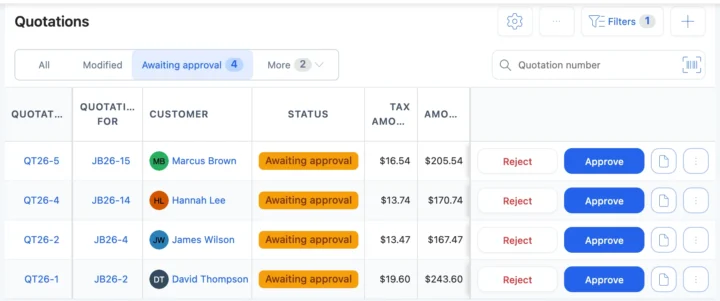
Send the quotation. The customer approves or rejects it from the link before you order the part, and the answer is saved with the time. - 6
Order and fit the part
The part comes off stock and onto the bill. Waiting on the supplier? Set your own status, such as Waiting for parts. - 7
Check it and tell the customer
Post-repair checks such as temperature stable and no leaks, then each status change can go by email or SMS, or on WhatsApp in one tap, with a link to the job. - 8
Invoice and drop it back
Invoice from the job, collect payment on delivery, and confirm the drop-off with a one-time code.
Situations appliance shops deal with every week
Five moments where appliance repair software saves a wasted trip, a part nobody approved or an argument at the door.
The fridge is too heavy to carry in
Schedule a pickup from the job, assign an executive and send the customer a tracking link with an estimated arrival time. Proof at the door can be a one-time code, a signature or photos. Pickup and dropA washer needs a drum bearing you don’t stock
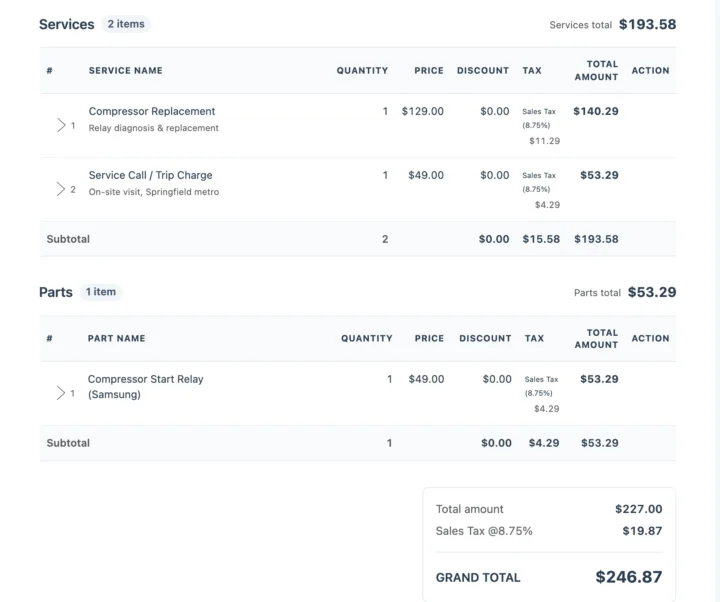
Send the quotation first. Order the bearing only after the customer approves from the link, and set the job to Waiting for parts. QuotationsThe customer says the dent was not there
Condition photos and the pre-repair checklist were saved at pickup, with the customer’s signature on the job sheet. Device images“When is my machine coming back?”
The customer opens the link from their last update and sees the job’s status. On the drop day, the tracking link shows the expected arrival time. Repair trackingA housing society has 20 units to look after
Put every fridge and washer on one AMC contract with its serial and warranty, schedule the service visits, and get email reminders before it ends. AMC contractsBuilt for appliance repair shops: tickets, pickups and contracts
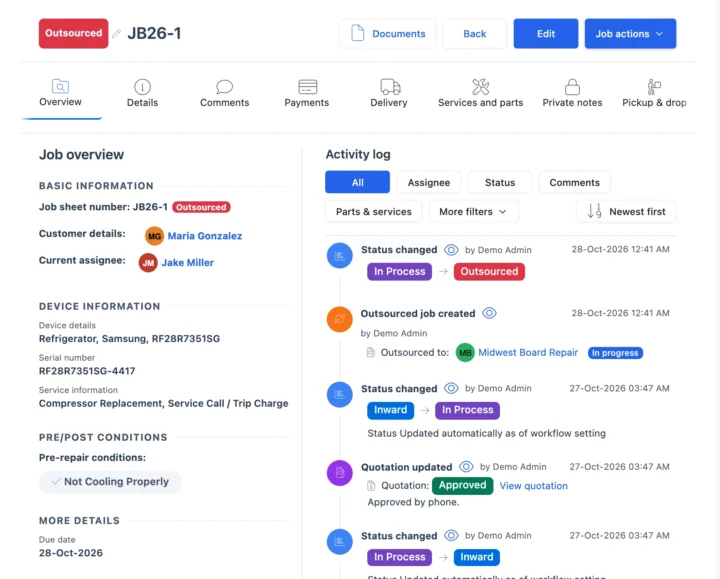
Tickets, checks and photos per appliance
Each job holds the customer, the appliance type, brand, model and serial number, the fault and the service type, with pre- and post-repair checks, condition photos and signatures. The setup wizard loads fridges, washing machines, dishwashers, ovens, microwaves and dryers with common faults and services. See repair ticket management.
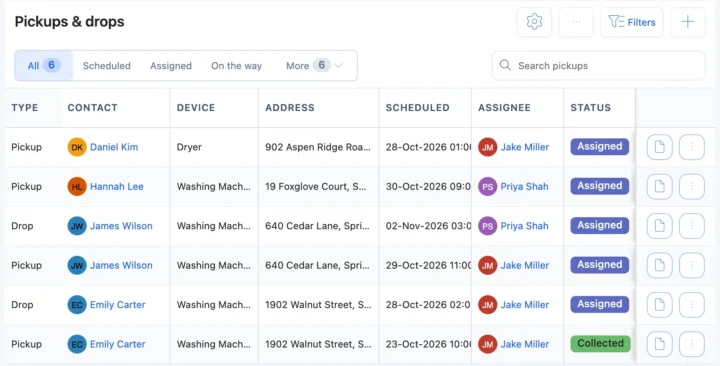
Pickup and drop for bulky appliances
Schedule a pickup or a drop from the job and assign an executive. The customer gets a tracking link with an estimated arrival time, and the executive records a one-time code, a signature, photos or a condition checklist at the door, and collects payment on delivery. Missed visits are rescheduled. See pickup and drop and OTP for delivery.
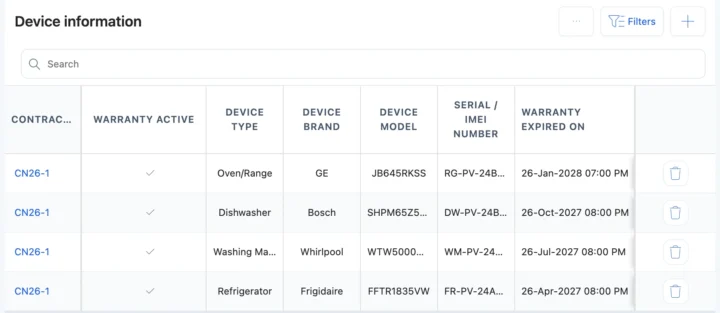
AMC contracts for societies and property managers
Housing societies, landlords and property managers want one service partner for every unit. Put their appliances on an AMC contract with the covered units, scheduled service visits, complaints and payments. You get email reminders 15 days and 1 day before the end date and on the day, and your team renews it. See AMC software.
Logbook, field-service app or appliance repair software?
| What you need to do | Notebook or spreadsheet | General field-service app | BytePhase |
|---|---|---|---|
| Collect a fridge and prove its condition | A note, if someone wrote one | Visit notes, if set up | Pickup with photos, checklist and a one-time code at the door |
| Get the price approved before ordering the part | A phone call | Depends on the app | Quotation link; the answer is saved with the time |
| Know which parts each job used | Remember them at the end | Often not tied to shop stock | Parts on the job come off stock and onto the invoice |
| Look after a society’s 20 appliances | A spreadsheet of serials | Recurring visits, if supported | AMC contract with units, visits, complaints and renewal emails |
| Find last year’s repair on a washer | Page through by hand | Search by visit | Search by serial number, job number or customer |
| Tell the customer it is ready | Call them | Text messages | Email, your own SMS or WhatsApp in one tap, with a tracking link |
Fridges, washing machines and ovens
The jobs that fill an appliance shop’s week, and what BytePhase records for each.
Refrigerator compressor replacement
Pickup, a not-cooling pre-check, the quote approved before the compressor is ordered, and a temperature check before the drop.Washing machine drum bearing
The bearing comes off stock with its warranty, and the customer’s Jobs tab keeps the washer’s history.Oven heating element
Repaired on site, with the visit charge and the element on the same invoice.Microwave magnetron
Carried in at the counter, checked, quoted, fixed and handed back with a one-time code.Your currency, your tax and the messages you already use
Price repairs, parts and visits in your operating currency with your tax name and rate. Send updates by email, by SMS through your own provider, or on WhatsApp in one tap.
Setting up your appliance shop
Moving to new appliance repair shop software should not mean typing everything in again.
- 1
Pick home appliance repair
The setup wizard loads appliance types, common faults, services and pre- and post-repair checks. - 2
Bring your data across
Import customers, parts and appliance brands and models from a spreadsheet. Old repair records are not imported; open jobs are added as new jobs. - 3
Add your technicians
Add or import your staff and choose what each person can see and do. See permissions. - 4
Book the first repair
Create the first job, schedule its pickup or visit, and send the customer their first update. See the quick-start guide.

Appliance repair software questions
Set the job’s service type to Pickup or On Site. For a pickup, schedule it from the job and assign an executive; the customer gets a tracking link with an estimated arrival time, and proof at the door can be a one-time code, a signature or photos. For on-site work, the technician opens the job in the app at the customer’s place.
Yes. Send the quotation; the customer opens the link and taps Approve or Reject. BytePhase saves the answer with the time, so you order the part only once the price is agreed.
Import customers, parts, staff and appliance brands and models from a spreadsheet. Past repair history and open tickets are not imported; add jobs that are still open as new jobs.
Yes. There are native Android and iOS apps. When you assign a job, the technician gets an alert and opens it in the app, at the bench or at the customer’s home.
Yes, in one tap: BytePhase writes the update and opens WhatsApp. Email and SMS through your own provider work too.
Yes. An AMC contract lists the covered appliances with their serial numbers, the service visits, complaints and payments. You get email reminders 15 days and 1 day before it ends and on the end date, and your team renews it.
Your data is encrypted (AES-256) in its own database, backed up daily, and protected by two-factor login. Your logo and business details print on job sheets, quotations and invoices.
There is a 15-day free trial with a 30-day money-back guarantee. See the pricing page for the price in your country.
It runs an appliance repair business: it books each repair, schedules pickups or on-site visits, records the appliance’s condition, tracks the quote, parts and technician, keeps the customer updated and bills the job. When you compare appliance repair software, check for pickup and drop, quote approval, parts tied to jobs, AMC contracts and a technician app.
Run your appliance repair shop from one system
Try the appliance repair software on your own jobs: book your next repair, schedule its pickup and send the customer their first update.
15-day free trial · 30-day money-back guarantee
Last updated: 30 October 2026