
See the BytePhase repair shop software demo
Watch one phone repair go through BytePhase from check-in to delivery: intake with IMEI and photos, automatic customer updates, quotation approval, parts, sales tax on every line and card payment at the counter, and handover with a one-time code.
- One real repair, start to finish
- 7 minutes, with chapters
- Full transcript on this page
15-day free trial · 30-day money-back guarantee
International demo · 7 min
Jump to any part of the repair shop software demo
Select a time and the video plays from that point.
Check in the phone
Customer, IMEI, the repair, condition photos and a printed job sheet in about a minute.
Related: repair ticket management, device photos at check-in and customer self check-in.
Automatic customer updates and the customer portal
Confirmation email, status updates on WhatsApp, SMS or email, and a portal the customer can open.
Related: WhatsApp updates and pickup and drop.
Diagnosis, quotation and online approval
The technician adds what he found, sends one quotation, and the customer approves it in the portal.
Parts, stock and purchases
Parts come off stock as they are used, and each one stays tied to the repair it went into.
Related: inventory management and purchase management.
Invoice and payment
The invoice comes from the job with parts, labour and tax already on it, and the payment is recorded against it.
Related: repair shop POS and billing.
Handover with a one-time code
The device is marked delivered only after the customer reads out the code sent to their phone.
Related: OTP for delivery.
Dashboard and role permissions
What came in, what was billed and what is unpaid, and control over what each role can see and do.
Related: configurable permissions.
Mobile apps, leads and integrations
Native Android and iOS apps on every plan, enquiries from your forms and ads, and the tools you already use.
Related: the mobile app, lead management and all integrations.
Industries, maintenance contracts, rentals and your own branding
Sixteen kinds of repair business, plus AMC, pickup and drop, rentals, data recovery and white label.
Related: industries, AMC management, device rentals and white-label branding.
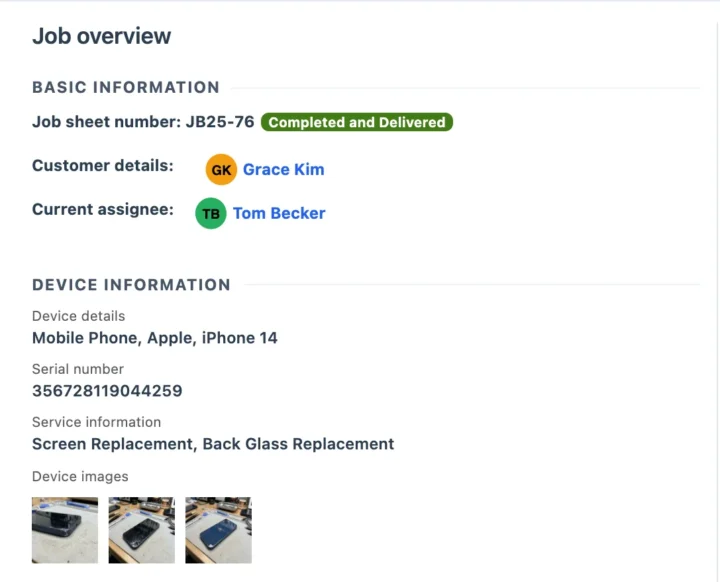
Check in a repair in about a minute
The customer comes up from their phone number. Add the device, its IMEI and the problem in their own words, then take the photos that settle arguments later.
- IMEI on the job, so the exact device can be traced
- Condition photos saved with the date
- Job sheet on A4 or thermal, with a label for the device
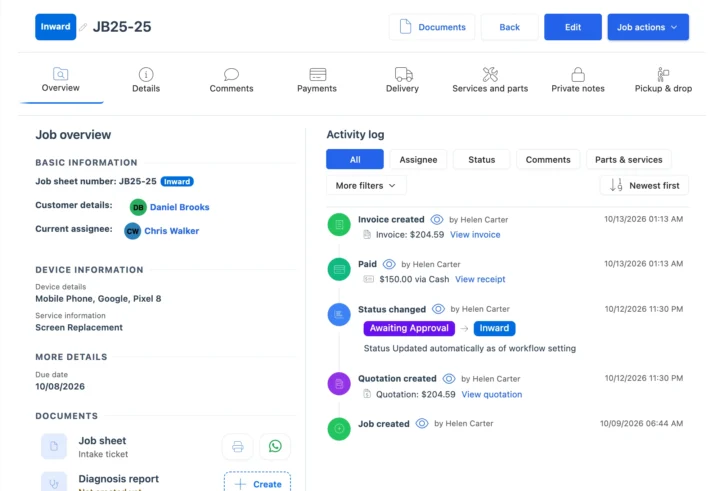
Get the quotation approved without a phone call
The technician adds what he found and sends one quotation. The approval lands on the job, so the repair goes ahead and nobody disputes it at pickup.
- Labour and parts on one quotation, with sales tax on every line
- The customer approves or rejects it in their portal
- Every quote, approval and change is recorded with who and when
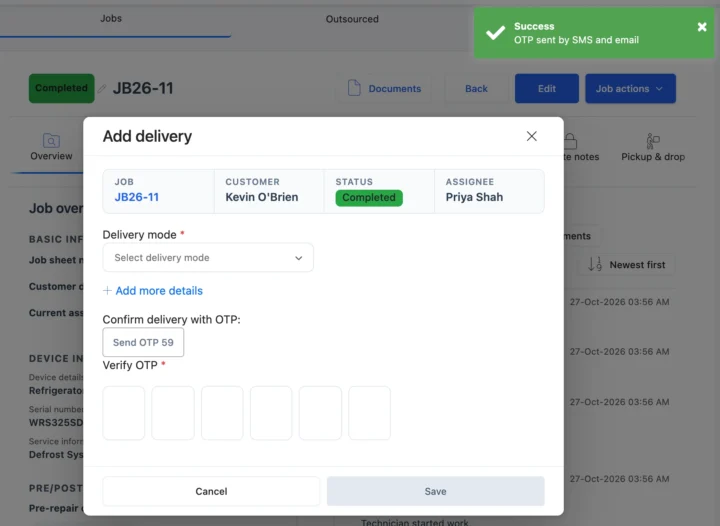
Take payment and hand over with a one-time code
The invoice comes straight from the job with parts, labour and sales tax already on it, and the card payment is recorded against it. The device is marked delivered only after the customer reads out the code sent to their phone.
- Nothing typed twice between job, quotation and invoice
- A 6-digit code confirms the right person collected it
- Thermal receipt or a full-page invoice
The features you just watched
Each step of the repair has its own page with screenshots and answers.
Repair tickets
Check-in, statuses, job sheets and the full history of every repair.WhatsApp updates
Status messages that go out as the repair moves along.Inventory
Parts tied to the repair they went into, and stock that stays right.POS and billing
Invoices from the job, payments recorded against it.OTP for delivery
A one-time code confirms the device went to the right person.Mobile app
Native Android and iOS apps on every plan.Repair shop software demo transcript
Prefer to read? This is the full demo, edited lightly for reading. Select a time to play the video from that point.
Why repair shops need one workflow
Some shops run on paper, some on Excel, some on a CRM that was never built for repairs, and all of them get the same call. Is my phone ready yet? One repair means dozens of details, decisions and updates. BytePhase keeps them all in one connected workflow.
Check in the phone
Grace walks in with an iPhone 14. She dropped it on the sidewalk this morning. Helen types her number, and Grace's details come straight up. Her contact, her history, everything. Then the phone. Apple, iPhone 14, and the IMEI, so this exact device can always be traced, even months from now.
Next, the repair she came in for. A new screen. Helen adds the screen replacement and the iPhone 14 screen itself, each at its own price. And the problem in Grace's own words, so the technician knows exactly what happened before he even opens it up. Helen assigns it to Tom, the technician, and promises it for this evening.
Last, the step that prevents arguments later. Photos of the cracked screen, the line on the back, and the dented corner. If anyone asks how the phone came in, the answer is right here, with the date. One click creates the job. You pick which messages Grace gets, and print the job sheet on an A4 or thermal with a label for the phone. That took about a minute, and when the counter's busy, customers can check themselves in from a link.
Related: repair ticket management, device photos at check-in and customer self check-in.
Automatic customer updates and the customer portal
Grace leaves her iPhone at the shop and gets a confirmation email with her job number and device details. As the repair moves along, BytePhase keeps her updated automatically on WhatsApp, SMS, or email, whichever the shop uses.
Grace has her own customer portal, too. She can follow her repair as it moves along, open the documents for her job, and book a pickup for her next repair, so she doesn't have to come in at all. Nobody at the counter types a message, and nobody answers "is it ready yet?" on the phone. Fewer calls reach the front desk.
Related: WhatsApp updates and pickup and drop.
Diagnosis, quotation and online approval
At the bench, Tom opens the job. He finds that the line on the back is cracked glass, not a scratch. Tom adds the back glass replacement and scans the new back glass, so labour and parts go on one quotation, with the price and the sales tax on every line, and the total at the bottom.
And Tom emails it straight to Grace, ready for her to approve. She gets it straight away, opens it in her portal, and sees exactly what she's paying for. The labour, the parts, the sales tax, and the total, and approves it, right there in her portal.
The approval lands on the job straight away, so Tom can go ahead with the repair. There is no phone tag, and nobody says, I never agreed to that, at pickup. If she'd rejected it, the shop would know immediately. Every quote, approval, and change is recorded on the job, with who did it and when.
Parts, stock and purchases
Both parts are already on the job. The screen from check-in and the back glass Tom scanned at the prices Grace approved, so nothing is typed twice. Stock drops as each part is used, and every part is tied to this repair. So the owner always knows what's on the shelf and where every part went.
Each part's stock history shows the job it went on, like Grace's screen. When it's time to reorder, the purchase goes against the supplier, and the stock comes back in.
Related: inventory management and purchase management.
Invoice and payment
When the repair is done, Tom marks the job completed and saves it. He ticks mail, so Grace hears by email. Straight away, Grace gets a message that her phone is ready to collect.
At the counter, the invoice comes straight from the job, with nothing typed twice. The parts, labour, and sales tax are already on it. Grace pays by card. Helen picks the payment method, the balance is already filled in, and one click records the payment against the job. The balance is now zero.
Related: repair shop POS and billing.
Handover with a one-time code
Now the handover, where shops quietly lose money. A phone goes to the wrong person, or a customer says it isn't theirs. BytePhase sends a one-time code to her phone. She reads it out. Helen types it into the six boxes, and only then is the device marked as delivered.
Helen marks the job completed and delivered. No message this time. Grace is right there at the counter. The receipt prints on the thermal printer, or as a full-page invoice if she needs one for work. The job is closed, paid, and proven.
Related: OTP for delivery.
Dashboard and role permissions
And the moment Grace approved, Helen's phone showed it too. On the dashboard, what came in, what was billed in the last 30 days, and what's still unpaid.
As the team grows, configurable permissions control what each role can access and do. Tom can access the repair jobs he needs, but in stock, the purchases module is switched off for him, and so is the supplier list. For each module, you control who can view, create, edit, and delete. Under Payment, he can't record or delete payments, and he doesn't see the billing list. Reports are off too, so the business figures stay with Helen.
You can also control access to payment information. Helen changes it right here. She switches off view payment information for Tom. And under Commission, you choose whether employees see only their own commission or everyone's. Then she saves the changes. Your team gets the access they need to work, while you stay in control of your business.
Related: configurable permissions.
Mobile apps, leads and integrations
And it's all on your phone too. Native Android and iOS apps come with every plan, with no per device fee. Helen can open any job from anywhere. Its status, what's been paid, and every document.
And new inquiries come straight in. From your Meta ads, your WordPress website, your own website forms, Typeform, JotForm, Zapier, n8n, or our REST API, so every lead lands in one place. And it works with tools you already use, like Google Calendar, Outlook, QuickBooks, and Xero. In dollars, with sales tax.
Related: the mobile app, lead management and all integrations.
Industries, maintenance contracts, rentals and your own branding
Phones today, laptops, tablets, cameras, appliances, and watches too. BytePhase works for 16 kinds of repair business. And as your shop grows, BytePhase grows with it. Annual maintenance contracts with renewal reminders, pickup and drop, rentals, and a dedicated data recovery module. You can run it under your own brand and domain.
Related: industries, AMC management, device rentals and white-label branding.
Questions about the BytePhase demo
About 7 minutes. It follows a single phone repair from check-in to delivery, so you see the whole workflow rather than a list of features.
Check-in with IMEI and condition photos, automatic customer updates, a quotation the customer approves online, parts coming off stock, the invoice and card payment, and handover confirmed with a one-time code. It ends with role permissions, the Android and iOS apps, and integrations.
Yes, near the end. Native Android and iOS apps come with every plan, with no per-device fee, and the demo shows a job being opened from a phone with its status, payments and documents.
Yes. Select Book a Demo, pick a time that suits you, and we walk you through BytePhase on a call and answer your questions.
Yes. Start a 15-day free trial and check in your next repair. Every subscription also comes with a 30-day money-back guarantee.
Try it on your own repairs
Check in your next repair in BytePhase, or book a live demo and we will walk you through it.
15-day free trial · 30-day money-back guarantee
Last updated: 21 November 2026