
Musical Instrument Repair Shop Software
BytePhase is musical instrument repair software for guitar techs, piano tuners and band instrument shops: rent out instruments by the month with a deposit, keep schools and piano owners on maintenance contracts, and run every music repair on a ticket with its serial number, photos and an approved quote. Technicians work the same jobs in native Android and iOS apps.
- Instrument rentals with deposits
- Maintenance contracts for schools and piano owners
- Quotes the customer approves from a link
- Tickets for every instrument type
15-day free trial · 30-day money-back guarantee
“BytePhase is a future for repair shop management or the repair industry. They have crafted the UI very beautifully.”
How instrument repair works in BytePhase
Eight steps, one ticket. In BytePhase’s musical instrument repair software the check-in, the quote, the bench work and the handover stay on the same repair order.
- 1
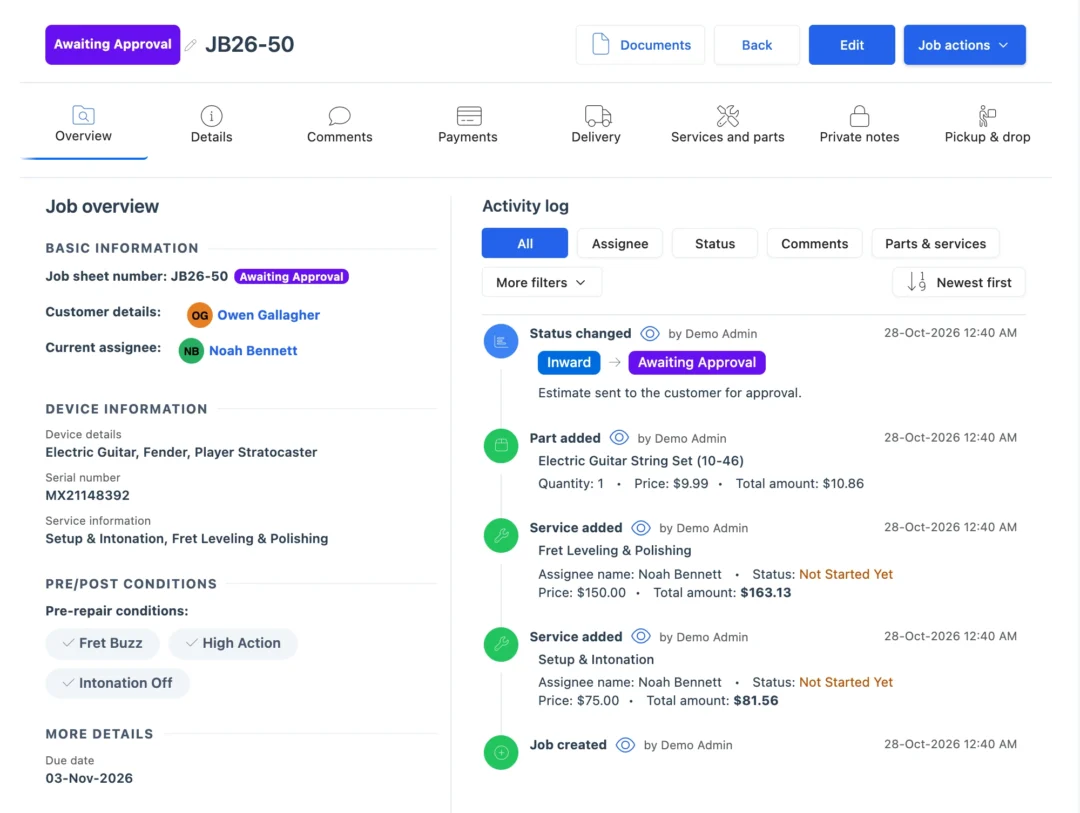
Check in the instrument
Customer, instrument type, brand and model, the serial number and accessories such as the case, gig bag or bow. Walk-ins can use the self check-in form. - 2
Record its condition
Photos, a pre-repair checklist such as “Plays in tune across all frets?” and the customer’s signature on the job sheet. - 3
Quote and approval
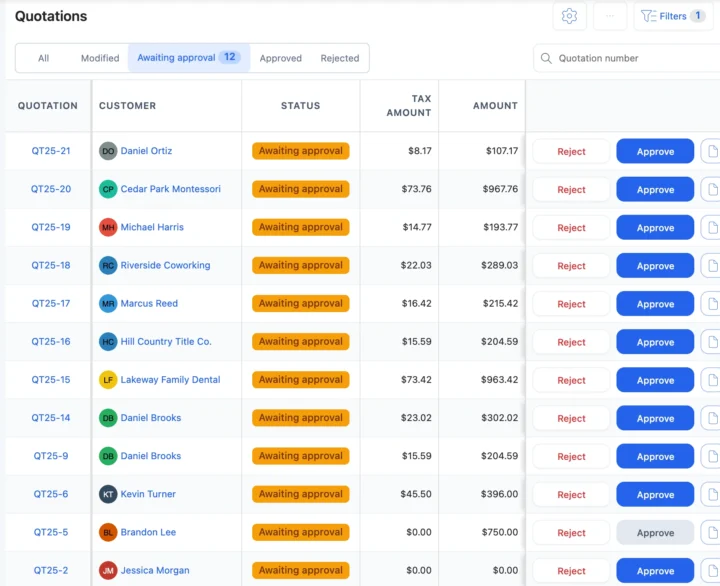
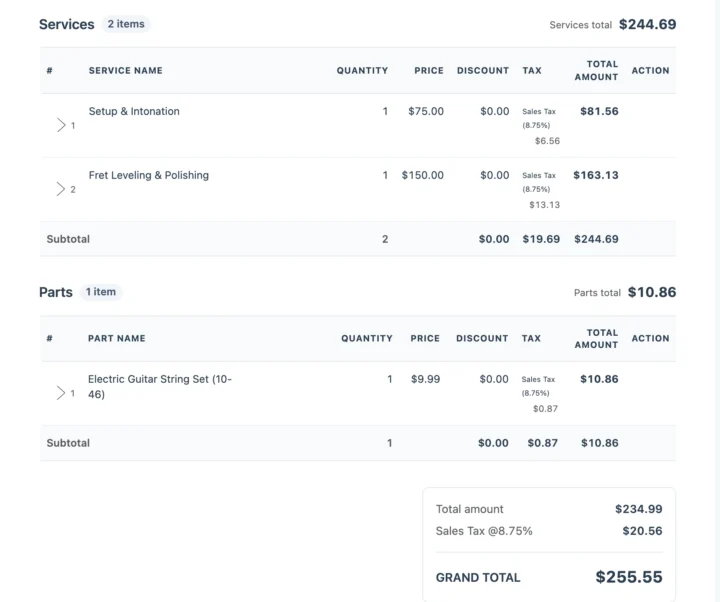
Send the quotation. The customer, or a parent, approves or rejects it from the link before work starts. - 4
Assign the technician
Pick who works on it and set the estimated delivery date. The technician is alerted and opens the job in the app. - 5
Bench or specialist
Strings, reeds and pads come off stock. Re-lacquering or a soundboard can go to a specialist with a delivery challan. - 6
Check it again
A post-repair checklist such as “Tuned to A440?” and “Any crackling or buzzing?” before the customer is told. - 7
Keep the customer updated
Each status change can go by email or SMS, or on WhatsApp in one tap, with a link to the job. - 8
Bill and hand over
Invoice from the job, record the payment, and confirm the handover with a 6-digit code.
Situations every music repair shop knows
Five moments where musical instrument repair software saves a phone call, a lost part or an argument at pickup.
A school drops off 20 band instruments in June
Add Bulk Repair Job creates one job per instrument for the school, and one bulk payment can settle the bills. Bulk paymentsA parent has to approve the pad job
Send the quotation link; the answer is saved with the time and the technician can start. QuotationsA rented violin comes back damaged
Return it to the bench as Under repair, open a repair job for the damage, and refund or keep the deposit on the contract. Device rentalsA gig on Saturday: “Is my guitar ready?”
The customer opens the tracking link from their last update and sees the status and the due date. Repair trackingRe-lacquering goes to a specialist
Outsource the job with a delivery challan, and update its status when the instrument is back. OutsourcingInstrument rentals and maintenance contracts
Instrument rental management with deposits
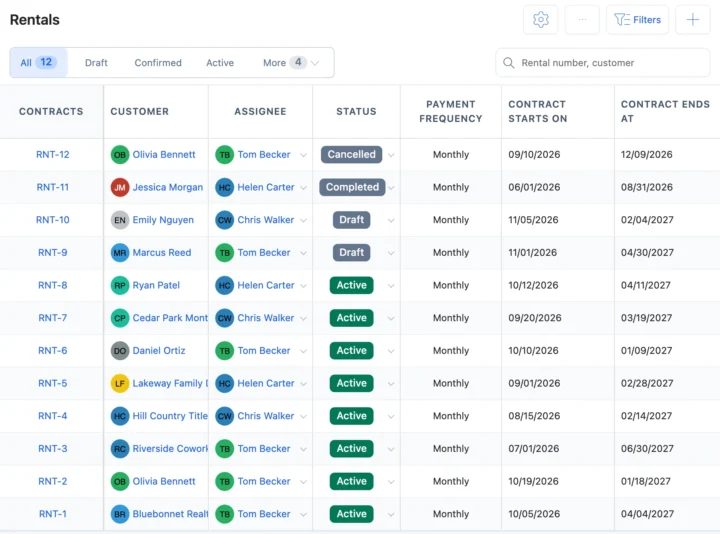
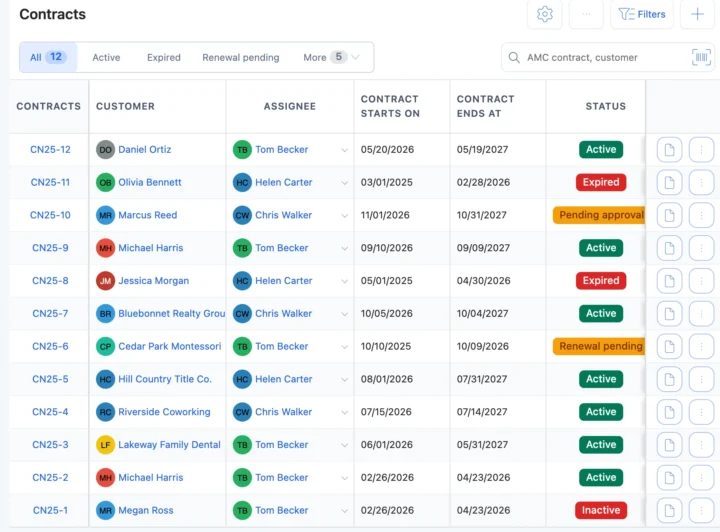
List each rental instrument with its serial number, monthly rent and security deposit, and make a contract for the customer with a monthly, quarterly, biannual or annual payment cycle. BytePhase adds the rent each cycle, records the deposit and its refund, and marks the contract Overdue when rent stays unpaid past the days you allow. See device rental management; returned instruments go back to Available, or to Under repair with a repair ticket.
Maintenance contracts for school bands and piano owners
Put school band programmes and regular piano customers on an annual maintenance contract. Record the dates, the instruments covered with their serial numbers, how many visits are included and the payment schedule. Log each pad check or tuning visit against the contract and assign it to a technician. Reminder emails go out 15 days and 1 day before the end date and on the day, and your team renews the contract by hand. Bill parts and visits from the job or the point of sale.
Moving from a repair notebook or a music-store POS
| What you need to do | Notebook or spreadsheet | Music-store POS | BytePhase |
|---|---|---|---|
| Find an instrument by serial, job number or customer | Page through the notebook | Sales records only | Search every repair order by serial, job number or mobile number |
| Get a parent’s OK on the price | A phone call | Not built for it | Quotation link; the answer is saved with the time |
| Rent out a violin with a deposit | A deposit book | Sales and layaway | Rental contract with monthly rent, deposit, refund and overdue status |
| Look after a school’s band instruments all year | A diary of visits | No contracts | Maintenance contract with instruments, visits, payments and reminder emails |
| Take in a whole school at once | 20 slips by hand | One sale | Bulk repair job, one ticket per instrument |
| Tell the customer it is ready | Call them | Marketing messages | Email, your own SMS or WhatsApp in one tap, with a tracking link |
Guitar repair shop software for setups and fret work
Guitar jobs and the rest of the week’s instrument work, and what BytePhase records for each.
Guitar setup
Setup and intonation or fret levelling from the template, with strings off stock and a post-repair check.Piano tuning visit
Piano tuning or a pitch raise logged against the customer’s maintenance contract.Saxophone pad job
Pad and cork replacement quoted and approved, with the pads on the bill.Amp tube swap
Tube or speaker replacement, and “Any crackling or buzzing?” checked before pickup.Your currency, your tax and the messages you already use
Price repairs, rent and parts in your operating currency with your tax name and rate. Send updates by email, by SMS through your own provider, or on WhatsApp in one tap.
Setting up your music repair shop
Moving to new musical instrument repair software should not mean typing everything in again.
- 1
Pick Musical Instrument Repair
The setup wizard loads 14 instrument types, from acoustic guitar to DJ equipment, with their services and checklists. - 2
Bring your data across
Import customers, parts, staff and instrument brands and models from a spreadsheet. Old tickets are not imported; open jobs are added as new jobs. - 3
Add your technicians
Add your team and choose what each person can see and do. See permissions. - 4
Check in the first instrument
Create the first job with its serial number and send the customer their first update. See the quick-start guide.

Musical instrument repair software questions
It runs a music repair shop: it logs each instrument with its serial number and photos, tracks the quote, the bench work and the parts, keeps the customer updated and bills at the counter. BytePhase adds instrument types and checklists, maintenance contracts and instrument rentals.
The price for your country is on the pricing page. You can start with a 15-day free trial, and you are covered by a 30-day money-back guarantee.
Yes, in one tap: BytePhase writes the update and opens WhatsApp. Email and SMS through your own provider work too.
Photos and a signed checklist at check-in, the serial number on the ticket, an approved quote before work, private notes only your team sees, and a handover confirmed with a 6-digit code.
Pick Musical Instrument Repair in the setup wizard, then import customers, parts, staff and instrument brands and models from Excel or CSV. Jobs still open in the notebook are added as new jobs, and free training sessions are available.
Yes. White label runs BytePhase on your own domain with your logo, so customers track repairs and approve quotes on your brand. For several locations, our team sets up branches with you.
Yes. List each instrument with its serial number, monthly rent and security deposit, make a contract for the customer, and BytePhase adds the rent each cycle and records the deposit and any refund.
Yes. Add Bulk Repair Job creates one job per instrument for the school, and Bulk payment settles several bills with one receipt.
Yes, native Android and iPhone apps with no per-device fee. Technicians open their jobs, add photos and update statuses from the bench; the app needs an internet connection.
Yes. Set your operating currency and your tax name and rate, whether sales tax, VAT or GST, and sync invoices to QuickBooks or Xero.
Run your music repair shop from one system
Try the musical instrument repair software on your own jobs: check in your next guitar with its serial number and send the customer their first update.
15-day free trial · 30-day money-back guarantee
Last updated: 30 October 2026