
Cell phone repair shop software for the counter and the bench
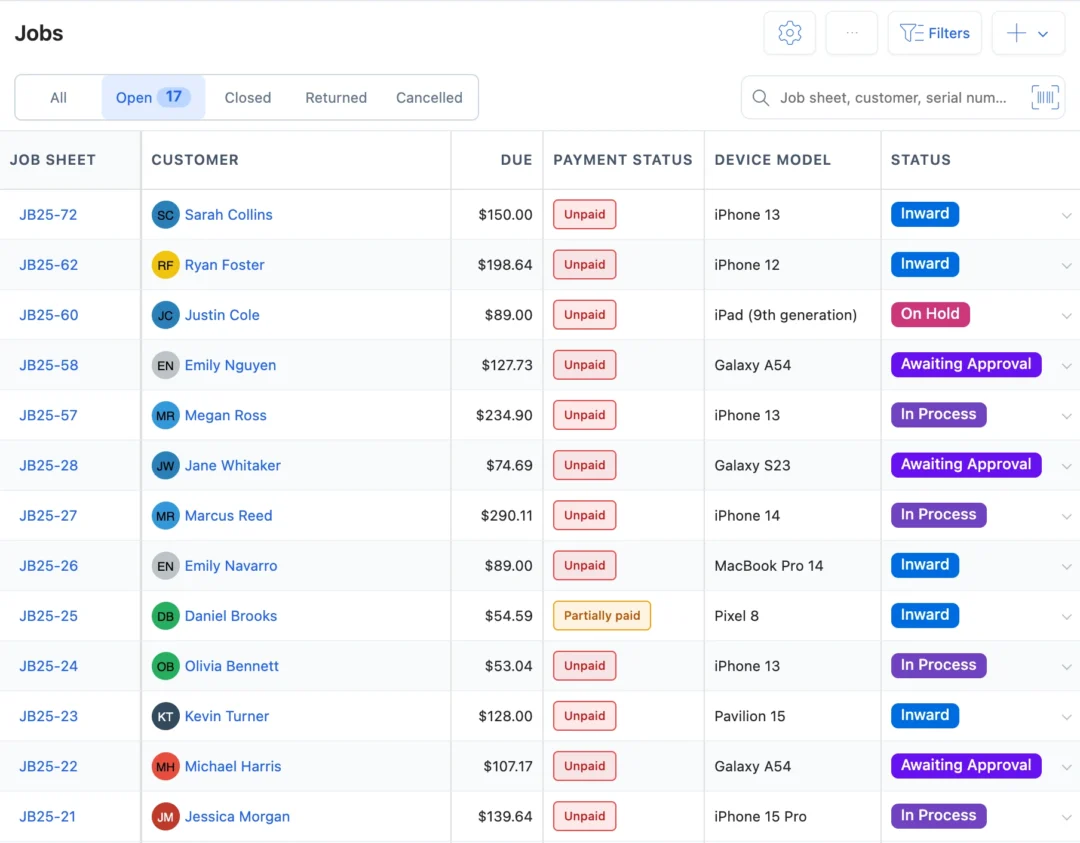
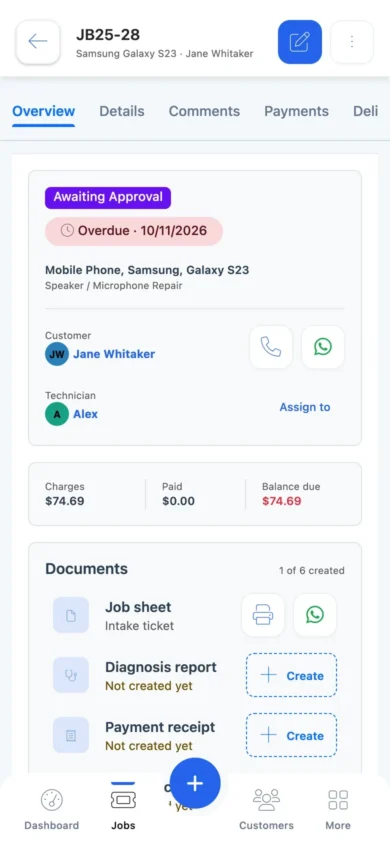
BytePhase is cell phone repair shop software that checks in each phone with its IMEI and condition photos, sends the quote for the customer to approve, fits parts from stock and hands the phone back with a one-time code. Your technicians work the same tickets in native Android and iPhone apps.
- IMEI typed or scanned on every job
- Customer approves the quote from a link
- Email, SMS or WhatsApp in one tap
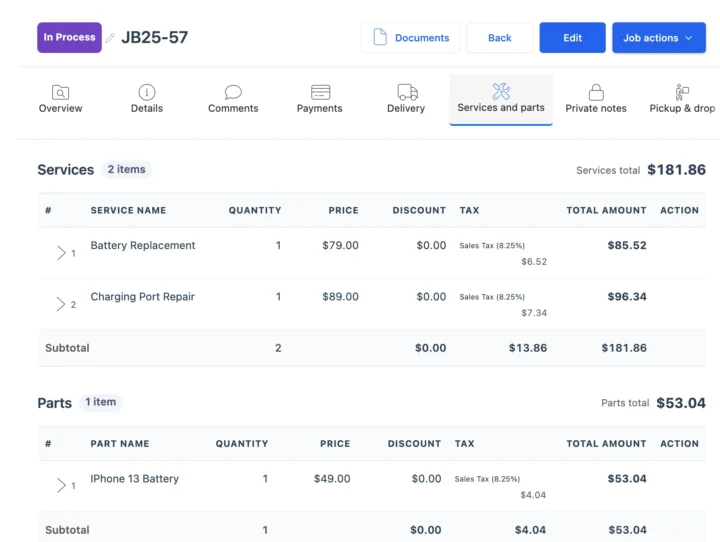
- Parts and billing on the same job
15-day free trial · 30-day money-back guarantee
“BytePhase is a future for repair shop management or the repair industry. They have crafted the UI very beautifully.”
How a phone repair moves through BytePhase
Eight steps, one ticket. In BytePhase’s cell phone repair shop software, everything the counter, the bench and the customer need stays on the same job.
- 1
Check in the phone
Customer, model, IMEI typed or scanned, accessories, colour and the pattern lock. BytePhase warns you if another open job has the same IMEI. - 2
Record its condition
Photos from the counter phone or a webcam, a pre-repair checklist and the customer’s signature on the job sheet. - 3
Diagnose the fault
Add the fault and a diagnosis report. The job sheet prints on A4 or a 58 mm or 80 mm thermal printer. - 4
Quote and get approval
Send the quotation. The customer approves or rejects it from the link, and the job can move to the next status on its own. - 5
Assign the technician
Pick who works on it. They get a phone alert and open the job in the BytePhase app. - 6
Fit the parts
The part comes off stock and goes on the bill. Not in stock? Set your own status, such as Waiting for parts. - 7
Keep the customer updated
Each status change can go by email or SMS, or on WhatsApp in one tap, with a link to the job. - 8
Take payment and hand over
Invoice from the job, record the payment, and confirm the handover with a 6-digit code.
Situations every phone shop knows
Five moments where cell phone repair shop software saves a phone call, a lost part or an argument at pickup.
“Is my phone ready?”
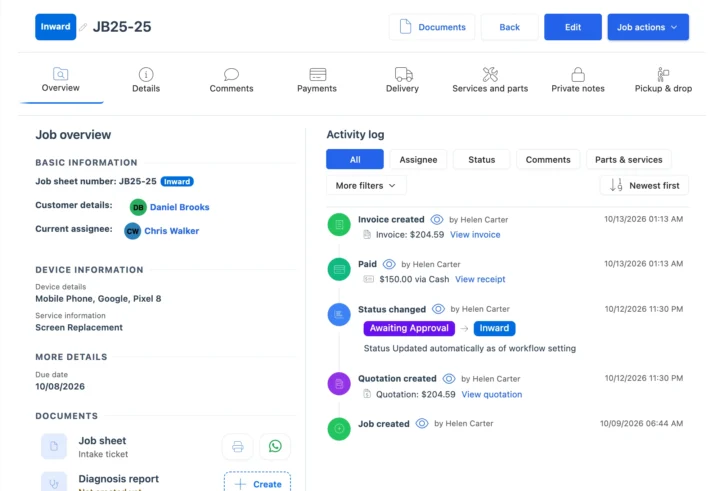
The customer opens the tracking link from their last update and sees the status and the job sheet. At the counter, search by IMEI, job number or mobile number. Repair trackingThe repair is waiting for the customer’s OK
Send the quotation link. When they approve, the job moves on and the technician is alerted, without a phone call. QuotationsThe technician needs a screen that is running low
The part’s stock shows on the job. Parts at their low stock level are flagged on the dashboard, so the purchase from your supplier goes in on time. InventoryA dealer drops off 12 phones
Add Bulk Repair Job creates one job per phone for one customer. When the dealer pays once for several bills, one bulk payment settles them with one receipt. Bulk paymentsA board-level fault you send out
Outsource the job to a specialist with a delivery challan and follow it until the phone is back at your counter. OutsourcingCell phone repair shop software for tickets, parts and billing
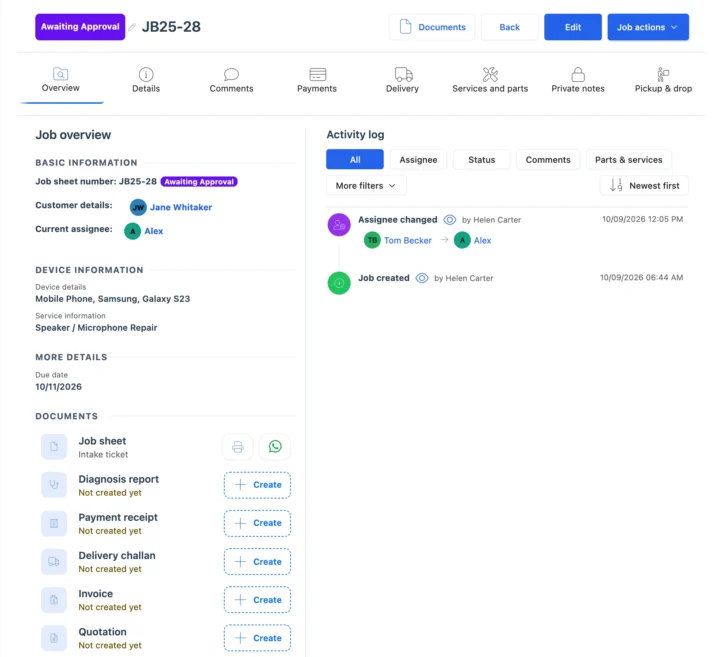
Every phone on one ticket
The ticket holds the customer, the model, the IMEI, accessories, the pattern lock, condition photos, the pre- and post-repair checklist and signatures. The activity log records who changed what and when, so a dispute at pickup is settled by the ticket, not by memory. See repair ticket management.
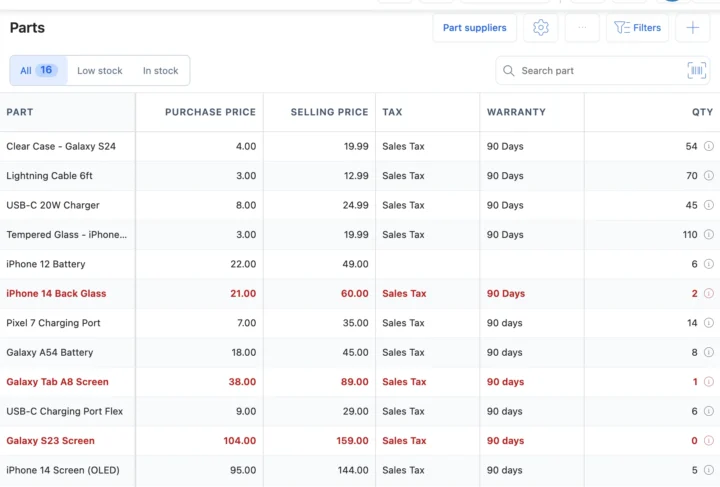
Parts and billing on the same job
In the cell phone repair shop software, screens, batteries and charging ports carry a purchase price, a selling price, tax and a warranty. Add one to the job and it comes off stock and onto the bill. Sell cases and chargers at the counter from the same inventory, and bill from the job or the point of sale.
Notebook, general POS or cell phone repair shop software?
| What you need to do | Notebook or spreadsheet | General POS or CRM | BytePhase |
|---|---|---|---|
| Find a phone by IMEI, job number or the customer’s mobile number | Page through by hand | Sales records only | Search every job; warning when an IMEI already has an open job |
| Prove the phone’s condition at check-in | A note, if someone wrote one | Not part of a sale | Photos, checklist and signature on the ticket |
| Get the customer’s OK on the price | A phone call | Not built for it | Quotation link; the answer is saved and the job moves on |
| Know which technician has which phone | Ask around the bench | No repair stages | Assignee, due date and status on every job; technician app |
| Bill the parts you fitted | Remember them at the end | Sold as separate items | Parts on the job come off stock and onto the invoice |
| Tell the customer it is ready | Call them | Marketing messages | Email, your own SMS or WhatsApp in one tap, with a tracking link |
Screen, battery and warranty repairs
The jobs that fill a phone shop’s day, and what the cell phone repair shop software records for each.
Walk-in screen replacement
Quote, approval, the screen from stock, a post-repair checklist and the OTP handover, all on one ticket.Battery replacement
The battery’s part warranty, for example 90 days, sits on the part and prints on the bill.Warranty repairs
Mark the job type as a warranty repair; the customer’s Jobs tab shows the original repair.Waiting for a part
Add your own status, such as Waiting for parts, so the counter and the customer’s tracking page show it.Your currency, your tax and the messages you already use
Price repairs and parts in your operating currency with your tax name and rate. Send updates by email, by SMS through your own Twilio or BulkGate account, or on WhatsApp in one tap, and sync invoices to QuickBooks or Xero.
Getting your phone shop set up
Moving to new cell phone repair shop software should not mean typing everything in again.
- 1
Pick phone repair
The setup wizard asks what you repair and which devices, and sets up your device types to match. - 2
Bring your data across
Import customers, parts and device brands and models from a spreadsheet. Jobs still open in your old system are added as new jobs. - 3
Add your team
Add or import your staff and choose what each person can see and do. See permissions. - 4
Check in the first phone
Create the first job and send the customer their first update. See the quick-start guide.

Mobile repair shop software questions
Cell phone repair shop software runs a phone repair business: it logs each phone with its IMEI, tracks the repair and the parts used, keeps the customer updated and bills at the counter. BytePhase does this on the web and in native Android and iOS apps.
Yes. The customer’s profile has a Jobs tab with every repair you have logged for them, and you can search jobs by IMEI or serial number. When you scan an IMEI on a new ticket, the cell phone repair shop software warns you if another open job has the same number.
Yes. Add Bulk Repair Job creates one job per device for a single customer. When the dealer pays one amount against several bills, Bulk payment links it to each bill and prints one receipt.
Invoices use your currency and your tax, whether sales tax, VAT or GST, and can sync to QuickBooks or Xero.
Yes, there are native Android and iPhone apps, with no per-device fee. They need an internet connection. If the connection drops, the app shows it, and your saved data stays safe on the server.
On every repair, yes: type or scan the IMEI on the ticket and search by it later. Parts stock is counted by quantity, not by IMEI, and BytePhase does not check blacklists.
Yes. Send the quotation; the customer opens the link and taps Approve or Reject. BytePhase saves the answer with the time and can move the job to the next status for you.
Each status change can go by email, by SMS through your own provider, or on WhatsApp in one tap. The message carries a link to the job.
Yes. Import customers, parts and device brands and models from a spreadsheet into the cell phone repair shop software, and add or import your staff. Jobs that are still open in your old system are added as new jobs.
You can keep more than one business in one BytePhase account, each with its own GST or tax details, numbering and stock. For several locations of the same shop, see multi-branch repair shop software.
Support comes by 24/7 AI chat, email, support tickets and callback requests, and your counter and bench staff can join free training sessions. Book a demo to see the cell phone repair shop software before you start.
Run your phone repair shop from one system
Try the cell phone repair shop software on your own repairs: check in your next phone with its IMEI and send the customer their first update.
15-day free trial · 30-day money-back guarantee
Last updated: 30 October 2026