
Jewelry Repair Shop Software
BytePhase is jewelry repair software for the counter and the bench: photograph every ring, chain and earring at intake, print a job sticker for its envelope, send the quote for the customer to approve and hand the piece back with a one-time code. This jewelry repair shop software runs on the web and in native Android and iOS apps.
- Photos and a checklist at intake
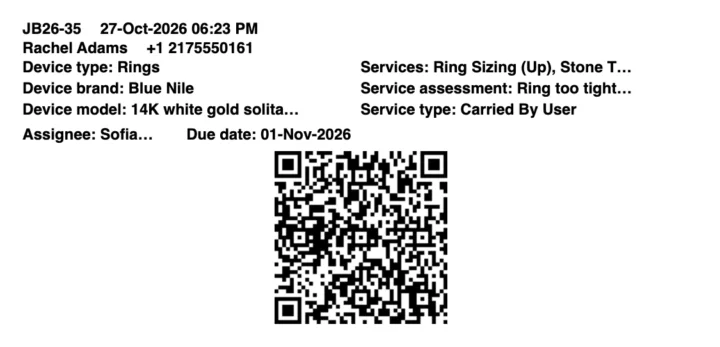
- A job sticker for every envelope
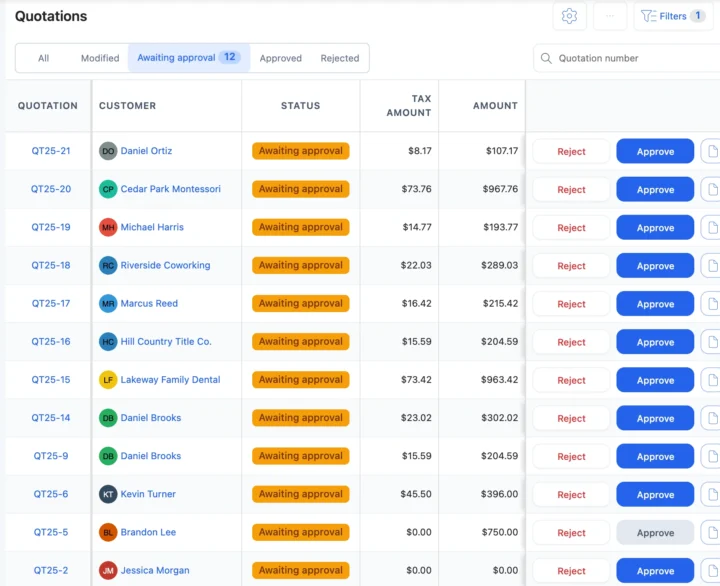
- Quotes the customer approves from a link
- OTP and signature at handover
15-day free trial · 30-day money-back guarantee
“BytePhase is a future for repair shop management or the repair industry. They have crafted the UI very beautifully.”
How a jewelry repair moves through BytePhase
Eight steps, one ticket. With jewelry repair shop software the photos, the quote, the outside setter and the signed handover all stay on the same job.
- 1
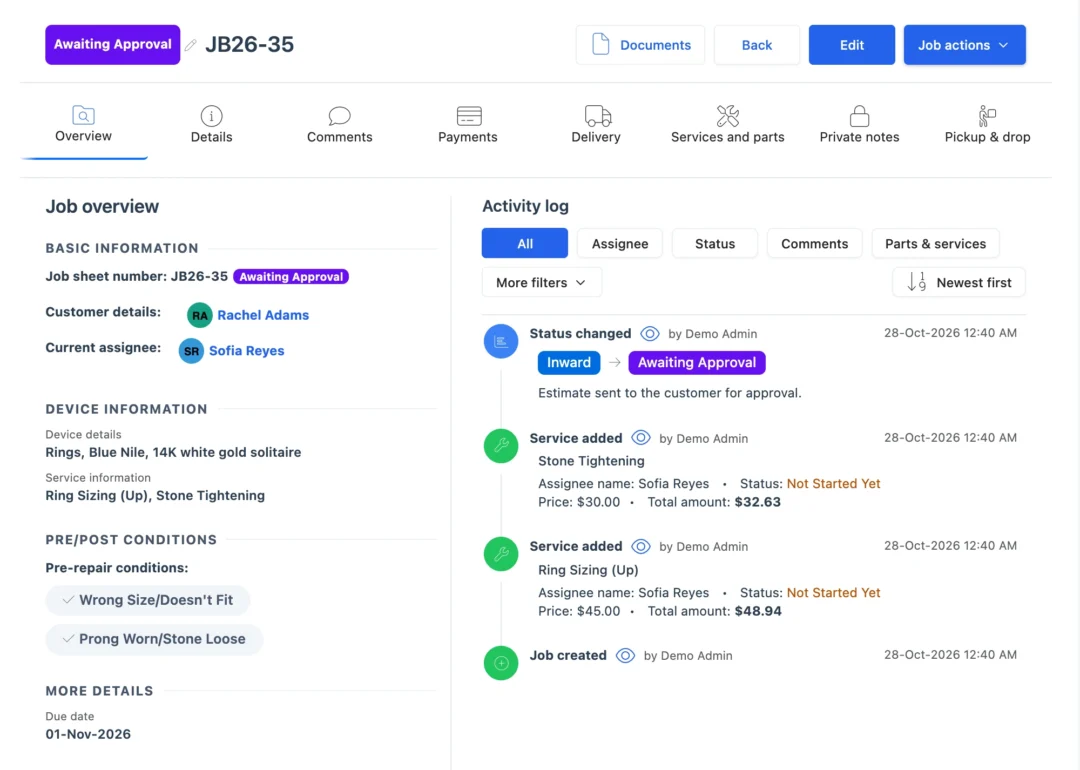
Take the piece in
Customer, item type, a description, a reference number if it has one, and where it is kept: safe, tray or drawer. - 2
Photograph and check it
Photos from every side, a pre-repair checklist such as “All stones secure” and “Clasp locks properly”, and the customer’s signature. - 3
Sticker on the envelope
Print a job sticker at intake, so the envelope or tray carries the job number from the counter to the bench. - 4
Quote and approval
Send the quotation. The customer approves or rejects it from the link before you cut a shank or order a stone. - 5
Bench or outside setter
Assign the jeweler, or outsource stone setting or engraving to a specialist with a delivery challan and follow it back. - 6
Findings and parts
Clasps, jump rings and watch batteries come off stock by quantity and onto the bill. - 7
Tell the customer
Each status change can go by email or SMS, or on WhatsApp in one tap, with a link to the job. - 8
Hand over with a code
Invoice from the job, record the payment, and release the piece only with the 6-digit code and the customer’s signature.
Moments every jewelry counter knows
Five moments where jewelry repair shop software settles a question before it turns into a dispute.
“Was that stone already loose?”
Open the intake photos and the signed checklist on the ticket, recorded before anyone touched the piece. Condition photosThe quote is ready and the customer is away
Send the quotation link. They approve from their phone, and the answer is saved with the time. QuotationsA ring goes to an outside setter
Outsource it with a delivery challan and follow it until the ring is back in your safe. OutsourcingTwo billing names under one roof
Keep more than one business, GST and non-GST, in one account, each with its own numbering and invoices. Multiple businessesA relative collects the engagement ring
The 6-digit code goes to the customer by SMS and email. Whoever collects must give it, and signs for the ring. OTP for deliveryJewelry repair tracking software from drop-off to pickup
Jewelry repair shop ticketing for sizing, retipping and plating
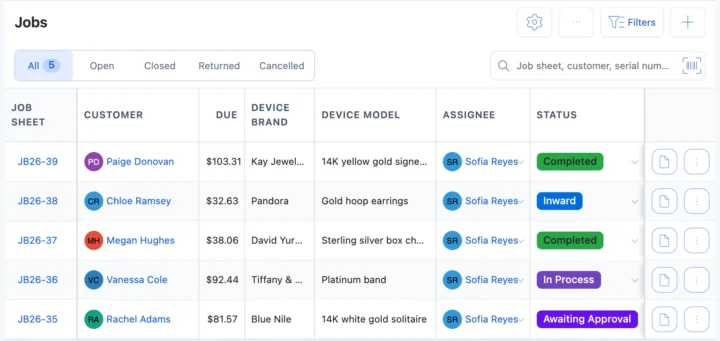
Pick Jewelry Repair at sign-up and rings, necklaces, bracelets, earrings, pendants, brooches, watches and body jewelry arrive as item types, with about 100 services such as ring sizing, prong retipping, rhodium plating, stone tightening, pearl restringing and laser welding. Each ticket keeps condition photos, the checklist, the storage location, the estimated delivery date and a status you name. See repair ticket management.
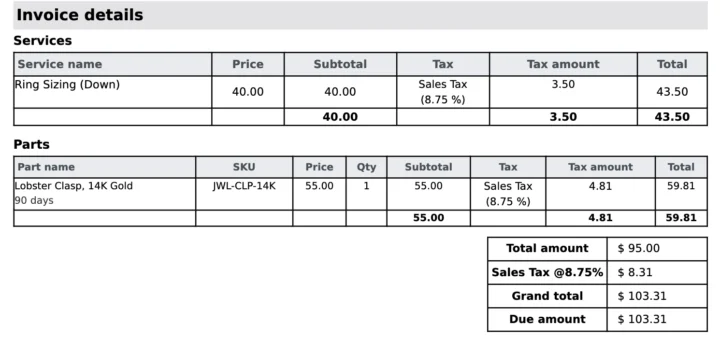
Jewelry repair invoices and counter sales
Bill from the job with your tax, or sell findings and watch batteries at the counter. Parts are counted by quantity, and those at their low stock level are flagged in the list and on the dashboard. See inventory and the point of sale.
Envelopes, a jewellery POS or jewelry repair software?
| What you need to do | Notebook or spreadsheet | Jewellery retail POS | BytePhase |
|---|---|---|---|
| Find a piece by job number or customer | Search the envelope drawer | Sales records only | Search every ticket by job number, customer or mobile number |
| Prove a stone was loose at intake | A note on the envelope | Not part of a sale | Photos, checklist and signature on the ticket |
| Agree the price before work starts | A phone call | Not built for it | Quotation link; the answer is saved with the time |
| Follow a ring at the outside setter | A note in the diary | Not built for it | Outsourced job with a delivery challan |
| Release the piece to the right person | Check the slip | A receipt | 6-digit code and signature at handover |
| Tell the customer it is ready | Call them | Marketing messages | Email, your own SMS or WhatsApp in one tap, with a tracking link |
Ring sizing, retipping and chain repairs
The jobs that fill a jewelry bench, and what BytePhase records for each.
Ring sizing
Size up or down from the template services, with photos before and after on the ticket.Prong retipping
Stones checked at intake, the quote approved, and the checklist ticked again before pickup.Chain and clasp repair
The new clasp comes off stock and goes on the bill with its price and tax.Watch batteries at the counter
Sell a battery at the counter or open a job; full watch work fits the watch repair template.Your currency, your tax and the messages you already use
Price repairs and findings in your operating currency with your tax name and rate. Send updates by email, by SMS through your own provider, or on WhatsApp in one tap, and sync invoices to QuickBooks or Xero.
Jewelry software setup and support
Moving to new jewelry repair shop software should not mean typing everything in again, and support is there while you switch.
- 1
Pick Jewelry Repair
The setup wizard loads item types, about 100 services, checklists and terms such as an appraisal disclaimer and a heirloom pieces policy. - 2
Bring your data across
Import customers, parts, staff and item types from a spreadsheet. Old tickets are not imported; open jobs are added as new jobs. - 3
Add your team
Add your staff and choose what each person can see and do. See permissions. - 4
Take in the first piece
Create the first ticket with photos and print its sticker. See the quick-start guide.

Jewelry repair software questions
It runs a jewelry repair counter: it logs each piece with photos and a checklist, tracks the repair, the outside work and the parts, keeps the customer updated and bills at the counter. Jewelry repair software like BytePhase also tags every envelope with a job sticker.
The price for your country is on the pricing page. You can start with a 15-day free trial, and you are covered by a 30-day money-back guarantee.
Yes, in one tap: BytePhase writes the update and opens WhatsApp. Email and SMS through your own provider work too.
Your data is encrypted (AES-256) in its own database, backed up daily and protected by two-factor login, and you choose what each person can see. White label lets you run BytePhase on your own domain.
Yes. Import customers, parts, staff and item types from Excel or CSV yourself; jobs still open in the notebook are added as new jobs. Free training sessions help with setup, and support comes by 24/7 AI chat, email, support tickets and callback requests.
Photos and a signed checklist at intake, a sticker on the envelope, a storage location on the ticket, an approved quote before work, and release only with the 6-digit code and the customer’s signature.
There are native Android and iPhone apps with no per-device fee, so staff take photos, update statuses and hand over pieces from a phone. The app needs an internet connection.
Yes. Set your operating currency and your tax name and rate, whether sales tax, VAT or GST, and sync invoices to QuickBooks or Xero.
Yes. Send the quotation; the customer taps Approve or Reject from the link, and BytePhase saves the answer with the time.
Yes. Keep more than one business in one BytePhase account, each with its own GST or tax details, numbering and invoices.
Run your counter on jewelry repair shop software
Try the jewelry repair shop software on your own pieces: take in your next ring with photos and print its sticker.
15-day free trial · 30-day money-back guarantee
Last updated: 30 October 2026