The Digital Front Door: How Online Booking & Self-Service Can Fill Your Repair Queue

Imagine a customer in Pune searching “computer repair near me” at 10 PM. They find your shop and want to book, but your only booking channel is a phone number they cannot call until morning. By then they have booked with a competitor that offers online repair booking.
In short: a good online repair booking system lets a customer send the device, the fault and their contact details from a phone at any hour, confirms it is a real person, alerts your team and turns the request into a repair job without anyone retyping it. A plain appointment widget books a time. Repair shop software with a built-in booking or intake form also carries the details through to the job, the estimate, the invoice and the status updates.
Want the booking form and your repair queue in one place? BytePhase’s online self check-in form gives you a shareable link, and reception turns each request into a repair job with the details already filled in.
What a good online repair booking system must do
Whichever tool you shortlist, whether a booking widget or full repair shop software, judge it against these eight points. They come from how repair counters actually work, not from a feature list.
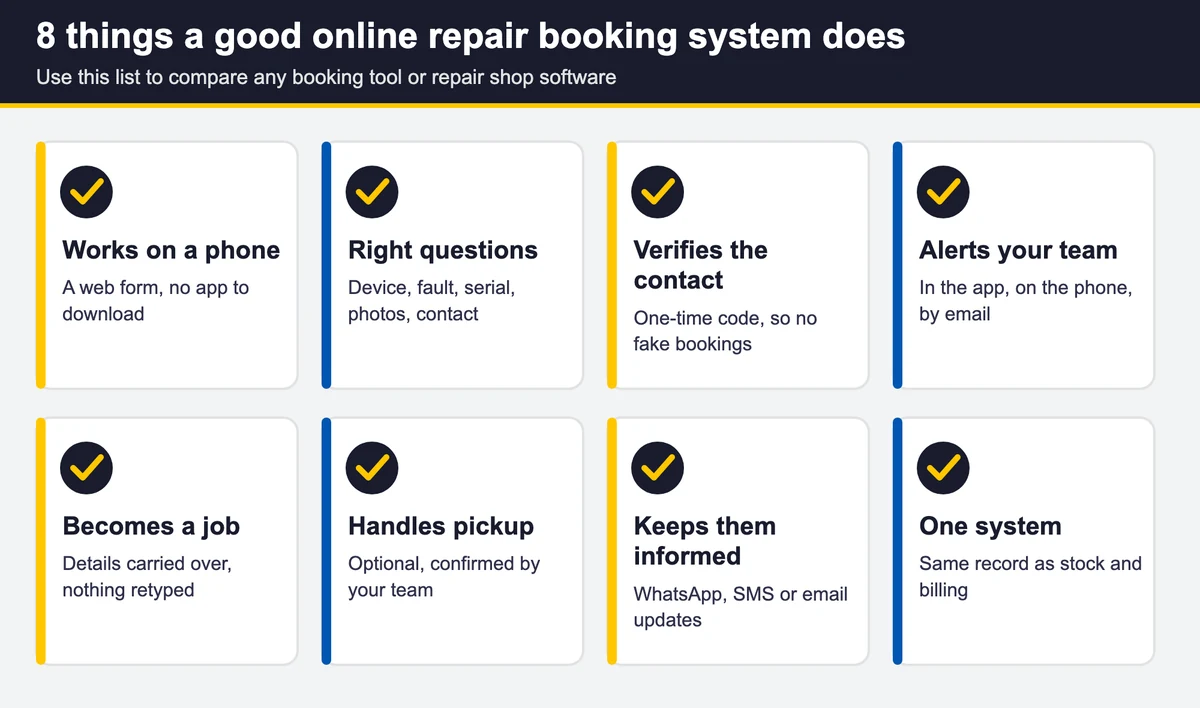
- Works on a phone, with no app for the customer. Most people will book from a phone, so the form must be a normal web page behind a link you can put on your website, Google Business Profile or WhatsApp.
- Asks repair questions, not generic ones. Device type, brand, model, serial number, accessories, a description of the fault and contact details. Photos of the condition are a bonus: they settle “it was already scratched” arguments later.
- Verifies the contact. A one-time code to the customer’s mobile or email stops fake and mistyped bookings before they reach your team.
- Alerts your team at once. A booking nobody notices is the same as a missed call. Look for an in-app alert, a phone notification and an email.
- Becomes a repair job without retyping. If staff copy the booking into another system, you have only moved the typing, not removed it.
- Handles pickup if you offer it. Optional, and confirmed by your team, so customers cannot book a pickup you cannot serve.
- Keeps the customer informed afterwards. Status updates by WhatsApp, SMS or email cut the “is it ready yet?” calls.
- Lives in the same system as stock and billing. A separate calendar app plus separate invoicing creates a second place to check and a second place for mistakes.
Booking widget or repair shop software with a booking form?
These are the two kinds of tool you will meet. Neither is wrong; they suit different shops.
| Point | Generic booking widget | Repair shop software with a booking form |
|---|---|---|
| What the customer submits | Name, contact, a time slot | Device, fault, serial number, photos, optional pickup |
| After the booking | Staff re-enter it into the job system | The request becomes a repair job |
| Status, estimates, invoices | Handled elsewhere | Same record as the job |
| Best for | Shops that only need a calendar | Shops that want intake, jobs and billing connected |
Why phone-only booking costs you jobs
The phone still has its place, but as the only door it leaks work.
- Lost after-hours demand. Customers search in the evening, when you are closed. If they cannot book then, many will not try again tomorrow.
- Staff time on basic questions. “Are you open?” and “How much for a screen?” take a counter person away from repairs and from customers in the shop.
- Incomplete information. A phone call rarely captures the exact model and fault, so diagnosis and part sourcing start from zero when the customer arrives.
How online repair booking works in BytePhase
BytePhase’s online repair booking system is called self check-in. It is part of the repair shop software, so a request goes straight into the same system as your jobs.
- You share one link. Put it on your website, Google Business Profile, WhatsApp or social pages. Customers open it in a browser on their phone or computer, with nothing to install.
- The customer fills in the form. Repair or data recovery, device type, brand, model, serial number, accessories, a description of the problem, their name, mobile number, email and address, plus optional photos.
- A one-time code verifies them. It goes to their mobile or email, and the request is submitted once the contact is verified.
- Your team is alerted. The request appears in your Self Check-In list, and the default reception user is notified in the app, on their phone and by email.
- You create the job. Reception reviews the request and opens a repair job with the device and fault already filled in. The customer record is created if the person is new.
If you collect devices from customers, the customer can also ask for a pickup. It must be scheduled at least 12 hours ahead and is arranged only after your team approves the request. A tracked pickup and drop process then handles the collection and return.
What happens after the booking
Because the request is now a normal repair job in the repair ticket system, the rest of the repair runs on the same record:
- Send the customer an estimate they approve from a link, which converts to the invoice with the same lines.
- Update them by WhatsApp, SMS or email as the job moves along.
- Take a customer signature and before and after photos, and hand the device back against a 6-digit OTP.
- Bill parts from stock and services as separate lines, with tax on each line.
What it does not do
Self check-in is a request-and-approve flow. The customer asks, and your team confirms. It collects a request and an optional pickup time; it does not reserve a counter slot on a fixed calendar. Availability also depends on your plan, so check the plan comparison before you promise it to customers.
How to roll out an online repair booking system
- Choose software that already holds your jobs. A repair shop system with intake built in beats a calendar app plus invoicing software, which creates two places to look and two places for errors.
- Put the link where customers already look. Your website home and contact pages, your Google Business Profile and your WhatsApp profile.
- Brief your team. Decide who checks new requests and how quickly you reply, then tell the team the form removes retyping rather than adding work.
Pre-filled bookings from your online repair booking system also make the day easier to plan. When the morning’s requests already list the device and fault, you can see which technician will be busy and which parts need to be on the shelf before the first customer arrives.
Walk-ins too: fixing the repair shop intake process
An online repair booking system helps customers who find you after hours. The repair shop intake process for walk-ins needs the same treatment, because that is where queues form at the counter.
Signs your intake is costing you jobs
- Check-in queues at peak hours while the front desk hand-writes tickets.
- Details copied from paper into the system, with the typos that follow.
- Customers arriving with no device or fault details, so diagnosis starts from zero.
- Staff spending the morning on phone bookings instead of repairs.
Let walk-in customers check themselves in
The customer opens the same link on their own phone, or on a tablet at the counter, enters the device, fault and contact details, and sends it. Nobody retypes anything, the queue shortens, and the technician gets a readable description of the fault instead of a one-line note. For a wider look at the benefits, see 10 reasons self check-in matters for your repair shop. If you run a phone or computer repair shop, see how BytePhase works for cell phone repair and computer repair shops.
The bottom line
An online repair booking system earns its place when it captures the repair details, verifies the customer and hands your team a ready-made job. Use the eight-point checklist above on any tool you consider, including ours.
Frequently asked questions
Because customers search after hours. A shop reachable only by phone loses the 10 PM “computer repair near me” searcher to a competitor with a booking form. Online booking captures the job while interest is highest, and it reaches your counter with the device and fault details already filled in.
It moves the first part of intake online. Customers describe the device and the problem themselves, verify their contact with a one-time code and send the request. Your team is alerted and turns it into a repair job, so the counter spends its time on repairs instead of intake questions and nobody retypes a note.
Keep the form short: device type, brand and model, a description of the fault, contact details and optional photos, followed by a one-time code to verify the contact. Then connect it to your shop software so a request becomes a repair job without retyping. BytePhase’s self check-in works this way, and an optional pickup can be requested for your team to approve.
No. With BytePhase the customer opens your self check-in link in a normal browser on their phone or computer. Only your team uses the BytePhase web, iOS or Android app, and there is no per-device limit.
The best one is the one that fits how you work. If you only need a calendar, a simple booking widget is enough. If you want the booking to become a job, an estimate, an invoice and status updates, choose repair shop software with a built-in booking or intake form, and test it against the eight-point checklist in this guide. BytePhase offers a 15-day trial so you can try the flow with your own devices.
Take bookings and run the repair from one place with BytePhase self check-in. Try it for 15 days or book a demo: