
Auto Repair Shop Management Software for Cars, Trucks and EVs
BytePhase is auto repair shop software built for the shop, not a generic CRM: repair orders for cars, trucks, motorcycles, EVs and hybrids, from oil changes and brake jobs to spark plugs, run from check-in to paid invoice. As shop management software it keeps the estimate the customer approves, the parts used and the technician on one repair order, in the browser and in native Android and iOS apps.
- Repair orders with condition photos
- Estimates the customer approves from a link
- Parts used costed on the job
- Service contracts for fleet customers
15-day free trial · 30-day money-back guarantee
“BytePhase is a future for repair shop management or the repair industry. They have crafted the UI very beautifully.”
How a car moves through your auto repair shop software
Eight steps, one repair order. The complaint, the inspection, the estimate, the parts and the payment stay together, so nothing depends on a paper job card.
- 1
Check the vehicle in
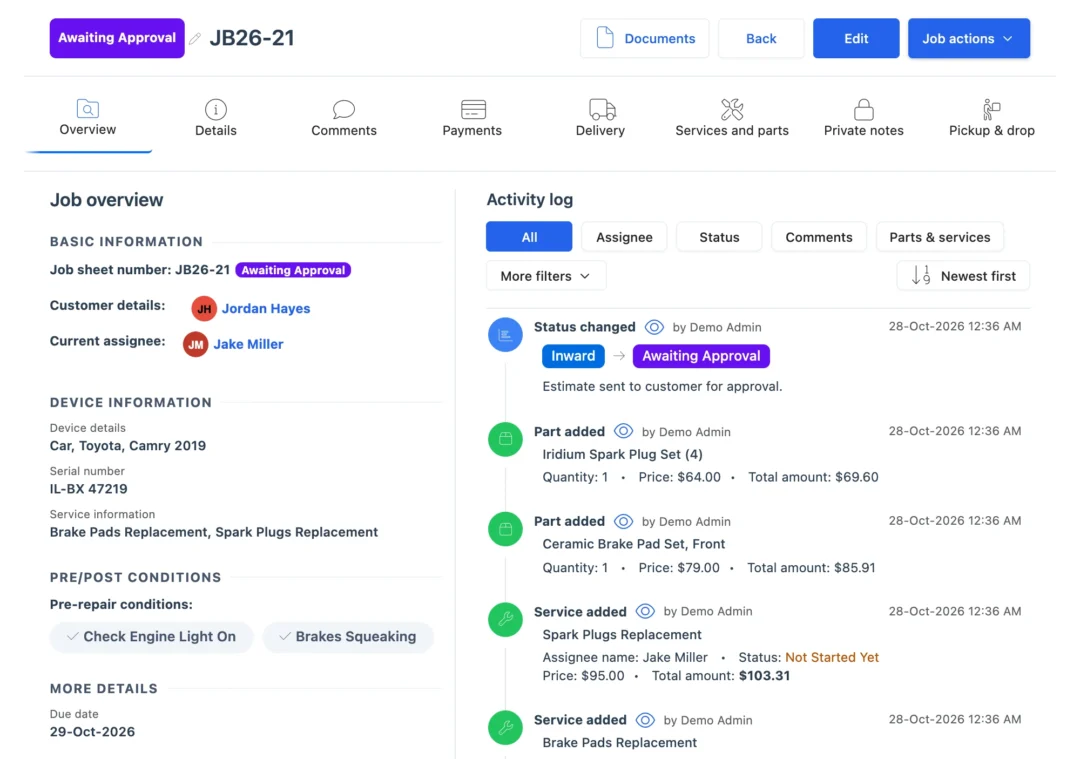
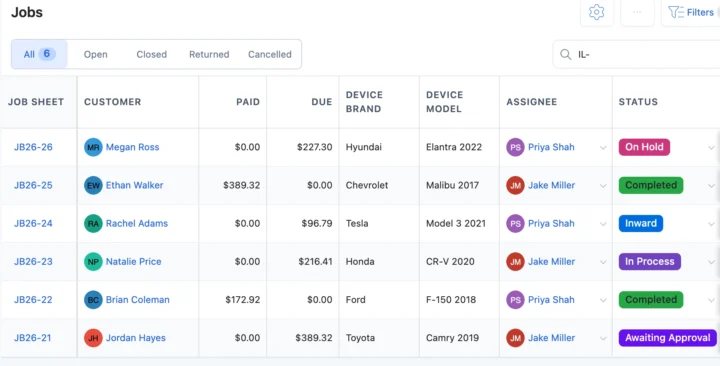
Customer, vehicle type, make and model, the plate or VIN typed into the serial field, and the complaint in the customer’s words. BytePhase warns you if another open job has the same number. - 2
Record its condition
A pre-repair checklist such as “Check Engine Light On” or “Brakes Squeaking”, photos from a phone or webcam, and the customer’s signature. - 3
Diagnose
Add what you found and the services the vehicle template loads, such as brake pads, alignment, AC recharge or a timing belt. - 4
Estimate and approval
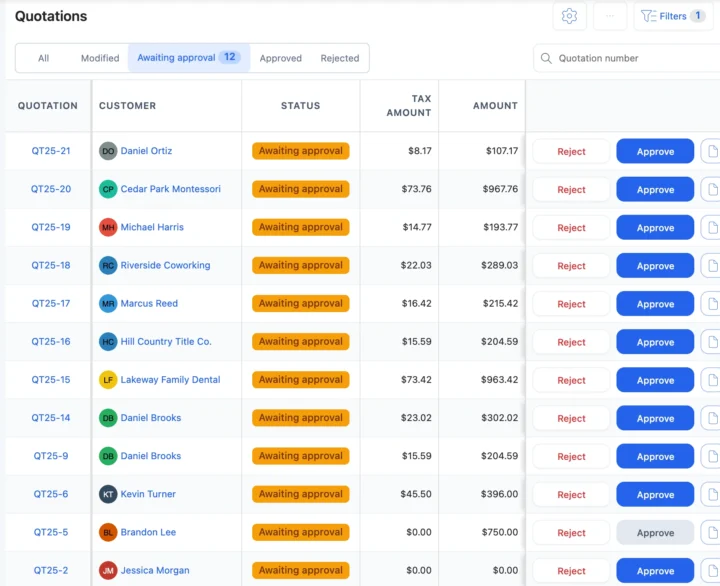
Send the estimate. The customer approves or rejects it from the link, and the answer is saved before work starts. - 5
Technician and parts
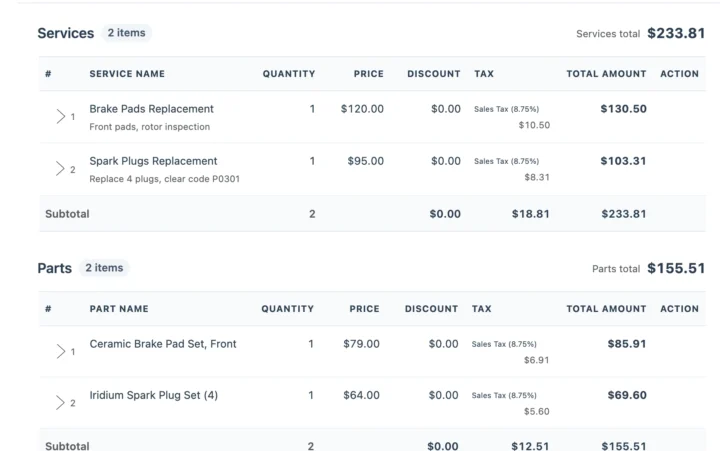
Assign the technician, who opens the repair order in the app. Pads, filters and plugs come off stock and onto the bill. - 6
Re-quote when it grows
Brake job turned into rotors? Update the estimate and send it again; work waits for the new approval. - 7
Keep the customer updated
Each status change can go by email or SMS, or on WhatsApp in one tap, with a link to the job. - 8
Invoice and hand over
Invoice from the repair order with your sales tax, record card or cash payment, and confirm the handover with a 6-digit code.
Days every service advisor knows
Six moments where automobile repair shop software saves a phone call, a lost part or an argument at pickup.
The brake job grows into rotors
Update the estimate and send the link again. The customer approves from their phone and the bay keeps working. QuotationsA fleet van is due its contract visit
Log the visit against the fleet’s service contract, assign a technician and keep the payments on the same record. AMC contractsThe customer can’t drop the car off
Schedule a pickup, assign who goes, and confirm the return with the 6-digit code. Pickup and dropBrake pads are running low
Parts at their low stock level are flagged in the list and on the dashboard, so the supplier purchase goes in on time. Inventory“Is my car ready?”
The customer opens the tracking link from their last update and sees the status and the job sheet. Repair trackingThe customer asks what the bill covers
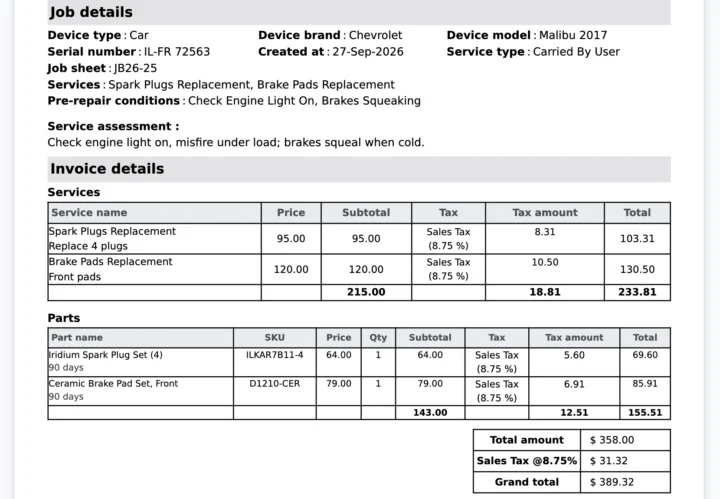
Labor, parts and sales tax print as separate lines on the invoice made from the repair order. auto repair invoice softwareRepair orders, parts and invoices in one auto shop management software
Repair orders with condition photos
Pick Vehicle/Auto Repair at sign-up and cars, motorcycles, trucks, SUVs, EVs and hybrids arrive as vehicle types, with services such as oil change, brake pads, tire rotation, alignment, AC recharge, transmission service, spark plugs and EV battery health check. Each repair order keeps condition photos, the checklist, signatures, the technician and a status you name. See repair ticket management.
Parts used, costed on every invoice
Brake pads, filters, 5W-30 and spark plugs carry a purchase price, a selling price, tax and a warranty. Used on a repair order they come off stock and onto the invoice; supplier purchases add stock and barcode labels print from the inventory. Bill from the repair order or the point of sale.
Vehicle repair shop software vs paper job cards or a general POS
| What you need to do | Notebook or spreadsheet | General POS | BytePhase |
|---|---|---|---|
| See a vehicle’s past repairs | Dig through old job cards | Sales records only | Every repair on the customer’s record; search by plate, job number or mobile |
| Get the customer’s OK on the estimate | A phone call | Not built for it | Estimate link; the answer is saved with the time |
| Cost the parts used on each job | Remember them at the end | Sold as separate items | Parts on the repair order come off stock and onto the invoice |
| Look after a fleet’s vehicles all year | A spreadsheet | No contracts | Service contract with vehicles, visits, complaints and payments |
| Know who is on which car | Ask around the bays | No repair stages | Technician, status and due date on every repair order; technician app |
| Tell the customer it is ready | Call them | Marketing messages | Email, your own SMS or WhatsApp in one tap, with a tracking link |
Oil changes, brake jobs and spark plug replacement
The jobs that fill a service bay’s week, and what BytePhase records for each.
Oil change and filters
The service from the template, oil and filter off stock, and the invoice ready at pickup.Brake pads and rotors
Inspection photos, an approved estimate and a re-quote by link if the rotors need replacing too.Spark plug replacement
Plugs priced by vehicle type, brand or model, off stock and on the bill.EV battery health check
EV and hybrid battery services sit in the same template as the everyday work.Your sales tax, your card payments and the books you already use
Invoices use your sales tax name and rate and your currency, payments by card or cash, and sync to QuickBooks or Xero. Send updates by email, by SMS through your own provider, or on WhatsApp in one tap.
Getting your auto shop set up
Switching from paper, a spreadsheet or another auto shop system should not mean typing everything in again.
- 1
Pick Vehicle/Auto Repair
The setup wizard loads vehicle types, common makes, services, parts and pre- and post-repair checks. Running a garage in the UK? See garage management software. - 2
Bring your data across
Import customers, parts, staff and vehicle makes and models from a spreadsheet. Old repair orders are not imported; open jobs are added as new jobs. - 3
Add your technicians
Add your team and choose what each person can see and do. See permissions. - 4
Check in the first car
Create the first repair order and send the customer their first update. Free training and a live demo are available. See the quick-start guide.

Auto repair shop software questions
Import customers, parts, staff and vehicle makes and models from Excel or CSV. The vehicle template is ready on day one, open jobs are added as new repair orders, and free training sessions are available.
Yes. Native Android and iPhone apps, with no per-device fee, let mechanics open their repair orders, add photos and update the status from the bay. The app needs an internet connection.
Your data is encrypted (AES-256) in its own database, backed up daily and protected by two-factor login. White label lets you run BytePhase on your own domain.
Yes, in one tap: BytePhase writes the update and opens WhatsApp. Email and SMS through your own provider work too, each with a link to the repair order.
Yes. Fleet customers go on service contracts with their vehicles, visits, complaints and payments. For more than one location, see multi-branch repair shop software; our team sets up branches with you.
No. You set your own service prices, and the vehicle template pre-loads common services. The plate or VIN is typed or scanned into the serial field and is searchable, but it is not decoded.
Yes. Each repair order works as a job card with the complaint, checklist, photos and signatures, and the estimate goes to the customer as a link to approve or reject.
It covers what a car repair shop runs on: repair orders, approved estimates, parts costed per job, technicians with an app, service contracts for fleets and customer updates. Try it on your own jobs with a 15-day free trial.
Vehicle check-in with condition photos, estimates the customer approves, parts tied to repair orders, technician assignment, customer updates, invoicing with your tax, and contracts for fleet customers.
It runs an auto repair shop: it logs each vehicle and its complaint, tracks the estimate, the parts and the technician, keeps the customer updated and invoices at the end, on the web and on a phone.
Run your auto repair shop from one system
Try the auto repair shop software on your own repair orders: check in your next car and send the customer their first update.
15-day free trial · 30-day money-back guarantee
Last updated: 1 November 2026