Data Recovery Management Software for Recovery Labs
BytePhase is data recovery management software for recovery labs and repair shops: book in each drive with its capacity and serial numbers, record which of your backup drives holds the recovered data, send the diagnosis report and quote for approval, and let the customer confirm the recovered file list with a one-time code and a signature before handover. The recovery itself stays in your own tools; BytePhase runs the job around it.
- Recovery jobs with capacity and serials
- Backup drives with the space left
- Diagnosis report, then quote approval
- File list confirmed by the customer
15-day free trial · 30-day money-back guarantee
“Bytephase is a value-for-money tool for the professional in the repair business. The staff is willing and listens to the customers and they improve over time.”
How a recovery job moves through a lab
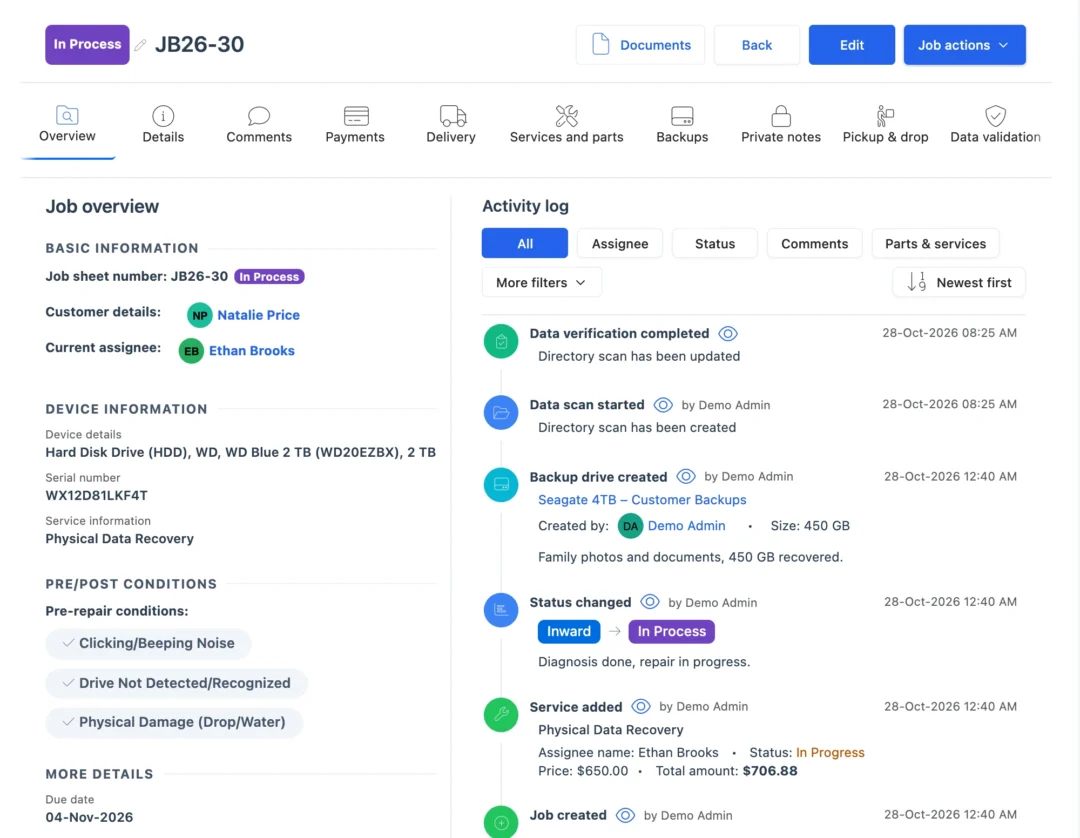
As a recovery management platform for labs, BytePhase keeps the drive, the diagnosis, the customer’s approval, the backup and the sign-off on one job, so nobody asks which drive holds whose data.
- 1
Book in the drive
Customer, media type, brand and model, serial number, the capacity in GB or TB, and a second serial such as the PCB number when you need it. - 2
Record its condition
Photos and a pre-check list, with the customer’s signature on the job sheet and your terms, such as a data-loss disclaimer, printed on it. - 3
Write the diagnosis report
Note what you observed, add your notes and terms, and print it with signature boxes or send it by email, SMS or WhatsApp. - 4
Quote and get approval
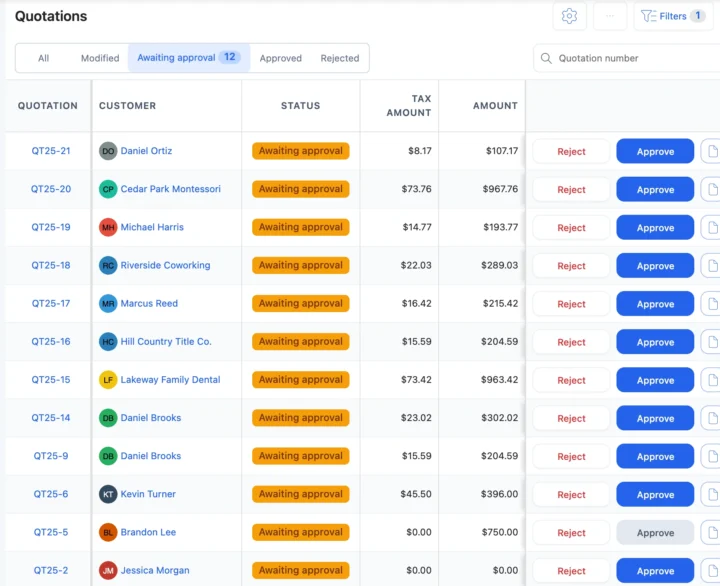
Send the quotation. The customer approves or rejects it from the link, or you record their answer. - 5
Recover or send it out
Your engineer works the job in your own recovery tools. A drive that needs clean-room or chip-off work goes to a partner lab with a delivery challan. - 6
Record the backup
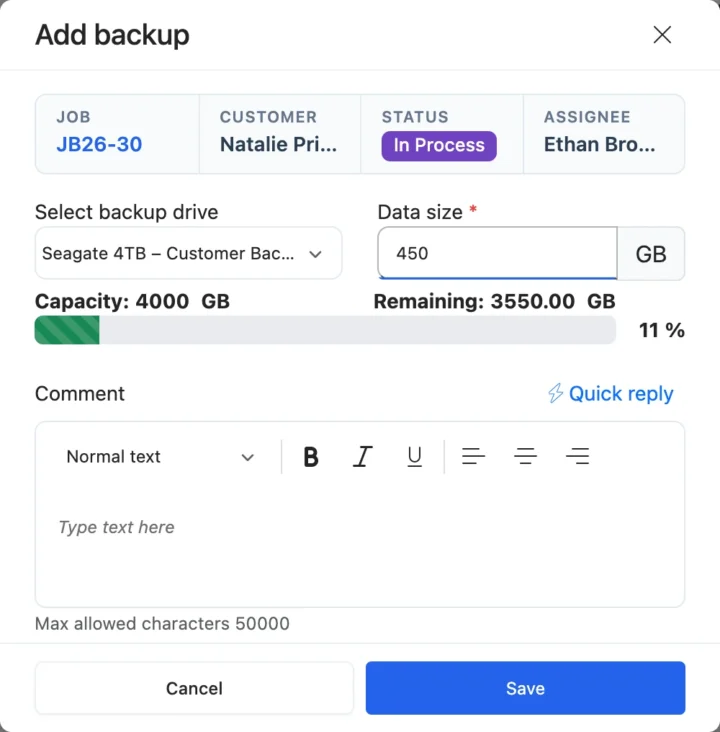
Pick the backup drive, enter the data size and a comment. BytePhase shows the drive’s capacity and the space left, and warns you when there is not enough. - 7
Let the customer verify the files
The lab PC scans the recovered folder; the customer checks the file list from a secure link and confirms with a code sent to their email and a signature. - 8
Take payment and hand over
Invoice from the job, record the payment, and release the drive with a 6-digit handover code.
Situations every recovery lab knows
Five moments where data recovery management software keeps each customer’s data accounted for.
“Which drive has my photos on it?”
Open the job’s Backups tab: the backup drive, the data size and who saved it are on record. Backup drivesA clicking drive that needs a clean room
Outsource the job to a partner lab with a delivery challan and follow it until the drive comes back. OutsourcingThe customer wants a price before you start
Send the diagnosis report and the quotation, and start only when they approve from the link. Quotations“Is everything I need actually there?”
Send the recovered file list for the customer to check and confirm with a code and a signature before they pay. Signature captureA drive arrives by courier from another city
Log it as a courier job, or schedule a pickup and drop, and keep the customer updated at each status. Pickup and dropRecovery lab management software for the counter and the bench
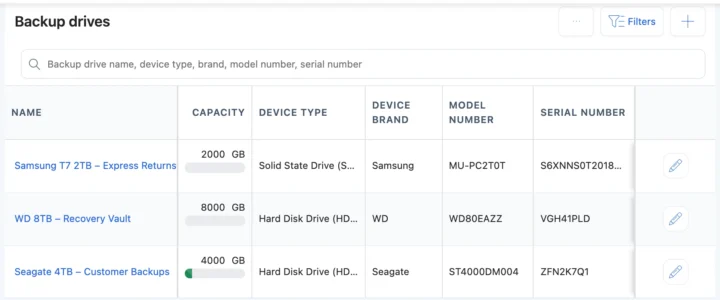
Backup drives: know where every customer’s data sits
Add each of your backup drives to the data recovery management software with its type, brand, capacity and serial. When you record a backup on a job, BytePhase shows the space left and warns you when there is not enough, and the job’s Backups tab lists every backup with its drive, size and who saved it. See repair ticket management and the recovery jobs guide.
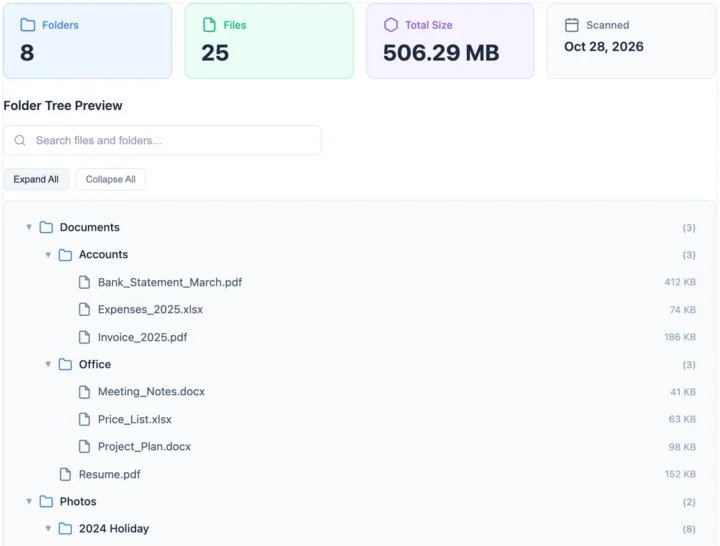
Recovered-file verification before the customer pays
On the lab PC, the BytePhase desktop agent scans the folder of recovered data and saves the file list on the job. The customer opens a secure link, checks the files, confirms with a 6-digit code sent to their email and signs, and BytePhase saves a reference ID with the job. Every milestone, from book-in and diagnosis to verified handover, is on record in the data recovery management software. See signature capture and OTP for delivery.
A recovery management platform vs spreadsheets
| What you need to do | Notebook or spreadsheet | General CRM | BytePhase |
|---|---|---|---|
| Know which backup drive holds a customer’s data | Labels on the drive and a sheet | Not built for it | Backup drive, data size and who saved it, on the job |
| Record the media’s capacity and serials | A column, if someone filled it | A free-text note | Capacity, serial and a second serial such as the PCB number |
| Agree the price before recovery | A phone call | An email thread | Diagnosis report and a quotation approved from a link |
| Prove the customer saw the recovered files | A file list on WhatsApp | Not built for it | File list confirmed with an email code and a signature |
| Send a drive to a clean-room partner | A note in the diary | Not built for it | Outsource with a delivery challan and track it back |
| Release the drive to the right person | Trust the face | No handover step | 6-digit code by email, or SMS on your provider |
Hard drives, SSDs, phones and RAID
The media a recovery lab takes in, and what the data recovery management software records for each.
Failed hard drives
Capacity, serial and PCB number at book-in, a diagnosis report, and the backup drive that holds the recovered data.SSDs and NVMe drives
SSD and NVMe media types and brands come ready in the Data Recovery setup.Phones and memory cards
Book them in with the capacity, keep the passcode in private notes only your team sees, and verify the files before handover.RAID and NAS for business clients
One job per disk with a bulk repair job, and an outsourced job when the array needs a specialist.Your currency, your tax and the messages you already use
Price recovery work in your operating currency with your tax name and rate. Send updates by email, by SMS through your own provider, or on WhatsApp in one tap, and sync invoices to QuickBooks or Xero.
Setting up your recovery lab
Moving to new data recovery management software should not mean typing everything in again.
- 1
Pick data recovery
The setup wizard asks what you repair and loads media types, brands and models, from HDDs and SSDs to memory cards and NAS. - 2
Turn on recovery jobs
Choose Recovery Service or Both in the job service settings, then add your backup drives. - 3
Bring your data and team across
Import customers, parts, staff and device brands and models from a spreadsheet, and choose what each person can see and do. Old jobs are not imported. See permissions. - 4
Book in the first drive
Create the first recovery job with its capacity and send the customer their first update. See the quick-start guide.
Set up data recovery management software step by step
Short guides with screenshots in the BytePhase Help Center, checked against the app.

Data recovery management software questions
It is data recovery management software inside BytePhase: recovery jobs with the media’s capacity, backup drives that show where each customer’s data sits, diagnosis reports, quote approval, file verification and OTP handover. The recovery itself is done with your lab’s own tools.
Yes. In the data recovery management software, record each backup on the job with the backup drive, the data size and a comment. The drive shows its space left, and the job’s Backups tab lists who saved what.
Each status change can go by email, by SMS through your own provider, or on WhatsApp in one tap, with a link where the customer checks the job.
Yes. Invoice from the job in your currency and tax, record payments and send the receipt by email, SMS or WhatsApp in one tap.
With data recovery management software, the customer gets the diagnosis report, approves the quote from a link, follows the status and checks the recovered file list before paying, so fewer calls ask whether it is done yet.
The BytePhase desktop agent on your lab PC scans the recovered folder. The customer opens a secure link, checks the file list, enters a 6-digit code sent to their email and signs. A reference ID is saved on the job.
Your account data in the data recovery management software is encrypted (AES-256) in its own database and backed up daily. Staff sign in with two-factor login through an authenticator app, permissions decide who sees what, and the activity log records every change.
Yes. Book them in as recovery jobs with the capacity, keep the passcode in private notes, and hand over after the customer checks the files from a secure link and gives the handover code.
Yes. Outsource the job with a delivery challan, note the partner’s price, follow its status in the data recovery management software and carry on with the job when the drive comes back.
Support comes by 24/7 AI chat, email, support tickets and callback requests, and your team can join free training sessions on the data recovery management software. You can also book a demo before you start.
Run your lab on data recovery management software
Try the data recovery management software on your own jobs: book in your next drive with its capacity and send the customer their first update.
15-day free trial · 30-day money-back guarantee
Last updated: 30 October 2026