How to Choose Bike Shop Management Software: The 15-Point Checklist
Every bike shop hits the same wall around April: the tune-up queue is two weeks long, the tags on the handlebars are smudged, nobody remembers which customer approved the new drivetrain, and a pile of tubes and brake pads is running low. Picking bike shop management software at that point feels urgent, and it is easy to pick the wrong kind. This guide gives you a checklist to choose by, and the questions to ask any vendor before you pay.
In short: bike shop management software should run the workshop and the shop floor together. Look for service tickets that record each bike and its frame number, estimates the rider can approve, parts that leave stock when they are fitted, one bill for retail and repair, ready-for-pickup messages, rentals if you rent bikes, and mobile access for mechanics. Match the type of software to where your shop earns its money: a generic retail POS suits a counter-led shop, repair-shop software suits a workshop-led one. The 15-point checklist below covers it.
Already know you want a workshop-first tool? See our bicycle repair shop software page for how it works day to day. Read on if you are still comparing.
What a bike shop actually needs from bike shop management software
A bike shop is two businesses under one roof: a workshop that sells hours and parts, and a store that sells bikes and accessories. Bike shop management software built for only one of them leaves the other on paper. Before you compare products, write down which of these jobs hurt most today.
- The service queue. Every bike needs a ticket with the customer, the bike type, brand and model, the frame number, the fault and the mechanic. Without it, bikes get lost between the stand and the rack.
- Tune-up packages. Basic, standard and overhaul services should be set up once, with prices by bike type, instead of being worked out at the counter.
- The spring rush. When 30 bikes arrive in a week you need a fast intake, a due date on each job and a clear view of who is working on what.
- Parts and accessories stock. Tubes, chains, brake pads, lights, locks and helmets need quantities, a selling price and a low-stock warning, or you find out you are out of a part with the bike already on the stand.
- Retail and repair on one bill. A rider who buys a helmet and a service should pay once.
- Telling the rider it is ready. A text or email that goes out when the status changes saves the phone calls that interrupt your mechanics.
- Deposits and rentals. If you rent bikes or e-bikes you need to know which unit is out, what rent is due and whether a deposit is held.
- Reports. Sales, repairs completed, parts used and unpaid bills, without a spreadsheet at night.
Generic POS, repair-shop software or bike-specific bike shop management software?
There are three families of tools, and each is strongest in a different place. The card below is a rule of thumb, not a verdict on any single product: features differ, so test the actual product against your own list.
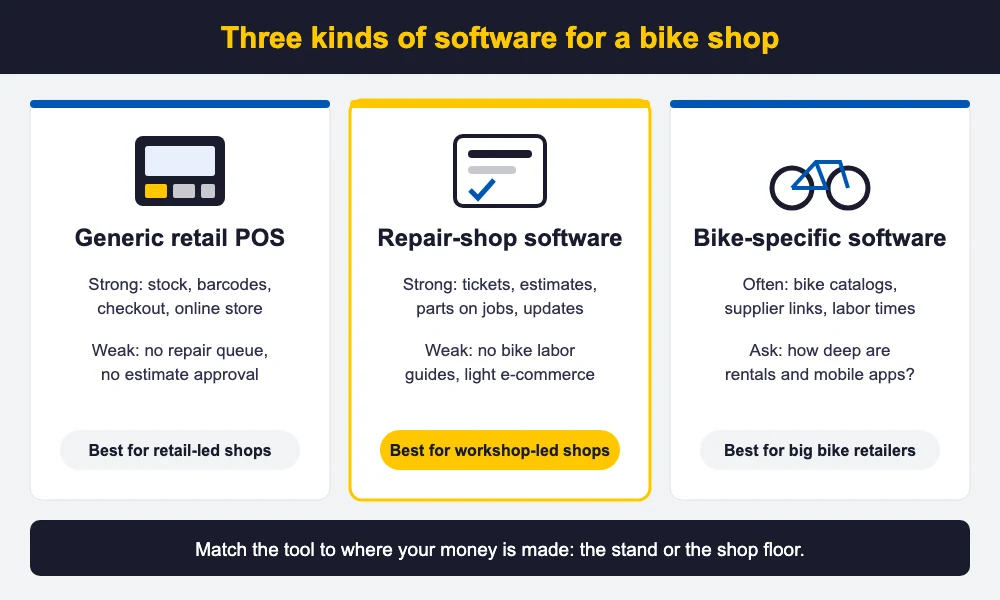
- A generic retail POS is excellent at checkout, barcodes, stock counts and often an online store. It usually has no repair queue, no estimate approval and no concept of a bike waiting on a part. Choose this if you sell far more than you service.
- Repair-shop software is built around the job ticket: intake, estimate, parts, status updates and the bill. It handles retail more lightly. Choose this if the workshop drives your income. Some repair-shop tools, BytePhase included, are not bike-specific, so check the bike details you need.
- Bike-specific software often adds bike catalogs, supplier ordering and labor-time guides, which suits larger retailers. Ask how deep its rentals, mobile apps and customer messaging go, and what you will pay in setup time.
The bike shop management software checklist: 15 points
Use these as a scorecard for any bike shop management software. Give each point 0, 1 or 2 during a trial, and compare totals rather than brochures.
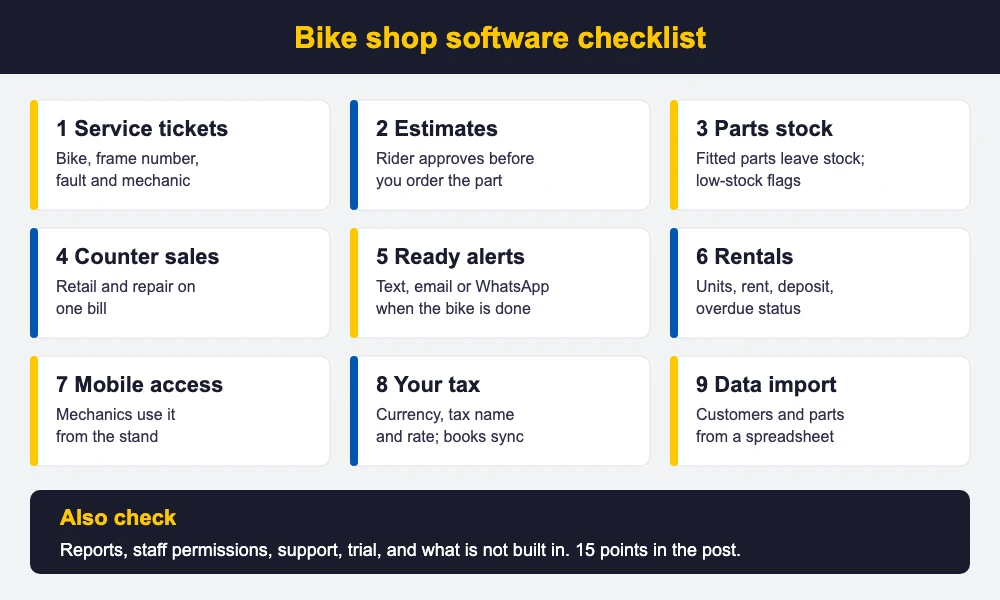
- Service tickets with bike details. Bike type, brand, model and frame number on every job. Ask: can I search by frame number, job number and customer phone?
- Condition at check-in. Photos, a checklist and a signature protect you from “that scratch was not there”. Ask: are photos and the signature stored on the ticket?
- Estimates with customer approval. Ask: does the rider approve from a link, and is the answer saved with a time?
- Tune-up packages and service prices. Ask: can prices differ by bike type, such as road, mountain or e-bike?
- The service queue. Status, mechanic and due date for each bike. Ask: can I set my own statuses, such as “Waiting for parts”?
- Parts and accessories inventory. Purchase price, selling price, quantity and low-stock alerts. Ask: do parts fitted on a job leave stock automatically?
- Retail POS and repair on one bill. Ask: can I sell a helmet and bill a repair to the same customer in one checkout?
- Customer notifications. Ask: which channels (email, text, WhatsApp), and does the message include a link to the job?
- Deposits and payments. Ask: can I record a deposit, cash or card payments and part payments?
- Rentals. Only if you rent. Ask: are rental units tracked separately, with rent, deposit and overdue status?
- Reports. Ask: what can I see for the day, month and mechanic, and can I export it?
- Mobile access for mechanics. Ask: is there a native app, is there a fee per device, and does it work offline?
- Your tax, currency and accounting. Ask: can I set my own sales tax or VAT rate, and does it sync with my accounting software?
- Getting your data in. Ask: can I import customers and parts from a spreadsheet, and what happens to my open jobs?
- Support, trial and exit. Ask: how long is the trial, who answers when something breaks, and can I export my data if I leave?
How to run the trial of bike shop management software
Do not test with sample data only. Take one real week: enter ten bikes through intake, send two estimates, fit parts from stock, bill one repair together with a retail item and send one “ready” message. Ask your busiest mechanic to use it from the stand. The product that disappears into your day is the one to buy.
Questions to ask any bike shop management software vendor
- Which of the 15 points above are built in, and which need a paid add-on or another product?
- What does not work yet, in your own words?
- Can I talk to a shop that has used it for a year?
- How do I move my customers, parts and open jobs in, and how long does it take?
- Where is my data kept, and can I export it?
- What happens to my bills and records if I stop paying?
A vendor who answers the second question plainly is usually one you can trust.
How BytePhase covers the bike shop checklist
BytePhase is bike shop management software in the sense of a repair-shop tool with a Bicycle Repair setup, used by 2,000+ repair businesses in 40+ countries on web, Android and iOS. Here is how it lines up with the checklist, and where it does not.
- Tickets and frame numbers. Each bike gets a ticket with bike type, brand, model and the frame number, typed or scanned. You can search by frame number, job number or the rider’s mobile number.
- Condition and approval. Photos at intake, a pre-repair checklist and the customer’s signature sit on the job. Estimates go out as a quotation link, and the rider approves or rejects it from there.
- Parts and billing. Parts carry a purchase price, a selling price, tax and a warranty. Fitted on a job, they come off stock and onto the bill, and low-stock parts are flagged. You can bill from the job or at the counter with the point of sale, and sell accessories from the same inventory.
- Updates. Status changes can go by email, by SMS through your own provider, or on WhatsApp in one tap, with a link to the job. Handover can be confirmed with a 6-digit code.
- Rentals. With device rental management you can list each e-bike with its serial number, monthly rent and security deposit, make a contract, and see it marked Overdue if rent stays unpaid.
- Mechanics’ apps. Native Android and iOS apps with no per-device fee. They need an internet connection, so check that against your workshop wifi.
- Tax and accounting. Set your currency and your own tax name and rate, and sync invoices to QuickBooks or Xero.
- Getting started. Pick Bicycle Repair in the setup wizard for bike types, tune-up and e-bike services and a checklist. Import customers, parts, staff and bike brands and models from a spreadsheet. Old tickets are not imported; open jobs are added as new jobs.
What BytePhase does not do
- It has no bike-specific labor-time guides or flat-rate manuals. You set your own service prices.
- It has no built-in online store sync. If you sell bikes online, that stays in a separate system.
- It does not connect to bike-industry supplier catalogs for ordering, so you add parts and suppliers yourself.
- It is repair-led. A shop whose income is mostly bike retail may be better served by a retail POS, or may want both.
For a workshop-first shop that also sells accessories and rents a few e-bikes, those gaps are often acceptable. That is a decision for you, based on the scorecard.
So what should you buy?
If you do not yet have a ticket for every bike, start there: a service queue is the biggest daily win. If you already have a retail POS you like, check whether it can run repair tickets; if not, add repair-shop software rather than replace the counter. And read our guide to point of sale software for repair shops or the comparison of repair ticket software options if you want a wider view.
Frequently asked questions
It is software that runs a bicycle shop day to day: service tickets for each bike with its frame number, estimates, the repair queue, parts and accessories stock, counter sales, customer messages and reports. Some tools add rentals. It replaces paper tags, a spreadsheet and a separate till.
It depends on where your income comes from. A workshop-led shop that also sells accessories is often well served by repair-shop software. A shop whose income is mostly bike retail, with catalogs and supplier ordering, may need a retail or bike-specific system. Score each on the 15-point checklist during a trial.
Some can. Ask whether you can sell a part or accessory and bill a repair to the same customer in one checkout, and whether parts fitted on a job leave stock automatically. In BytePhase you can bill from the job or at the counter, from the same stock list.
Yes for the workshop side: E-Bike is its own bike type with battery, motor and display services, and e-bikes can be rented by the month with a deposit and an Overdue status. It has no bike-specific labor-time guides and no built-in online store sync.
Setup is quick when you can import your lists. In BytePhase you pick Bicycle Repair in the setup wizard, import customers, parts, staff and bike brands and models from a spreadsheet, and enter open jobs as new jobs. Old tickets are not imported. Try it with a real week of bikes in the 15-day free trial.
The bottom line
The best bike shop management software is the one your mechanics will actually use from the stand and your counter staff can bill with. Score three or four bike shop management software products on the 15 points above during a real week, ask each vendor what is not built, and decide based on where your shop earns its money.
Ready to see it on your own bikes? Run a real week through BytePhase bicycle repair shop software with a 15-day free trial, or book a demo: