
Auto repair invoice software, from estimate to paid invoice
For garages, auto repair shops and fleets that want the bill to match the job: quote parts and labor on the work order, convert the approved estimate into a tax invoice with one click, and send it by WhatsApp, SMS or email the moment the car is ready. Start billing on a 15-day free trial. In short: built for garages and auto repair shops.
- Estimates convert into invoices with one click, nothing retyped
- Parts and labor line items come straight from garage inventory
- Invoices go out by WhatsApp, SMS and email when a vehicle is ready
15-day free trial · 30-day money-back guarantee
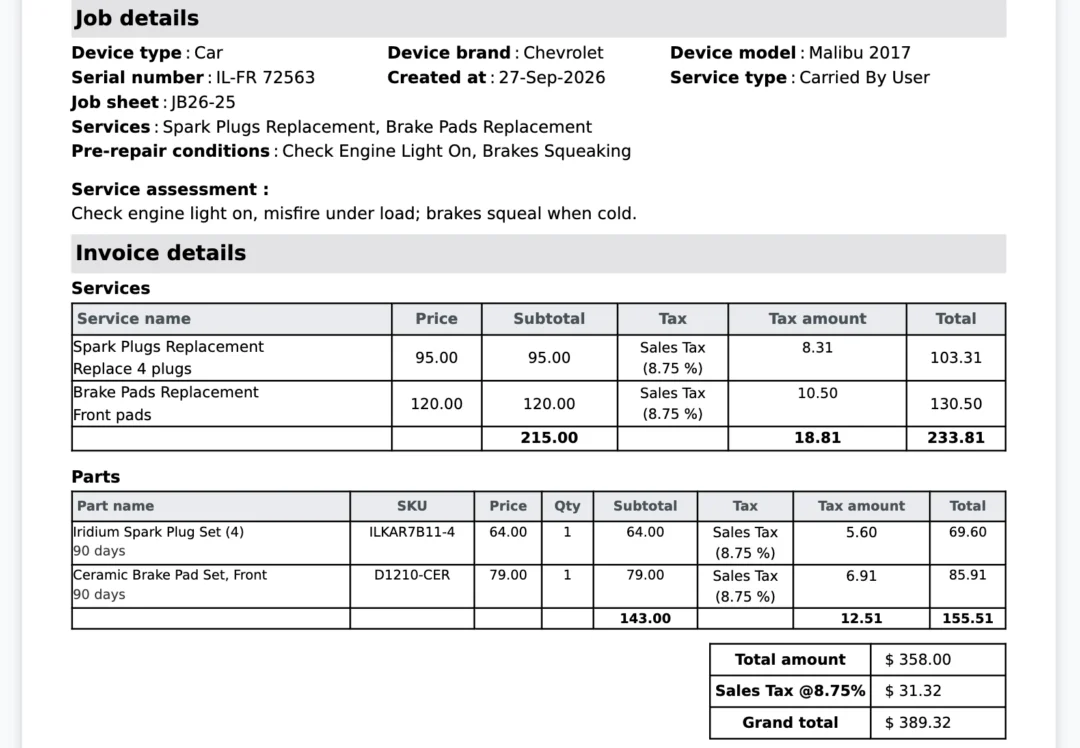
What is auto repair invoice software?
Auto repair invoice software turns the work done on a vehicle into the bill the customer pays. In BytePhase the estimate, the work order and the final invoice are the same record, so the parts, labor hours and tax line travel together from quote to paid receipt. The same invoicing runs inside BytePhase garage management software for independent garages and workshops.
From estimate to invoice in one flow
- 1
Quote parts and labor
Build the estimate on the work order from your parts stock and labor.
- 2
Get the customer’s sign-off
The customer approves the estimate before work starts.
- 3
Convert to an invoice
The approved estimate rolls forward into a tax invoice.
- 4
Send it and get paid
By WhatsApp, SMS or email, then record card or cash.
Parts, labor and payments on one invoice
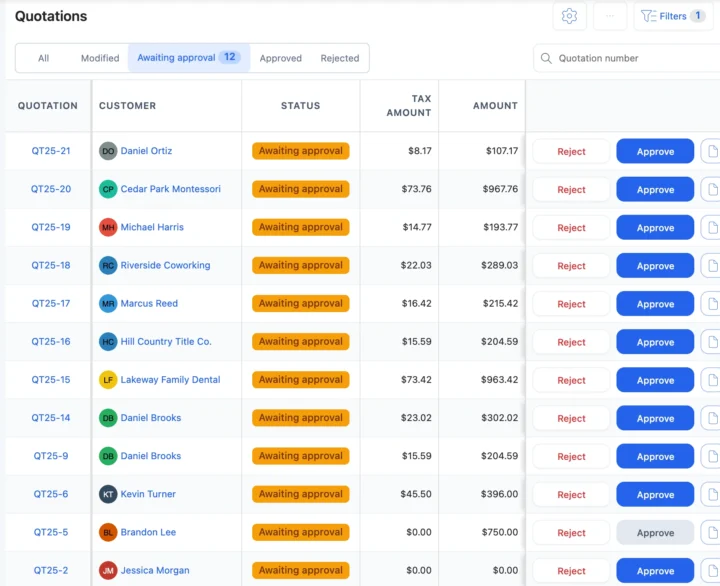
One record from quote to paid receipt
Quote the job, get sign-off, and the estimate rolls forward into the invoice: the ticket, the parts used, the labor hours and the tax line travel together, so a service advisor never reconciles a paper estimate against a separate billing screen.
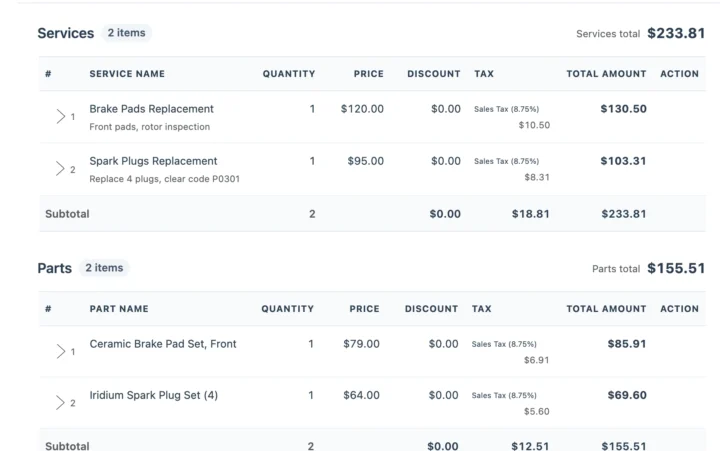
Parts and labor line items straight from inventory
Every spark plug, brake pad, filter and quart of oil used on a job comes from your stock, so the invoice matches what the job consumed. Labor for a diagnostic, an alignment or a transmission service is its own line, separate from parts. Parts are tracked in inventory management.
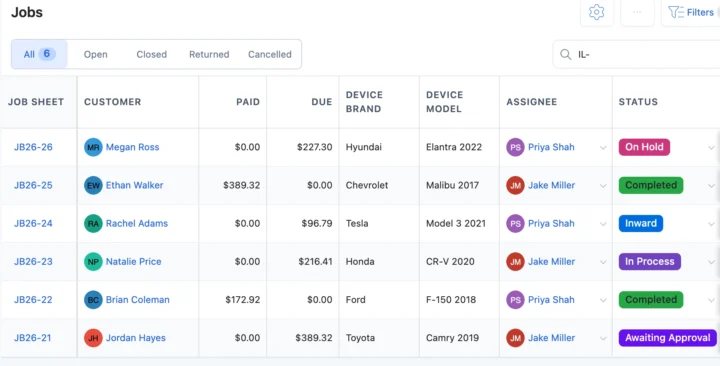
Counter billing, taxes and payments
A walk-in for a battery, wiper blades or an air filter is billed on the spot, with the tax rate you set for your region. Take card or cash and the payment updates the invoice straight away. Bill walk-ins from point of sale.
Send every invoice by WhatsApp, SMS or email
When a repair is marked complete, the invoice goes out over WhatsApp, SMS and email, alongside the OTP-verified handover the customer confirms before the vehicle leaves the bay. Add a digital signature and before and after photos, and the customer has the job card, invoice, signature and photos together. Set up messages with WhatsApp.
Why garages choose BytePhase for invoicing
Garage tools that feed the invoice
Each card opens the feature it shares data with, so nothing is typed twice.
Auto repair invoicing for every kind of garage

Auto repair invoice questions garages ask
BytePhase is auto repair invoice software built specifically for garages: it converts an approved estimate straight into a GST-compliant invoice, pulls parts and labor line items from your existing inventory, and sends the invoice to the customer automatically over WhatsApp, SMS or email. It’s used by 2,000+ repair businesses across 40+ countries.
Yes. Once a repair ticket is marked complete, BytePhase sends the invoice automatically by WhatsApp, SMS and email, so the customer doesn’t need to call the counter to ask if it’s ready or to request a copy of the bill.
Yes. In BytePhase, the estimate, the work order and the final invoice are the same record. Quote parts and labor on the work order, get the customer’s approval, and it converts into an invoice with matching line items, so nothing needs to be re-entered.
BytePhase generates GST-compliant quotations, invoicing and counter billing for garages in India, with a tax rate applied per line item on parts and labor. Outside India, invoices carry whatever tax rate you configure for your region.
Yes, a 15-day free trial with full access. You can also book a free demo before starting the trial.
A complete auto repair invoice shows your shop name, address and tax registration number, the customer and the vehicle with its registration or VIN, each part with quantity, rate and tax, labour as its own line, the subtotal, tax, total, payments received and balance due, plus your terms and any parts warranty. In BytePhase these come from the approved estimate and the parts used on the repair order, and the invoice prints on A4 or thermal with the full tax breakdown.
A template in Word or Excel works for a handful of jobs, but each invoice is typed by hand, parts never leave stock and nothing links the bill to the repair order. Invoice software turns the approved estimate into the invoice, deducts the parts from stock, records part payments and sends the invoice by WhatsApp, SMS or email. If you bill more than a few vehicles a week, the switch pays for itself in time saved and parts that are no longer forgotten.
Run your entire auto repair invoicing on BytePhase
Join 2,000+ repair businesses in 40+ countries. Full access for 15 days.
15-day free trial · 30-day money-back guarantee
2000+ Professional Repair & Data Recovery Businesses Trust BytePhase
We help you stay focused and organized by keeping detailed records
Best-in-class support
No matter what you need help with, our team is here to assist you. The goal of our business is to build long-lasting relationships with our customers.
Free Updates, Always Included
We will provide you with free and regular updates and welcome your feedback, which we will consider for implementation in your subscription.
Data Security & Encryption
We use the highest industry standard (AES-256) to encrypt your data on a secure RDS server for maximum protection.
Automatic Backups
We perform automatic backups daily on our dedicated database server to keep your data safe.
Last updated: 14 November 2026