
Garage Management Software for Independent Garages & Workshops
BytePhase is garage management software for independent garages in the UK: digital job cards with photos, estimates the customer approves, parts costed on each job and invoices in pounds with VAT and your VAT number. As workshop management software it also keeps fleet and repeat customers on service contracts, and your technicians work the same jobs in native Android and iOS apps. In short: built for garages and two-wheeler repair shops.
- Digital job cards with photos
- Estimates the customer approves
- Parts costed on each job
- Service contracts for fleets and regulars
15-day free trial · 30-day money-back guarantee
“BytePhase is a future for repair shop management or the repair industry. They have crafted the UI very beautifully.”
How a car moves through your workshop
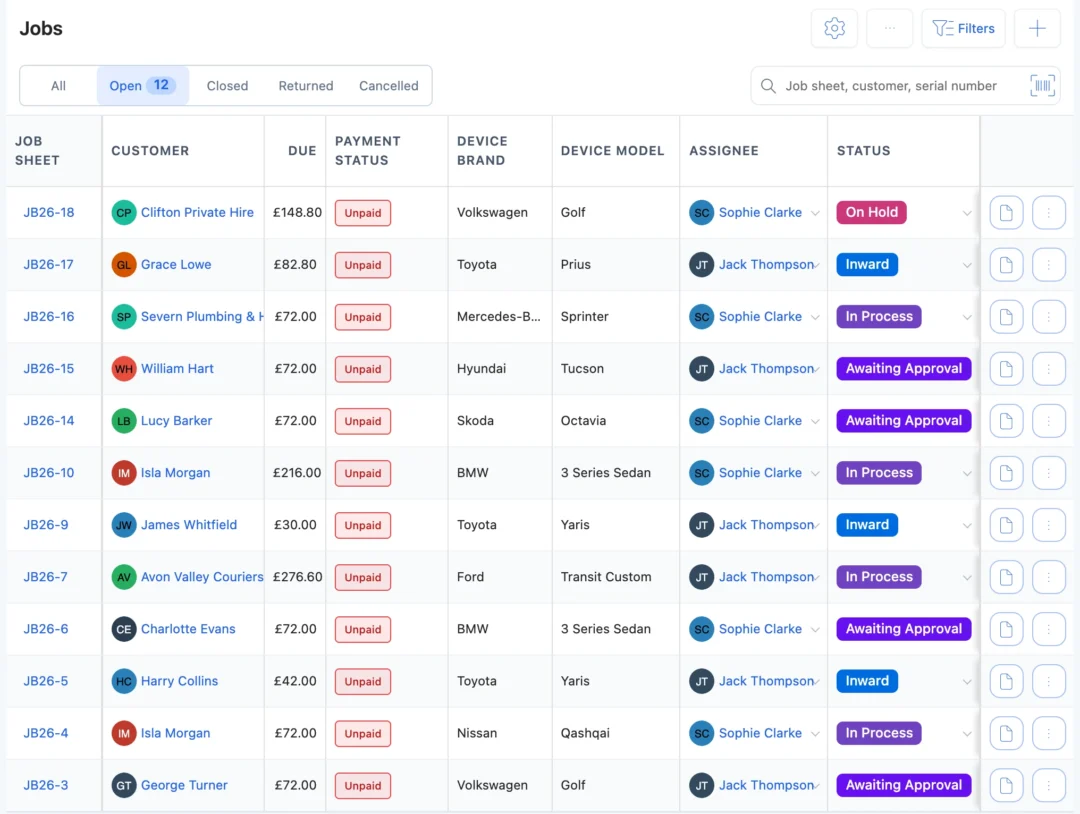
A car can sit in the workshop for a day or a week. In BytePhase’s garage management software, the job card, the estimate, the parts and the handover stay on one job.
- 1
Book the car in
Customer, vehicle type, make and model, and the registration typed into the serial number field, with the keys, the fault in the customer’s words and the service type. - 2
Record its condition
Pre-checks such as check engine light on, brakes squeaking or oil level low, with photos of existing damage and the customer’s signature on the job card. - 3
Diagnose the fault
Note what you found on the job card. It prints on A4 or a thermal printer for the customer or the ramp. - 4
Estimate and get approval
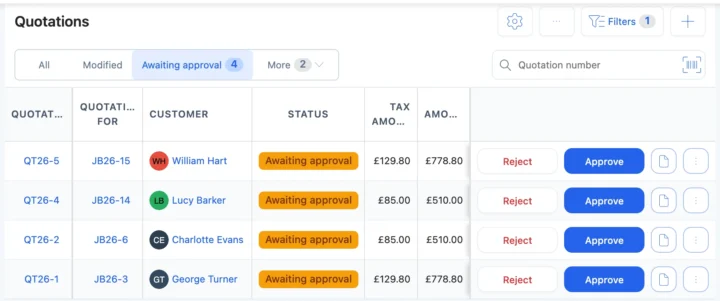
Send the estimate as a quotation. The customer approves or rejects it from the link, and the answer is saved with the time. - 5
Assign the technician
Each service on the job can have its own technician, who is alerted and opens it in the app. - 6
Fit the parts
Brake pads, filters and batteries come off stock and onto the bill. Waiting on the motor factor? Set your own status, such as Waiting for parts. - 7
Keep the customer updated
Each status change can go by email or SMS, or on WhatsApp in one tap, with a link to the job. - 8
Invoice and hand back the keys
An invoice in pounds with VAT and your VAT number, the payment recorded, and the handover confirmed with a one-time code.
Situations every garage meets in a week
Six moments where garage management software saves a phone call, a lost invoice or an argument at the counter.
The brakes need discs as well as pads
Add the discs to the estimate and send it again. The customer approves from the link before you fit them. QuotationsA fleet van is due its contract service
The service visit is on the contract’s schedule and the calendar, with the technician assigned. Service contractsA customer asks for last year’s invoice
Search by registration, job number or customer. Every past job and invoice is on the customer’s record. Repair ticketsOil filters are running low
Parts at their low stock level are flagged on the list and the dashboard, so the supplier purchase goes in on time. InventoryTwo cars need the same technician
Each service on a job has its own assignee, and the calendar shows who has what by due date. CalendarLabour and parts on one bill
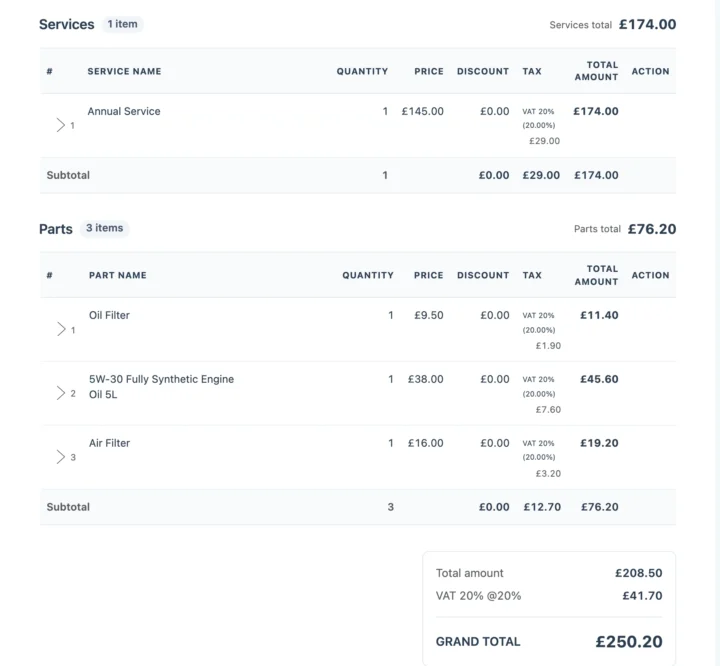
Labour, parts and VAT show as separate lines on the invoice made from the job card. auto repair invoice softwareGarage job cards for every vehicle in your workshop
A digital job card for each car
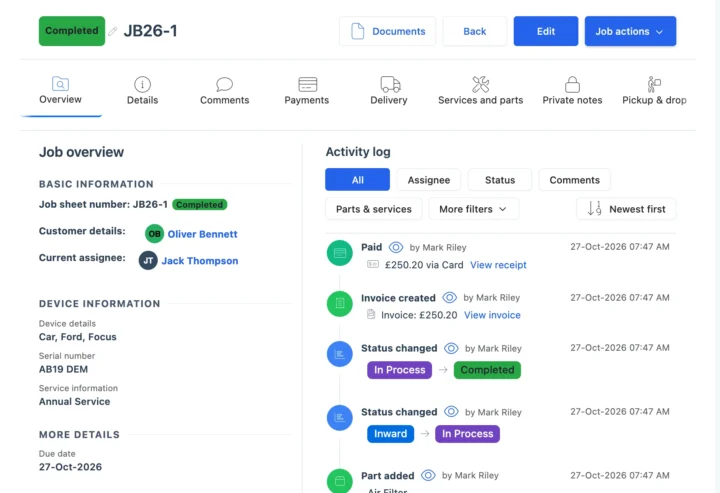
The job card holds the customer, the vehicle type, make and model, the registration, the fault and the service type, with pre- and post-checks, condition photos and signatures. The activity log records who changed what and when, and the customer’s record keeps every past job. See repair ticket management.
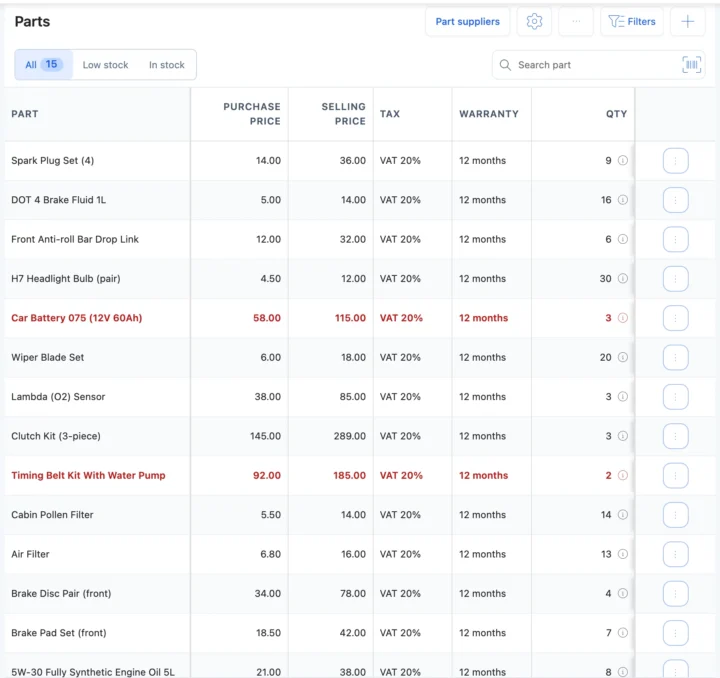
Parts stock and supplier purchases
Brake pads, filters, batteries and oil carry a purchase price, a selling price, tax and a warranty. Fit one on a job and it comes off stock; record a supplier purchase and it goes back on. Barcode labels and a low-stock list keep the shelves honest. See inventory management.
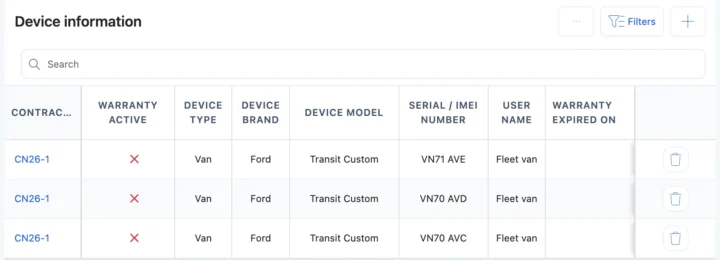
Service contracts for fleets and regulars
Local businesses with vans and taxis want one garage for every vehicle. Put them on a service contract with the vehicles covered, dated service visits, complaints and payments. You get email reminders 15 days and 1 day before the end date and on the day, and your team renews it. See AMC software.
Paper job cards, a spreadsheet or garage software?
| What you need to do | Notebook or spreadsheet | Spreadsheet | BytePhase |
|---|---|---|---|
| Find a car’s past work by registration | Page through old books | Filter, if it was typed in | Search every job by registration, job number or customer |
| Prove the car’s condition at booking in | A note, if someone wrote one | Not built for it | Photos, checklist and signature on the job card |
| Get the extra work approved | A phone call | Not built for it | Estimate link; the answer is saved with the time |
| Cost the parts on each job | Remember them at the end | A separate sheet | Parts on the job come off stock and onto the invoice |
| Service a fleet on contract | A diary entry | A list of dates | Service contract with vehicles, visits, payments and renewal emails |
| Tell the customer the car is ready | Call them | Call them | Email, your own SMS or WhatsApp in one tap, with a tracking link |
Servicing, brake jobs and MOT prep
The jobs that fill a garage’s week, and what BytePhase records for each.
Interim and full services
Oil change, filters and spark plugs as services on one job card, with the parts off stock.Brake pads and discs
A revised estimate for the discs, approved from the link, and a post-check that the brakes work smoothly.MOT prep
Pre-MOT checks and repairs on a job card with your own checklist. The MOT itself is booked and recorded outside BytePhase.Fleet vans
One service contract for many vehicles, with dated visits and payments.Garage management software set up for UK VAT
Price labour and parts in pounds with VAT at 20%, and print your VAT number on every invoice. Send updates by email, by SMS through your own provider, or on WhatsApp in one tap, and sync invoices to QuickBooks or Xero. It is garage management software for independent garages, workshops and MOT prep across the UK, with the job card, the estimate and the invoice on one record.
Setting up your garage
Moving to new garage management software should not mean typing everything in again.
- 1
Pick vehicle and auto repair
The setup wizard loads cars, vans, motorcycles and EVs, common services and pre- and post-checks. It is the same Vehicle/Auto Repair template US auto shops use. See auto repair shop management software. - 2
Bring your data across
Import customers, parts and vehicle makes and models from a spreadsheet. Old job cards are not imported; cars still in the workshop are added as new jobs. - 3
Add your technicians
Add or import your staff and choose what each person can see and do. See permissions. - 4
Book in the first car
Create the first job card with its registration and send the customer their first update. See the quick-start guide.

Questions about garage management software
Yes. You work in pounds with VAT at 20%, your VAT number prints on every invoice, and updates go by email, by SMS through your own provider, or on WhatsApp in one tap.
No. BytePhase does not book MOTs, look up a registration or decode a VIN, and has no labour-time guides. You type the registration into the job, record pre-MOT checks and repairs on the job card, and search past work by registration.
Yes. Import customers, parts, staff and vehicle makes and models from a spreadsheet. Old job cards are not imported; add cars still in the workshop as new jobs.
Yes. Invoices can sync to Xero or QuickBooks, so your books stay in the accounting software you already use.
Each status change can go by email, by SMS through your own provider, or on WhatsApp in one tap. The message carries a link to the job.
Look for job cards, estimates the customer approves, parts tied to jobs and a technician app, without a server to run. BytePhase does this on the web and in native apps, and you can try it free for 15 days.
Yes. A service contract lists the vehicles covered, with dated service visits, complaints and payments. You get email reminders 15 days and 1 day before it ends and on the end date; your team renews it by creating the next contract.
Yes. Each job card holds the vehicle, the registration, the fault, pre- and post-checks, photos, signatures, the services and parts, and the technician, and prints on A4 or a thermal printer.
Customer, vehicle and job data is encrypted (AES-256) at rest and backed up daily, permissions decide what each person can see and do, and the activity log records who changed what. Support comes by 24/7 AI chat, email, support tickets and callback requests, with free training sessions for your team.
It runs a garage or vehicle workshop: it books each car in on a job card, tracks the estimate, the parts and the technician, keeps the customer updated and produces the invoice.
Job cards with photos and checks, estimate approval, parts stock and supplier purchases, technician assignment, customer updates, invoices with your tax, and service contracts for fleet customers.
Yes. Motorcycle and car workshops print the job card for each vehicle on A4 or a thermal printer, with the registration recorded on it, and the invoice made from that job card carries your VAT or sales tax name, rate and registration number in your currency.
Run your garage from one system
Try the garage management software on your own jobs: book in your next car and send the customer their first update.
15-day free trial · 30-day money-back guarantee
Last updated: 14 November 2026