Laptop Data Recovery Options: A Repair Shop’s Guide to Running the Job

When a customer walks in and says their laptop won’t turn on and everything they have is on it, you’re looking at someone having a genuinely bad day — years of family photos, a half-written thesis, or the only copy of a client contract can feel like it just disappeared. That reaction is normal, and a good intake conversation acknowledges it before anything else.
Once the reassurance is done, though, your job is different from your customer’s panic: you’re running what amounts to a laptop data recovery service — a paid diagnostic and recovery job that has to be tracked, priced correctly, and delivered on a timeline you can actually promise. Laptop data recovery options aren’t one thing — they range from a five-minute software scan to a multi-day referral to a cleanroom lab — and which tier a case falls into changes how you quote it, staff it, and communicate about it. This guide walks through the recovery tiers, what to capture at intake, and how to run the whole job as a proper ticket instead of a side favor.
Laptop Data Recovery Options: Software-Level, Hardware-Level, and Cleanroom Referral
Not every data-loss case needs the same treatment, and treating them all the same is how shops either overpromise or undercharge. Before you quote anything, sort the job into one of three tiers.
Software-Level Recovery
This is the fastest tier and the one most customers expect. It covers accidental deletion, an empty recycle bin, or a quick-format mistake, and it works only when the drive itself is mechanically healthy. A scan with reputable laptop file recovery tools can often rebuild a file table or recover laptop data that was recently deleted — but it can’t fix a physically failing drive, and previously overwritten data is generally gone for good. Set that expectation before you start the scan, not after.
Hardware-Level Recovery
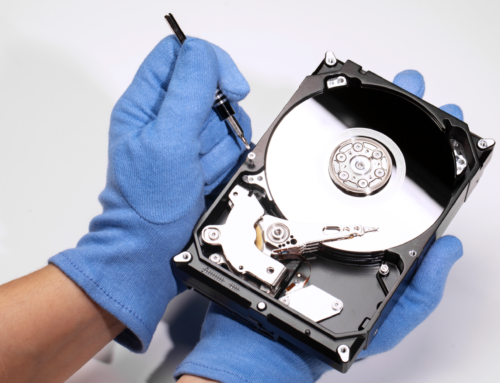
Clicking or grinding noises, a drive that’s suddenly unresponsive, or a connector and controller-board fault push the job into hardware-level territory. This is still work you can do in-shop with the right tools and a trained technician, but it takes longer, usually needs a donor part or replacement enclosure, and should be quoted separately from a straightforward software scan.
Cleanroom Referral
Severe physical damage — a drive with visible platter damage, a failed complex RAID configuration, or a case where in-shop attempts have already been made without success — needs a particulate-free cleanroom environment most repair shops don’t have on-site. Here your role shifts from technician to coordinator: refer the drive to a specialized partner lab, but keep the ticket, the customer communication, and your service fee under your own shop’s process. The customer’s relationship stays with you even when the physical work happens elsewhere.
Recommend the cleanroom tier whenever you see:
- Clicking, grinding, or other unusual drive noises
- A completely unresponsive SSD after basic checks
- Heavily corrupted or inaccessible file systems
- Data loss involving a failed RAID configuration
What Customers May Have Already Tried Before They Walk In
Most customers try something before they bring the laptop in, and knowing what they attempted changes your diagnosis. Ask these questions during intake:
- Did they check the Recycle Bin or Trash? Accidentally deleted files often sit there untouched.
- Did they check cloud backups? Google Drive, Dropbox, and OneDrive frequently hold a recent copy without the customer realizing it.
- Did they try System Restore or Time Machine? These can revert software-related loss, but running them can also overwrite the very data you’re trying to recover.
- Did they run an anti-virus scan? Malware can hide or corrupt files, and a scan sometimes resolves the issue without any recovery work at all.
- Have they kept using the laptop since the problem started? Continued use overwrites data and is the single biggest thing that turns an easy software-level job into an unrecoverable one — get this answer before you touch anything else.
If a customer already ran recovery software themselves before coming in, ask what they used and whether they wrote any new data to the drive — that history belongs in your intake notes, not just in conversation.
Recovery Job Intake: Photos, Sign-Off, and the Ticket
Data recovery for repair shops carries more risk than a standard repair — you’re handling a device that may already be failing, and the data itself, not just the hardware, is the customer’s real concern. Three things protect your shop and set expectations correctly:
- Photograph the device on arrival. Record its physical condition — case damage, port condition, any prior repair stickers — before you open it. This protects you if the drive turns out to already be compromised.
- Get a signed customer sign-off. The sign-off should state plainly that recovery isn’t guaranteed, list the diagnostic fee versus the recovery fee, and confirm the customer understands the difference between the two.
- Open a ticket at intake, not after diagnosis. Log the model, serial number, and reported symptoms the moment the laptop is dropped off, before you know which of the three recovery tiers it belongs to.
Managing the Job as a Ticket, Not a Side Favor
Data recovery is the easiest repair category to lose track of, because it doesn’t follow the same predictable timeline as a screen or battery swap — a job can sit at “diagnosing” for two days while a technician runs a long scan, or it can be paused waiting on a customer decision about cleanroom costs. Running it through the same ticket system as every other repair keeps it visible instead of buried.
If your shop runs on dedicated data recovery software, each case gets its own ticket the moment the laptop is logged in — recovery tier, assigned technician, and current status are all visible in one place instead of living in a technician’s memory or a paper drop-off slip. If the job needs a replacement drive, enclosure, or cable, pull it from tracked spare-parts inventory so the part is accounted for and the final invoice reflects it. And because recovery jobs often run longer than a standard repair, having a technician clearly assigned to the ticket matters for accountability — if a customer calls on day three asking for an update, whoever picks up the phone should be able to see exactly where the job stands.
Keeping Customers Informed During a Multi-Day Recovery
A recovery job that stretches across several days is exactly the kind of job that generates anxious phone calls if you don’t get ahead of it. Set the communication cadence at intake so the customer knows what to expect, then let automation carry it:
- Automated status updates. SMS, WhatsApp, and email updates at each stage — received, diagnosed, recovery in progress, complete — cut down on “just checking in” calls without adding to your team’s workload.
- A customer portal. Letting the customer check status themselves is especially useful on a multi-day job, where the honest answer on day two is often just “still scanning.”
- OTP-verified delivery. Recovered data is sensitive by definition — an OTP check at pickup confirms the device and the files on it are only released to the actual customer or someone they’ve authorized.
- Round-the-clock reachability. Recovery jobs don’t run on a 9-to-5 schedule, and 24/7 support access matters more here than on a same-day repair.
Data recovery is one of the highest-trust jobs a repair shop takes on — treating it with the same ticketing, documentation, and communication discipline as every other repair is what turns a stressful walk-in into a repeat customer. If you want to see how recovery jobs, sign-offs, and status updates run inside BytePhase, start a 15-day free trial.