
Auto Repair Invoice Template: Free PDF and Word Download
An auto repair invoice template gives your shop one consistent bill for every job: who the customer is, which vehicle it was, what was wrong, what you fixed, what parts and labor went into it, and what it costs. Below you can download a free auto repair invoice template as a printable PDF (US Letter) or as an editable Word file, then read what each field is for and how to fill it in.
In short: a good auto repair invoice shows the shop and customer details, the vehicle (year, make, model, VIN, plate and odometer), the customer complaint, cause and correction, parts and labor on separate lines, shop supplies, sales tax, the total, payment method, your warranty terms and the customer’s signed authorization. Download the blank auto repair invoice template, fill it in on every job, and switch to software when paper starts slowing you down.
Download the free template (US Letter, blank):
Writing invoices by hand every day? In BytePhase the approved estimate becomes the invoice with the same parts and labor lines, so nothing is retyped. See how invoicing works for auto repair shops.
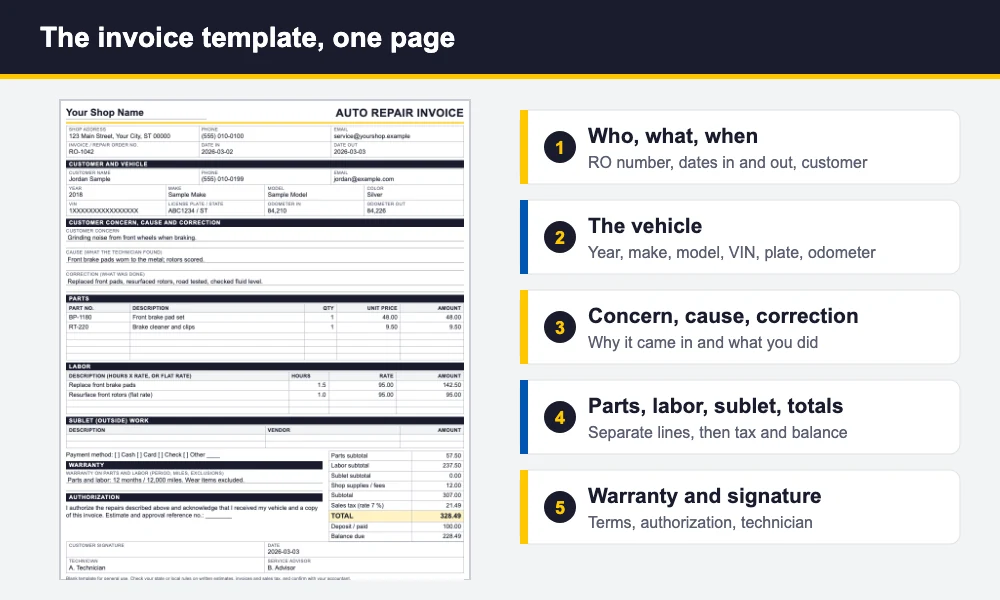
This auto repair invoice template is blank, so you can print it and write on it, or open the Word file, add your logo and shop details once, and save it as your master copy. A filled example with generic data is included so you can see how each section reads on a real job.
What an auto repair invoice template must include
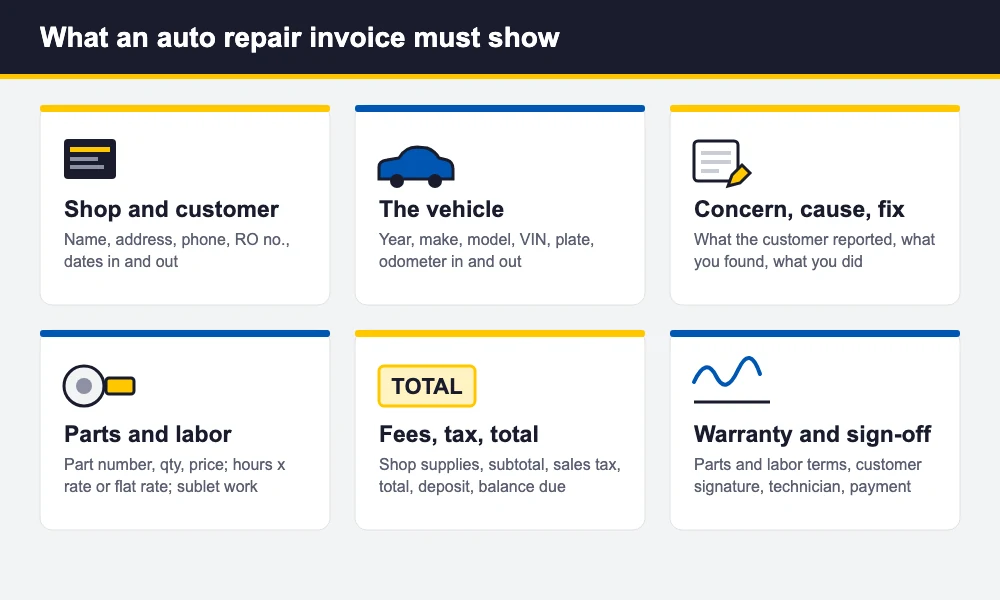
An invoice is more than a total. It is the record of what you agreed to do, what you did and what the customer owes. If a customer disputes a charge, an insurer asks what was repaired, or a comeback shows up three months later, this page is the evidence. These are the fields that belong on every auto repair invoice:
- Shop details: shop name, address, phone and email, plus your tax or business ID if your state expects it on the invoice.
- Invoice or repair order number: one unique number per job, so you can find it later and match it to the estimate.
- Dates: the date the vehicle came in and the date it went out.
- Customer: name, phone and email.
- Vehicle: year, make, model, VIN, license plate and state, and the odometer reading in and out.
- Customer complaint, cause and correction: what the customer reported, what the technician found, and what was done. This “three Cs” story is what makes an invoice believable.
- Parts: one line each with part number, description, quantity, unit price and line amount.
- Labor: a description of the work with hours times rate, or a flat-rate price, on its own lines.
- Sublet work: anything done by an outside vendor, such as an alignment, machine work or glass, shown separately.
- Shop supplies and fees: only what you actually charge, labelled clearly.
- Totals: subtotal, sales tax, total, any deposit and the balance due.
- Payment method: cash, card, check or other.
- Warranty terms: the period and mileage on parts and labor, and what is excluded.
- Authorization and sign-off: the customer’s signature and date, plus the technician and service advisor.
Rules on written estimates, itemized invoices, labelling used or rebuilt parts and charging for shop supplies differ by state, so check yours and confirm the details with your accountant. This auto repair invoice template is a starting point, not legal advice.
How to fill in the auto repair invoice template, step by step
- Start with the header. Add your shop name and number series. Write the invoice or repair order number and the date the vehicle came in at check-in, not at the end of the day.
- Customer and vehicle. Copy the VIN from the dashboard or door jamb and write down the odometer reading while the customer is still at the counter. A wrong VIN digit causes wrong-part orders later.
- Write the complaint in the customer’s words. Then leave the cause and correction lines empty until the technician has diagnosed the vehicle.
- Record the cause. The technician writes what was found: “front pads worn to the metal, rotors scored”, not just “brakes”.
- List every part. Add each part with its number, quantity and price as it goes on the vehicle, not from memory at the end. Mark parts that are customer-supplied.
- List labor separately. Use hours times your rate where you bill by the hour, or a flat-rate price from your labor guide. Add sublet work on its own lines.
- Add fees and tax. Add shop supplies if you charge them, work out the subtotal, apply your sales tax rate to the taxable lines and write the total.
- State the warranty. Fill in the period and mileage for parts and labor so the customer sees it before they pay.
- Get the signature. The customer signs to confirm the authorized work and receipt of the vehicle. Record the payment method, give them a copy and file yours.
Want to see it filled in first? Open the filled example invoice (PDF). It uses generic data you can ignore.
Estimate and invoice: how they connect
An estimate is your price before the work. An invoice is the bill after it. They should match line for line, and where they don’t, the invoice should explain why. The clean flow is estimate, customer approval, repair order, invoice. If the technician finds more work mid-job, stop, get the customer’s approval for the extra work (note when and how it was given), and add it to the repair order before it reaches the invoice.
Keeping the estimate number on the invoice makes that trail easy to follow. On paper, that means writing the estimate number in the authorization box of the auto repair invoice template and stapling the two together. In software, the invoice can pick up the estimate’s lines automatically. In BytePhase, for example, the customer approves an estimate from a link and it converts to the invoice with the same lines.
Invoicing mistakes that cost auto repair shops money
Even a good auto repair invoice template only helps if the shop uses it the same way every time. These are the slips that cost shops the most:
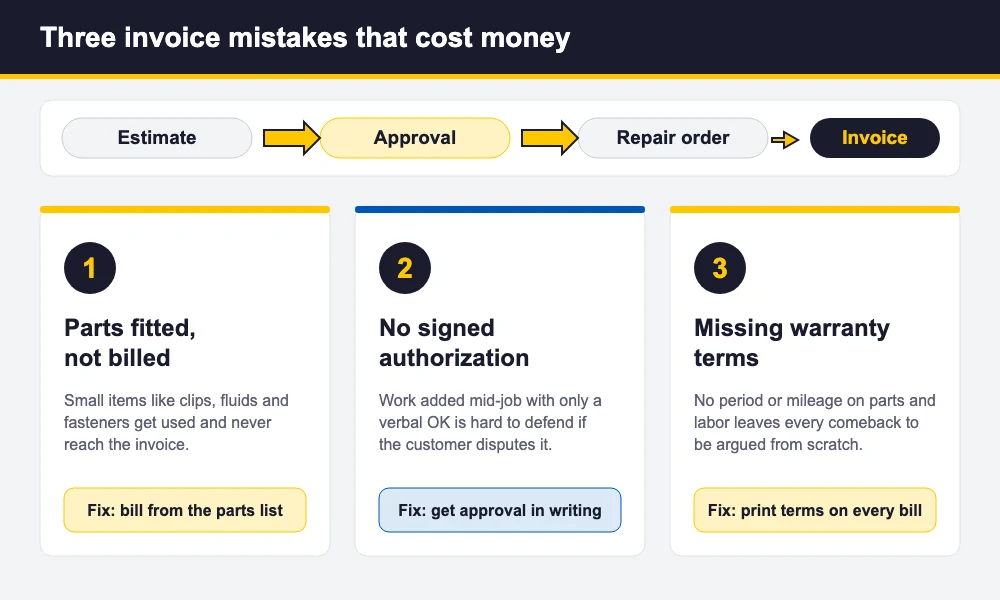
- Parts fitted but never billed. Gaskets, clips, fluids and fasteners get used on the job but not written down. Build the invoice from the parts that left your shelf, not from memory, and check the parts list against the invoice before the customer pays.
- No signed authorization. A verbal OK for extra work is hard to prove. Put the signature line on every invoice, and when you add work, record who approved it and when.
- Missing warranty terms. Without a printed period and mileage, every comeback becomes an argument. Write the warranty on every bill and be specific about what is excluded.
- Labor and parts lumped together. One “brake job” line invites questions. Separate lines make the bill easier to defend and make your parts margin visible.
- Forgetting sublet and fees. An outside machine shop bill that never gets passed on comes straight out of your profit.
- Vague complaint, cause and correction. “Fixed car” is not a record. Detail protects you in a dispute and helps the next technician.
When an auto repair invoice template stops being enough
A paper or Word auto repair invoice template is a fine start for a one-bay shop with a few jobs a day. It stops working when you retype the same customer and vehicle details every visit, can’t find last year’s invoice for a returning customer, forget parts because stock isn’t linked to the bill, or spend evenings chasing customers who never received an invoice.
That is the point to move to auto repair invoice software. In BytePhase the invoice is raised from the job, parts come off stock onto the bill, and labor and services are their own lines, with tax applied per line using your own tax name and rate. Invoices and updates can be sent by WhatsApp, SMS or email, and you can capture the customer’s signature on the job and print on standard paper or thermal receipts. Parts and accessories sold at the counter can be billed with a repair POS system that uses the same parts list and customer record. It works on web, iOS and Android with no per-device limit, and you can start with a 15-day free trial.
If you are comparing tools first, read our guide to the best auto repair software. For the full picture of running the shop, including jobs, parts and customers on one system, see auto repair shop management software or the garage management software page.
Download the free template (US Letter, blank):
Frequently asked questions
Shop name and contact details, an invoice or repair order number, dates in and out, the customer, the vehicle (year, make, model, VIN, plate and odometer), the customer complaint, cause and correction, parts and labor on separate lines, any sublet work and shop fees, sales tax, the total, payment method, warranty terms and the customer’s signed authorization.
No. An estimate is your price before the work and the customer approves it. The invoice is the bill after the work. They should match line for line, and any extra work added mid-job should be approved by the customer and recorded before it appears on the invoice.
It is good practice and many shops require it. The VIN identifies the exact vehicle and the odometer in and out proves the mileage at service, which matters for warranty claims. Check your state’s rules and confirm with your accountant or attorney.
Yes. A Word or PDF template works well for a small shop with a few jobs a day: add your logo and details once, print it or fill it in and save a copy for each job. When retyping, lost paperwork and unbilled parts start costing time and money, move to invoice software.
A repair order is the working document for a job: the complaint, the authorized work and what the technician did. The invoice is the final bill built from it. Many shops use one numbered document for both, which is how this template is laid out.
Ready to stop retyping invoices? See how auto repair invoice software works, then try it on your own jobs for 15 days or book a demo:
