Multiple Businesses vs Branches in BytePhase: Which One Should You Use?
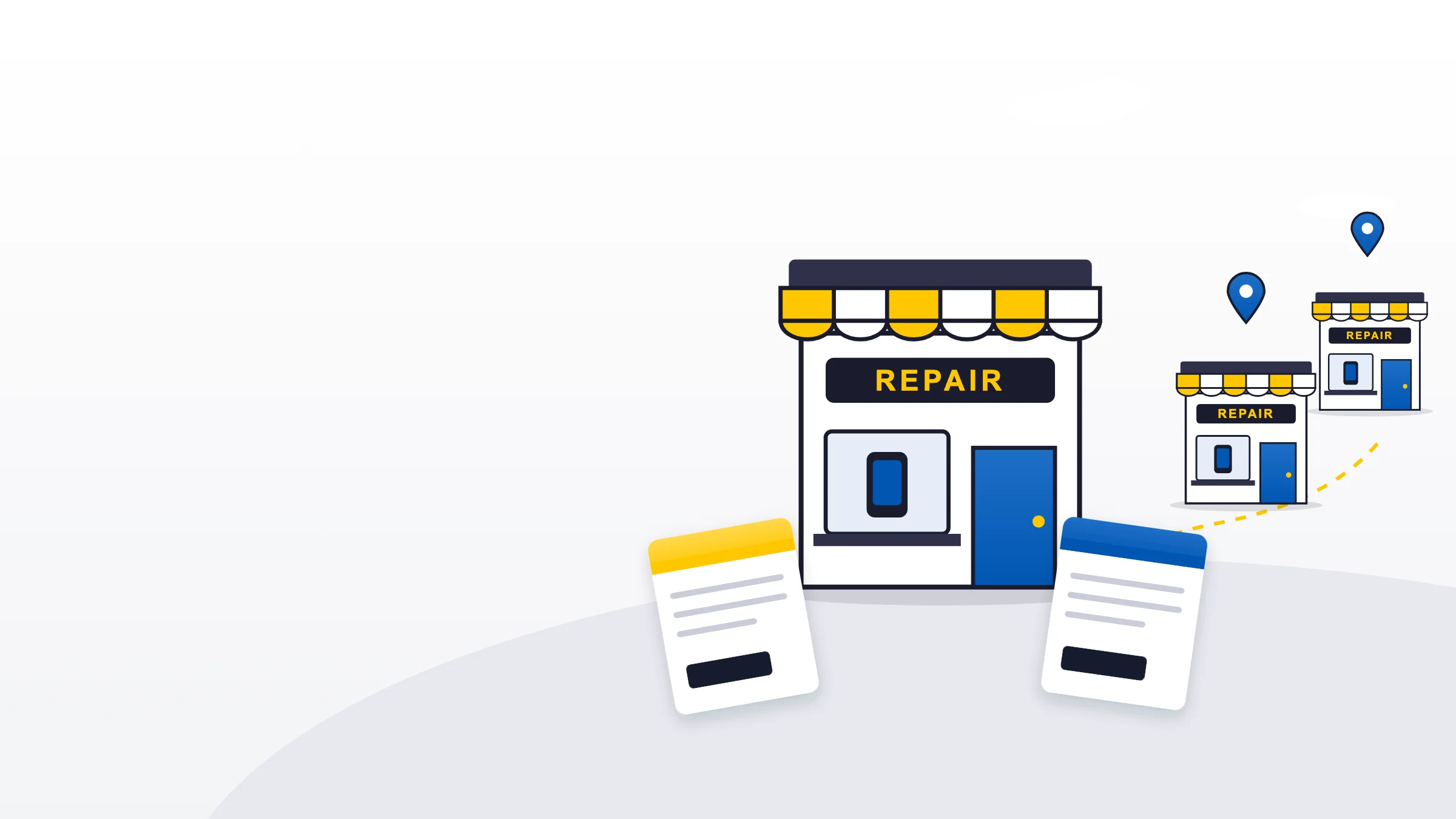
As your repair business grows, you may wonder about multiple businesses vs branches in BytePhase: should you add another Business, or open a Branch? The answer is simpler than it sounds.
In short: a Business is another name you bill under, with its own tax number, logo and invoice numbers, from the same shop and team. A Branch is another shop or location, with its own staff, customers and stock, on the Enterprise plan.
This guide answers the questions shop owners ask most:
- Should I add another Business or create a Branch?
- What if I have two tax numbers, or one business that charges tax and one that doesn’t?
- What if I have two shops?
- Can I keep my staff and customers separate?
The one rule to remember
Use a Business when you run more than one billing identity from the same shop or team. Use a Branch when you run more than one shop or location, especially when each location has its own team.
Same shop, different name on the bill → Business.
Different shop, different team → Branch.
Opening another shop? Choose the Enterprise plan. Branches come with the Enterprise plan. Contact the BytePhase team and we’ll set up your new location as a branch, linked to your login. Compare plans.
What is a Business in BytePhase?
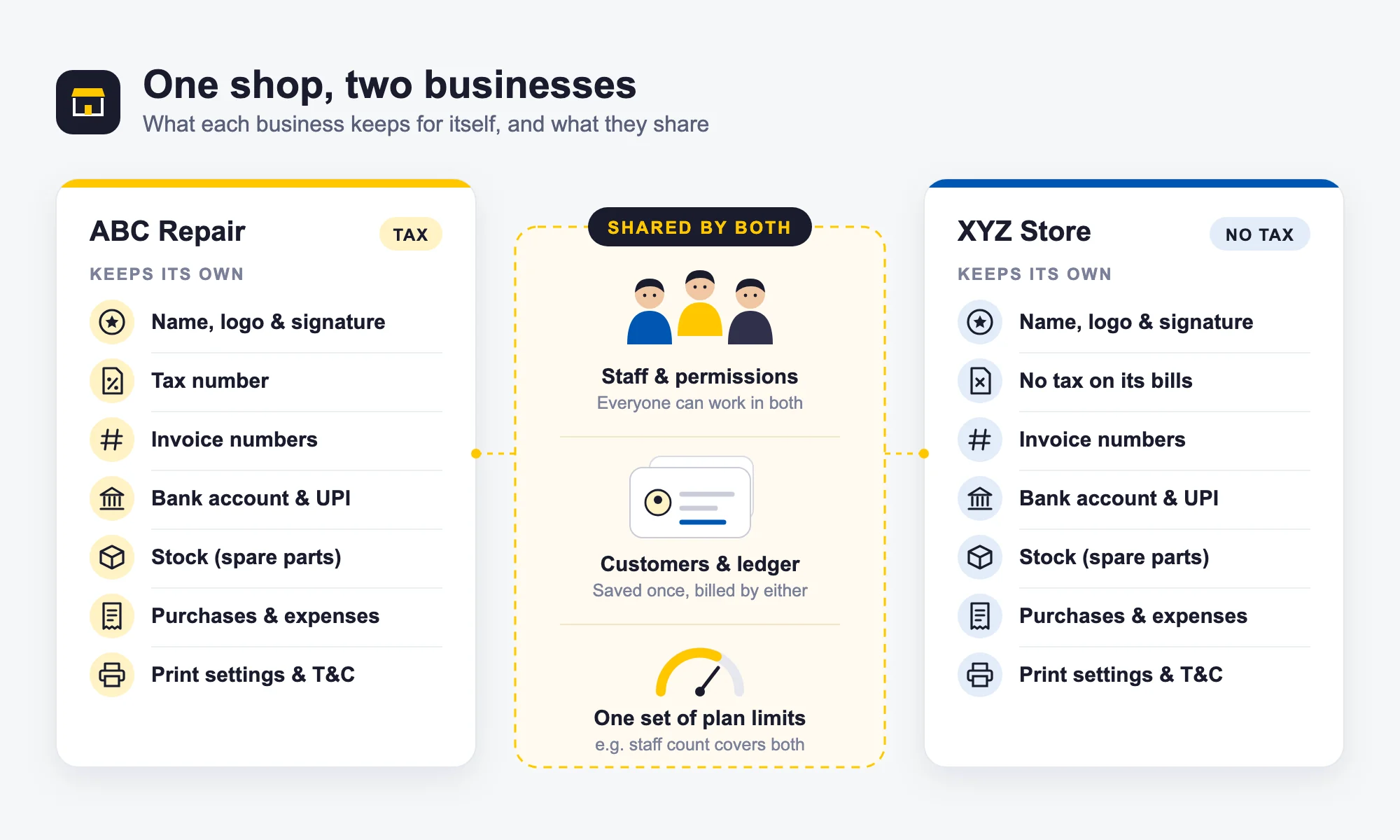
A Business is a separate billing identity inside your BytePhase account. Suppose you run one repair shop but bill customers under two names, ABC Mobile Repair and XYZ Accessories. You can create two Businesses in the same account. Each Business can have its own:
- Business name, address and contact details
- Tax number, or no tax at all (tax settings guide)
- Logo and signature
- Invoice numbering (sequence settings guide)
- Bank account and UPI details (bank details guide)
- Terms and conditions and print settings
- Stock, purchases and expenses
- Invoices and other documents
Every invoice prints with the details of the Business it was created in. How many Businesses you can add depends on your plan: see what each plan includes.
What is shared between Businesses?
Businesses in the same account share customers and the customer ledger, employees and staff permissions, tasks and leads, and your plan’s limits. This means a Business is not a way to create a separate team: if you have two Businesses in one account, your employees can work with both (how roles and permissions work). Plan limits work the same way. If your plan allows a certain number of employees, that number covers all your Businesses together, not each one.
How Businesses work, step by step
- Add a business. Go to Settings → Businesses and choose Add business. Start from scratch, or copy an existing business to save time.
- Fill in its details. Name, tax registration (or none), address, logo, signature, invoice numbering, bank account and UPI (business information guide).
- Switch to it. Pick the business from the switcher at the top of the screen.
- Work as usual. Jobs, invoices and quotations you create now belong to that business and print with its name, logo and numbers.
- Check your numbers. Reports show all businesses together, or one at a time.
Two things can’t be changed after you create a business: its 2-letter short code and its tax setting. Take a moment to get them right.
Example
You run a phone repair shop and also sell accessories under a different business name from the same counter. One location, one team, many of the same customers, two names on your bills. → Use two Businesses.
What is a Branch in BytePhase?
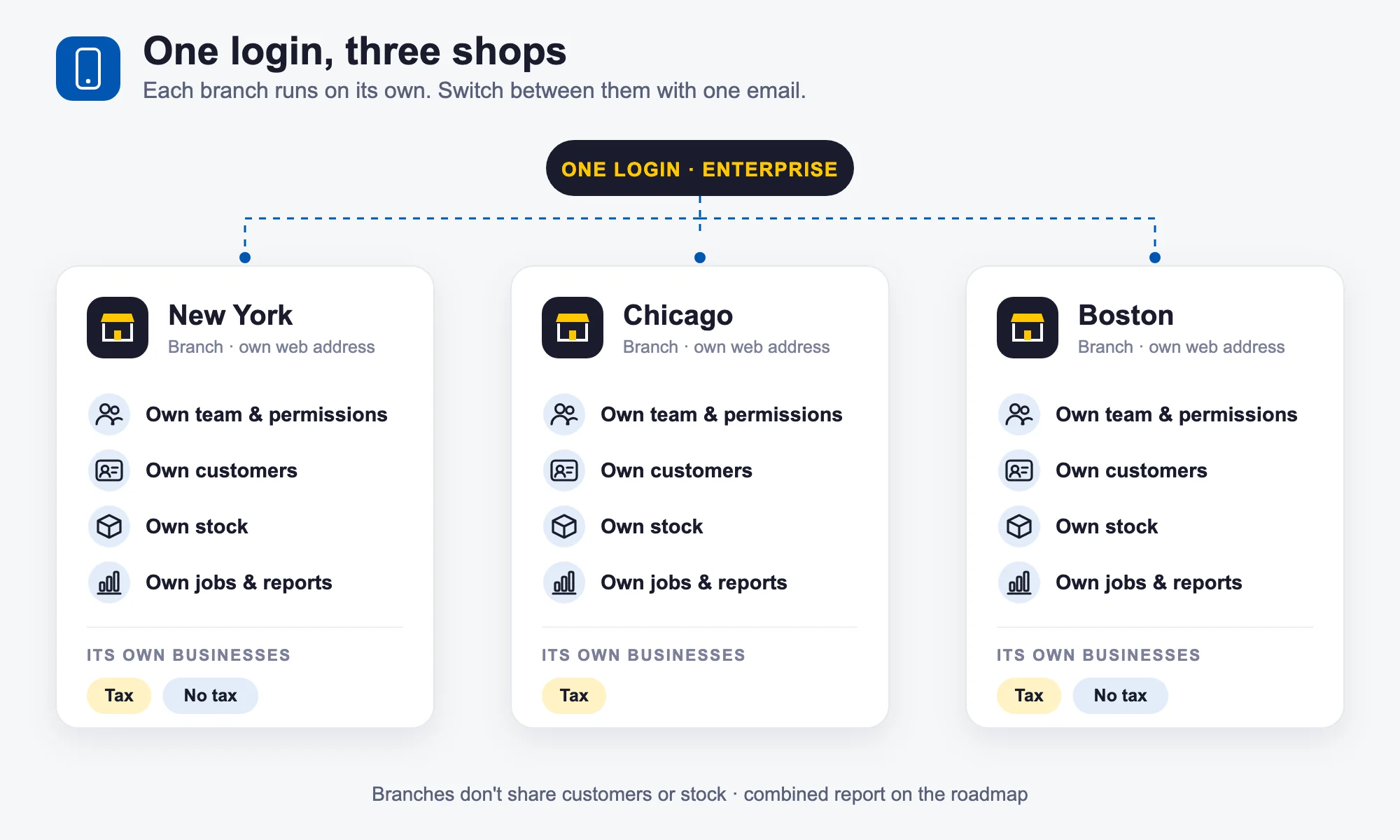
A Branch is another shop or location. Each Branch is a separate BytePhase account, so it keeps its own data and team. If you have a New York shop, a Chicago shop and a Boston shop, each can run as its own Branch with its own:
- Staff and permissions
- Customers
- Repair jobs and invoices
- Stock, purchases and expenses
- Reports and business settings
- Businesses and plan limits
Branches come with the Enterprise plan: see how many branches it includes. Branches do not share customers or stock with each other. There is currently no stock transfer between branches, and a combined report across all branches is on the roadmap. See how multi-branch works in BytePhase.
How Branches work, step by step
- Choose the Enterprise plan. Branches come with Enterprise.
- Contact BytePhase. Tell us about your new location. Our team sets up the branch and links it to your login.
- Add your team. Add the staff who work at that shop and give them the right permissions.
- Sign in once. Use the same email for every shop. Pick the branch when you sign in, or switch from the logo menu in the sidebar.
- Run each shop. Every branch keeps its own customers, jobs, stock, businesses and reports.
Example
You have a repair shop in New York. Business is growing, so you open another shop in Chicago with a different team. → Chicago should be a Branch, not another Business.
Multiple businesses vs branches at a glance
Shared means one set used by all of them. Separate means each one has its own.
| Business | Branch | |
|---|---|---|
| What is it? | Another name you bill under | Another shop or location |
| Best for | Different brands, legal entities or tax identities at one shop | Multiple shops or locations |
| Staff | Shared | Separate |
| Customers | Shared | Separate |
| Plan limits | Shared | Separate |
| Stock | Separate | Separate |
| Invoices and numbering | Separate | Separate |
| Tax details | Separate | Separate |
| Reports | Separate or combined | Separate |
| How do you add it? | Settings → Businesses | Enterprise plan + BytePhase team |
| Is it a separate account? | No | Yes |
Which one is right for you?
1. You have one repair shop
One team, one location and one business name. → You need one Business. There is nothing else to set up.
2. You have two brands at the same counter
For example, ABC Phones for phone repairs and XYZ Laptops for laptop repairs. The same people work at the same location, but customers receive bills under different names. → Use two Businesses.
3. One business charges tax and the other doesn’t
You may have a tax-registered business and another genuine business that does not charge tax. If both operate from the same shop with the same team, set them up as separate Businesses, each with its own tax settings and billing identity. → Use two Businesses.
Important: do not create separate Businesses simply to avoid tax registration or tax obligations. Tax rules depend on your actual business structure and ownership. Speak to your accountant or tax professional about your situation.
4. You have shops in different cities
Stores in New York, Chicago and Boston, each with its own staff and customers. → Use Branches. Each location operates separately in BytePhase.
5. You have two shops with different teams
Your New York shop has five employees and your Chicago shop has three, and you want each team to work with its own customers, stock and records. → Use two Branches. Do not create two Businesses for this: Businesses do not provide separate staff access.
6. You repair both phones and laptops
Same company name, same team, same location. You don’t need a second Business just because you offer another type of repair. → Use one Business, and organise your work with service categories and device types.
7. You have a head office and several service centres
Four service centres from one company, each with its own team and customers. → Use a Branch for each service centre. There is no special “Head Office” account; you switch between branches to see each location’s information. A combined report across all branches is on the roadmap.
8. You offer pickup and delivery
Pickup and drop does not mean you need another Branch. → Keep it in the same account and use the pickup and drop feature and storage locations to organise the work. Create another Business only if you actually bill under a different business identity.
Common mistakes to avoid
- Creating a Business for every shop. Three physical shops need three Branches. Remember: Business = billing identity, Branch = shop.
- Using Businesses to separate employees. You can’t give an employee access to only one Business. For separate teams, use separate Branches.
- Expecting Branches to share customers. A customer saved in your New York Branch will not appear in your Chicago Branch. The same applies to stock and reports.
- Expecting stock transfers between Branches. BytePhase does not currently support them. Each Branch keeps its own inventory.
- Waiting until after billing to reorganise. Existing documents and data cannot be moved from one Business to another, or from one Branch to another. Choose your structure before you start billing.
What happens to invoices, customers, staff, stock and reports?
Invoices: each Business has its own name, tax details, logo, numbering, bank and UPI details and terms. Switch to the right Business from the switcher at the top of the screen before you create the invoice, and it uses that Business’s details.
Customers: shared between Businesses, separate between Branches.
Employees: shared between Businesses; a Business is not a staff-access boundary. Each Branch has its own staff and permissions.
Stock: each Business has its own stock within its Branch, and Branches keep their stock completely separate. There is no stock transfer between Businesses or Branches.
Reports: inside a Branch you can view all Businesses together or one Business. “All Businesses” means all Businesses inside that Branch, not all of your shops.
How do I decide in 30 seconds?
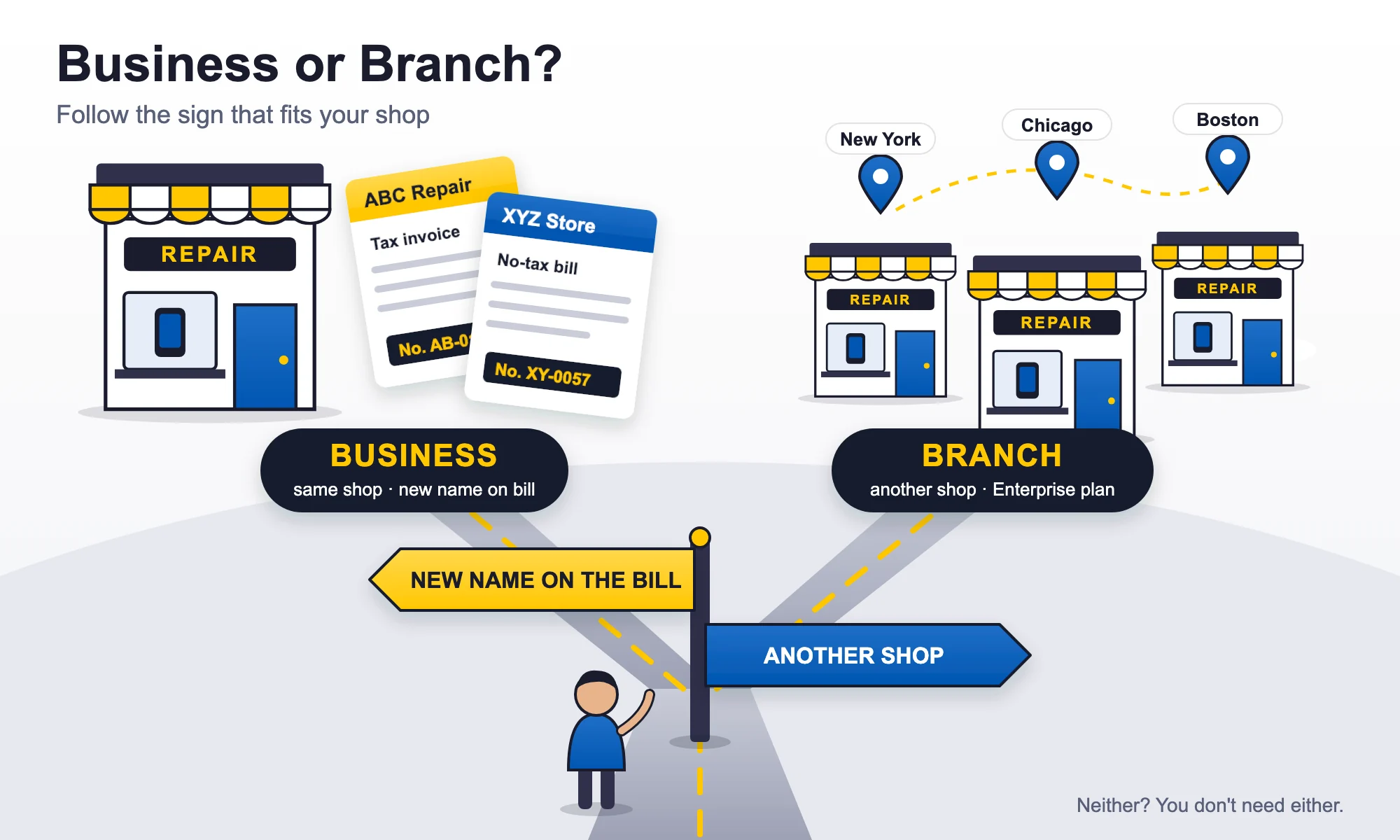
Ask yourself one question: “Is this another shop, or just another name on my bill?”
- Another shop? → Branch
- Same shop, another name or tax identity? → Business
- Neither? → You probably don’t need another Business or Branch.
Quick examples
| Your situation | What to use |
|---|---|
| One repair shop, one company | One Business |
| One shop, two brands | Two Businesses |
| One shop, one business that charges tax and one genuine business that doesn’t | Two Businesses |
| Phone and laptop repairs under one company | One Business |
| New York + Chicago shops | Two Branches |
| Three shops in three cities | Three Branches |
| Two shops with separate teams | Two Branches |
| One shop with pickup and delivery | One account, no extra Branch |
Frequently asked questions
A Business is a billing identity inside your account: its own name, tax number (or none), logo, invoice numbering, bank and UPI details, stock, purchases and expenses. A Branch is another shop or location with its own BytePhase account, staff, customers and data.
No. Branches are set up by the BytePhase team under the Enterprise plan. Contact BytePhase if you are opening another location and we will link the new branch to your login.
Yes, depending on your plan. Businesses are created from Settings → Businesses, either from scratch or by copying an existing business. The pricing page shows how many Businesses each plan includes.
No. Limits such as the number of employees are shared by all Businesses in an account, not given to each one. Each Branch gets its own limits. See the pricing page for the limits on your plan.
No. Businesses in the same account share employees and permissions, and you cannot limit an employee to one Business. Use separate Branches when you need separate teams.
Yes. Businesses in the same account share customers and their ledger, so a customer is saved once and can be billed by any of your Businesses.
No. Each Branch has its own customer list. A customer saved in one Branch does not appear in another.
No. Each Business keeps its own stock, purchases and expenses.
Not currently. Each Branch keeps its own stock, and stock cannot be moved between Branches or between Businesses.
Not currently. Reports run inside each Branch, and inside a Branch you can view all Businesses together or one at a time. A combined cross-Branch report is on the roadmap.
Yes. Each Business can have its own tax registration details, or it can be a business that does not add tax to its bills. Tax rules depend on your actual business structure and ownership, so confirm your setup with your accountant.
No. A Business is not a location. If you run different physical shops, use Branches on the Enterprise plan.
You can add a Business later if your plan allows it, but existing bills and other records cannot be moved between Businesses or Branches. Choose the right structure before you start billing.
The bottom line
That is the whole difference between multiple businesses vs branches. Different name on the bill? → Business. Different shop? → Branch.
Businesses are for separate billing identities, tax details, branding, numbering, stock and expenses while working from the same account. Branches are for separate locations, each with its own staff, customers, stock and reports. If you are opening another shop, don’t create another Business for it.
Not sure which setup fits your business? Contact BytePhase before you start billing and we’ll help you choose the right structure, or see plans.
Tax note: tax rules can change and depend on your business structure, ownership and location. This article explains how BytePhase works and is not tax advice. Please confirm your GST, VAT, sales tax or other tax obligations with your accountant or tax adviser.