How to Configure Tax Settings in the BytePhase Portal

Tax compliance is a crucial part of running a repair business. Proper tax configuration ensures accuracy in billing, smooth financial transactions, and regulatory compliance. BytePhase simplifies tax management by automatically applying your configured tax rates to invoices, payments, and other financial documents.
Billing under a GST and a non-GST name from the same shop? Each one can be its own Business with its own tax setting. See multiple businesses vs branches.
In this guide, you’ll learn how to configure tax settings in the BytePhase portal, plus the key benefits and best practices for seamless tax management.
Why Is Tax Configuration Important in BytePhase?
First, automating tax calculations minimizes errors in billing and ensures compliance with tax regulations. Second, it saves time by applying tax settings to every payment field automatically. Furthermore, businesses can customize tax structures to meet specific regional requirements like GST, SGST, CGST, and VAT. Additionally, proper tax configuration ensures smooth financial reporting and simplifies audits.
Step-by-Step Guide: How to Configure Tax Settings in BytePhase
Step 1: Log in to the BytePhase Portal
- Visit the official BytePhase Portal.
- Enter your login credentials to securely access your dashboard.
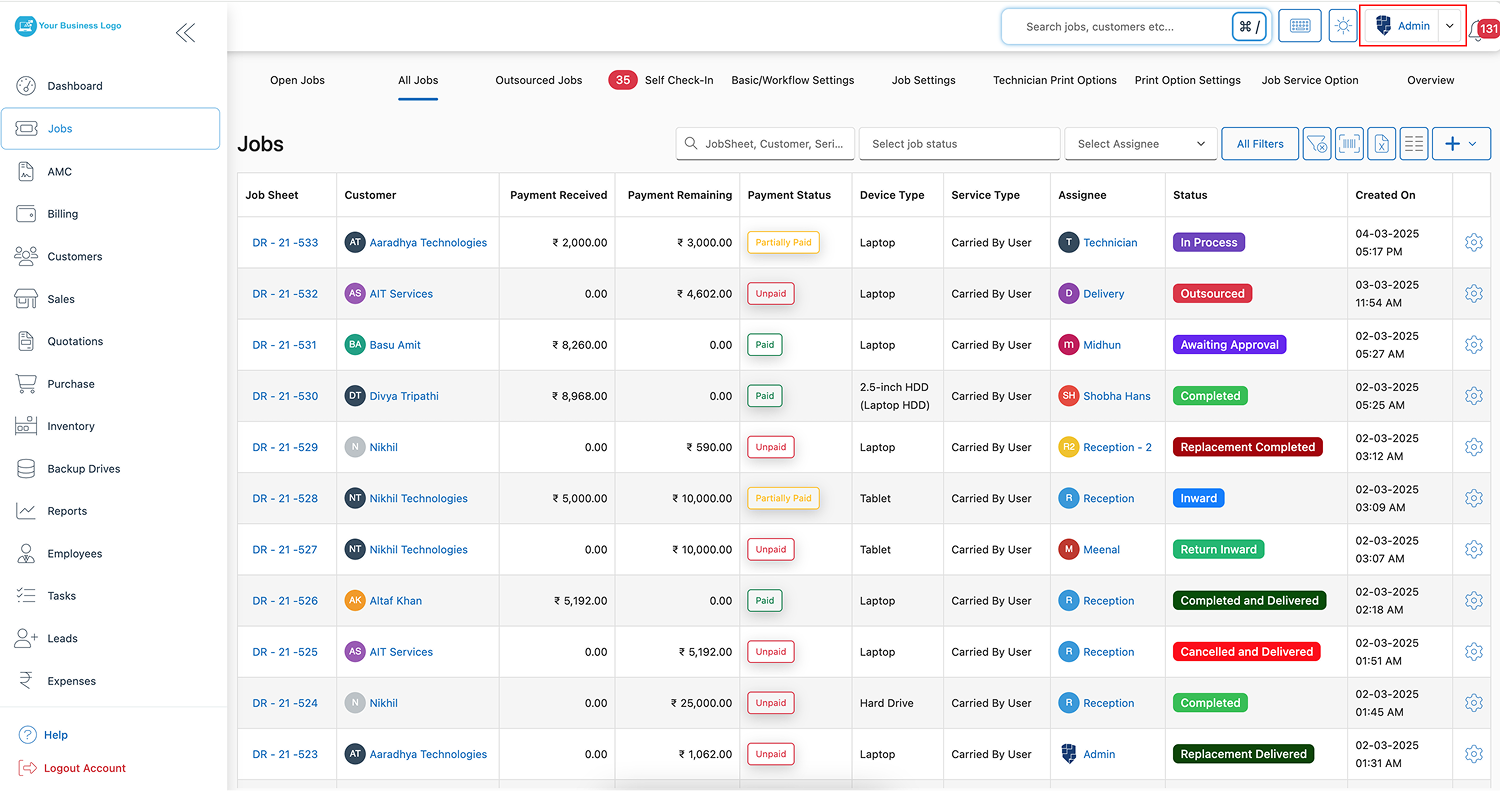
Step 2: Access Business Settings
- Click on your profile icon located at the top right corner of the screen.
- From the dropdown, select “Business Settings” to manage your business profile.
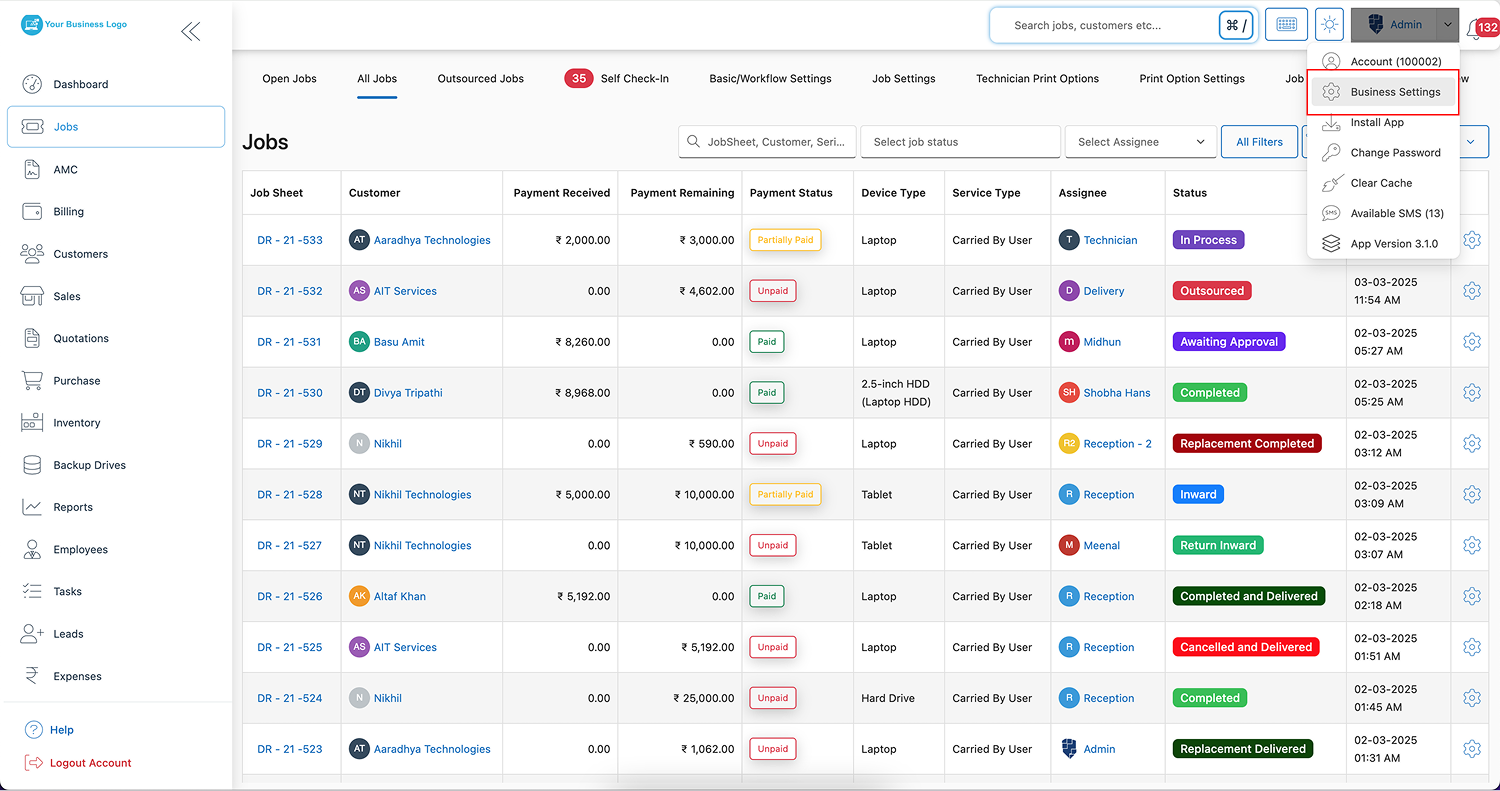
Step 3: Open the Tax Setting Tab
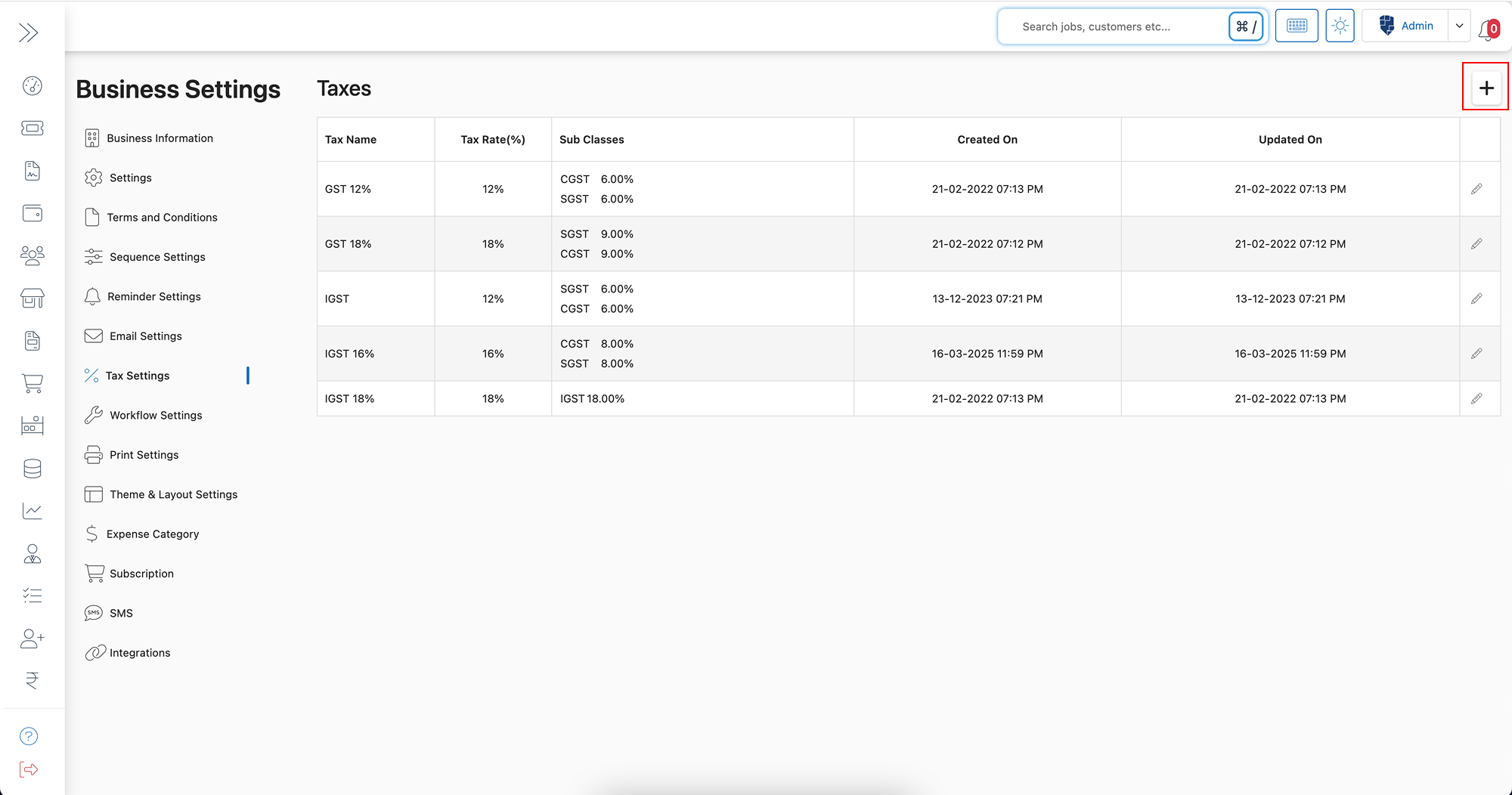
- Inside Business Settings, click on the “Tax Setting” tab to access tax configurations.
Step 4: Add or Edit a Tax Rate
- Click the “+” button to add a new tax rate, or click “Edit” next to an existing entry to modify it.
Step 5: Configure Your Tax Settings
You can customize tax settings based on your business needs:
- Tax Name – Define the tax name (e.g., GST, VAT, Sales Tax).
- Tax Rate – Enter the applicable tax percentage.
- Tax Subclass (Optional) – If your tax system includes multiple components (e.g., SGST, CGST), click “Add Subclass” and define additional tax breakdowns.
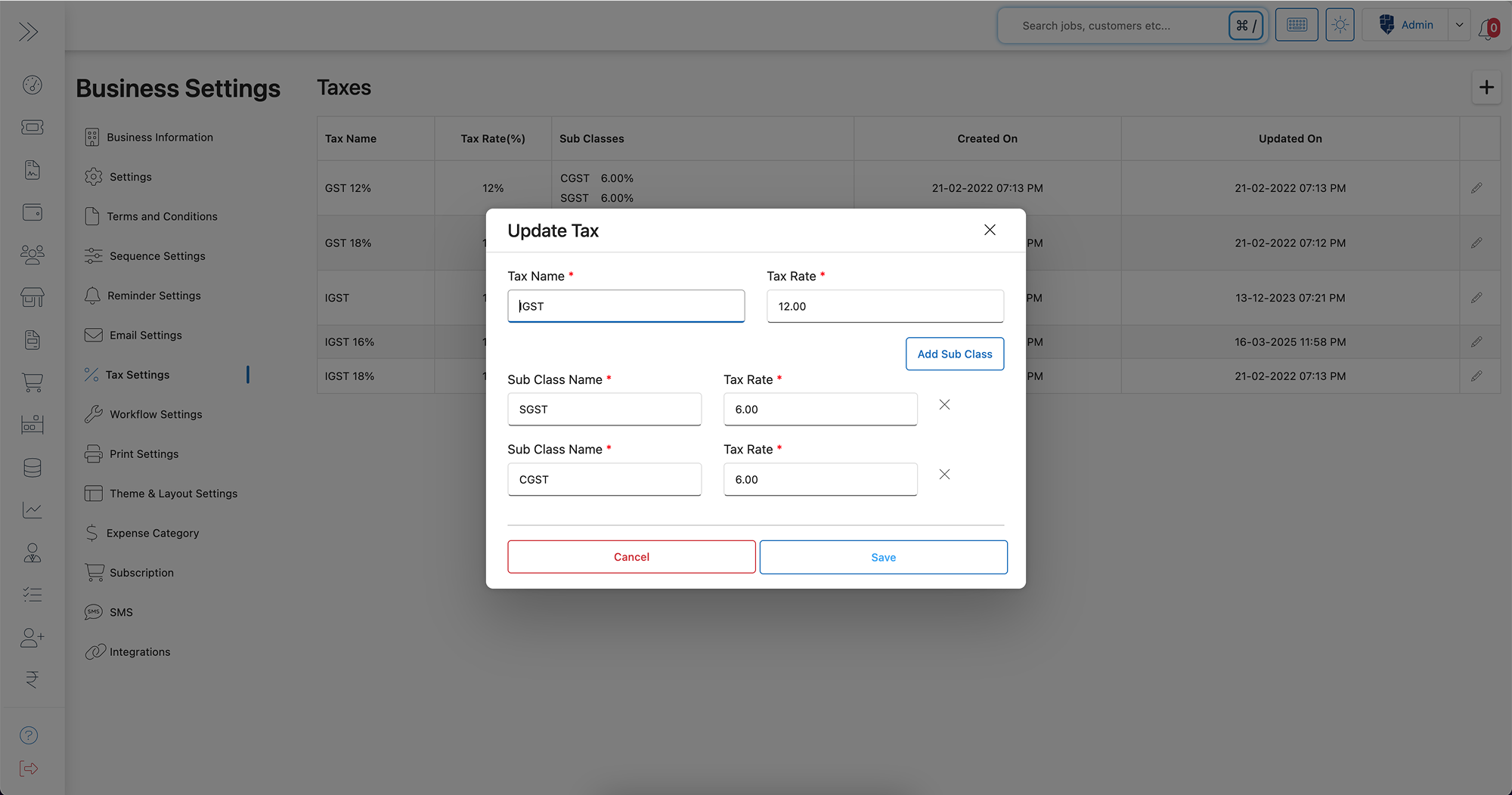
– Example: If your business operates in India, you may need to configure:
- GST – 18% (CGST 9% + SGST 9%)
- VAT – 5%
Step 6: Save Your Settings
- Once the tax settings are configured as needed, click “Save” to apply them.
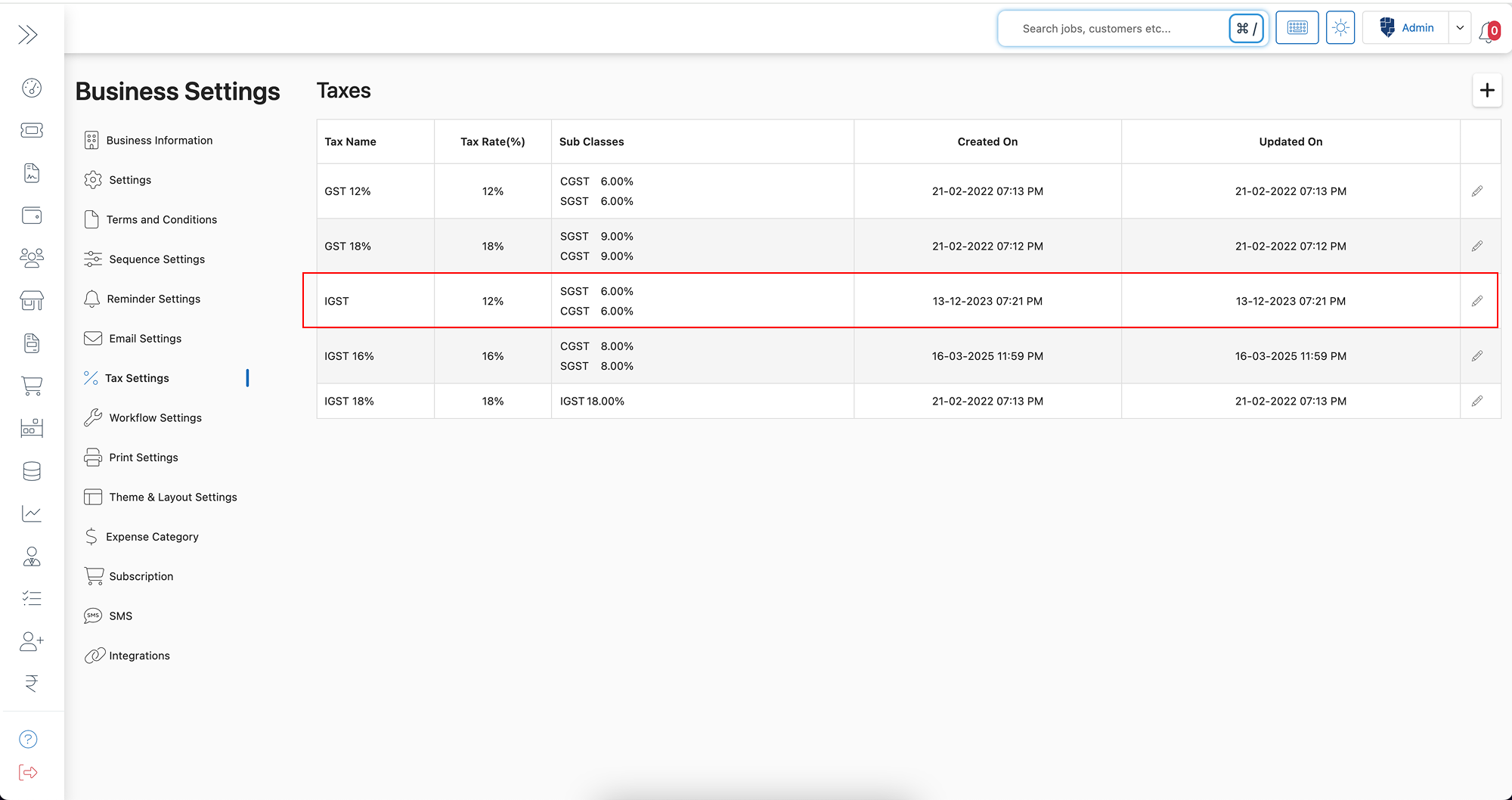
- Your customized tax settings will now reflect automatically in all payment-related fields, invoices, sale, purchase and billing statements.
Key Features and Benefits of Tax Settings in BytePhase
- Automated Tax Calculation – Reduces manual effort by applying tax settings across all financial transactions.
- Accurate Billing – Ensures customers receive invoices with the correct tax amounts.
- Regulatory Compliance – Helps businesses stay compliant with tax laws and reporting requirements.
- Customizable Tax Structure – Add SGST, CGST, VAT, or other tax components based on business needs.
- Seamless Integration – Tax settings automatically update all invoices, quotations, and payment records.
- Saves Time and Reduces Errors – No more manual tax adjustments—BytePhase does the work for you!
Practical Example: Why Businesses Need Tax Settings in BytePhase
Imagine a business that manually calculates taxes for every invoice. This increases the risk of errors, delays in payments, and compliance issues. Now, with BytePhase’s automated tax settings, businesses can predefine tax rates, auto-apply them to invoices, and ensure error-free billing—saving time and maintaining accuracy. It’s one reason repair shops running on BytePhase as their repair shop billing software rely on it for GST- and VAT-ready invoices without manual tax entry.
Best Practices for Configuring Tax Settings in BytePhase
- ✅ Use clear and standard tax names for easy identification.
- ✅ Ensure accuracy in tax rates to comply with regional tax laws.
- ✅ Only add tax subclasses (SGST, CGST, etc.) if your jurisdiction mandates them.
- ✅ Regularly review tax settings to reflect changes in tax laws.
- ✅ To confirm accuracy, first test tax settings on a sample invoice before finalizing.
Conclusion: Automate and Simplify Tax Management with BytePhase
Setting up tax settings in the BytePhase portal ensures accurate billing, smooth financial transactions, and full compliance with tax regulations. With customizable tax rates, automated application, and error-free calculations, BytePhase makes tax management effortless for businesses.
🎯 Ready to automate your tax processes?
👉 Log in to BytePhase now and configure your tax settings in minutes.
Read more about our other features.
Need help? Visit our Help Center or contact BytePhase Support for expert assistance in setting up your business profile.