PhonePe Card Machine Integration for Repair Shops: Accept Card & UPI Payments Directly in BytePhase
If your repair shop uses a PhonePe card machine, you probably follow the same process dozens of times every day. A technician completes the job, your staff enters the amount into the card machine manually, waits for the payment to succeed, and then returns to the software to record the payment against the invoice.
While this works, it creates unnecessary steps and increases the risk of mistakes. Entering the wrong amount, recording payments against the wrong invoice, or spending extra time reconciling transactions at the end of the day are common problems for growing repair businesses.
The BytePhase PhonePe Card Machine Integration eliminates these issues by connecting your PhonePe terminal directly with your repair shop management software. Staff can initiate a payment directly from a repair job or sales invoice, send the amount to the card machine automatically, and let BytePhase record the transaction once PhonePe confirms the payment.
The result is a faster checkout process, fewer payment errors, improved accounting accuracy, and a better customer experience.
What Is the BytePhase PhonePe Card Machine Integration?
The BytePhase PhonePe Card Machine Integration allows repair shops to connect their PhonePe EDC terminals directly to their business operations.
Instead of entering payment amounts manually on the machine, staff can initiate payments directly from:
-
- Repair Jobs
- Sales Invoices
- Device Pickup Transactions
- Advance Payment Requests
- Outstanding Balance Collections
When the payment is initiated, BytePhase sends the exact amount to the selected PhonePe terminal. The customer can then pay using a debit card, credit card, or UPI QR payment. Once PhonePe confirms the transaction, BytePhase automatically records the payment against the correct invoice or repair job.
This creates a seamless payment workflow from billing to reconciliation.
How to Integrate the PhonePe Card Machine with BytePhase
Setting up the integration takes about five minutes. Before you start, keep three things from your PhonePe merchant dashboard handy: your Merchant ID, your Store ID, and
the Terminal ID of each card machine (you’ll find these in the EDC / Card Machine section of the dashboard — your PhonePe account manager can also help).
Step 1 – One-Time Setup in BytePhase
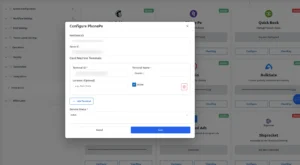
- Log into BytePhase and go to Settings → Integrations.
- Find the PhonePe tile and click Configure.
- Enter your Merchant ID (if not already configured).
- Enter your Store ID.
- Click Add Terminal and fill in each card machine: Terminal ID (exactly as shown in your PhonePe dashboard), Name (e.g. “Counter 1”),Location (optional), and tick Active.
- Repeat for every machine, then click Save.
You can return here any time to add a new counter, rename a terminal, or untick Active to take a machine out of rotation — inactive terminals simply stop appearing in the payment popup.
Step 2 – Collecting a Payment
- Open the repair job or sales invoice you’re collecting for.
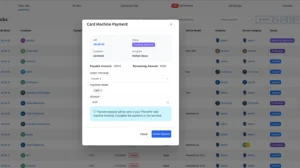
- Click Card Machine Payment.
- In the popup, select the terminal at your counter, enter the amount (BytePhase caps it at the remaining balance, so overcharging is impossible), and choose the paymentmodes — Card, QR (UPI), or both.
- Click Initiate Payment. The exact amount instantly appears on the selected PhonePe machine.
- The customer taps or dips their card, or scans the QR code on the terminal.
- BytePhase checks the payment status automatically every few seconds. The moment PhonePe confirms, you see a success notification and the payment is recorded against the job or invoice — with PhonePe’stransaction reference saved for reconciliation.
If a card is declined or the customer cancels, nothing is recorded — simply initiate the payment again.
Why Repair Shops Need Card Machine Integration
Most repair businesses focus on repairing devices efficiently but often overlook the payment collection process.
Manual payment collection introduces several challenges:
Incorrect Amount Entry
A staff member may accidentally enter ₹4,500 instead of ₹450 or ₹5,400 instead of ₹4,500. Even a small mistake can create customer disputes and accounting issues.
Time Lost During Checkout
Every payment requires staff to switch between the software and the card machine. During busy periods, these extra steps slow down customer service.
Reconciliation Problems
When payments are recorded manually, settlement reports and invoice records do not always match. This creates additional work for owners and accountants.
Multiple Counter Confusion
Businesses with multiple counters often struggle to identify which terminal processed which transaction.
The BytePhase PhonePe integration solves all of these problems by automating the entire payment process.
Key Benefits of the BytePhase PhonePe Integration
Faster Checkout Experience
The amount is sent directly from BytePhase to the PhonePe machine, eliminating manual entry and reducing customer wait times.
Automatic Payment Recording
Successful transactions are automatically linked to the correct invoice, repair job, or sales order.
Support for Card and UPI Payments
Customers can choose to pay using:
-
- Debit Cards
- Credit Cards
- Dynamic QR (UPI)
- PhonePe
- Google Pay
- Paytm
- BHIM UPI
Reduced Human Errors
Since the amount is transferred digitally, staff cannot accidentally enter incorrect payment amounts.
Better Financial Accuracy
PhonePe transaction references are stored directly within BytePhase, making reconciliation easier and more reliable.
Multi-Terminal Support
Businesses with multiple billing counters can register multiple PhonePe terminals and allow staff to select the correct device for each payment.
Perfect For
The PhonePe Card Machine Integration is ideal for:
-
- Mobile Phone Repair Shops
- Laptop Repair Centers
- Computer Service Businesses
- CCTV Installation Companies
- Electronics Repair Stores
- Appliance Repair Centers
- Gaming Console Repair Shops
- Multi-Branch Repair Businesses
- Franchise Repair Chains
Whether you operate a single service counter or multiple branches, BytePhase helps streamline payment collection and improve operational efficiency.