BytePhase Calendar: Your Repair Shop’s Schedule, Built Automatically
Running a repair business means juggling a lot of moving parts — job deadlines, customer pickups and drops, AMC renewals, technician schedules. Keeping track of all of it by hand is a recipe for missed deadlines and unhappy customers.
That’s why BytePhase comes with a built-in Calendar module that builds your schedule for you. Every job, task, pickup, and renewal you enter in BytePhase automatically appears on the calendar — no manual entry, ever. In this guide, we’ll walk you through the whole module and show you how to get the most out of it.
Meet the BytePhase Calendar
Open the Calendar item in the left sidebar (or go to yourshop.bytephase.com/calendar). Here’s what you’ll see:
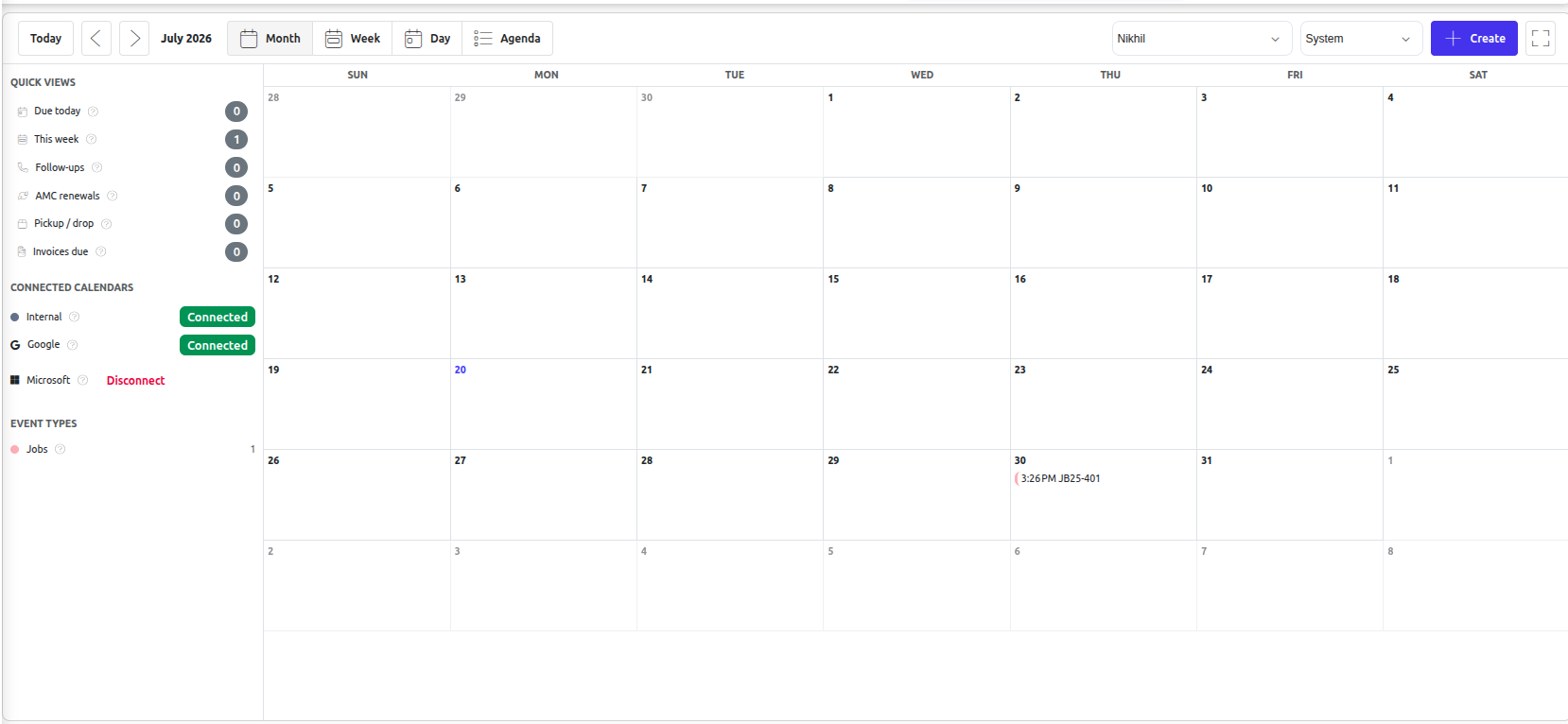
The screen is organised into four areas:
- View toolbar (top): Switch between Month, Week, Day and Agenda views, jump to Today, or move back and forward through dates.
- Left panel: Quick Views (Due today, This week, Follow-ups, AMC renewals, Pickup/Drop, Invoices due), your Connected Calendars, and Event Types with a colour legend and counts.
- Main calendar grid (centre): Your events, colour-coded by type.
- Smart Panel (right): Revenue-protection items (unpaid invoices, pending quotations, AMC renewals, supplier payments) and a live Technician Workload meter — so the calendar doubles as a daily operations cockpit.
There’s also an assignee selector at the top, so managers can view the calendar of any team member (subject to permissions), and a Create button for adding new events.
What Shows Up Automatically
The internal calendar is always connected — no setup needed. BytePhase pulls your business events straight from the modules you already use:
| Event type | Comes from |
|---|---|
| Job schedules | Jobs module |
| Tasks | Tasks module |
| Pickup & Drop assignments | Pickup Drops module |
| AMC contract renewals | AMC module |
| AMC service visits | AMC module |
| Warranty expiries | AMC module |
| Software expiry / renewals | AMC module |
Everything is filtered to the signed-in user, so each technician sees their own workload by default. You manage these events from their own modules — update a job’s deadline in the Jobs module, and the calendar always reflects the latest state.
Quick Views: Answers at a Glance
The Quick Views in the left panel are one-click filters for the questions you ask every day:
- Due today — everything that needs attention before closing time.
- This week — plan the week ahead in seconds.
- Follow-ups — customers waiting to hear back from you.
- AMC renewals — contracts coming up for renewal, so recurring revenue never slips away.
- Pickup/Drop — today’s device movements.
- Invoices due — payments to chase.
Choosing Your View
Use the toolbar to switch between Month (the big picture), Week and Day (detailed planning), and Agenda — a simple chronological list that’s perfect for a morning run-through of the day or week ahead.
Events are colour-coded by type, with a legend and live counts in the Event Types panel, so you can tell a job deadline from an AMC renewal at a glance — and toggle types on or off to focus on what matters right now.
The Smart Panel: Your Operations Cockpit
On the right, the Smart Panel keeps revenue-protection items in view at all times — unpaid invoices, pending quotations, upcoming AMC renewals, and supplier payments — right beside your schedule. Below it, the Technician Workload meter shows how busy each team member is in real time.
Viewing a Teammate’s Calendar
Managers can pick a team member in the assignee dropdown to see their schedule and balance workload — pair it with the Technician Workload panel to spot who’s overloaded at a glance and reassign work before deadlines slip.
Want Your Google or Outlook Calendar in the Same View?
The BytePhase Calendar can also display your personal Google Calendar and Microsoft (Outlook) Calendar alongside your internal events, merged into one unified view. We’ve covered the setup for each in separate guides:
- How to Connect Google Calendar with BytePhase
- How to Connect Microsoft 365 / Outlook Calendar with BytePhase
n t
Wrap-up
With the BytePhase Calendar, your schedule builds itself: jobs, tasks, pickups, AMC renewals and warranty expiries flow in automatically from the modules you already use, while Quick Views, the Smart Panel, and the Technician Workload meter turn the calendar into a daily operations cockpit for your whole team.
Try it today under Calendar in your BytePhase dashboard, and let your schedule run itself.
Questions? Reach out to our support team from the Help section inside BytePhase.