PhonePe Integration for Repair Shops: Accept UPI Payments in BytePhase
At a busy repair counter, a customer wants to pay and go — not wait while you copy a UPI ID by hand or hunt down a card machine. PhonePe integration is how BytePhase closes that gap: once it’s switched on, customers can pay by PhonePe or UPI directly against an invoice, and the payment status updates itself.
BytePhase is repair shop billing software built around the invoice-to-payment workflow — job card, invoice, and now payment confirmation, all in one place. This guide walks through the full PhonePe integration setup: getting a PhonePe Merchant ID, connecting it inside BytePhase, and what it unlocks once it’s live.
Why PhonePe Integration Matters at the Repair Counter
Most repair customers in India already default to UPI — and PhonePe, specifically, is the app already installed on their phone. A shop that only takes cash, or that needs a rented card machine to accept anything else, is pushing extra friction onto the customer at the exact moment they’re ready to pay.
- Instant confirmation: no “did it actually go through?” back-and-forth — the payment shows as received the moment it clears.
- No card machine rental: accept PhonePe payments with a QR code or payment link, not a rented POS terminal.
- It’s what customers expect: UPI payments at a repair shop are the norm now, not an extra.
Before you can turn on the PhonePe integration in BytePhase, you need a PhonePe Merchant ID.
Contact BytePhase support and we’ll connect you with the PhonePe for Business team, who will guide you through sign-up and ask for a few documents to verify your business.
Approval typically takes 3–4 working days, so request the Merchant ID before you plan to go live with PhonePe payments.
Step 2: Connect PhonePe to BytePhase
Once you have your Merchant ID, connecting it to BytePhase takes a few minutes:
- Log in to BytePhase with an admin account — only admins can edit integration settings.
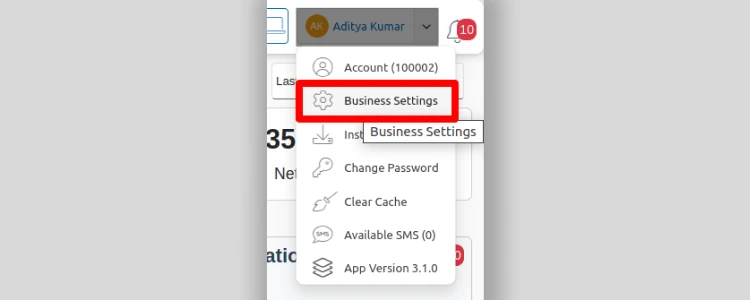
- Open Business Settings and go to the Integrations section.

- Select PhonePe from the list of integrations.
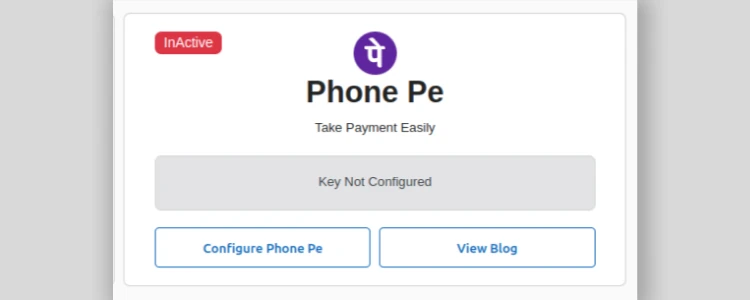
- Paste your Merchant ID into the Merchant ID field.
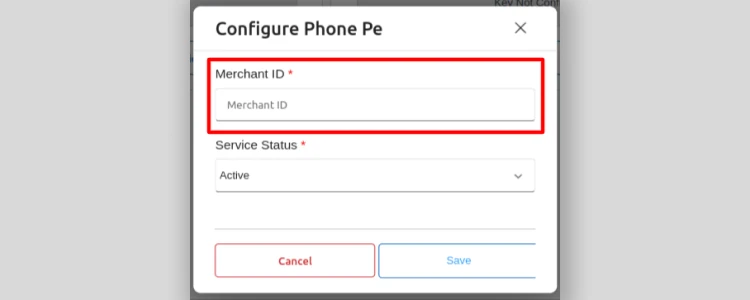
- Click Save. The PhonePe integration is now active on your account.
What PhonePe Integration Unlocks
Once it’s connected, PhonePe integration does more than confirm a payment — it changes how payment fits into your daily workflow:
- Automatic Payment Updates: When a customer pays through PhonePe, BytePhase marks the invoice paid on its own. No manual checking, no end-of-day reconciliation.
- Direct Payment Requests: Collecting payment remotely? Send a payment request straight to the customer’s PhonePe account from inside BytePhase, so they can accept PhonePe payments without a counter visit.
- QR Codes on Invoices: Every invoice can carry a PhonePe QR code. The customer scans it with their PhonePe app and pays instantly — no manual entry, no waiting for change.
Benefits for Your Repair Shop
Put together, PhonePe integration and UPI payments change a few things at once for a repair shop:
- Less counter time per handover: staff aren’t chasing payment confirmation while a queue builds behind the customer.
- Fewer reconciliation errors: payment status comes from PhonePe, not a manual note against an invoice.
- Faster settlement: QR codes and payment links get customers paying the moment the invoice is ready, in person or remotely.
- A payment option customers already trust: most walk in expecting to pay by UPI anyway.
- A cleaner financial picture: real-time payment status means your invoice list actually reflects what’s been paid.
Ready to Accept PhonePe and UPI Payments?
A PhonePe payment integration that reconciles itself is a small setup step with an outsized payoff: no card machine to rent, no manual payment log, and a payment method your customers were already going to ask for.
Contact BytePhase support to get started with your PhonePe Merchant ID, or explore the rest of the platform with a 15-day free trial.