Gupshup SMS Integration: Send DLT-Compliant SMS Updates Automatically
Gupshup SMS Integration: Send DLT-Compliant SMS Updates Automatically
Gupshup SMS integration lets your BytePhase account send DLT-compliant SMS updates to repair customers automatically — repair status, pickup reminders, and service alerts — without a single manual text. For a repair shop management software buyer in India, that’s not a nice-to-have: DLT-registered SMS is what keeps your messages out of the spam filter and off the “sender blocked” list.
In short: the Gupshup SMS integration lets BytePhase send DLT-compliant SMS updates to repair customers automatically — status, pickup reminders and alerts — with a two-step setup: generate a Gupshup API key, paste it into BytePhase. Made for Indian repair shops that need SMS delivered, not filtered.
This guide walks through two short steps: generating your Gupshup SMS API key, then pasting it into BytePhase. Ten minutes, and every repair update goes out on its own.
Why DLT-Registered SMS Matters for Indian Repair Shops
India’s TRAI DLT (Distributed Ledger Technology) rules require every commercial SMS sender to register their templates and Sender ID before messages go out. Skip it, and carriers silently drop your texts — no error, no bounce, just a customer who never got the pickup reminder. This is why Gupshup SMS integration matters for a repair shop specifically:
- Compliance: Gupshup is a registered DLT operator, so templates you send through it (repair status, ready-for-pickup, payment receipts) stay within TRAI rules.
- Sender ID: customers see a recognizable, approved sender ID instead of an anonymous long number — fewer messages ignored as spam.
- Delivery rates: DLT-registered routes are prioritized by Indian telecom operators, so status updates actually land instead of silently failing.
The two steps below get your Gupshup account talking to your BytePhase dashboard so every repair ticket update, pickup alert, and invoice notice goes out compliant, automatically.
Step 1: Generate Your Gupshup SMS API Key
You need one thing before touching BytePhase: your Gupshup SMS API key. Here’s the fast path:
- Sign up or log in at
https://www.gupshup.io/, verifying your email and phone number if you’re new. - Open the SMS / API dashboard from the main navigation — look for “Messaging,” “SMS,” or “Developer Dashboard.”
- Register your DLT template and Sender ID if you haven’t already — this is the step that keeps your BytePhase alerts compliant and deliverable in India.
- Generate the API key from “Generate API Key” or “My API Keys.”
- Copy the key and keep it secure — it grants full access to send messages from your Gupshup account.
Pro-tip: confirm your Gupshup account has active SMS credits and an approved DLT template before you connect it to BytePhase, or your first automated update will fail silently.
Step 2: Connect the API Key Inside BytePhase
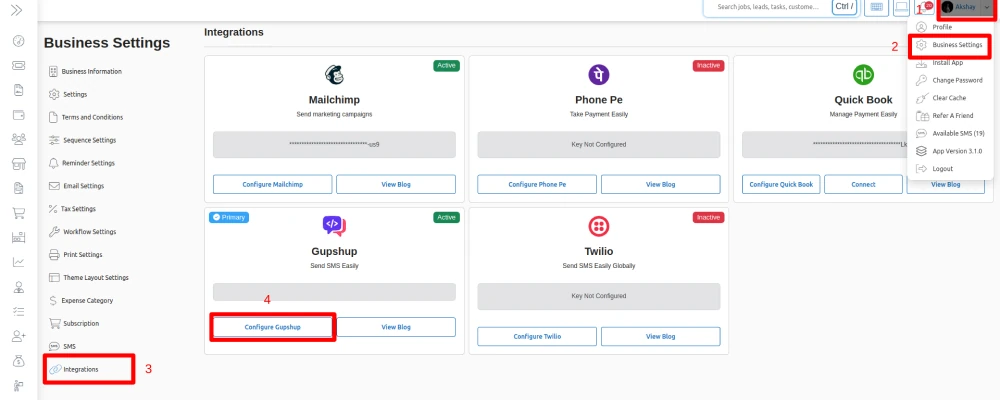
With the API key copied, connecting it to your BytePhase repair shop management system takes under two minutes:
- Log in to your BytePhase admin account with your admin credentials.
- Open Business Settings from the profile menu, top right of the dashboard.
- Click Integrations to see the list of supported third-party services.
- Select Gupshup, then Configure.
- Paste your Gupshup API key into the field in the pop-up.
- Save. That’s the whole setup.
Your BytePhase account is now connected to Gupshup. Every repair ticket update, pickup reminder, and payment confirmation goes out as a DLT-compliant SMS automatically — no manual texting, no compliance guesswork, better delivery rates.
Not on BytePhase yet? Start a 15-day free trial and have Gupshup SMS integration running before the trial ends.
Frequently asked questions
DLT (Distributed Ledger Technology) registration is TRAI’s system for approving commercial SMS senders and message templates in India. Messages from unregistered senders or templates get blocked or filtered as spam — so a repair shop’s status updates only reliably reach customers when sent through a DLT-registered route such as Gupshup.
Two steps: create a Gupshup account and generate an SMS API key, then paste that key into the SMS settings inside BytePhase. Once connected, ticket status changes trigger the SMS templates automatically — no manual texting.
Yes — BytePhase also sends WhatsApp updates, and many shops run both: WhatsApp for rich updates and SMS as the reliable fallback that needs no data connection. DLT-registered SMS still matters for customers who are not on WhatsApp.