Repair Estimate Template: Free Printable Form for Repair Shops
A repair estimate template turns “it will probably be around this much” into a written offer the customer can read, question and sign. For a repair shop the signature is the point: it is the customer saying yes before you open the device, order a part or spend a technician’s hour. Below you can download a free repair estimate template as a printable PDF (US Letter) and an editable Word file, plus a filled example.
In short: a repair estimate template should carry your shop details, an estimate number, date and valid-until date, the customer, the device (make, model, serial number or IMEI), the fault the customer reported, your diagnosis, parts and labor on separate lines, your diagnostic fee policy, the estimated total with tax, a turnaround time, a clause that the price can change only after you ask again, the warranty, and a signature box with approve and decline options. Work starts when the customer signs, not before.
Writing the same estimate by hand every day? In BytePhase the estimate goes to the customer as a link they approve or reject, and the approved estimate turns into the invoice with the same lines. See how repair ticket software with built-in estimates works.
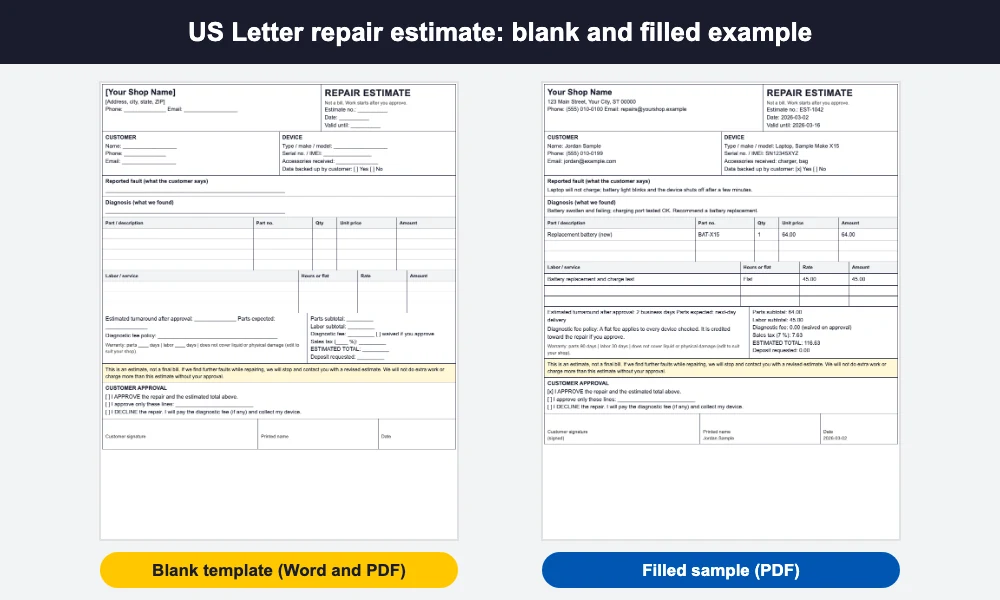
The repair estimate template is blank on purpose: print it and fill it in at the counter, or open the Word file, add your logo and shop details once and save it as your master copy. The filled sample uses generic names and a small example repair so you can see how each box reads on a real job. Rules for written estimates differ by state, so check yours and confirm the details with your accountant or attorney.
Repair estimate vs quote vs invoice
People use these words loosely, and mixing them up causes arguments at pickup. Here is how most shops separate them.
| Document | When | What it says | Binding? |
|---|---|---|---|
| Estimate | After diagnosis, before work | What you expect the repair to cost, based on what you found | Becomes the agreed price once the customer signs it |
| Quote | Before or after diagnosis | A fixed price offer for a defined job | Usually a firm price for a stated period |
| Invoice | After the work | What the customer owes for the work done | A request for payment and a record of the sale |
In day-to-day repair work “estimate” and “quote” are often the same document, and the label matters less than what is on it: the work, the price, how long the offer holds and the customer’s approval. Use whichever word your customers expect, and keep the invoice matching it line for line. (Auto shop? We have a separate auto repair invoice template for vehicle work.)
What to put on a repair estimate template
This is the checklist behind the repair estimate template, in the order the boxes appear.
Shop details and estimate identity
- Shop name, address, phone and email, so the customer can reach you with questions.
- Estimate number and date. One unique number per estimate lets you find it later and match it to the job and the invoice.
- Valid-until date. Parts prices move and shops fill up, so state how long the estimate holds. Seven to fourteen days is common; set your own.
Customer and device
- Customer name, phone and email.
- Device type, make and model, and the serial number or IMEI. This proves exactly which device the estimate covers.
- Accessories received (charger, case, SIM tray) and whether the customer backed up their data.
Fault, diagnosis and what you propose
- Reported fault in the customer’s words, and diagnosis in yours. Keep them separate: the first protects you if the customer later says the problem was something else.
- Write the diagnosis in plain language (“the battery is swollen and no longer holds a charge”), not shop jargon.
Parts, labor and the diagnostic fee
- Each part on its own line with description, part number, quantity, unit price and amount.
- Labor as its own line, either hours times rate or a flat price for the job.
- Your diagnostic fee policy: whether it is charged, how much, and whether it is credited toward the repair if the customer approves. Our guide to repair shop warranties and diagnostic fees compares the common structures.
Total, turnaround, price-change clause and warranty
- Estimated total with sales tax shown separately, and any deposit you require.
- Turnaround estimate once the customer approves, plus when parts are expected. See how to set repair turnaround times you can keep.
- The price-change clause: “If we find further faults while repairing, we will stop and contact you with a revised estimate. We will not charge more than this estimate without your approval.” It sets the expectation and keeps you honest.
- Warranty on parts and on labor, stated separately, and what it does not cover (liquid or physical damage, for example).
Approval: sign, approve in part, or decline
- A box for approve, one for approve only these lines, and one for decline (with the diagnostic fee, if any, due and the device returned).
- Signature, printed name and date. Without a signature you have an offer, not an agreement.
How to present a repair estimate so customers approve
A repair estimate template only works if the customer actually reads and signs it. These habits raise approvals without pressure.
- Itemize. One lump sum feels like a guess. A part line and a labor line feel like a fair price, and they make it easy to see what the customer is paying for.
- Explain the fault in one plain sentence. “The charging port is worn, so the phone only charges at a certain angle” does more than a part number.
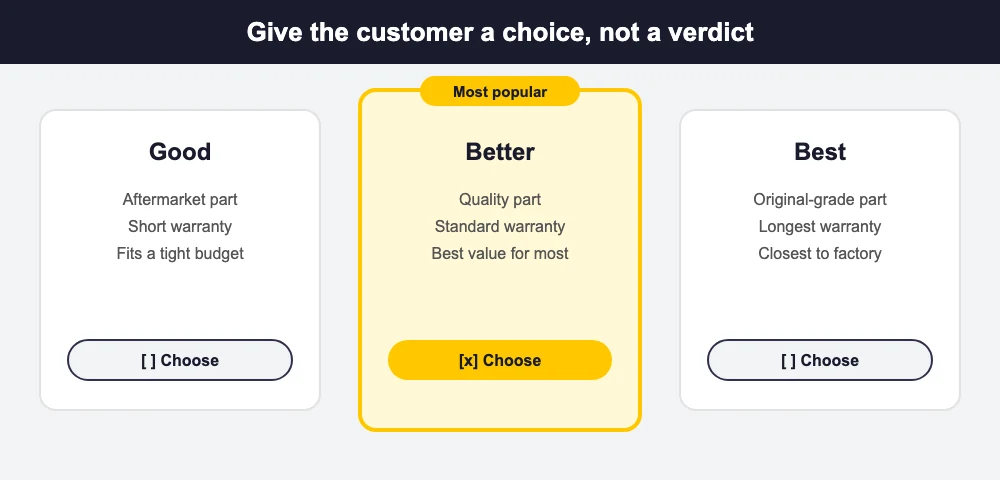
- Offer options. A good, better, best choice (for example a budget part, a quality part, an original-grade part, with different warranties) lets the customer pick instead of deciding yes or no on one big number.
- Show the diagnostic fee up front and say whether it is credited if they approve. Nobody likes a fee that appears at pickup.
- Set a valid-until date and a turnaround. A clear next step (“approve by Friday and it is ready Tuesday”) moves people to decide.
- Send it where they will see it. A printed copy at the counter works for walk-ins; for everyone else send it by message or email so they can answer from their phone.
What happens when the job costs more than the estimate
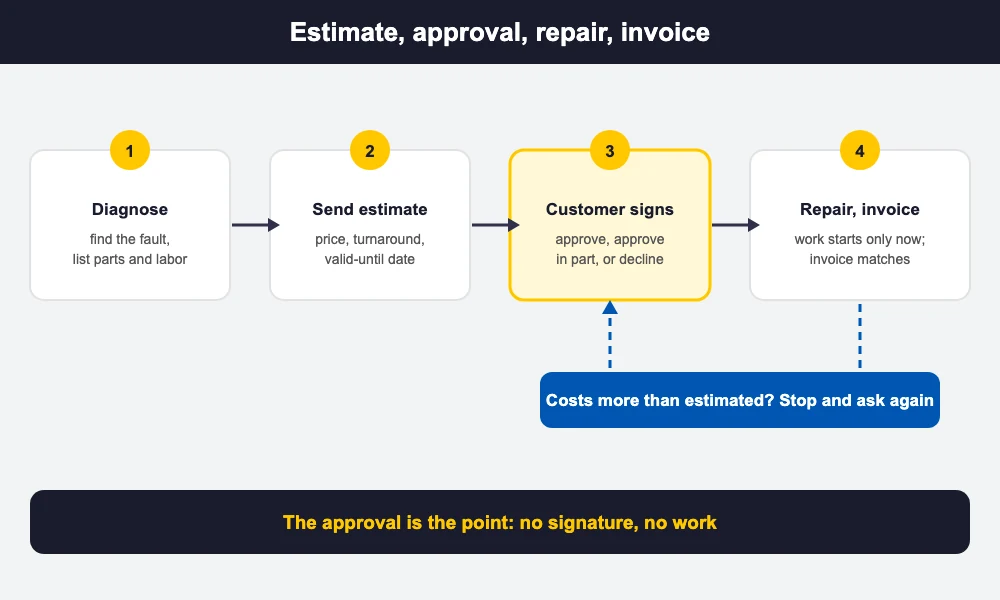
It happens: a second fault shows up once the device is open, or a part has to be sourced at a higher price. The rule that protects both sides is simple. Stop, tell the customer what you found, give a revised estimate and get a fresh approval before you continue.
- Ask again, in writing. A call is fine to start the conversation, but follow it with a revised estimate by message or email, or a signed revision, so the approval is on record.
- Give the customer a way out. They can approve the extra work, approve only part of it, or decline and collect the device. The diagnostic fee policy on the estimate says what they owe if they decline.
- Keep the original. Number the revision against the original estimate so the file shows what changed and why.
- Know your local rules. Some states cap how far a final bill may exceed a written estimate without consent. Confirm yours with your attorney or accountant.
The price-change clause in this repair estimate template says all this in advance, so a revised estimate is never a surprise.
Common repair estimate mistakes
These slips spoil an otherwise good repair estimate template:
- No signature. A verbal “go ahead” is hard to prove weeks later.
- One lump-sum line with no parts and labor breakdown.
- No valid-until date, so a customer returns months later expecting the old price.
- No serial number or IMEI, so you cannot prove which device the estimate covered.
- Silent overruns: doing extra work and adding it to the bill without asking.
- Vague warranty. State the days for parts and labor and what is excluded.
How BytePhase handles repair estimates
A paper repair estimate template is a good start, but retyping fields and chasing signatures costs time. With BytePhase repair shop software, the estimate lives on the job:
- You build the estimate from the job, with parts taken from your stock and labor as its own lines, and tax applied per line using your own tax name and rate.
- The estimate goes to the customer as a link they approve or reject, and you can send it by WhatsApp, SMS or email.
- The job can move to its next status on its own when the estimate is approved or rejected, based on the workflow you set.
- The approved estimate converts into the invoice with the same lines, so nothing is retyped and the two documents always match.
- The device’s IMEI can be typed or scanned on phone jobs, and the customer’s signature and before/after photos can be captured on the job.
Shops that repair phones, computers, electronics or appliances can see how BytePhase fits each trade: cell phone repair, computer repair, electronics repair and home appliance repair.
BytePhase works on web, Android and iOS, is used by 2,000+ repair businesses in 40+ countries and offers a 15-day free trial.
Frequently asked questions
Your shop details, an estimate number, date and valid-until date, the customer, the device with its make, model and serial number or IMEI, the reported fault and your diagnosis, parts and labor on separate lines, your diagnostic fee policy, the estimated total with tax, a turnaround time, a clause that the price changes only after you ask again, the warranty, and a signature box with approve and decline options.
An estimate is what you expect the repair to cost based on your diagnosis; a quote is a fixed-price offer for a defined job. Many shops use the words interchangeably. What matters is that the document lists the work and the price, says how long it is valid and records the customer’s approval before work starts.
A signature is not required by this template, but it is the best record that the customer agreed to the work and the price. Rules on written estimates and customer authorization vary by state, so check yours and confirm with your attorney or accountant.
Stop work, tell the customer what you found, send a revised estimate and get a fresh approval before continuing. Let them approve the extra work, approve only part of it, or decline and collect the device. Some states also limit how far a final bill can exceed a written estimate, so confirm your local rules.
Many shops charge a diagnostic fee because finding the fault takes technician time. State the fee on the estimate and say whether it is credited toward the repair if the customer approves. Whether and how you may charge can depend on your state, so confirm with your attorney or accountant.
The bottom line
Put the same boxes on every estimate, keep parts, labor and the diagnostic fee clear, ask again before the price changes, and do not start work until the customer has signed. Use the repair estimate template above today, and move estimates into your repair software when writing them by hand starts costing you time.
Send the estimate from the job instead of retyping it with BytePhase repair shop software. Try it free for 15 days or book a demo: